

A platform dedicated to providing unbiased reviews of newly launched applications, analyzing everything from their features to their full potential.
info@scoutforge.net© 2026 Scoutforge. All rights reserved.
A platform dedicated to providing unbiased reviews of newly launched applications, analyzing everything from their features to their full potential.
info@scoutforge.net© 2026 Scoutforge. All rights reserved.
A platform dedicated to providing unbiased reviews of newly launched applications, analyzing everything from their features to their full potential.
info@scoutforge.net© 2026 Scoutforge. All rights reserved.
Cycling through all six. Tap any point to stop.
Measured on six things
Free YouTube transcript generator with timestamps and AI ...
Real problem — YouTube's transcript panel is genuinely painful to copy from — with concrete export and timestamp features. But the category is crowded with free tools and the wedge is thin.
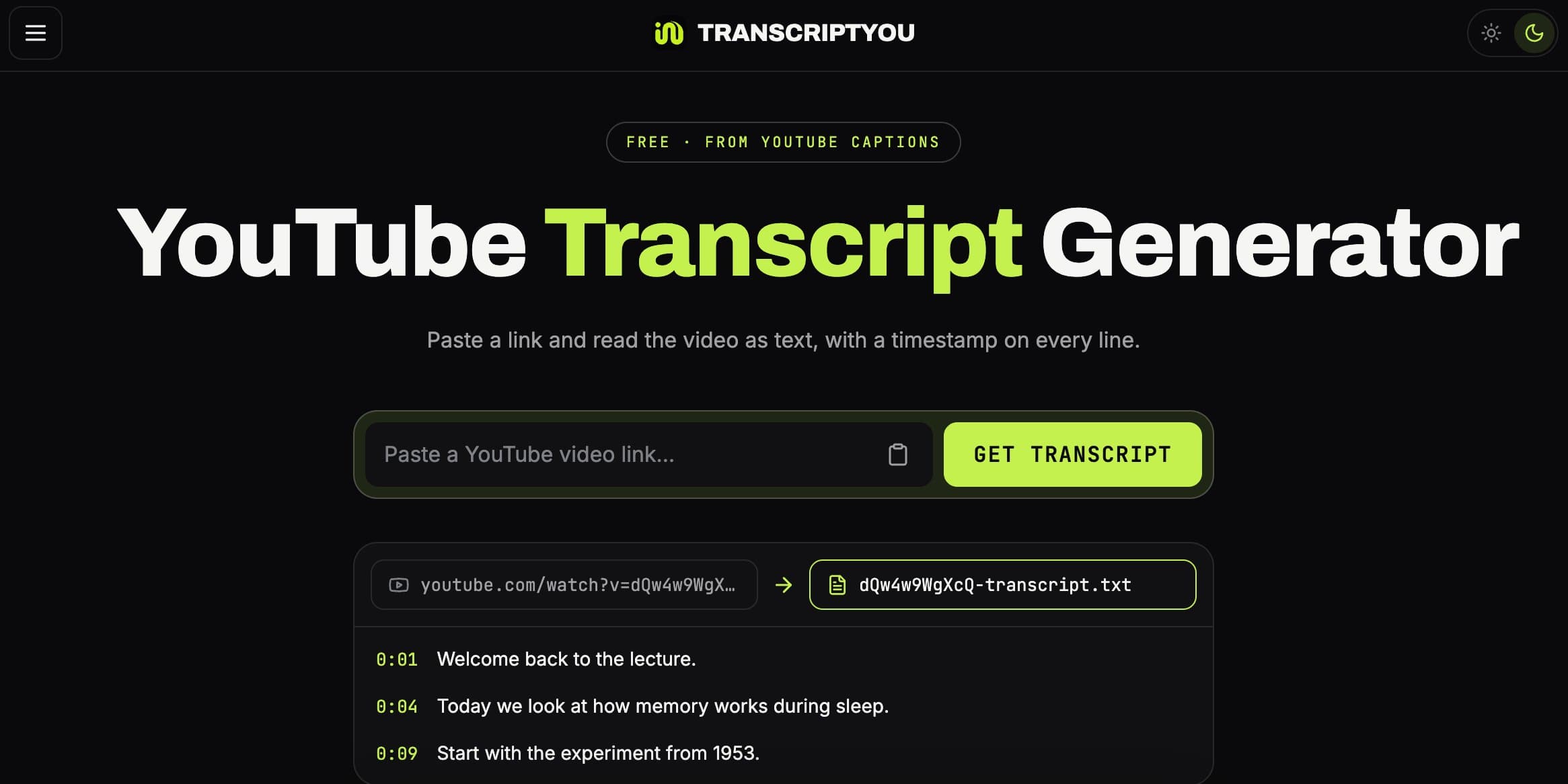
TranscriptYou is a free web-based tool that extracts transcripts from YouTube videos using the platform's existing captions. It offers a clean, ad-free experience with no sign-up required. The tool supports all caption tracks, including auto-generated and creator-uploaded subtitles, and provides options to copy the text, download as .txt or .srt, and toggle timestamps. Additional features include a YouTube summarizer, subtitle downloader, and SRT converter. It's ideal for students, researchers, content creators, language learners, and anyone needing quick access to video text for note-taking, quoting, or repurposing. The tool emphasizes privacy, doesn't store transcripts, and works on any public video with captions.
Drawn from the product itself, not from a survey.
Demographic
Students & Researchers
Pain points
Manual note-taking from lengthy lectures is time-consuming; cannot easily search video content.
Primary needs
Quick transcription for study, accurate quotes with timestamps, ability to search text.
Demographic
Content Creators & Marketers
Pain points
Repurposing video content into blogs or social posts is labor-intensive; need accurate show notes.
Primary needs
Efficient content repurposing, accurate transcripts for editing, easy export formats.
Demographic
Language Learners
Pain points
Difficulty following fast-paced speech; need to look up words and compare translations.
Primary needs
Readable transcripts in multiple languages, ability to switch caption tracks, synchronized timestamps.
Demographic
Deaf & Hard of Hearing
Pain points
Captions move too quickly; cannot pause and read comfortably.
Primary needs
Static, readable transcript at own pace, option to remove timestamps for smoother reading.
Written by AI from measured evidence, scored out of 100.
TranscriptYou is a free, no-signup web tool that turns YouTube captions into clean, copyable text with optional timestamps and .txt/.srt export. It does one thing well: paste a link, get the transcript. The design is polished and the speed is genuinely excellent — 96 mobile, 100 desktop on Lighthouse. Security is solid on headers but lacks SPF/DMARC and any published compliance or security page. Accessibility scores 100/100 on automated checks but has no statement or multi-language UI. The real question is differentiation: DownSub, NoteGPT and YouTube Transcript all occupy the same space, and TranscriptYou's edge is a cleaner UX and a timestamp toggle. For students, researchers and creators who just want the text fast, it's a strong free option. For anyone needing summaries, note-taking or bulk workflows, the alternatives do more. It's a well-built tool in a crowded, free category.
No sign-up, no extension, paste-and-go flow explained in three steps. Export matrix and comparison table answer real questions. Long scroll and a missable 'Try it' arrow are the only friction.
Dark, disciplined lime-accented UI with a live hero demo that shows the product instantly. Dense 10+ section page and repetitive card fills drag it below the top of its band.
Lighthouse mobile 96/100 (LCP 2.1s, CLS 0.057, TBT 82ms) and desktop 100/100. Lightweight page, no heavy SPA overhead, no lag complaints found.
HTTPS enforced with HSTS, CSP, frame protection and full header set (10/12 checklist). No SPF/DMARC, and no published SOC 2, pen-test or bug-bounty page.
Lighthouse accessibility 100/100 and a responsive layout that works on phone or desktop. No WCAG statement, no multi-language UI, and keyboard/screen-reader behavior unverified.
Real problem — YouTube's transcript panel is genuinely painful to copy from — with concrete export and timestamp features. But the category is crowded with free tools and the wedge is thin.
TranscriptYou's design is confident and coherent: near-black background, disciplined lime accents, and a hero that puts a live input field next to a sample transcript with timestamps. You understand the product before you scroll. The three-step process section and the export matrix are genuinely useful, mapping tasks to .txt or .srt output. The problem is density — ten-plus sections, identical dark card fills, and small body text in the comparison tables make the back half of the page a slog. Usability is the stronger half: no sign-up, no extension, no account. Paste a link, press Get transcript, copy or download. The site explains every caption track, auto-generated versus creator-uploaded, and warns you to replay before quoting auto-captions. That honesty is rare. The only friction is the long scroll and a 'Try it right now' arrow that's easy to miss. For a free, no-friction tool, the flow is close to ideal.
Speed is where TranscriptYou quietly wins. Lighthouse mobile performance is 96/100 with an LCP of 2.1s, CLS of 0.057 and TBT of 82ms; desktop scores a clean 100/100. The page is lightweight, no heavy SPA framework, no visible bloat. For a tool whose entire value is 'paste a link, get text fast,' that matters. Security is competent but not exceptional. The HTTP probe shows HTTPS enforced with HSTS, CSP, frame protection, X-Content-Type-Options, Referrer-Policy and Permissions-Policy — 10 of 12 checklist points. The two missing are SPF and DMARC, which matter for email spoofing more than for a transcript tool, but they're still gaps. There's no published SOC 2, ISO, pen-test or bug-bounty page, and no dedicated security page. The site claims transcripts aren't stored, which is the right posture for a privacy-conscious tool, but it's a claim without a policy page to back it up. For a free utility handling public video captions, this is a reasonable baseline — not a compliance story.
Accessibility scores 100/100 on Lighthouse's automated axe-core audit, and the site is responsive across phone and desktop. That's a strong starting point, but automated checks cover only part of WCAG. There's no accessibility statement, no mention of keyboard navigation or screen-reader support, and no multi-language UI — ironic for a tool that handles 125+ caption languages. The product's own pitch to deaf and hard-of-hearing users is that they can read at their own pace, which is a real accessibility benefit, but the site doesn't document its own a11y commitments. Growth is a judgement call. The problem is real: YouTube's native transcript panel requires manual line selection, offers no download, and the mobile app blocks copying entirely. TranscriptYou fixes that with one-click copy, .txt/.srt export, a timestamp toggle, and shareable /video/ links. The target segments are specific — students, researchers, creators, language learners, deaf/HoH users. But the category is crowded. DownSub already downloads subtitles in multiple formats, NoteGPT bundles AI summaries and note-taking, and YouTube Transcript does the plain-text version. TranscriptYou's differentiators are real but incremental. The domain is only months old and the only listed social profile is YouTube, so traction is early. The idea can grow, but the wedge is thin and the incumbents are free.
Conclusion
If you need a YouTube transcript right now and don't want to fight YouTube's panel, TranscriptYou is the fastest path from link to text. No account, no extension, no ads. The export options are sensible and the timestamp toggle is exactly the kind of small control that makes a tool feel finished. Where it falls short is depth: no bulk processing, no editing, no team features, and a growth story that leans on being slightly nicer than free alternatives. That's fine for a utility. It's not a business yet. Try it for a lecture or a podcast episode and see if the copy button alone saves you enough time to care. If it does, you'll bookmark it. If you need summaries or notes, NoteGPT is one tab away.
Named competitors, point by point. Nobody paid to appear here or to be left out.
 TranscriptYou TranscriptYou | YouTube Transcript |  DownSub DownSub |  NoteGPT NoteGPT | |
|---|---|---|---|---|
| Pricing | Free, no sign-up | Free, no sign-up | Free with ads | Freemium with paid tiers |
| Export formats | .txt and .srt | Plain text only | SRT, TXT and more | Text, notes, summaries |
| Timestamps | Toggle on/off | No timestamps | Included in SRT | Included with transcript |
| AI summarization | Yes, built-in summarizer | No | No | Yes, core feature |
| Sign-up required | No | No | No | Yes for some features |
| Multi-language support | All caption tracks (125+ languages) | Default track only | Multiple languages | Multiple languages |
YouTube Transcript
A simple web tool that extracts transcripts from YouTube videos. It provides a plain text output without timestamps.
DownSub
Allows downloading subtitles from YouTube and other platforms in various formats, including SRT and TXT.
NoteGPT
AI-powered tool that summarizes YouTube videos and provides transcripts, with additional note-taking features.
Comparing options? See TranscriptYou alternatives, scored side by side

An all-in-one hospitality software for restaurants and ba...

A weekly newsletter delivering curated tech jobs, intervi...

White-label reputation management software for agencies s...

Privacy-first open source journal app with a continuous t...

Puzzly is an all-in-one B2B lead generation platform that...

All-in-one AI workspace for docs, projects, and knowledge...

A free, open-source platform offering 110 AI agent skills...

Open-source desktop app for switching AI coding providers...

One verified handle for your online identity, readable by...

Frame-perfect video-to-GIF maker that runs entirely in yo...

White-label website audits that close deals for digital a...

Automated quote follow-up for trades and service businesses.
A platform dedicated to providing unbiased reviews of newly launched applications, analyzing everything from their features to their full potential.
info@scoutforge.net© 2026 Scoutforge. All rights reserved.
