Cycling through all six. Tap any point to stop.
Measured on six things
A free iPhone AI keyboard that reads the chat you're in and writes the reply in your own voice and the chat's language. You check and send it yourself.
Accessibility
57Lighthouse 84/100 but five failing audits: contrast, touch targets, ARIA misuse, and orphaned list items. English-only listing, no declared accessibility features. Multi-language replies are a functional plus, not an a11y fix.
Screenshots
1 / 4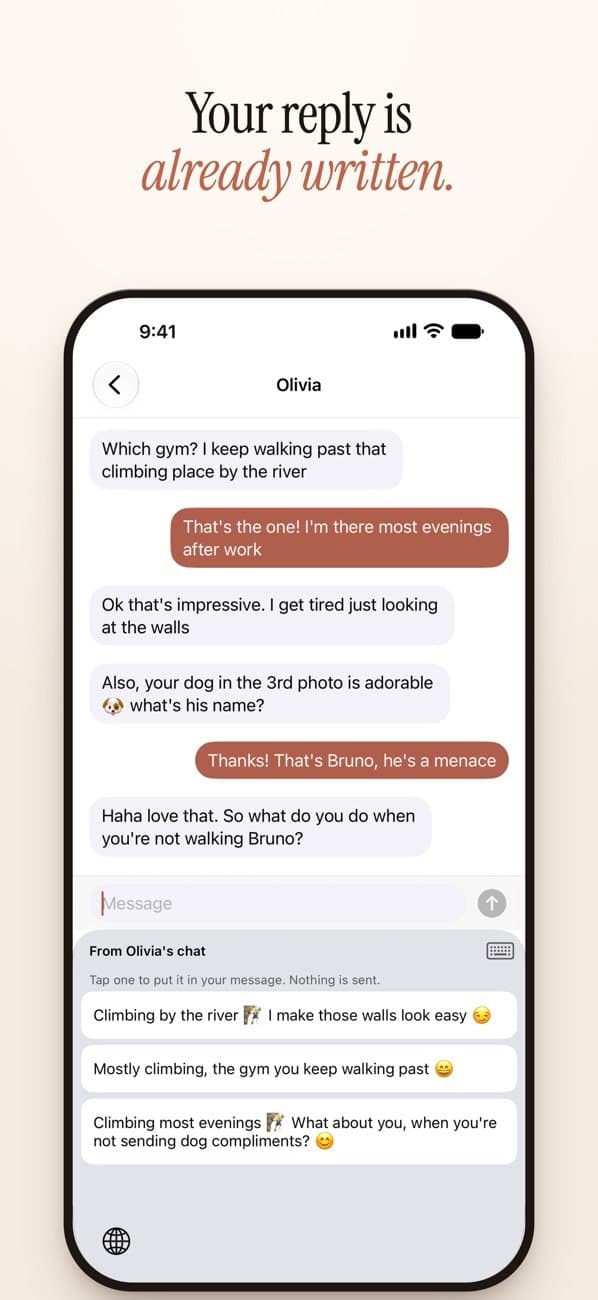
About this app
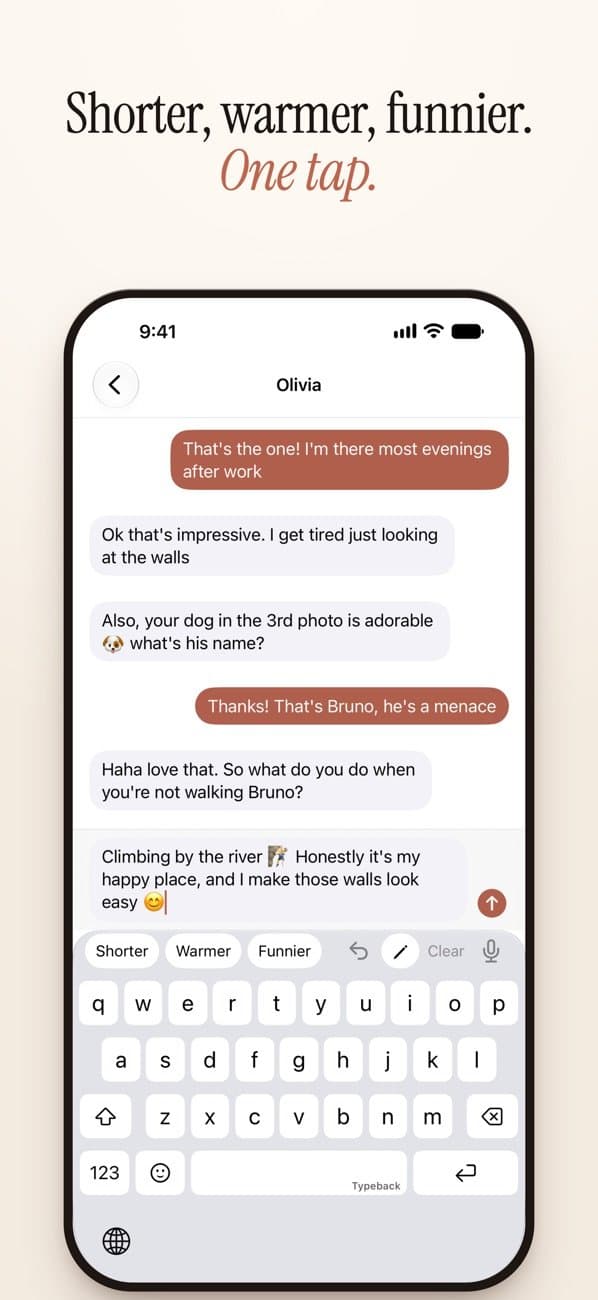
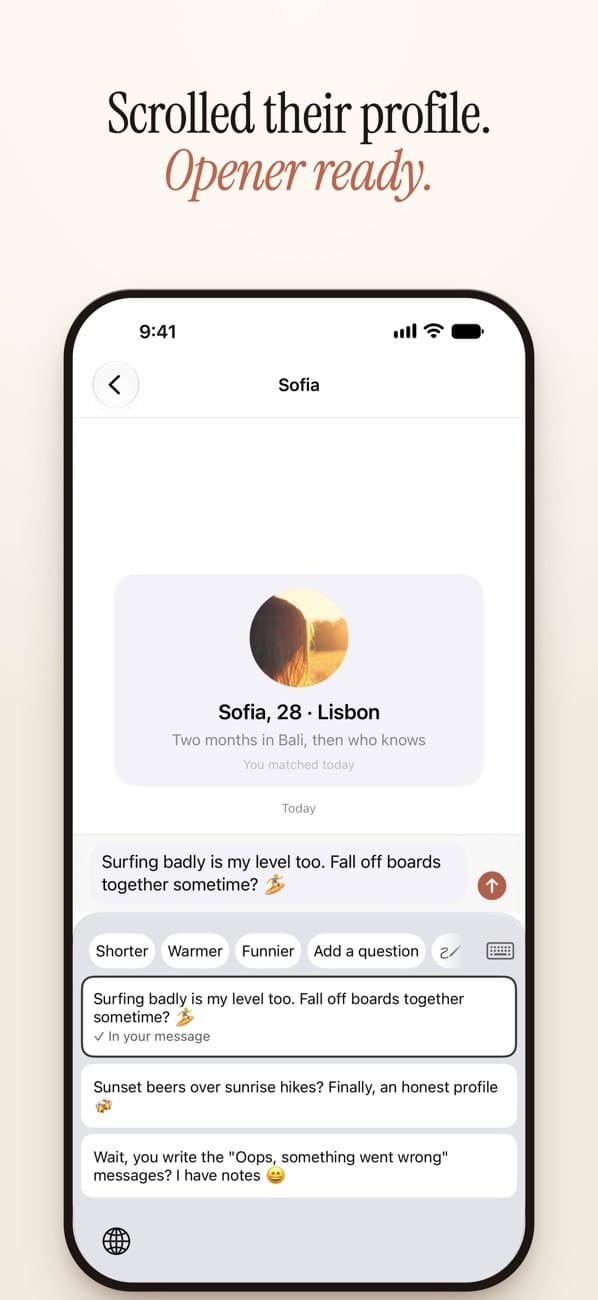
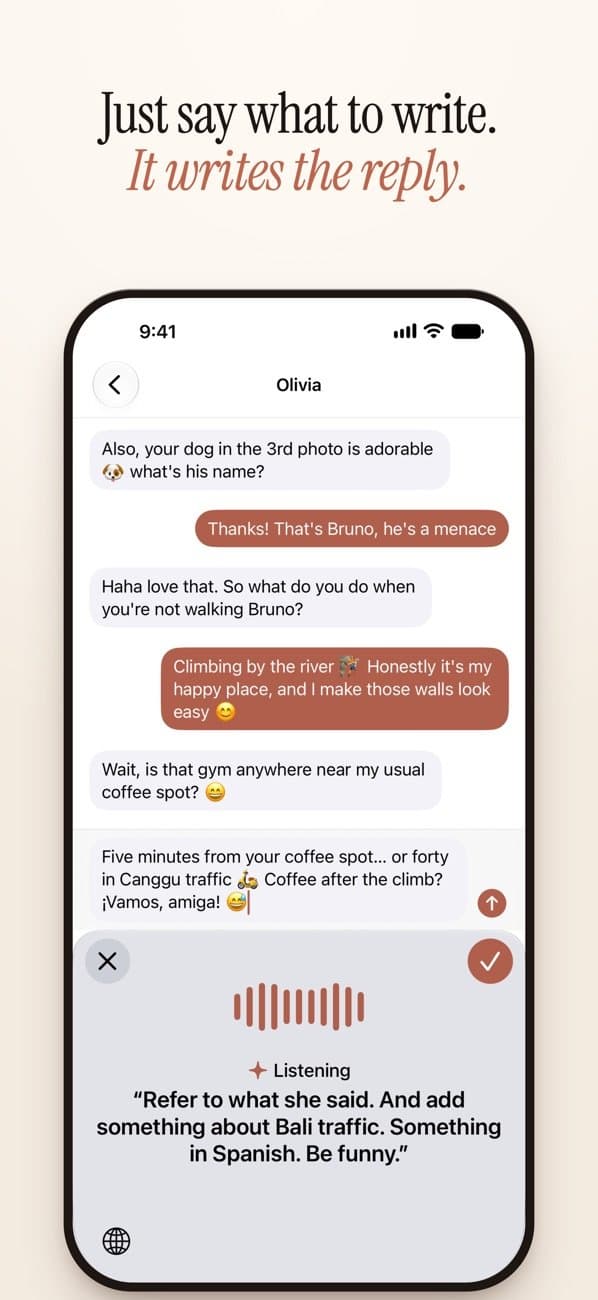
Typeback is a free AI keyboard for iPhone. Open any chat (texts, DMs, dating apps, work chats, email), switch to Typeback, and share the chat with it. It writes three replies in your own voice and the chat's language. Pick one, edit it if you like, and send it yourself; Typeback never sends anything for you. Make any reply or draft shorter, warmer, or funnier in one step, dictate with the mic, or ask what someone meant. Try it in a made-up practice chat inside the app first. Typeback types without Full Access; AI replies need it because iOS uses that switch for a keyboard's internet access. Nothing about your chats is sent until you agree in the app, the server keeps no iPhone chat text, screenshots, or replies, and keystrokes are never logged, stored, or sent. Free, no account, no ads, iOS 16.4+. Setup needs Full Access: 30-second how-to at https://typeback.app/full-access/
Key features
- 1Three AI replies in your own voice, generated from the chat you're in — you edit and send yourself.
- 2One-tap Shorter / Warmer / Funnier / Add-a-question rewrites on any reply or draft, plus custom actions.
- 3Works across texts, DMs, dating apps, work chats and email; matches the chat's language and translates both ways.
- 4Dictation with clean voice-to-text, chat Q&A ('what did they mean?'), and a built-in practice chat.
- 5No account, no ads, free with a daily AI limit; keystrokes never logged, chat text never stored server-side.
Target customer profile
Drawn from the product itself, not from a survey.
Demographic
People who text a lot on iPhone: texts, DMs, dating apps
Pain points
Not knowing what to reply, or how to word it
Primary needs
Three replies in their own voice, which they check and send themselves
Demographic
People with busy work chats and email
Pain points
Slow drafting of replies
Primary needs
Make any reply or draft shorter, warmer, or funnier in one step
Demographic
People who chat in more than one language
Pain points
Wording a reply in the chat's language
Primary needs
Replies in their own voice and the chat's language
Demographic
People who would rather speak than type
Pain points
Typing long replies on a phone
Primary needs
Dictate with the mic
Scout Review
Written by AI from measured evidence, scored out of 100.
Typeback is a free iOS AI keyboard that reads the chat you're in and offers three replies in your voice, with one-tap Shorter/Warmer/Funnier rewrites, dictation, and chat Q&A. It works everywhere you type — texts, DMs, dating apps, work chats, email — and never sends anything for you. The design has a real editorial voice and the keyboard feels native; the privacy story is unusually candid and the security headers are solid. The costs: mobile performance lags desktop, accessibility audits fail on contrast and touch targets, and Full Access is a mandatory scary permission. It's a well-built, genuinely differentiated indie tool with rough edges where it counts most — on the phone.
Measure by measure
Usability
66Practice chat before real conversations, three ways to share a chat, and a 30-second Full Access how-to are genuinely thoughtful. The Full Access requirement is still the biggest friction point for a first-time user.
Design
71Judging the app UI and store material: serif headlines with terracotta italics give it a real editorial voice, and the Shorter/Warmer/Funnier chip row reads native. Small low-contrast tool glyphs are the weak spot.
Speed
58Lighthouse mobile 72/100 with a 5.3s LCP drags it down; desktop is a clean 92/100. The changelog admits the keyboard used to be slow to appear, so mobile snappiness has been a real issue.
Security
76Strong header hygiene (HSTS, CSP, frame protection, SPF, DMARC) and an unusually candid privacy policy: no chat text stored server-side, keystrokes never logged. Missing Referrer-Policy and Permissions-Policy, no audits published.
Accessibility
57Lighthouse 84/100 but five failing audits: contrast, touch targets, ARIA misuse, and orphaned list items. English-only listing, no declared accessibility features. Multi-language replies are a functional plus, not an a11y fix.
Growth
62Real, specific problem (what do I text back) with a genuine wedge: chat-aware replies in your voice, which SwiftKey, Gboard and Grammarly don't do. Free and accountless lowers the barrier; category headroom is real but crowded.
Improvement areas
- Mobile performance: 5.3s LCP and 72/100 Lighthouse drag down the only platform the app ships on.
- Accessibility: failing contrast, touch-target, and ARIA audits on a keyboard UI where those hit hardest.
- Security headers: add Referrer-Policy and Permissions-Policy; publish an audit or bug bounty to back the strong privacy claims.
- Store listing: no ratings yet, English-only, no declared accessibility features — thin trust signals for new users.
Design & Usability
Typeback's design is judged on the app UI and store material, not a landing page — and it holds up. The serif-plus-terracotta-italic headline treatment gives the store screenshots an editorial voice you don't see from keyboard apps, and the Shorter/Warmer/Funnier chip row above the keys feels native rather than bolted on. The suggestion card's 'Nothing is sent' microcopy builds the human-in-the-loop promise into the interface itself. Usability is thoughtful: a practice chat before real conversations, three ways to hand the keyboard a chat, and a dedicated 30-second Full Access walkthrough. The friction is structural — Full Access is a scary iOS permission and it's mandatory for the core feature.
Speed & Security
Speed is a split verdict. Desktop Lighthouse lands at 92/100, but mobile — the only platform this ships on — scores 72/100 with a 5.3s largest contentful paint and 284ms total blocking time. The changelog openly notes the keyboard 'comes up faster' now, which tells you responsiveness was a real complaint. Security is the strongest dimension: HTTPS enforced with HSTS, CSP, frame protection, SPF and DMARC, and a privacy policy that names exactly what leaves the phone (chat text or a screenshot, with names, numbers and links stripped) and what doesn't (keystrokes, stored chat text, replies). Missing Referrer-Policy and Permissions-Policy headers and no published audits keep it short of excellent.
Accessibility & Growth
Accessibility is the soft spot. Lighthouse scores 84/100 but five audits fail: insufficient color contrast, touch targets too small, aria-hidden elements containing focusable descendants, prohibited ARIA attributes, and list items outside list parents. On a keyboard — where small targets and low contrast hit hardest — those matter. The listing is English-only and declares no accessibility features, though in-app multi-language replies and chat translation are a functional strength. Growth is a judgement on the idea: the problem (not knowing what to text back) is real and universal, and the wedge — chat-aware replies in your own voice — is something SwiftKey, Gboard and Grammarly genuinely don't do. Free, no account, no ads lowers the barrier. The category is crowded and the listing has no ratings yet, but the idea has room.
Conclusion
If you text a lot and freeze on replies, Typeback is worth the 30-second Full Access setup — the practice chat lets you test it before committing, and the privacy policy is one of the more honest ones in this category. Go in knowing the mobile keyboard can feel slow on first load and the small grey tool icons are hard to hit. It won't replace your keyboard for everything, but as a reply-drafting layer it earns its place. The idea is stronger than the execution right now; tighten mobile speed and accessibility and this becomes a keeper.
Suggestions for improvement
- Fix the mobile LCP — 5.3s on the only platform you ship is the single biggest speed win available.
- Raise contrast and enlarge the keyboard tool icons (undo, pencil, Clear, mic); they fail touch-target and contrast audits.
- Add Referrer-Policy and Permissions-Policy headers to close the last gaps in an otherwise strong security posture.
- Publish an accessibility statement and declare supported languages/features on the App Store listing.
Alternatives comparison
Named competitors, point by point. Nobody paid to appear here or to be left out.
 Typeback | Microsoft SwiftKey | Gboard | Grammarly Keyboard | |
|---|---|---|---|---|
| Chat-aware AI reply generation in your voice | Yes — core feature; reads the chat and drafts three replies in your voice | No — predictions and autocorrect, not chat-aware reply drafting | No — glide typing, voice input, translation; no reply generation | Partial — tone/grammar polish, not context-aware chat replies |
| One-tap tone rewrites (shorter / warmer / funnier) | Yes — chips above the keyboard plus custom actions | No — autocorrect and predictions only | No — no tone rewrite controls | Yes — tone adjustment is a Grammarly strength |
| Multi-language replies and chat translation | Yes — replies match chat language; translate whole chats both ways | Yes — multilingual typing support | Yes — built-in translation and multilingual input | Limited — grammar/tone in supported languages, not chat translation |
| Free with no account and no ads | Yes — free, no sign-up, no ads, daily AI limit | Yes — free keyboard | Yes — free keyboard | Freemium — paid tiers for full AI features |
| Privacy: no chat text stored server-side, keystrokes never logged | Yes — stated in policy; keystrokes never logged, stored or sent | Varies — Microsoft privacy terms apply; typing data handling disclosed | Varies — Google privacy terms; typing data used per policy | Varies — Grammarly privacy terms; text processed for suggestions |
Microsoft SwiftKey
A popular third-party keyboard with predictions, autocorrect, emoji and multilingual typing; less focused on chat-aware AI reply generation.
Gboard
Google's keyboard with glide typing, voice input and translation built in; convenient for everyday typing but not tailored to drafting replies in your voice.
Grammarly Keyboard
Focuses on grammar, spelling and tone improvements as you type; helpful for polishing text rather than generating context-aware chat replies.
Comparing options? See Typeback alternatives, scored side by side
More Productivity apps
View all Productivity
Qamarero
92An all-in-one hospitality software for restaurants and ba...

Puzzly – B2B Lead Generation & Sales Intelligence Platform
92Puzzly is an all-in-one B2B lead generation platform that...

The Stack Newsletter
92A weekly newsletter delivering curated tech jobs, intervi...

StoryPad
92Privacy-first open source journal app with a continuous t...

Vibe Coding Agent Skills
92A free, open-source platform offering 110 AI agent skills...

Notion
92All-in-one AI workspace for docs, projects, and knowledge...

EmbedMyReviews
92White-label reputation management software for agencies s...

QRBliss
91Branded QR codes with AI Brand Sync, 15 free dynamic code...

Strukchad Property Management
91Property management for Kenyan letting agents: rent invoices raised every month, M-Pesa rent prompts to tenants, arrears tracking and landlord statements.

CC Switch
91Open-source desktop app for switching AI coding providers...

Gerty
91Private, local AI assistant for Mac that runs offline

BACKLNK
90Backlnk is a free SEO and AI visibility website: 15 website checks, a full audit as a PDF report, and guides to get found in search and AI answers.


A platform dedicated to providing unbiased reviews of newly launched applications, analyzing everything from their features to their full potential.
info@scoutforge.net© 2026 Scoutforge. All rights reserved.
