Cycling through all six. Tap any point to stop.
Measured on six things
Extract Outlook OST offline cache data into portable PST ...
Security
26HTTPS not enforced, no HSTS, CSP, frame protection, or security headers (1/12 checklist). SPF present, DMARC absent. No SOC 2, ISO, or bug-bounty signals.
Screenshots
1 / 3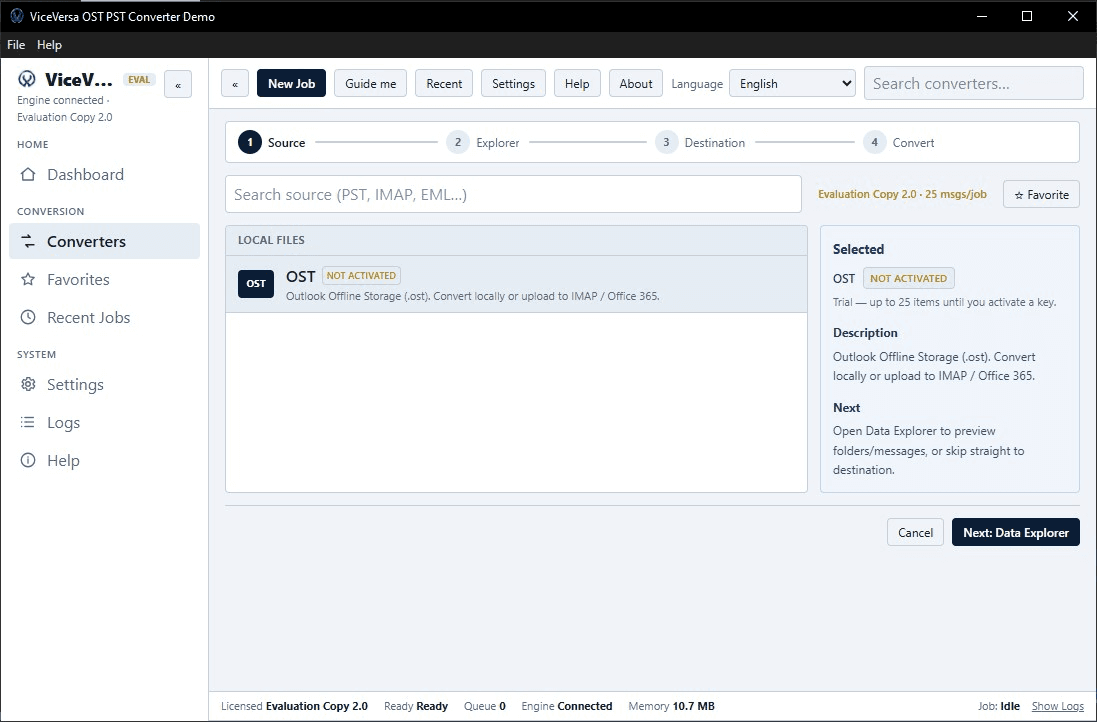
About this app
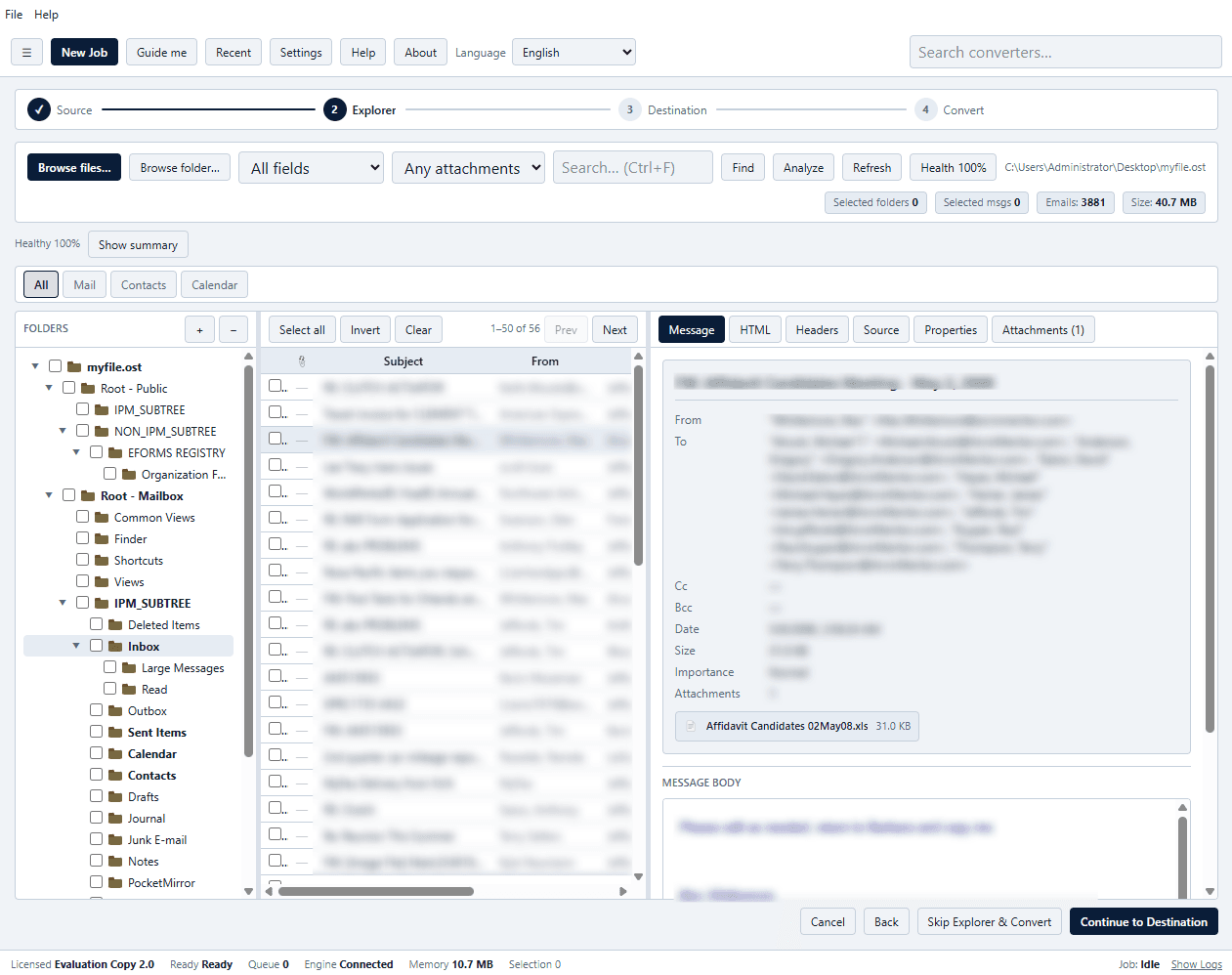
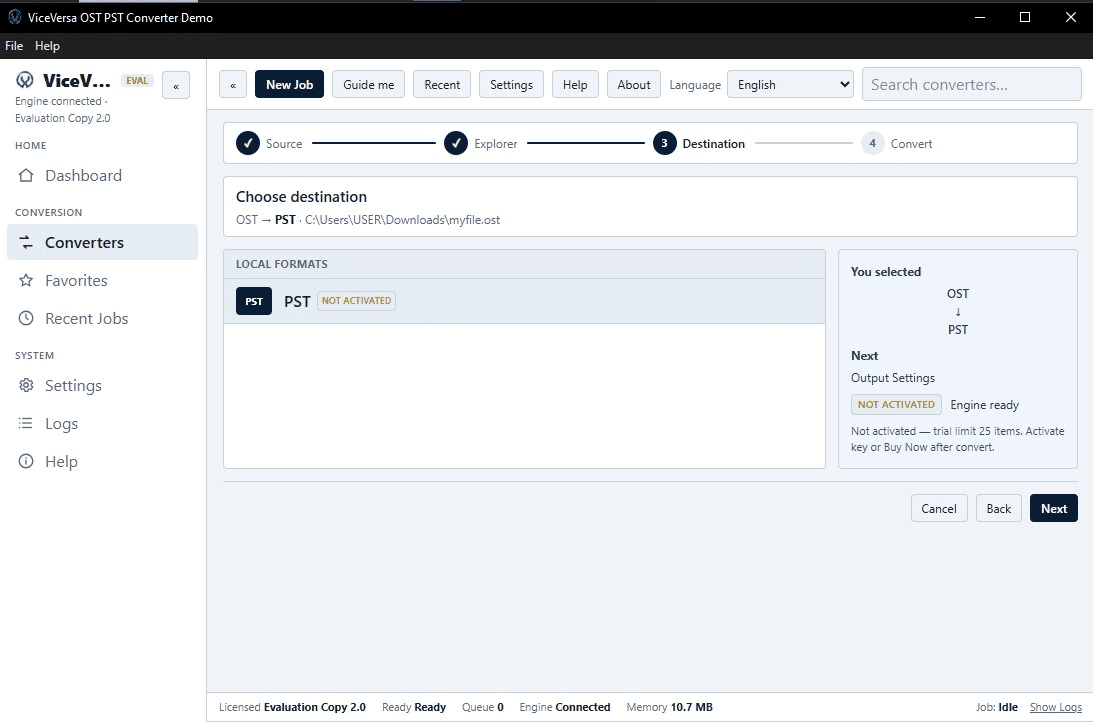
ViceVersa OST to PST Converter is designed to migrate mailbox data from orphaned or inaccessible OST files to the standard PST format. It is suitable for people, IT experts and organizations. It eases Outlook data administration during migration, upgrade and backup processes. The tool has a built-in bulk migration feature that allows users to export multiple OST files together. It also comes with a pre-conversion preview pane that allows users to view the mailbox content including emails, contacts, calendars, notes and tasks – and export only the required data. The application retains all important email metadata and folder structures and has a simple, intuitive user interface that does not require advanced technical expertise. It is compatible with previous and current versions of Windows such as 11, 10, 8.1, 8 and 7. There is a free trial version for testing and converts up to 25 files per folder. To unlock full conversion users can upgrade to one of the premium licensing options.
Key features
- 1One-way OST to PST conversion for orphaned or inaccessible Outlook offline cache files
- 2Bulk migration of multiple OST files with a pre-conversion preview pane for emails, contacts, calendars, notes, and tasks
- 3Retains email metadata and folder structure; compatible with Windows 11, 10, 8.1, 8, and 7
Target customer profile
Drawn from the product itself, not from a survey.
Demographic
IT administrators managing Outlook and Exchange environments
Pain points
OST files are locked to a profile and can't be handed off or archived easily
Primary needs
A reliable, repeatable way to extract OST data into PST for backups or migrations
Demographic
Employees leaving a company or switching machines
Pain points
Mail lives in an OST that won't open elsewhere, risking loss of important messages
Primary needs
A portable PST copy of their mailbox they can keep or re-import later
Demographic
Small business owners without dedicated IT staff
Pain points
Outlook profile corruption or reinstall leaves mail stranded in the offline cache
Primary needs
An affordable, simple Windows tool to recover mail into a usable PST
Scout Review
Written by AI from measured evidence, scored out of 100.
ViceVersa OST to PST Converter is a focused Windows utility for extracting mailbox data from orphaned OST files into PST. The marketing site is fast (Lighthouse 93 mobile / 99 desktop), clean, and clear about what the tool does and costs: $29 Personal, $99 Professional, $299 Technician, with a free trial. Usability is solid for a small product — three-step workflow, FAQ, transparent pricing — though documentation is thin and there's no live demo. Security is the clear weakness: 1/12 on the header checklist, HTTPS not enforced, no DMARC, and no compliance or audit signals. Accessibility lands at 90/100 with a few markup failures and no WCAG statement. Growth is a real but crowded opportunity: the problem is specific and the wedge is clear, but the category is full of interchangeable converters and the page doesn't explain why this one wins. A competent, fast, no-frills tool with a security gap and a differentiation gap.
Measure by measure
Usability
64Three-step workflow, free trial, and a 6-question FAQ cover the basics. Pricing is clear ($29/$99/$299). No live demo or in-depth docs beyond the FAQ.
Design
68Clean, modern single-product page with a clear OST→PST directional diagram and 3-step flow. App UI is shown via screenshots but not independently verifiable. Solid for an indie Windows utility.
Speed
82Lighthouse mobile 93/100 (LCP 2.6s, CLS 0.001, TBT 0ms) and desktop 99/100. Genuinely fast, lightweight marketing page with no heavy SPA overhead.
Security
26HTTPS not enforced, no HSTS, CSP, frame protection, or security headers (1/12 checklist). SPF present, DMARC absent. No SOC 2, ISO, or bug-bounty signals.
Accessibility
70Lighthouse accessibility 90/100. Failing audits: ARIA role children missing, list markup issues, no main landmark. No WCAG statement or a11y page found.
Growth
54Real, specific problem (orphaned OST files) with named segments and a clear one-way wedge. But the category is crowded with near-identical converters and the site shows no structural moat.
Improvement areas
- Security headers and HTTPS enforcement are almost entirely absent (1/12 checklist points)
- Documentation is limited to a six-question FAQ with no live demo or in-depth guides
- No accessibility statement or WCAG conformance claim despite a 90/100 automated score
Design & Usability
The site is a single, tightly focused product page for a Windows desktop utility. Design is clean and modern: a dark/light layout, a clear OST→PST directional diagram, and a three-step 'how it works' section that tells you exactly what the tool does. The app's own UI is shown only through screenshots, so in-app design can't be independently verified. Usability is competent: a free trial installer, a six-question FAQ covering reversibility, Outlook requirements, download location, pricing, and Windows versions, and transparent pricing at $29 Personal, $99 Professional, and $299 Technician. There's no live demo and no documentation beyond the FAQ, which is thin for a tool aimed partly at IT admins. Navigation is simple and the page loads fast. For an indie converter, it's above-average on clarity but not exceptional on depth.
Speed & Security
Speed is the standout measured result: Lighthouse mobile performance 93/100 with LCP 2.6s, CLS 0.001, TBT 0ms, and desktop 99/100. The marketing page is lightweight and snappy, with no heavy SPA framework dragging it down. Security is the weak spot. The HTTP probe found HTTPS not enforced, no HSTS, no CSP, no frame protection, no X-Content-Type-Options, no Referrer-Policy, and no Permissions-Policy — just 1 of 12 checklist points, with SPF present but DMARC absent. There's no SOC 2, ISO, pen-test, or bug-bounty signal on the site. For a tool that handles entire mailbox exports, that's a meaningful gap, though it's not unusual for a small indie Windows utility at this stage.
Accessibility & Growth
Accessibility scores 90/100 on Lighthouse, with failing audits for ARIA role children, list markup, and a missing main landmark. No WCAG statement or accessibility page exists, so the automated score is the main signal. Growth is a judgement on the idea: the problem is real and specific — OST files are locked to a profile and can't be handed off, so leavers, rebuilds, and IT admins need a portable PST. The site names those segments and offers a clear one-way wedge at $29. But the category is crowded with near-identical converters, and the page offers no structural reason to pick this over DataVare or the many other OST-to-PST tools. The domain is two years old and social profiles exist, but that's context, not a moat. The idea can grow; the differentiation is thin.
Conclusion
If you need a quick, cheap way to pull data out of a stuck OST and you're comfortable with a small indie vendor, this does the job and the trial lets you test it first. If you're an IT admin handling sensitive mailbox data at scale, the missing security headers and absence of any compliance signal should give you pause — you'll want to check how the vendor handles data before trusting it with a full export. The pricing is fair and the speed is genuinely good. The product's future depends on whether it can differentiate from the many lookalike converters; right now the page doesn't make that case. Try the trial, verify the output, and decide from there.
Suggestions for improvement
- Enforce HTTPS and add HSTS, CSP, frame protection, and the other missing security headers — 1/12 is a red flag for a mailbox tool
- Publish a security or data-handling page explaining what happens to OST data during conversion and whether anything leaves the machine
- Add real documentation beyond the FAQ: supported OST scenarios, error handling, and a comparison against DataVare and other converters
- Add an accessibility statement and fix the failing audits (main landmark, ARIA roles, list markup) to back up the 90/100 score
Alternatives comparison
Named competitors, point by point. Nobody paid to appear here or to be left out.
 ViceVersa OST to PST Converter | DataVare OST to PST Converter Expert | |
|---|---|---|
| Pricing (entry tier) | $29 Personal (1 machine, 1 year updates) | Not verified in collected evidence |
| Free trial | Yes — converts up to 25 files per folder | Not verified in collected evidence |
| Bulk conversion | Yes — multiple OST files together | Not verified in collected evidence |
| Pre-conversion preview | Yes — emails, contacts, calendars, notes, tasks | Not verified in collected evidence |
| Windows compatibility | Windows 11, 10, 8.1, 8, 7 | Not verified in collected evidence |
| Security headers / HTTPS enforcement | HTTPS not enforced; 1/12 header checklist points | Not verified in collected evidence |
Comparing options? See ViceVersa OST to PST Converter alternatives, scored side by side
More Productivity apps
View all Productivity
StoryPad
92Privacy-first open source journal app with a continuous t...

The Stack Newsletter
92A weekly newsletter delivering curated tech jobs, intervi...

Qamarero
92An all-in-one hospitality software for restaurants and ba...

Vibe Coding Agent Skills
92A free, open-source platform offering 110 AI agent skills...

Puzzly – B2B Lead Generation & Sales Intelligence Platform
92Puzzly is an all-in-one B2B lead generation platform that...

Notion
92All-in-one AI workspace for docs, projects, and knowledge...

EmbedMyReviews
92White-label reputation management software for agencies s...

QRBliss
91Branded QR codes with AI Brand Sync, 15 free dynamic code...

CC Switch
91Open-source desktop app for switching AI coding providers...

Strukchad Property Management
91Property management for Kenyan letting agents: rent invoices raised every month, M-Pesa rent prompts to tenants, arrears tracking and landlord statements.

Gerty
91Private, local AI assistant for Mac that runs offline

username.md
90One verified handle for your online identity, readable by...


A platform dedicated to providing unbiased reviews of newly launched applications, analyzing everything from their features to their full potential.
info@scoutforge.net© 2026 Scoutforge. All rights reserved.
