Cycling through all six. Tap any point to stop.
Measured on six things
Free AI-powered group expense tracker and bill splitter w...
Security
52HTTPS with HSTS and secure cookies are solid basics. Missing CSP, frame protection, and other headers. No SOC 2 or audit reports found — typical for a 0.1-year-old app, but worth watching.
Screenshots
1 / 4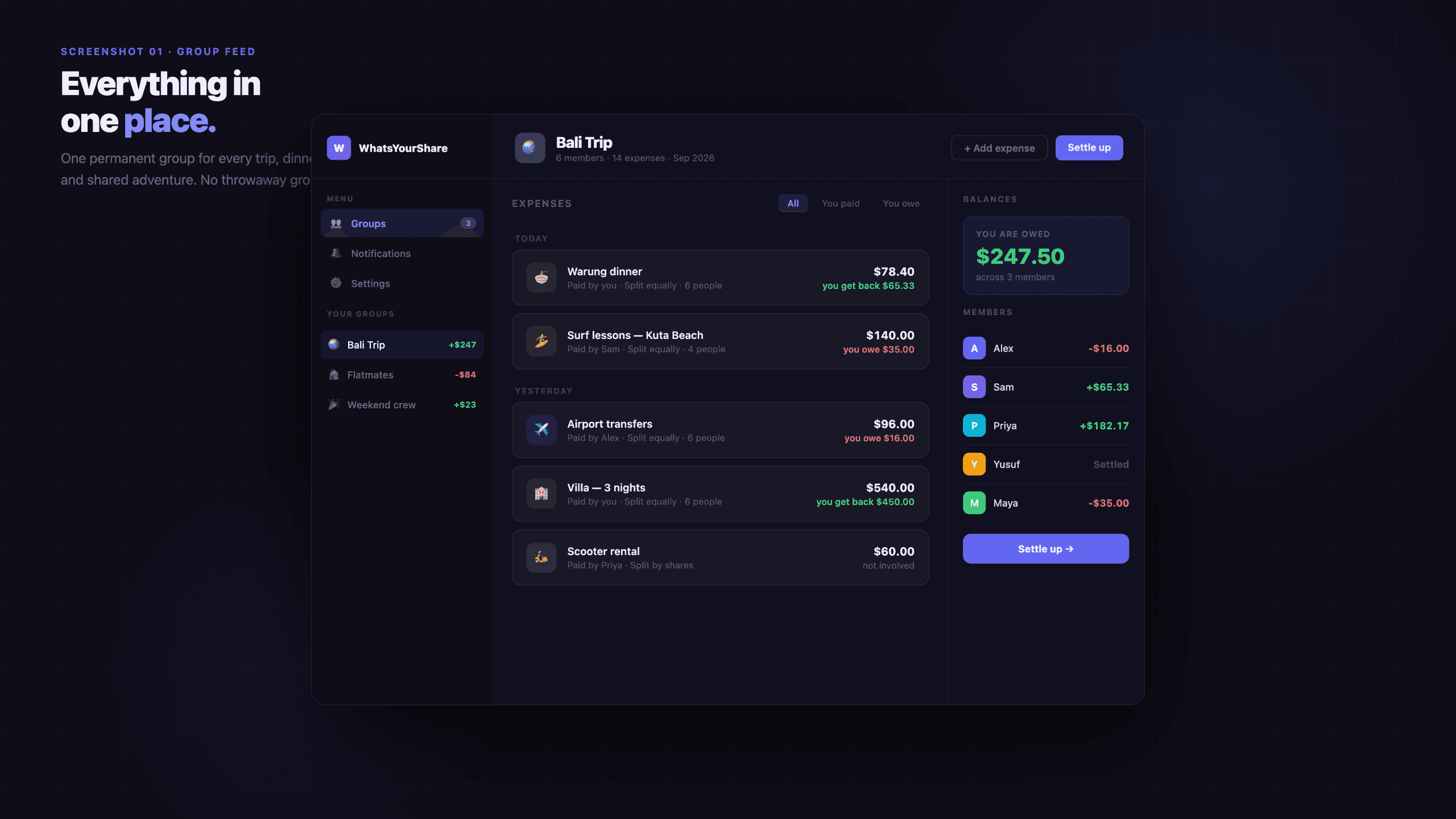
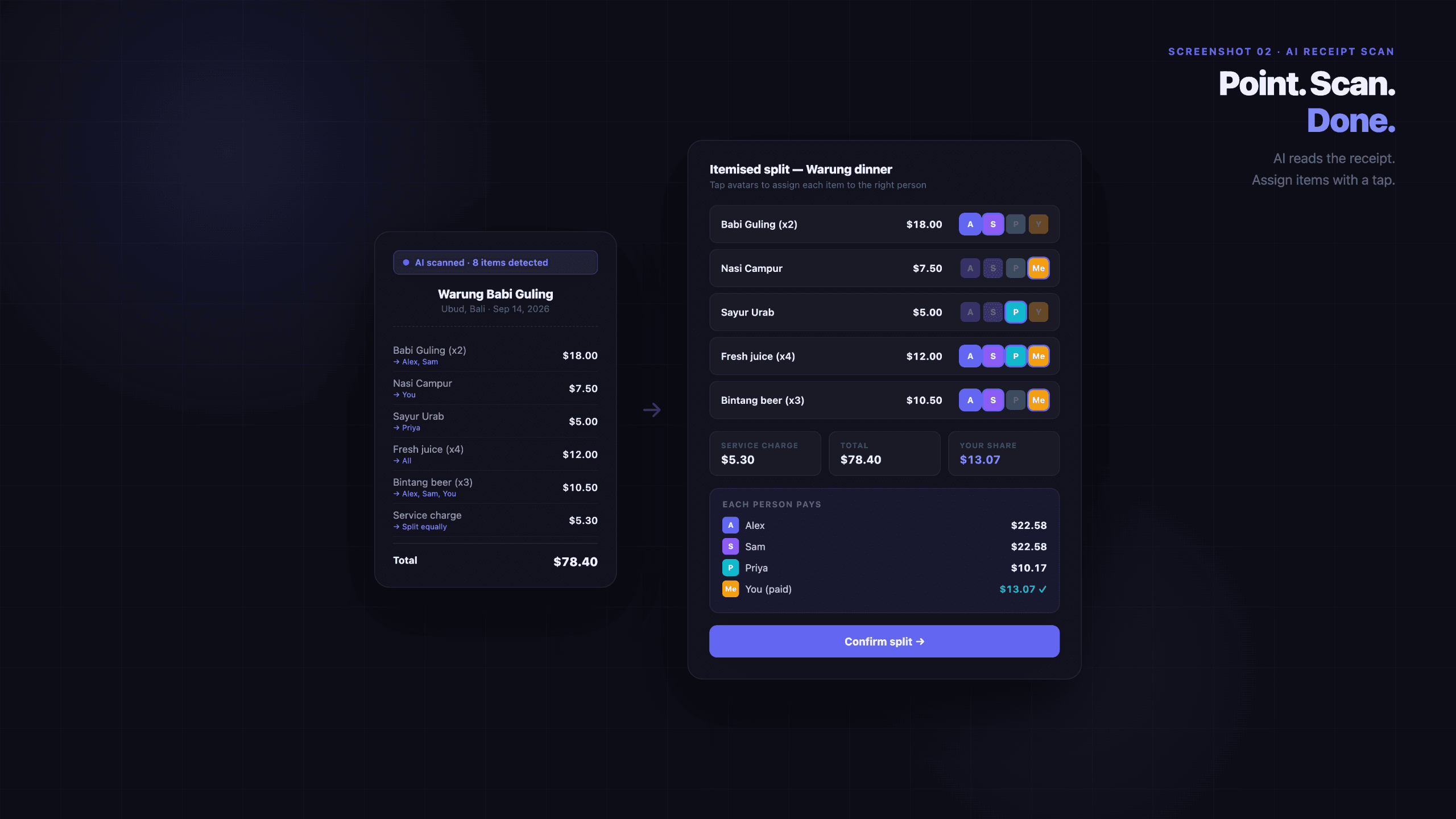
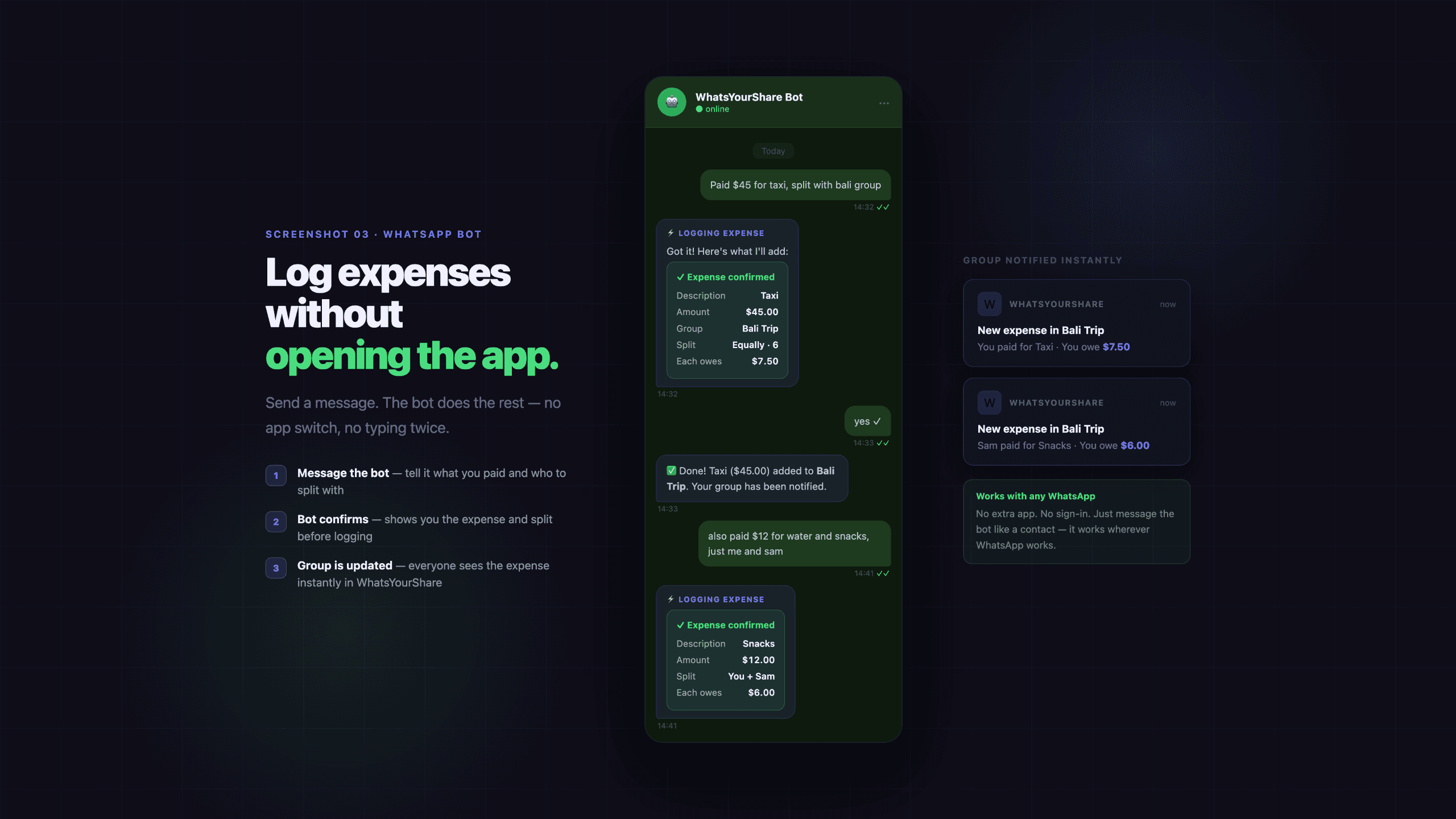
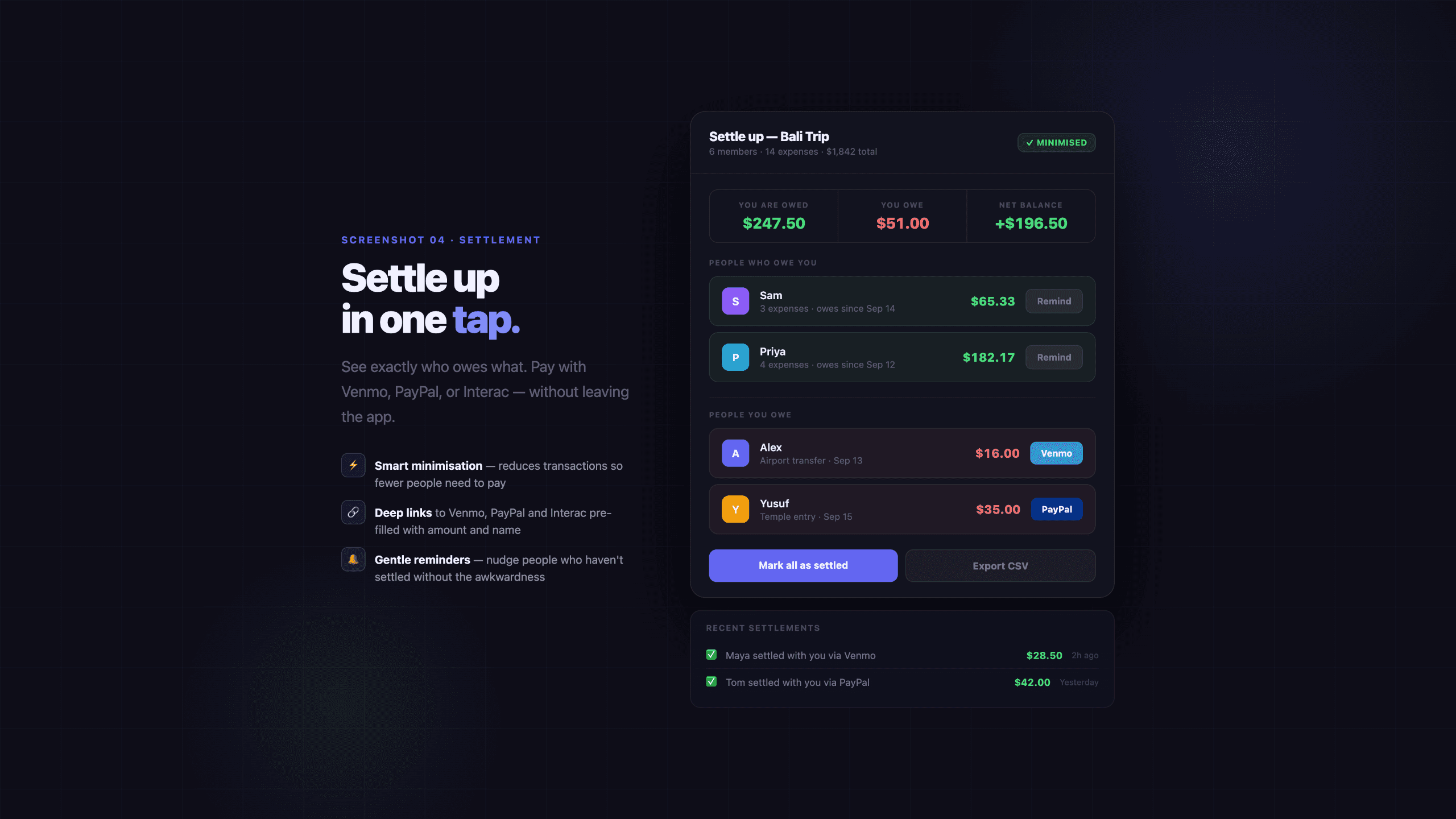
About this app
WhatsYourShare is a refreshingly simple yet powerful app designed to take the awkwardness out of splitting bills and tracking shared expenses among friends. What sets it apart? It’s completely free, ad-free, and doesn’t even require guests to create an account. The standout feature is its seamless integration with WhatsApp: you can log expenses, scan receipts with AI, and split bills without ever leaving your chat. This makes it perfect for spontaneous outings, group trips, or regular hangouts where money can get messy. I’ve been using it with my friend group for a few weeks now, and the AI receipt scanning is surprisingly accurate—it automatically detects items and amounts, which saves a ton of manual entry. The interface is clean and intuitive, with no clutter. You can create groups, add participants, and track balances effortlessly. It focuses on making sure friendships stay about the fun, not the finances. Whether you're planning a weekend getaway, splitting a dinner bill, or ma...
Key features
- 1AI-powered receipt scanning that auto-detects items and amounts for quick splitting
- 2WhatsApp integration to log expenses and split bills without leaving the chat
- 3Free, ad-free, and no-account-required for guests, lowering adoption friction
Target customer profile
Drawn from the product itself, not from a survey.
Demographic
College students and young adults aged 18-25
Pain points
Frequent group spending for meals, trips, and events; difficulty tracking who owes whom; lack of financial experience
Primary needs
Easy bill splitting, transparent tracking, and a free, no-account solution
Demographic
Working professionals aged 26-35 who socialize regularly
Pain points
Busy schedules making it hard to settle expenses; awkward money conversations with friends; need for quick and convenient tools
Primary needs
Integration with messaging apps like WhatsApp, AI-assisted receipt scanning, and a simple way to manage group finances
Demographic
Friends who travel together frequently, such as adventure buddies or travel groups
Pain points
Complex expense tracking across multiple trips and activities; shared costs for accommodation, transport, and food; risk of disputes
Primary needs
A centralized platform for group expenses that is accessible on the go and supports quick log entries
Demographic
Roommates or people sharing living costs
Pain points
Monthly bills like rent, utilities, and groceries; tracking shared purchases; ensuring fair splits
Primary needs
A dependable and free app to track recurring and ad-hoc shared expenses without the friction of account creation
Scout Review
Written by AI from measured evidence, scored out of 100.
WhatsYourShare is a promising early-stage expense-splitting app with a genuinely useful twist: WhatsApp integration and AI receipt scanning, wrapped in a clean, dark UI. It's fast (96/100 mobile Lighthouse), easy to try (no signup demo), and free — all the right moves for its college-and-young-professional audience. The design is polished inside the product, though the homepage's light/dark mix feels unfinished. Security is basic but not alarming for a 0.1-year-old app. The real question is growth: the WhatsApp wedge is clever but copyable, and the 'free forever' model needs a path to revenue. If it can build a loyal user base before an incumbent copies the feature, it has a shot.
Measure by measure
Usability
72Zero-friction demo, prominent CTAs, and scannable expense lists make onboarding easy. Receipt scan flow with visible avatars reduces ambiguity. Solid usability for a young app.
Design
70Polished dark product UI with strong hierarchy and color-coded avatars, but homepage's light/dark mix feels disjointed. Solid execution with room to unify visual language.
Speed
84Exceptional performance: 96 mobile, 100 desktop Lighthouse scores. LCP 2.7s, zero CLS, 14ms TBT. Fast, snappy, and no lag complaints found. Clearly ahead of category peers.
Security
52HTTPS with HSTS and secure cookies are solid basics. Missing CSP, frame protection, and other headers. No SOC 2 or audit reports found — typical for a 0.1-year-old app, but worth watching.
Accessibility
74Lighthouse 95/100 with only two failing audits: color contrast and missing main landmark. No WCAG statement, but strong automated score suggests decent baseline. Keyboard support not explicitly documented.
Growth
62Real problem, clear wedge: WhatsApp-native splitting with AI receipt scanning, free and no-account. Category has headroom, but differentiation is narrow and copyable by incumbents.
Improvement areas
- Missing security headers like CSP and frame protection need implementation
- Homepage design mixes light and dark themes, creating a disjointed visual experience
- No WCAG statement or accessibility documentation despite decent Lighthouse scores
Design & Usability
WhatsYourShare nails the core experience: a clean, dark product UI with color-coded avatars and green balance highlights makes expense tracking feel almost fun. The homepage demo panel is a smart touch — you can try the splitter without signing up, which is exactly the right friction level for a casual tool. The light homepage with a floating dark panel feels disjointed, and nav/footer text is small and low-contrast, but the product screenshots show a polished, consistent aesthetic. Usability is strong: prominent CTAs, scannable expense lists with clear 'you get back' indicators, and a receipt scan flow that assigns items to people with visible avatars. For a young app, the onboarding path from landing to value is remarkably short.
Speed & Security
Performance is the standout here: 96/100 mobile and 100/100 desktop Lighthouse scores, with a 2.7s LCP, zero CLS, and 14ms TBT. The site feels instant, and there are no lag complaints anywhere. Security is more of a mixed bag — HTTPS with HSTS and secure cookies are solid, but the absence of CSP, frame protection, and other headers leaves room for improvement. No SOC 2 or audit reports exist yet, which is expected for a 0.1-year-old app, but worth tracking as it grows. The SPF and DMARC setup shows some email hygiene. Overall, fast and functional, with security basics in place and clear headroom for hardening.
Accessibility & Growth
Accessibility is decent: 95/100 on Lighthouse with only two failing audits — color contrast and a missing main landmark. No WCAG statement exists, but the automated score suggests a reasonable baseline. Growth-wise, the idea is solid: splitting bills is a real, recurring pain point, and the WhatsApp-native workflow is a genuine differentiator that Settle Up lacks. The free, no-account model lowers adoption barriers, especially for the 18-25 target. The risk is that the wedge is narrow — Meta could easily build this into WhatsApp, and incumbents like Splitwise have deep user bases. The category has headroom, but the moat is shallow.
Conclusion
For a weekend trip, a dinner split, or a month of roommate expenses, WhatsYourShare is genuinely pleasant to use — fast, clear, and free. The WhatsApp integration is the kind of feature that makes you wonder why Splitwise hasn't done it yet. The team should focus on hardening security headers, adding an accessibility statement, and unifying the homepage design. If they can grow a community around the WhatsApp-native workflow before a big player copies it, this could carve out a real niche. For now, it's a solid, early-stage tool that's worth a try — especially if your group chat lives in WhatsApp.
Suggestions for improvement
- Add a unified dark theme across homepage and product to fix the visual disconnect
- Implement CSP, frame protection, and other missing security headers
- Publish a WCAG statement and fix contrast and main landmark issues
- Consider a freemium tier (e.g., advanced analytics) to build a revenue path
Alternatives comparison
Named competitors, point by point. Nobody paid to appear here or to be left out.
 WhatsYourShare |  Settle Up | |
|---|---|---|
| WhatsApp integration for in-chat expense logging | Native WhatsApp integration allows logging and splitting expenses directly in chat | No WhatsApp integration; requires switching to the app for expense management |
| AI receipt scanning | AI auto-detects items and amounts from receipts, assigning them to group members | No AI receipt scanning; manual entry required for expenses |
| Account requirement for guests | Guests can participate without creating an account, reducing friction | Requires account creation for all users to track and split expenses |
| Pricing model | Completely free and ad-free with no premium tier | Freemium model with premium features behind a paid tier |
| Offline functionality | No offline mode mentioned; relies on internet connection for WhatsApp integration | Works offline, allowing expense tracking without an internet connection |
Comparing options? See WhatsYourShare alternatives, scored side by side
More Expense Management apps
View all Expense Management
Receipt Bot
88Automated bookkeeping software that extracts data from re...

OpenBudget
87Connect your bank to AI for real answers about your money.

FollowIncome
86Business workspace for solo founders and small teams.

PropHours
86PropHours is a material participation tracker for STR and REPS: log rental hours by AI, voice, scan or timer, attach evidence, and export a CPA-ready file.

FreeBillKit
86FreeBillKit: free invoices, receipts, estimates & business documents in your browser. No signup, no watermark.

Dokta
84Dokta is an AI-powered document management and invoicing ...

Fake Receipt Maker
84Fake Receipt Maker is a free online receipt generator that lets you create realistic, fully customizable receipts in seconds.

DEFTER
83Sleek account book for personal & business finance with s...

Traceback
83Reveal No Caller ID, unknown numbers, and private callers...

BarBrain
82BarBrain is a digital inventory app for the hospitality i...

Receipt Generator
82An online tool for creating realistic store receipts with...

Fugoya
81An all-in-one productivity app for freelancers to manage projects, track time, and handle finances with ease.


A platform dedicated to providing unbiased reviews of newly launched applications, analyzing everything from their features to their full potential.
info@scoutforge.net© 2026 Scoutforge. All rights reserved.
