Cycling through all six. Tap any point to stop.
Measured on six things
AI-powered automation platform with multi-engine scriptin...
Speed
47Lighthouse mobile 54/100 with a brutal 22.7s LCP and 6.5s FCP; desktop 49/100. The homepage is heavy and slow to first paint on both form factors.
Screenshots
1 / 7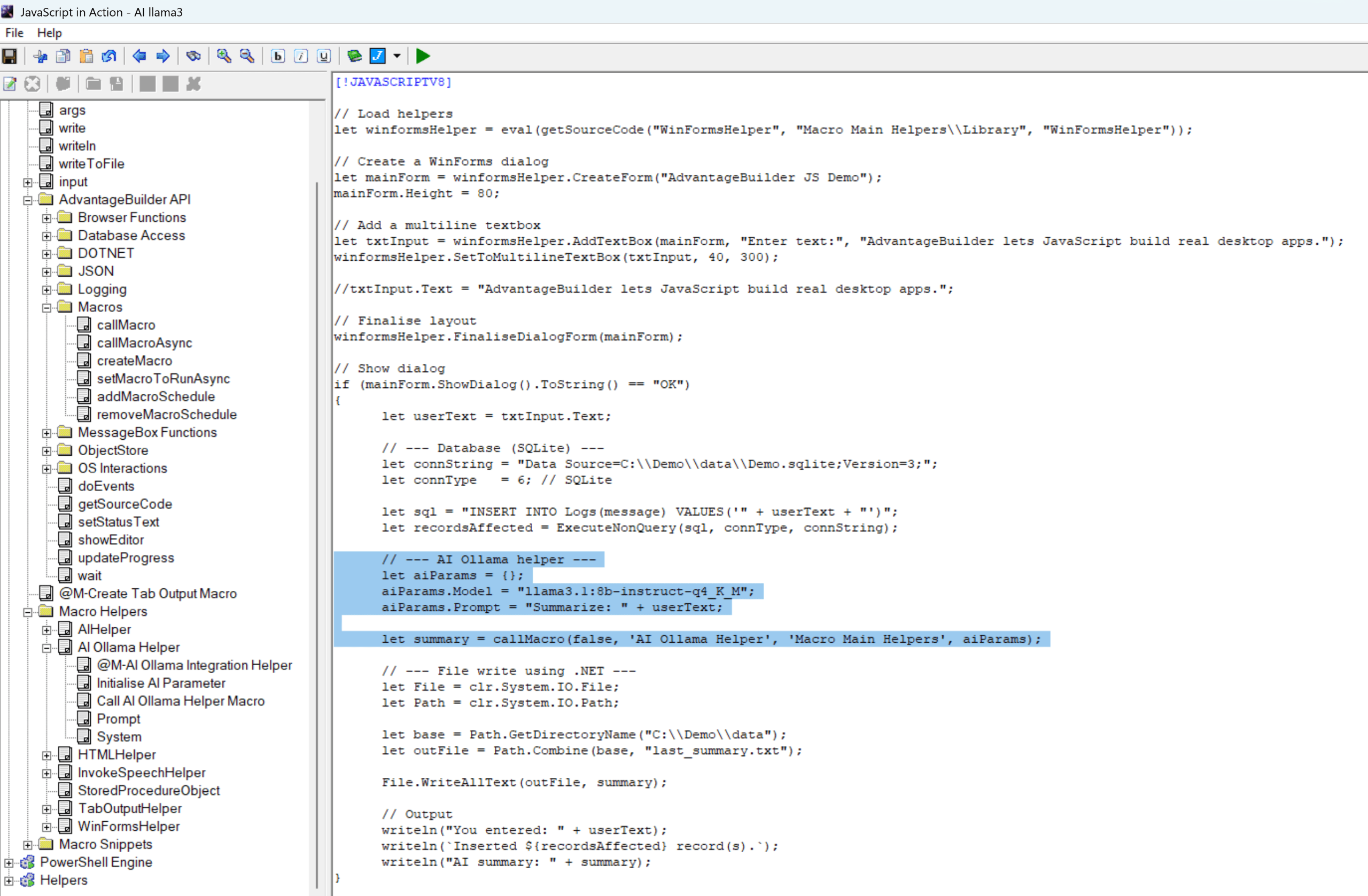
About this app
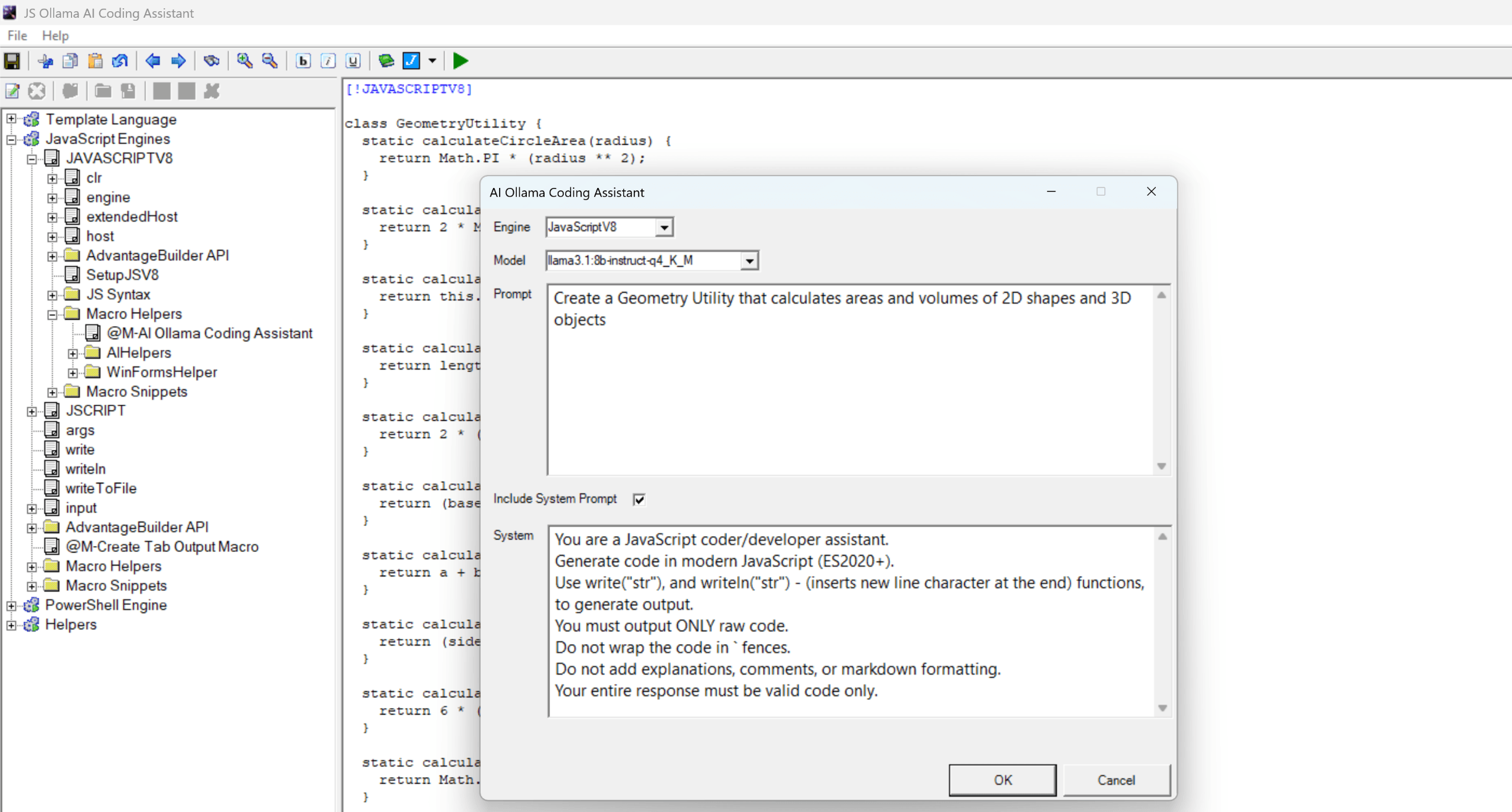
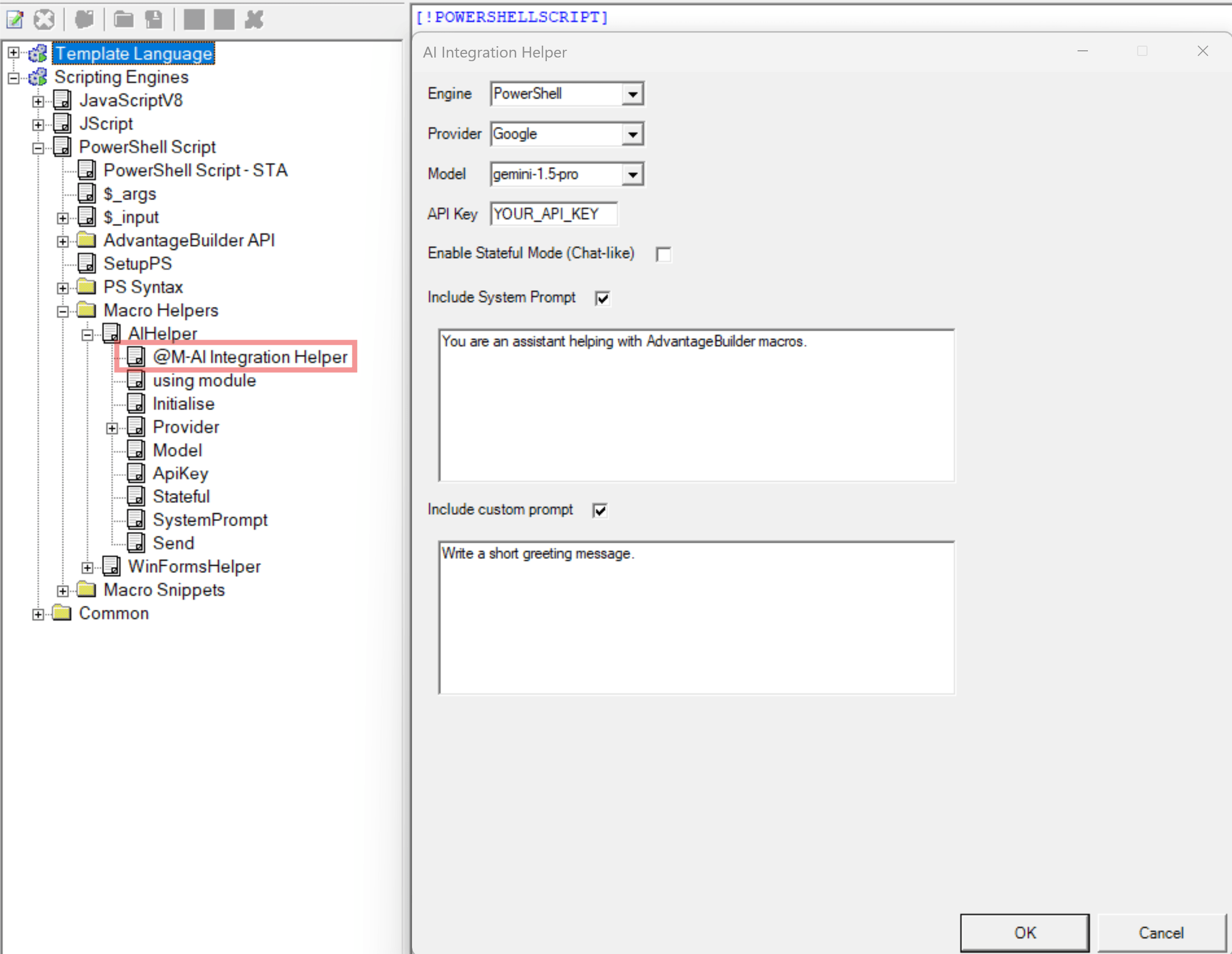
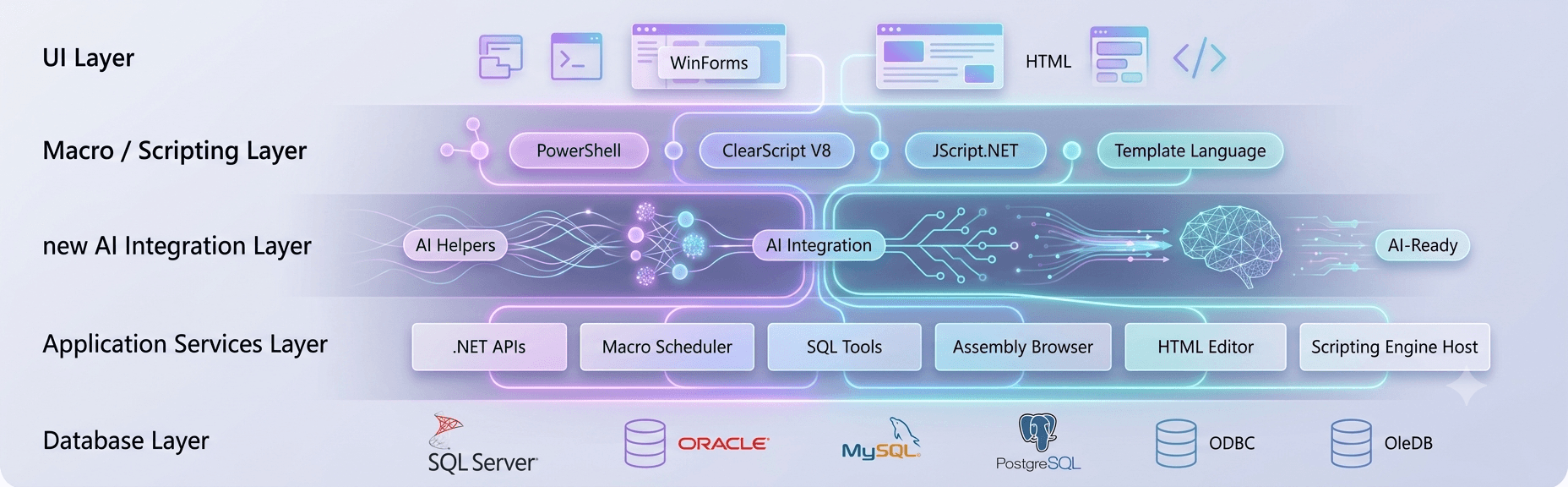
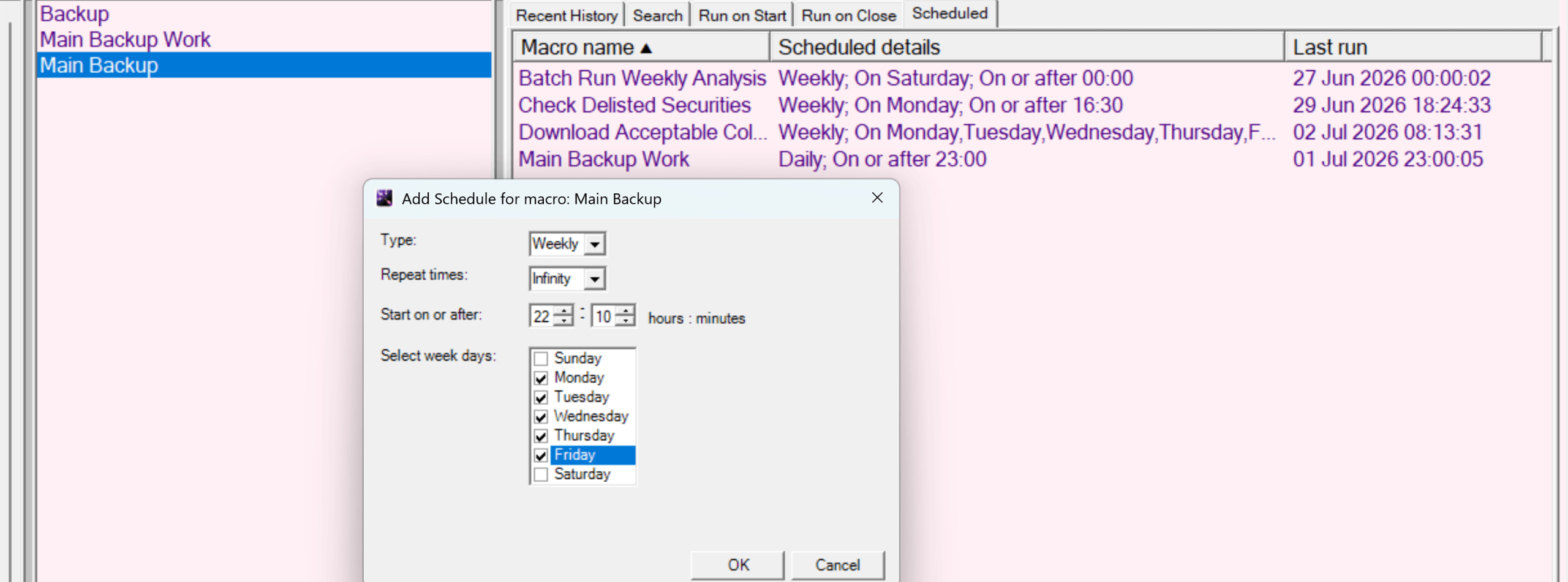
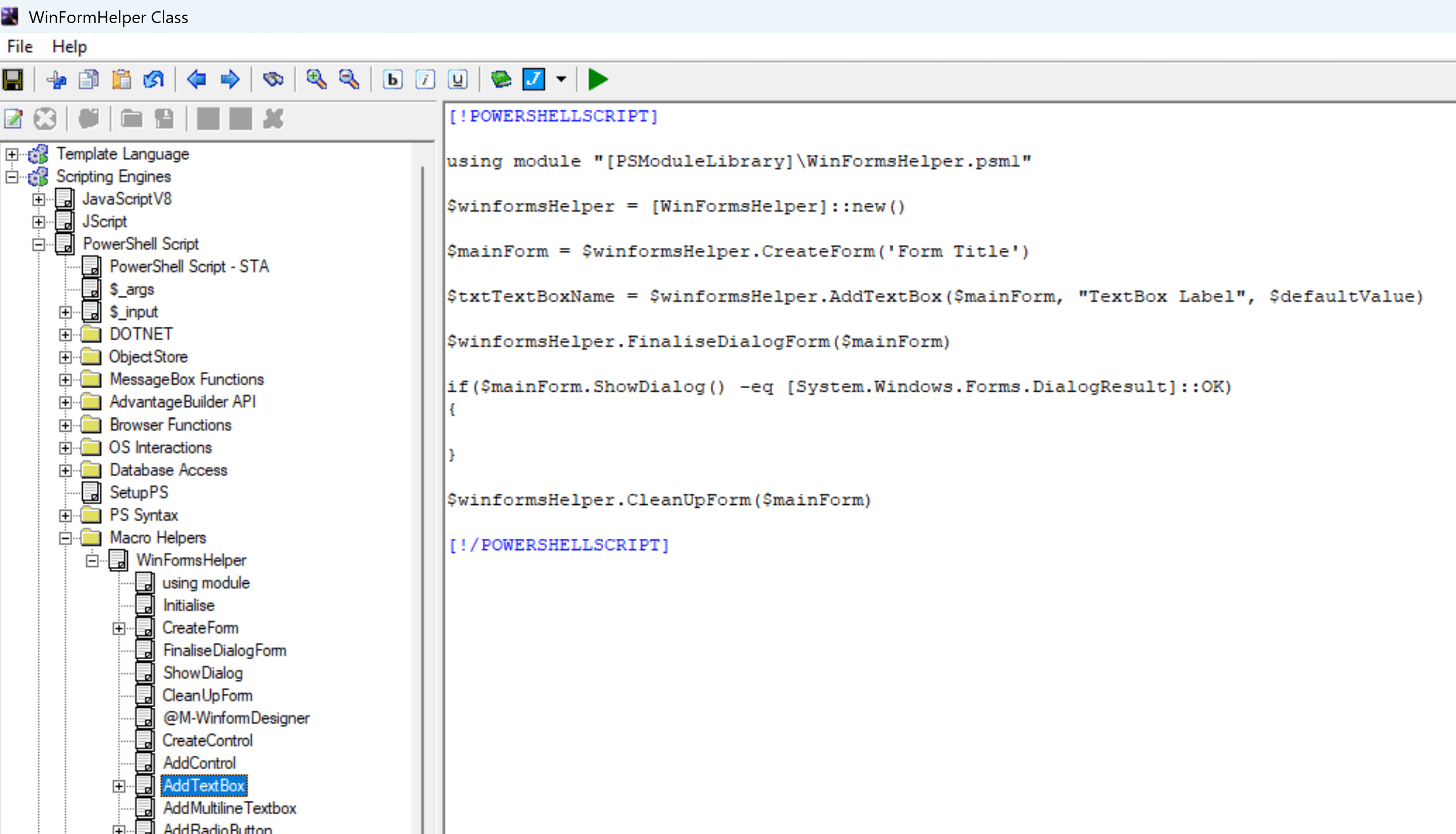
AdvantageBuilder is an AI-powered automation and application-building platform that lets you create intelligent tools using scripts instead of complex compiled projects. It combines point-and-click macro construction, multi-engine scripting (PowerShell, JScript.NET, ClearScript V8), AI integration, .NET extensibility, UI helpers, and database connectivity into one cohesive environment. You can build macros visually, generate code automatically, connect to databases, design WinForms or HTML interfaces, and extend scripts with .NET APIs—all from a single workspace. Every macro can call any other macro, scheduling is built-in, and production deployment is supported through optional script encryption. AI actions can be added to any workflow, enabling models to analyze data, generate code, transform content, and assist with complex automation tasks. AdvantageBuilder gives you the speed of scripting with the intelligence of modern AI and the capabilities of a full application framework, m...
Key features
- 1Multi-engine scripting: PowerShell, JScript.NET, and ClearScript V8 in one workspace.
- 2Visual macro builder with nested macros, templates, and built-in scheduling.
- 3Local and cloud AI integration (e.g. Ollama) as actions inside any workflow.
- 4WinForms and HTML UI design plus .NET extensibility and database connectivity.
- 5Optional script encryption for production deployment.
Target customer profile
Drawn from the product itself, not from a survey.
Demographic
IT professionals and system administrators
Pain points
Repetitive manual tasks, need for cross-platform automation, lack of coding time
Primary needs
Automate workflows, integrate AI, schedule scripts, deploy securely
Demographic
Software developers and engineers
Pain points
Complex tooling, fragmented environments, slow prototyping
Primary needs
Rapid app building, multi-language scripting, AI code generation
Demographic
Small business owners and operations managers
Pain points
Limited technical resources, need for custom tools without hiring developers
Primary needs
Visual macro builder, pre-built templates, easy deployment
Scout Review
Written by AI from measured evidence, scored out of 100.
AdvantageBuilder is a Windows desktop automation and app-building platform that combines multi-engine scripting, visual macros, local AI, and WinForms/HTML UI design. The site is a dense feature brochure with a demo video and no pricing page, so the marketing undersells a genuinely differentiated product. Speed is the biggest red flag (22.7s LCP on mobile), security headers are half-present, and onboarding material is thin for a tool with this much surface area. Accessibility is strong. The idea has a real wedge, but the category is brutal and traction is near zero.
Measure by measure
Usability
55Claims a 5-minute quick start and demo video, but no visible docs, help center, or trial path. Multi-engine scripting implies real learning curve with thin onboarding material.
Design
58Functional marketing page with clear feature bullets and a demo video, but dense copy, no app screenshots, and no pricing page. Judged on the website, since the desktop app UI is not shown.
Speed
47Lighthouse mobile 54/100 with a brutal 22.7s LCP and 6.5s FCP; desktop 49/100. The homepage is heavy and slow to first paint on both form factors.
Security
52HTTPS enforced with SPF/DMARC and two security headers, but no HSTS, CSP, frame protection, or Permissions-Policy. No SOC 2, ISO, or bug bounty published — 6/12 on the header checklist.
Accessibility
82Lighthouse accessibility 96/100 with only a contrast-ratio failure. No WCAG statement or multi-language support found, but automated checks are strong.
Growth
58Real pain point (custom internal tools without hiring devs) with a specific wedge: script-first automation plus local AI. Differentiated, but the category is crowded and the audience is narrow.
Improvement areas
- Homepage performance: 22.7s LCP and 49-54 Lighthouse scores need urgent attention.
- Missing pricing page and free trial — no way to evaluate cost before committing.
- Thin onboarding: no visible docs, help center, or API reference for a complex tool.
- Security headers incomplete (no HSTS, CSP, frame protection) and no published compliance.
Design & Usability
AdvantageBuilder's site is a long feature list with a demo video and partner badges, but no app screenshots and no pricing page — you're judging a Windows desktop tool by its brochure. The copy is dense ('PowerShell, JavaScriptV8, and JScript.NET' in one bullet) and the visual hierarchy is thin. Usability is the bigger question: the site promises a 5-minute quick start and a demo, but there's no visible docs, help center, or trial path. For a tool aimed at IT pros who will be wiring multi-engine scripts together, that's a lot of learning curve with very little scaffolding. Competent marketing, thin onboarding.
Speed & Security
Speed is the weak spot: Lighthouse mobile 54/100 with a 22.7s LCP and 6.5s FCP, desktop 49/100. Whatever is loading first on that homepage is heavy enough that visitors may bounce before the hero renders. Security is middling — HTTPS is enforced and SPF/DMARC are set, but there's no HSTS, CSP, frame protection, or Permissions-Policy, landing at 6/12 on the header checklist. No SOC 2, ISO, pen-test, or bug bounty is published, which matters for a tool that pitches 'encrypt and deploy safely' to sysadmins. Neither dimension is broken, but neither is reassuring.
Accessibility & Growth
Accessibility is the standout: Lighthouse 96/100 with a single contrast-ratio failure. No WCAG statement or multi-language support surfaced, but the automated baseline is strong. Growth is a judgment call on the idea: the pain point is real (custom internal tools without hiring developers) and the wedge — script-first automation plus local AI via Ollama — is specific. But the category is crowded (Power Automate, UiPath, Zapier all named as alternatives) and the audience is narrow. The domain is brand new (registered 2026-07-21) and the only listed social is YouTube, so traction is essentially zero. The idea can grow; execution and distribution are the open questions.
Conclusion
If you're an IT pro who already lives in PowerShell and wants a single workspace for scripts, scheduling, UI, and local AI, AdvantageBuilder is worth a look — the multi-engine scripting plus Ollama integration is a genuinely unusual combination. But go in expecting to read the docs yourself: the site won't hold your hand, the demo is the only onboarding, and there's no trial or pricing to evaluate before you commit. Fix the LCP, publish pricing, and ship a real quick-start guide, and this becomes a much easier recommendation.
Suggestions for improvement
- Fix the 22.7s LCP — compress or lazy-load the hero asset and audit render-blocking resources.
- Add a pricing page and a free trial or demo download so buyers can evaluate before committing.
- Publish real documentation and a help center; a 5-minute video is not onboarding for multi-engine scripting.
- Add HSTS, CSP, and frame protection, and publish a security page if you're pitching encrypted deployment.
Alternatives comparison
Named competitors, point by point. Nobody paid to appear here or to be left out.
 AdvantageBuilder |  Power Automate |  UiPath |  Zapier | |
|---|---|---|---|---|
| Pricing transparency | No pricing page; donations via Stripe/Ko-fi | Tiered per-user and per-flow plans, free with M365 | Tiered enterprise licensing, free Community edition | Free tier plus paid plans by task volume |
| Scripting / code extensibility | PowerShell, JScript.NET, ClearScript V8, .NET APIs | Low-code connectors, limited custom code | VB.NET/C# expressions, custom activities | No-code; code steps limited to JS/Python |
| Local AI / offline model support | Local (Ollama) and cloud AI models | AI Builder (cloud, Microsoft-hosted) | Cloud AI Center; no local model focus | Cloud AI actions via integrations |
| Desktop UI / app building | WinForms and HTML UI design built in | No desktop UI builder | Apps module for web forms, not desktop | No UI builder; workflows only |
| Built-in scheduling | Daily, weekly, monthly, on-demand | Scheduled cloud and desktop flows | Orchestrator-based triggers and schedules | Scheduled Zaps on paid plans |
Power Automate
Microsoft's automation platform for connecting apps and services, with AI Builder and RPA capabilities.
UiPath
Robotic process automation platform for building software robots to automate repetitive tasks.
Zapier
No-code automation tool that connects thousands of apps to automate workflows.
Comparing options? See AdvantageBuilder alternatives, scored side by side
More Productivity apps
View all Productivity
Notion
92All-in-one AI workspace for docs, projects, and knowledge...

Qamarero
92An all-in-one hospitality software for restaurants and ba...

EmbedMyReviews
92White-label reputation management software for agencies s...

StoryPad
92Privacy-first open source journal app with a continuous t...

Puzzly – B2B Lead Generation & Sales Intelligence Platform
92Puzzly is an all-in-one B2B lead generation platform that...

The Stack Newsletter
92A weekly newsletter delivering curated tech jobs, intervi...

Vibe Coding Agent Skills
92A free, open-source platform offering 110 AI agent skills...

QRBliss
91Branded QR codes with AI Brand Sync, 15 free dynamic code...

Gerty
91Private, local AI assistant for Mac that runs offline

CC Switch
91Open-source desktop app for switching AI coding providers...

username.md
90One verified handle for your online identity, readable by...

PitchWhip
90AI cold call scripts & direct dials from LinkedIn


A platform dedicated to providing unbiased reviews of newly launched applications, analyzing everything from their features to their full potential.
info@scoutforge.net© 2026 Scoutforge. All rights reserved.
