Cycling through all six. Tap any point to stop.
Measured on six things
Online AI studio for image generation, editing, and short...
Design
56Warm cream palette and bold black headlines give it a distinct editorial identity, and the embedded hero generator is a strong demo. Undermined by black video thumbnails and clipped card captions.
Screenshots
1 / 1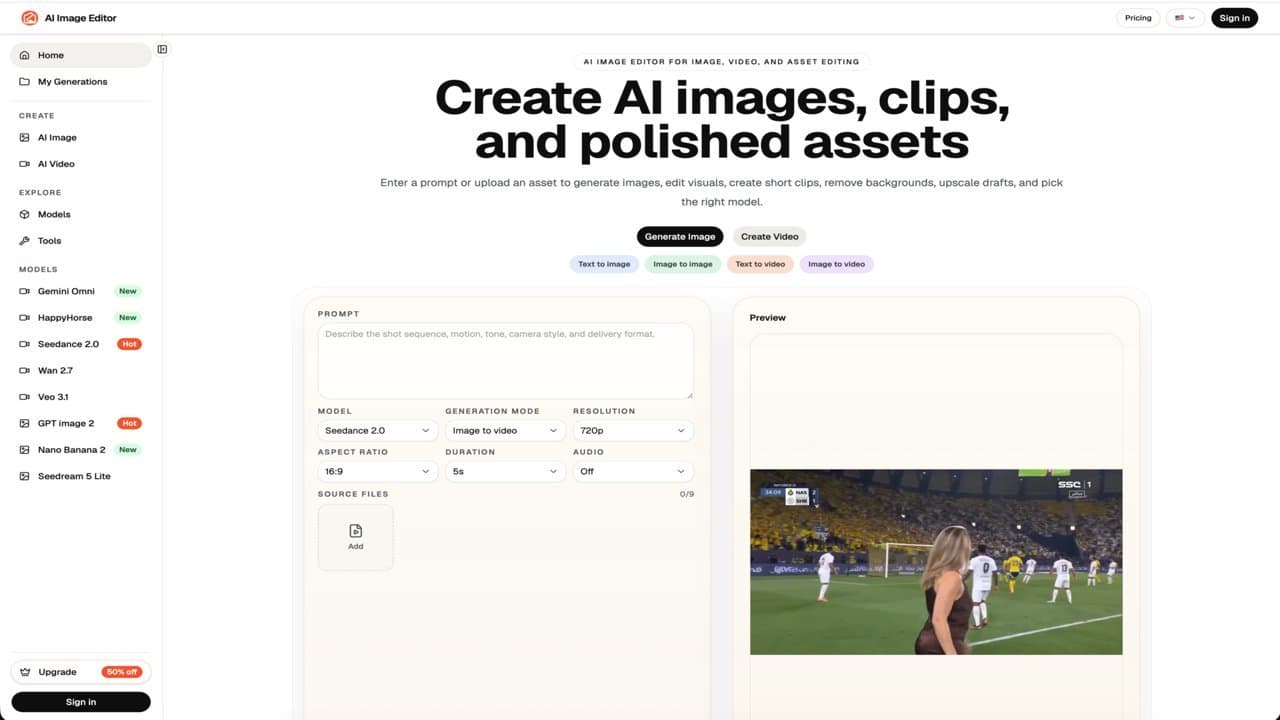
About this app
AI Image Editor is a web-based AI creative workspace that combines image generation, photo editing, upscaling, background removal, and short video creation in a single dashboard. It aggregates popular AI models like GPT Image, Midjourney, Flux, Kling, and Gemini Omni under one credit-based system, letting users generate new visuals, edit uploaded photos with text prompts, and turn stills into motion clips. With built-in tools for product photos, YouTube thumbnails, social posts, and ad creatives, it's tailored for marketers and designers who need fast draft visuals. Pricing runs on monthly subscriptions or credit packs, and the platform is designed for iterative, review-ready content production rather than deep professional editing suites.
Key features
- 1Multi-model access: GPT Image, Midjourney, Flux, Kling, Gemini Omni and more under one credit system.
- 2Prompt-based photo editing, background removal, upscaling and image-to-video in one dashboard.
- 3Transparent credit pricing shown on the Generate button before you commit.
- 4Purpose-built tools for product photos, YouTube thumbnails, social posts and ad creatives.
Target customer profile
Drawn from the product itself, not from a survey.
Demographic
Ecommerce visual managers and product photographers
Pain points
Costly reshoots and slow turnaround for product scene variations
Primary needs
Fast product photo generation, background cleanup, and upscaling
Demographic
Social media and content marketing leads
Pain points
Constant demand for fresh posts, thumbnails, and short video hooks
Primary needs
Quick asset variations and multilingual campaign drafts
Demographic
Indie app founders and small design teams
Pain points
Limited budget for multiple AI subscriptions and design tools
Primary needs
All-in-one model access with predictable credit pricing
Scout Review
Written by AI from measured evidence, scored out of 100.
AI Image Editor is a web-based creative workspace that puts image generation, prompt-based photo editing, upscaling, background removal and short video into one dashboard, with popular models like GPT Image, Midjourney, Flux, Kling and Gemini Omni behind a single credit system. The pitch is aimed squarely at ecommerce visual managers, social content leads and small design teams who are tired of paying for five separate AI subscriptions. Pricing runs across Basic, Standard and Pro tiers with monthly, yearly and credit-pack options, and the Generate button shows the credit cost before you commit — a small but meaningful trust signal. The product is early (domain registered mid-2026) and the execution is uneven: a distinctive editorial design language and a strong embedded demo sit alongside broken video thumbnails, a cluttered model catalogue, and a desktop performance score that lags mobile.
Measure by measure
Usability
58Credit cost shown on the Generate button is genuinely good. But the sidebar splits into two near-identical model lists and the homepage is a wall of catalogue grids with no guidance on where to start.
Design
56Warm cream palette and bold black headlines give it a distinct editorial identity, and the embedded hero generator is a strong demo. Undermined by black video thumbnails and clipped card captions.
Speed
68Mobile Lighthouse 75/100 with a fast 1.1s LCP, but desktop drops to 60/100 and TBT of 703ms shows real main-thread cost from the embedded generator.
Security
76Full 12/12 security header checklist — HSTS, CSP, frame protection, Referrer-Policy, Permissions-Policy, plus SPF and DMARC. Solid hygiene, but no published SOC 2, ISO, or bug-bounty program.
Accessibility
70Lighthouse a11y 92/100 is strong, but real failures remain: unnamed buttons, insufficient contrast, and mismatched accessible names. No WCAG statement published.
Growth
58Real consolidation wedge — many named models under one credit system, aimed at specific ecommerce and content segments. But Canva and Freepik bundle the same tools with bigger brands.
Improvement areas
- Video Models grid renders as solid black tiles — broken-looking assets undermine trust.
- Sidebar splits into two near-identical model lists, making navigation a scanning exercise.
- Desktop Lighthouse performance (60) lags mobile (75); TBT of 703ms needs attention.
- Accessibility failures: unnamed buttons, insufficient contrast, mismatched accessible names.
Design & Usability
The design has a real point of view: warm cream surfaces, heavy black headlines, and a hero that embeds a working generator with prompt box, model dropdowns and live preview — you can see the product before you sign up. Card grids share consistent radii and shadows. But the Video Models section renders as a row of solid black tiles that read as broken assets, and at least one thumbnail clips its own baked-in title. Usability is competent but unstructured: the credit cost on the Generate button is a genuinely good transparency move, yet the sidebar splits into two near-identical model lists and the homepage is a long catalogue with 'More →' buttons and no guidance on which model to pick first. The disabled Generate button tells you to enter a prompt but never suggests one.
Speed & Security
Speed is a mixed bag. Mobile Lighthouse lands at 75/100 with a quick 1.1s LCP and FCP, but desktop drops to 60/100 and total blocking time sits at 703ms — the embedded interactive generator is doing real main-thread work on load. CLS of 0.101 is just over the comfortable threshold. Security is the strongest dimension on paper: the HTTP probe returned a perfect 12/12 checklist with HTTPS enforced, HSTS, CSP, frame protection, X-Content-Type-Options, Referrer-Policy and Permissions-Policy all set, plus SPF and DMARC records. What's missing is anything beyond headers — no SOC 2, ISO 27001, penetration-test summary, or bug-bounty program appears in the collected content, so buyers handling client assets have only the transport-layer guarantees to go on.
Accessibility & Growth
Accessibility scores 92/100 on the Lighthouse audit, which is genuinely above average, but the failing audits are the ones that matter in practice: buttons without accessible names, insufficient color contrast, and visible text labels that don't match their accessible names. There's no WCAG conformance statement or accessibility page in the collected content. On growth, the idea has a real wedge — aggregating GPT Image, Midjourney, Flux, Kling and Gemini Omni under one credit system solves the 'five subscriptions' problem for ecommerce visual managers and small design teams, and the site names those segments specifically. The limit is structural: Canva and Freepik AI Suite already bundle AI image, editing, upscaling and video with stock libraries and vastly larger brand reach, so the differentiation rests on model breadth and credit pricing rather than anything incumbents can't copy.
Conclusion
If you're a marketer or small design team who wants one place to draft product scenes, thumbnails and short clips without juggling subscriptions, AI Image Editor is a reasonable early bet — the model breadth and transparent credit pricing are real. If you need polished, production-grade output or compliance documentation for client work, look at Freepik AI Suite or Canva first. The foundation is solid; the polish isn't there yet.
Suggestions for improvement
- Fix the Video Models grid — replace the solid black tiles with real preview thumbnails or a deliberate placeholder treatment.
- Add 2-3 example prompts under the disabled Generate button so first-time users have a starting point.
- Consolidate the sidebar's two near-identical model lists into one searchable, filterable catalogue.
- Publish a WCAG conformance statement and fix the failing contrast and accessible-name audits.
Alternatives comparison
Named competitors, point by point. Nobody paid to appear here or to be left out.
 AI Img Editor |  Canva | Freepik AI Suite | |
|---|---|---|---|
| AI image generation models | GPT Image, Midjourney, Flux, Qwen, Seedream, Nano Banana and more | Magic Media (own model), limited third-party model access | Multiple AI image generators plus stock library |
| Video generation | Kling, Seedance, Wan, Gemini Omni, Flux Video, MiniMax | Basic AI video tools within design editor | AI video generator included in suite |
| Pricing model | Credit-based: Basic $16.66/mo, Standard $58.33/mo, Pro $108.33/mo (yearly) | Free tier plus Pro subscription | Subscription tiers with credit allowances |
| Stock asset library | None — AI generation only | Large template and stock library | Extensive stock photo, vector and video library |
| Design editor depth | Prompt-based editing only, no layer-based design suite | Full drag-and-drop design editor with templates | AI-focused editor with some design tools |
| Target audience | Ecommerce visual managers, social leads, indie founders | General consumers, small businesses, marketers | Designers, marketers, content creators |
Canva
Design platform with AI image tools (Magic Media, background remover) integrated into a broader graphic design editor.
Freepik AI Suite
AI image generator, editor, upscaler, and video tools bundled with a stock asset library under subscription pricing.
Comparing options? See AI Img Editor alternatives, scored side by side
More Productivity apps
View all Productivity
Puzzly – B2B Lead Generation & Sales Intelligence Platform
92Puzzly is an all-in-one B2B lead generation platform that...

Qamarero
92An all-in-one hospitality software for restaurants and ba...

EmbedMyReviews
92White-label reputation management software for agencies s...

StoryPad
92Privacy-first open source journal app with a continuous t...

Notion
92All-in-one AI workspace for docs, projects, and knowledge...

The Stack Newsletter
92A weekly newsletter delivering curated tech jobs, intervi...

Vibe Coding Agent Skills
92A free, open-source platform offering 110 AI agent skills...

QRBliss
91Branded QR codes with AI Brand Sync, 15 free dynamic code...

Gerty
91Private, local AI assistant for Mac that runs offline

Strukchad Property Management
91Property management for Kenyan letting agents: rent invoices raised every month, M-Pesa rent prompts to tenants, arrears tracking and landlord statements.

CC Switch
91Open-source desktop app for switching AI coding providers...

PitchWhip
90AI cold call scripts & direct dials from LinkedIn


A platform dedicated to providing unbiased reviews of newly launched applications, analyzing everything from their features to their full potential.
info@scoutforge.net© 2026 Scoutforge. All rights reserved.
