Cycling through all six. Tap any point to stop.
Measured on six things
Browser-based face swaps for photos, videos and GIFs, with separate reference portraits for up to four people.
Security
41HTTPS is enforced and SPF is set, but HSTS, CSP, frame protection, Referrer-Policy and Permissions-Policy are all missing and DMARC is absent — 3/12 on the header checklist. No SOC 2, ISO or bug-bounty claims found.
Screenshots
1 / 1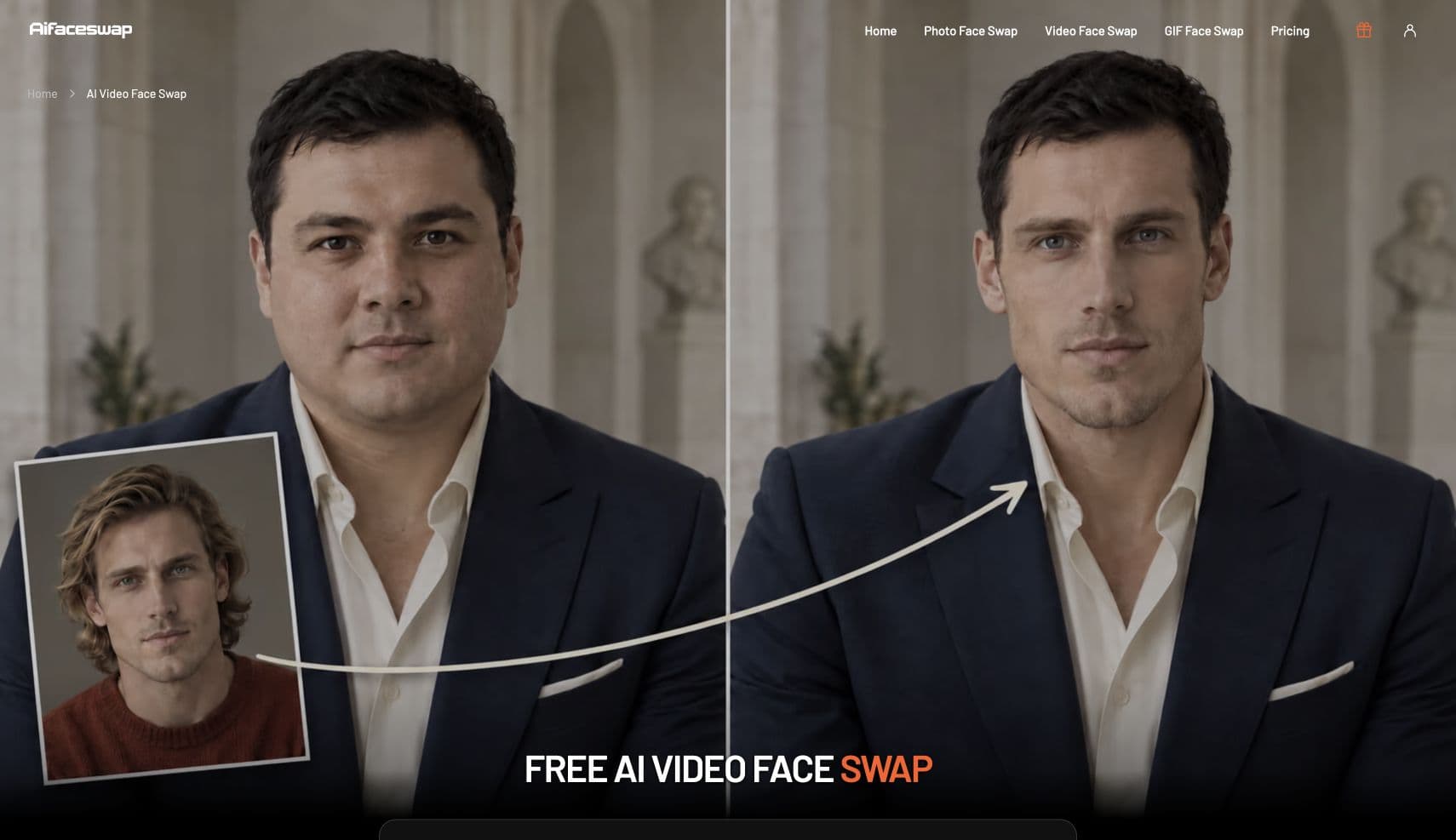
About this app
Aifaceswap is a web tool for replacing faces in photos, videos and GIFs. Upload media and a reference portrait, or assign different portraits to up to four people. It is designed for creative experiments with material and likenesses you have permission to use. No desktop software installation is needed. Review the result before sharing, and download it while it remains available. The tool offers free access with credit limits and optional one-time credit purchases. Submitted by the Aifaceswap team.
Key features
- 1Browser-based face swap for photos, videos and GIFs with no desktop install required
- 2Single Face or Multiple Faces mode — assign separate reference portraits to up to four people
- 310 free daily credits (refreshing 9 a.m. New York time) with no signup to start; 3 credits per single-face video task
- 4One-time credit packs from $10 (200 credits) to $100 (4,400 credits); credits never expire, no subscription
- 5Watermark-free MP4 downloads with original audio; optional HD toggle; 60-second / 100 MB video limit
Target customer profile
Drawn from the product itself, not from a survey.
Demographic
Social media creators and hobbyists
Pain points
Need a focused way to try face swaps without installing an editor
Primary needs
Photo, video and GIF face replacement in a browser
Demographic
Small creative and marketing teams
Pain points
Need to experiment with visual ideas using approved source material
Primary needs
A simple workflow for testing and reviewing edited clips
Demographic
People making personal visual projects
Pain points
Need to assign different portraits in a group scene
Primary needs
Separate reference portraits for up to four people
Scout Review
Written by AI from measured evidence, scored out of 100.
Aifaceswap is a browser face-swap tool that gets the fundamentals right. The landing page explains itself in one glance, the tool sits above the fold with a clear two-upload workflow, and you can start without an account on 10 free daily credits. Performance is excellent — 95 mobile, 100 desktop — and the accessibility audit is clean. The pricing model is the most interesting choice: one-time credit packs from $10 to $100, credits never expire, no subscription or auto-renewal, which is a genuine differentiator in a category that loves recurring billing. The weaknesses are real but fixable: dim, near-illegible body copy and a dark veil over the page hurt the design, and the security posture is thin — 3/12 on header checks, no CSP, no HSTS, no DMARC, no published audits. For a tool that handles uploaded faces, that gap matters more than the polish.
Measure by measure
Usability
63The tool card sits above the fold with clear Photo/Video/GIF tabs and two labelled upload zones, and you can start without an account on 10 daily free credits. Feature-section contrast and faint carousel controls are the weak spots.
Design
57Hero before/after with a curved arrow explains the product in one glance, and the orange accent threads cleanly through headings and CTAs. But dim grey body copy on near-black and a dark veil over the page drag the craft down.
Speed
88Lighthouse mobile 95/100 with LCP 2.4s, CLS 0 and TBT 0ms; desktop a clean 100/100. The page is light and snappy, and no lag complaints surfaced in the collected evidence.
Security
41HTTPS is enforced and SPF is set, but HSTS, CSP, frame protection, Referrer-Policy and Permissions-Policy are all missing and DMARC is absent — 3/12 on the header checklist. No SOC 2, ISO or bug-bounty claims found.
Accessibility
80Lighthouse accessibility audit returns a perfect 100/100, and the site ships a skip-to-content link plus granular cookie preferences. No published WCAG statement or multi-language support found, so automated checks are the ceiling here.
Growth
58Real, specific problem — browser face swaps without an editor — with a genuine wedge: four faces per scene, GIF support, no watermark, one-time credits that never expire. Crowded category, but the no-subscription pricing is a real hook.
Improvement areas
- Feature-section body copy is dim grey on near-black and nearly illegible — raise contrast to WCAG AA
- Security headers largely missing (no CSP, HSTS, frame protection, Referrer-Policy, Permissions-Policy, DMARC)
- No published security/privacy page explaining how uploaded face photos and videos are stored or deleted
- Carousel pagination and pause controls are small and faint; no WCAG conformance statement or multi-language support
Design & Usability
The landing page does the hardest thing right: the hero pairs a before/after face swap with a curved arrow, so you understand the product before reading a word. The orange accent carries through the headline, Generate button and Log In pill, giving a coherent brand thread, and the alternating split rows keep a long page scannable. The tool card sits immediately below the hero with Photo/Video/GIF/History tabs, a Single/Multiple Faces toggle and two clearly labelled upload zones, so the primary action is above the fold. Usability is genuinely strong: no signup to start, 10 free daily credits refreshing at 9 a.m. New York time, and a 3-credit single-face video task. The flaws are craft-level — feature body copy is dim grey on near-black and nearly illegible, the page reads as if under a dark veil, and the carousel's pagination and pause controls are too small and faint to find.
Speed & Security
Speed is the standout: Lighthouse mobile 95/100 with LCP 2.4s, CLS 0 and TBT 0ms, and a perfect 100/100 on desktop. The page is light, stable and snappy, and nothing in the collected evidence suggests lag complaints. Security is the opposite story. HTTPS is enforced and SPF is configured, but the probe found no HSTS, no CSP, no frame protection, no X-Content-Type-Options, no Referrer-Policy and no Permissions-Policy — 3 of 12 checklist points — and DMARC is missing. For a tool that accepts uploaded face photos and video, that is a thin posture: no published SOC 2, ISO or pen-test, no security page, no bug bounty. The basics work; the hardening does not exist yet.
Accessibility & Growth
Accessibility scores a perfect 100/100 on the Lighthouse axe-core audit, and the site backs it with a skip-to-content link and granular cookie preferences — solid automated coverage. What is missing is the human layer: no WCAG conformance statement, no evidence of multi-language support, and the low-contrast feature copy the visual audit flagged is exactly the kind of thing automated checks underweight. Growth is a judgement on the idea, and the idea is decent: browser-based face swaps for creators who do not want to install an editor, with a specific wedge — up to four faces in one scene, GIF support, watermark-free downloads, and one-time credits that never expire instead of a subscription. The category is crowded and the domain is only months old, but the no-subscription pricing is a real differentiator against subscription-first competitors.
Conclusion
If you want to try a face swap without installing anything or signing up, this is a low-friction way in — the free daily credits let you test the output quality before spending a cent, and the one-time pricing means you are never locked into a subscription. Go in with realistic expectations: the site is young, the security hardening is minimal, and the marketing copy is hard to read. Review your generated clips before sharing, keep source material you have permission to use, and download within the one-hour window the site specifies. It is a competent, fast, honestly-priced tool that needs a security pass and a contrast fix before it earns a stronger recommendation.
Suggestions for improvement
- Fix the feature-section body copy: dim grey on near-black is nearly illegible — raise contrast to at least WCAG AA.
- Add the missing security headers (CSP, HSTS, X-Content-Type-Options, Referrer-Policy, Permissions-Policy) and a DMARC record.
- Publish a short security/privacy page explaining how uploaded face photos and videos are stored and deleted.
- Enlarge the carousel pagination and pause controls so they are discoverable and keyboard-reachable.
Alternatives comparison
Named competitors, point by point. Nobody paid to appear here or to be left out.
 Aifaceswap |  | | |
|---|---|---|---|
| Pricing model | One-time credit packs $10–$100; credits never expire; no subscription | Not provided in app details | Not provided in app details |
| Free tier / trial | 10 free daily credits, no signup required; 3 credits per single-face video task | Not provided in app details | Not provided in app details |
| Media types supported | Photo, video (MP4 up to 60s / 100 MB) and GIF | Not provided in app details | Not provided in app details |
| Multiple faces per scene | Yes — separate reference portraits for up to four people | Not provided in app details | Not provided in app details |
| Watermark on output | No watermark; original audio preserved; download within one hour | Not provided in app details | Not provided in app details |
| Installation required | No — fully browser-based | Not provided in app details | Not provided in app details |
Comparing options? See Aifaceswap alternatives, scored side by side
More Productivity apps
View all Productivity
Puzzly – B2B Lead Generation & Sales Intelligence Platform
92Puzzly is an all-in-one B2B lead generation platform that...

Qamarero
92An all-in-one hospitality software for restaurants and ba...

EmbedMyReviews
92White-label reputation management software for agencies s...

StoryPad
92Privacy-first open source journal app with a continuous t...

Notion
92All-in-one AI workspace for docs, projects, and knowledge...

The Stack Newsletter
92A weekly newsletter delivering curated tech jobs, intervi...

Vibe Coding Agent Skills
92A free, open-source platform offering 110 AI agent skills...

QRBliss
91Branded QR codes with AI Brand Sync, 15 free dynamic code...

Gerty
91Private, local AI assistant for Mac that runs offline

Strukchad Property Management
91Property management for Kenyan letting agents: rent invoices raised every month, M-Pesa rent prompts to tenants, arrears tracking and landlord statements.

CC Switch
91Open-source desktop app for switching AI coding providers...

PitchWhip
90AI cold call scripts & direct dials from LinkedIn


A platform dedicated to providing unbiased reviews of newly launched applications, analyzing everything from their features to their full potential.
info@scoutforge.net© 2026 Scoutforge. All rights reserved.
