Cycling through all six. Tap any point to stop.
Measured on six things
browser, desktop and Android automation built with AI.
Security
52HTTPS enforced with SPF and basic headers, but no HSTS, CSP, frame protection or DMARC, and no SOC 2/ISO/pen-test claims published. Table-stakes hygiene only.
Screenshots
1 / 1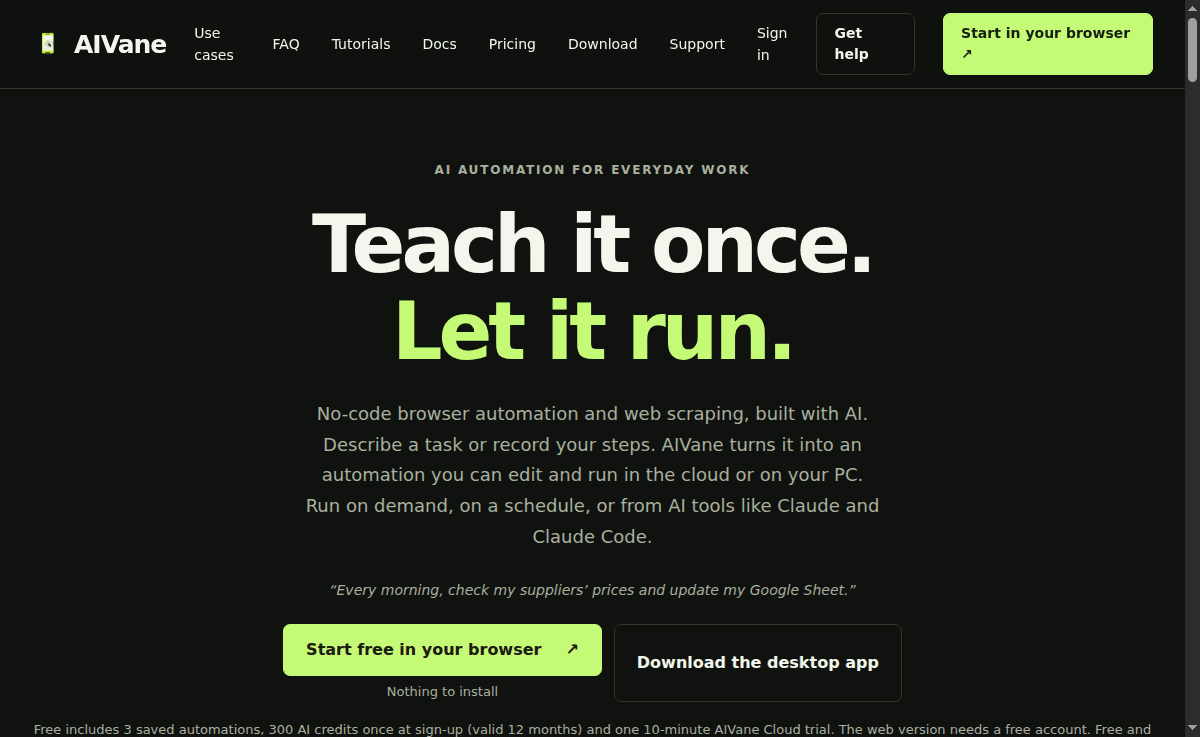
About this app
browser, desktop and Android automation built with AI. Describe a task in plain language or record it once and AIVane turns it into an editable automation that runs in AIVane Cloud or on your own device, on demand or on a schedule. It automates real browsers, desktop apps and Android phones: logins, clicks, typing, scrolling, reading tables, scraping and moving data between apps. Steps stay readable and editable, runs can be scheduled, and there is a free plan with 3 saved automations.
Key features
- 1Describe a task in plain language or record it once; AI turns it into editable, readable automation steps.
- 2Runs in AIVane Cloud, on Windows/macOS desktop, or replays steps on Android phones.
- 3Connects to Google Sheets, Slack, Notion, GitHub, Trello, Jira, ClickUp, Asana and Todoist.
- 4MCP support lets Claude Code, Codex or Cursor trigger automations.
- 5Scheduled runs, run history and per-step logs on paid plans.
Target customer profile
Drawn from the product itself, not from a survey.
Demographic
Ops, research and back-office teams in small and mid-size companies
Pain points
Repetitive browser, desktop and phone work eaten by copy-paste and manual data entry
Primary needs
Reliable scheduled automations without writing code
Demographic
Data analysts and researchers
Pain points
Copy-pasting web lists into CSVs from sites without APIs
Primary needs
Reliable no-code scraping to CSV/Excel with editable steps
Demographic
Developers and AI tool users
Pain points
Repetitive browser tasks not worth custom scripts; AI agents need web actions
Primary needs
MCP-triggered automations and recordable desktop/browser workflows
Demographic
Marketing and back-office teams
Pain points
Form filling and data entry across web apps and desktop software
Primary needs
Record-once automation with results pushed to Slack, Notion, Jira
Scout Review
Written by AI from measured evidence, scored out of 100.
AIVane is a no-code automation tool that turns plain-language descriptions or recorded steps into editable automations running in the cloud, on Windows/macOS, or on Android. The pitch is sharp: Zapier and Make need APIs, UiPath is enterprise-priced, and AIVane drives the actual browser, desktop app or phone. The marketing site is fast (Lighthouse 100/100) and well-branded, the help center is real, and pricing is transparent — free tier, $12 Starter, $29 Pro, $39/seat Business, Enterprise self-hosting. The gaps are trust and proof: no product UI on the homepage, no security certifications or hardened headers, and a very young product with limited third-party footprint. Worth a free-tier trial if your work lives in API-less sites and desktop apps; hold off on Business seats until security posture firms up.
Measure by measure
Usability
68Real help center with getting-started, per-app guides, timed tutorials, use cases and an MCP guide. Free-tier limits are buried in dense gray fine print under the hero, which slows the signup decision.
Design
71Confident dark/lime brand system and disciplined section rhythm make the long homepage scannable, but it never shows the actual product UI and the workflow mockups are too small to read.
Speed
88Lighthouse 100/100 on both mobile and desktop: LCP 1.4s, CLS 0, TBT 0ms. Genuinely fast, static-feeling marketing site with no measured lag.
Security
52HTTPS enforced with SPF and basic headers, but no HSTS, CSP, frame protection or DMARC, and no SOC 2/ISO/pen-test claims published. Table-stakes hygiene only.
Accessibility
76Lighthouse a11y 100/100 and a keyboard-friendly static site, but the hero fine print and use-case links are small low-contrast gray, and there's no WCAG statement or a11y docs.
Growth
63Real problem, specific wedge: driving actual browsers, desktop apps and Android where API-only tools like Zapier and Make structurally can't reach. Early stage, but the idea has room.
Improvement areas
- Homepage never shows the actual product UI; workflow mockups are too small to read.
- Missing security headers (HSTS, CSP, frame protection, DMARC) and no published audits.
- Free-tier limits buried in dense low-contrast fine print under the hero CTA.
- No WCAG conformance statement or dedicated accessibility documentation.
Design & Usability
The homepage is a well-built piece of marketing: dark palette, single lime accent, consistent eyebrow-headline-card rhythm, and a clear web-vs-desktop split above the fold. The problem is that it sells automation without ever showing the automation. The only product visuals are spreadsheet and Slack mockups rendered too small to read, so the strongest proof point on the page is wasted. Usability is stronger: /docs is a genuine help center with getting-started, per-app guides, timed tutorials, use cases and an MCP guide for Claude Code and Cursor. The weak spot is the free-tier fine print — three saved automations, 300 credits, one 10-minute trial — crammed into dense gray text under the CTA, which makes the signup decision harder than it needs to be.
Speed & Security
Speed is the standout: Lighthouse 100/100 on both mobile and desktop, LCP 1.4s, CLS 0, TBT 0ms. The marketing site is genuinely snappy and there are no measured lag complaints. Security is the opposite story. HTTPS is enforced and SPF is present, but HSTS, CSP, frame protection, Permissions-Policy and DMARC are all missing — five of twelve checklist points. For a product that stores your credentials and drives logged-in browsers and desktop apps, that's thin. There's no published SOC 2, ISO or pen-test, and no security page. Enterprise self-hosting is offered, which is a reasonable escape hatch for cautious teams, but the default cloud posture is table stakes only.
Accessibility & Growth
Accessibility scores 100/100 on Lighthouse's axe-core audit, which is a good baseline but only covers automated checks. The visual audit still flags small, low-contrast gray text in the hero fine print and the 'Popular use cases' list, and there's no WCAG conformance statement or dedicated a11y documentation. Growth is the more interesting question. The category is crowded — Zapier, Make, n8n, UiPath — but all four are structurally API-first or enterprise-heavy. AIVane's wedge is driving real browsers, desktop apps and Android phones, which is exactly where API connectors can't reach and where UiPath is overkill on price. The target segments (ops, research, back-office, analysts scraping API-less sites) are specific and underserved. The limit is that this is a hard engineering problem to keep reliable, and the product is early — domain registered 2026-03-31, one social profile. The idea has room; execution and trust are what decide whether it fills it.
Conclusion
If you're an ops or research team drowning in copy-paste across supplier portals, legacy desktop software or Android apps, AIVane is aimed squarely at you and the free tier costs nothing to test. Start with one real workflow — a supplier price check or a web list to CSV — and see whether the generated steps hold up when the site changes. If they do, the $12 Starter plan is a cheap way to find out whether this replaces a chunk of your week. If you're evaluating for a team, ask about security posture and self-hosting before you commit seats; the public evidence on that front is thin.
Suggestions for improvement
- Put a real, readable screenshot or short clip of the automation builder on the homepage — the current mockups are illegible.
- Add HSTS, CSP, frame protection and DMARC, and publish a security page with your data-handling posture.
- Lift the free-tier limits out of the hero fine print into a small, readable comparison strip.
- Publish a WCAG conformance statement and bump the low-contrast gray text in the hero and use-case list.
Alternatives comparison
Named competitors, point by point. Nobody paid to appear here or to be left out.
 AIVane |  Zapier |  Make |  n8n |  UiPath | |
|---|---|---|---|---|---|
| Drives real browsers, desktop apps and Android (not just APIs) | Yes — core capability across web, desktop and Android | No — API/app connectors only | No — API/app connectors only | Limited — HTTP/browser nodes, not native desktop/Android | Yes — enterprise RPA for desktop and web |
| No-code / plain-language automation building | Yes — describe or record, AI builds editable steps | Yes — visual builder, no code | Yes — visual no-code builder | Partial — visual but technical, self-hosted | Partial — low-code studio, enterprise-oriented |
| Free tier available | Yes — 3 saved automations, 300 credits, 10-min cloud trial | Yes — limited free plan | Yes — limited free plan | Yes — self-hosted community edition | Yes — community edition, limited |
| Entry paid price | US$12/month (Starter) | Tiered, entry paid plan around US$20+/month | Tiered, entry paid plan around US$9-10/month | Self-hosted free; cloud from ~US$24/month | Enterprise pricing, typically thousands per year |
| Self-hosting / on-prem option | Yes — Enterprise plan | No | No | Yes — core strength | Yes — on-prem enterprise deployment |
| Published security certifications | None found | SOC 2, GDPR | SOC 2, ISO 27001, GDPR | SOC 2 (cloud), GDPR | SOC 2, ISO 27001, FedRAMP |
Zapier
App-to-app automation with thousands of integrations, but relies on APIs rather than driving websites directly.
Make
Visual no-code workflow builder with strong app connectors; less suited to API-less site scraping.
n8n
Open-source, self-hostable automation platform for technical users; requires more setup than AIVane.
UiPath
Enterprise RPA suite for desktop and web automation; powerful but heavier and pricier for small teams.
Comparing options? See AIVane alternatives, scored side by side
More Productivity apps
View all Productivity
StoryPad
92Privacy-first open source journal app with a continuous t...

Puzzly – B2B Lead Generation & Sales Intelligence Platform
92Puzzly is an all-in-one B2B lead generation platform that...

Qamarero
92An all-in-one hospitality software for restaurants and ba...

Notion
92All-in-one AI workspace for docs, projects, and knowledge...

The Stack Newsletter
92A weekly newsletter delivering curated tech jobs, intervi...

EmbedMyReviews
92White-label reputation management software for agencies s...

Vibe Coding Agent Skills
92A free, open-source platform offering 110 AI agent skills...

QRBliss
91Branded QR codes with AI Brand Sync, 15 free dynamic code...

Gerty
91Private, local AI assistant for Mac that runs offline

Strukchad Property Management
91Property management for Kenyan letting agents: rent invoices raised every month, M-Pesa rent prompts to tenants, arrears tracking and landlord statements.

CC Switch
91Open-source desktop app for switching AI coding providers...

PitchWhip
90AI cold call scripts & direct dials from LinkedIn


A platform dedicated to providing unbiased reviews of newly launched applications, analyzing everything from their features to their full potential.
info@scoutforge.net© 2026 Scoutforge. All rights reserved.
