Cycling through all six. Tap any point to stop.
Measured on six things
Minimal focus tools to block distractions and capture ide...
Security
52HTTPS enforced with SPF/DMARC, but missing HSTS, CSP, and other security headers. No SOC 2 or security page found. Basic security posture for a small tool, but room for improvement.
Screenshots
1 / 2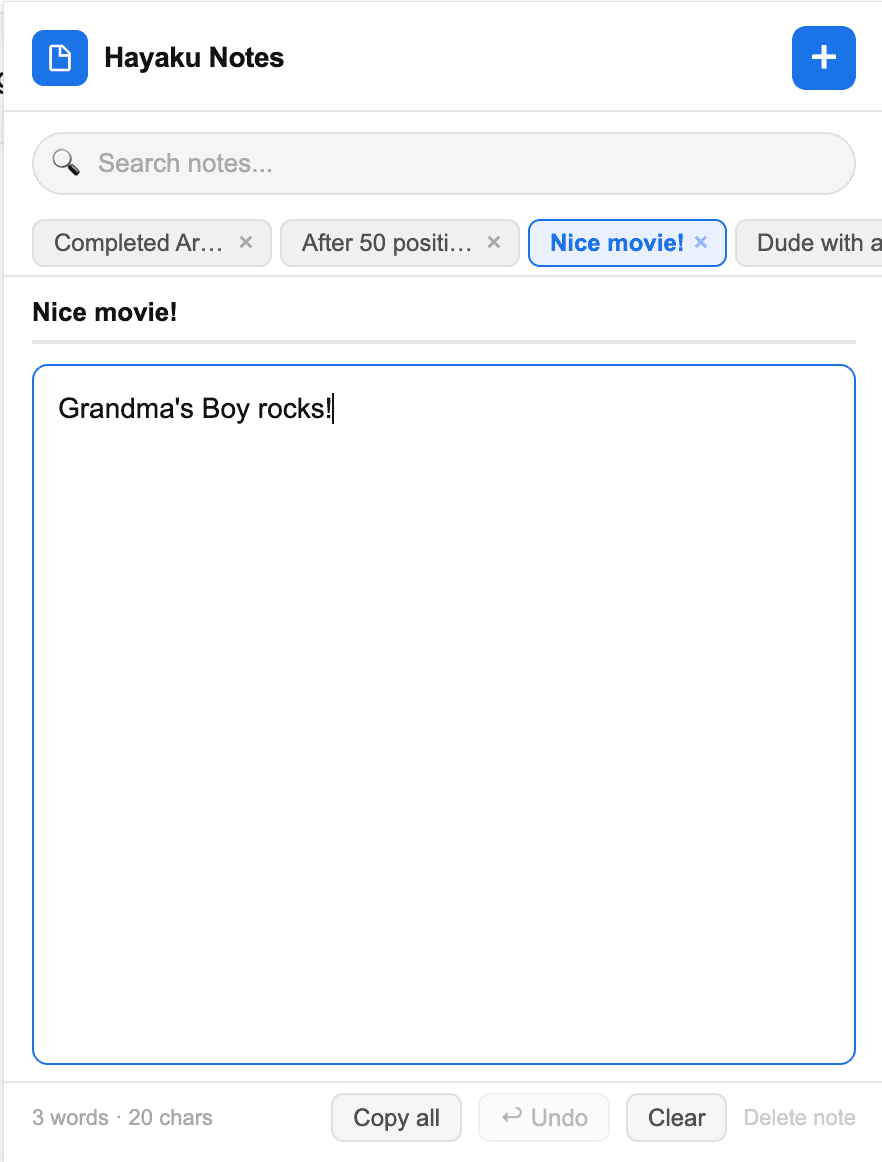
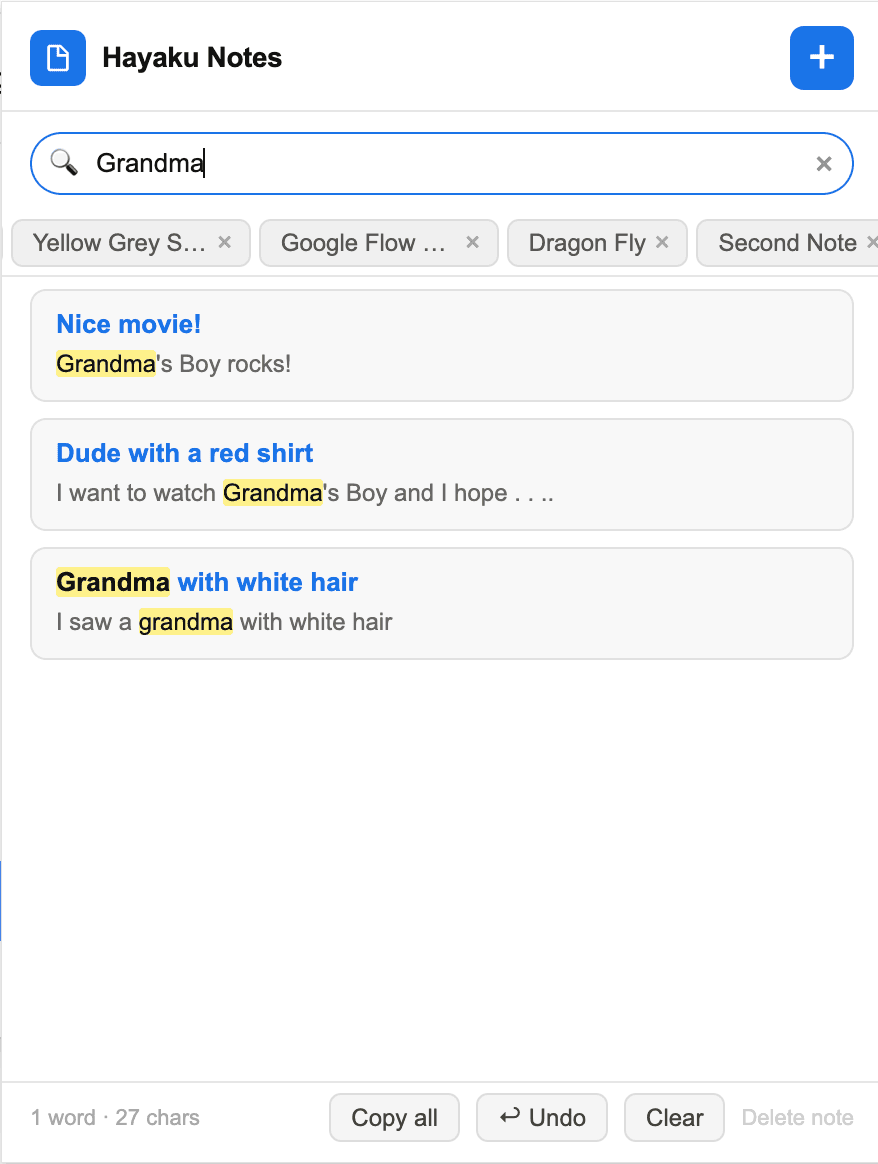
About this app
Akita Apps is a refreshingly simple suite of browser-based productivity tools built for people who value focus over feature bloat. The core offerings are Dopamine Destroyer, a one-toggle website blocker that kills distracting sites instantly with no guilt trips or monthly fees, and Hayaku Notes, a lightning-fast thought-capture tool that lets you jot down ideas with a single click and move on. No subscriptions, no clutter—just clean, minimal tools that respect your attention. Perfect for remote workers, students, and anyone trying to stay in the zone without getting bogged down by complicated software.
Key features
- 1Dopamine Destroyer: one-toggle website blocker for Chrome with no subscription
- 2Hayaku Notes: one-click thought capture with tag support and search
- 3No subscriptions, no bloat, browser-based tools that respect attention
Target customer profile
Drawn from the product itself, not from a survey.
Demographic
Remote workers and freelancers
Pain points
Constant distractions from social media and news sites, difficulty staying focused on deep work tasks
Primary needs
A quick, no-fuss way to block time-wasting sites without complex setup or recurring costs
Demographic
Students and researchers
Pain points
Easily lose train of thought when researching online, need to capture fleeting ideas before they vanish
Primary needs
Fast idea capture and a distraction-free browsing environment for study sessions
Demographic
Minimalist productivity enthusiasts
Pain points
Frustrated by bloated apps with endless features, subscriptions, and learning curves
Primary needs
Simple, no-subscription tools that do one thing well and get out of the way
Scout Review
Written by AI from measured evidence, scored out of 100.
Akita Apps offers a refreshingly simple suite of browser-based productivity tools. The design is clean and on-brand, though the hero lacks a strong CTA. Performance is excellent, but security headers are lacking. Accessibility is decent but needs contrast fixes. The growth potential is moderate: the idea is solid, but the category is competitive. Overall, it's a promising start for a small indie project, with clear strengths in speed and simplicity, but it needs more depth in docs, security, and accessibility to compete with established alternatives.
Measure by measure
Usability
62Navigation is clear and tools are discoverable. However, no docs, pricing, or onboarding flow found; Hayaku Notes lacks sort/filter controls. Browser-based simplicity is a plus but depth is thin.
Design
70Clean, minimal design with strong product cards and consistent iconography. Hero is sparse and lacks a primary CTA above the fold, but the overall aesthetic is modern and focused.
Speed
85Exceptional performance: Lighthouse 99/100 desktop, LCP under 700ms, zero layout shift. Lightweight static site with minimal JS. No complaints found.
Security
52HTTPS enforced with SPF/DMARC, but missing HSTS, CSP, and other security headers. No SOC 2 or security page found. Basic security posture for a small tool, but room for improvement.
Accessibility
68Lighthouse accessibility 88/100 with contrast and heading order issues. No a11y statement or WCAG mention. Keyboard navigation seems possible but undocumented. English-only.
Growth
58Real problem, clear differentiators (no-subscription blocker, one-click notes), but category is crowded and traction is unproven. Could grow if it nails a niche.
Improvement areas
- Add primary CTA and improve hero contrast for better conversion
- Implement security headers (HSTS, CSP) and publish a privacy policy
- Enhance accessibility with better contrast and heading structure
Design & Usability
Akita Apps presents a clean, minimal design that mirrors its 'no bloat' philosophy. The homepage clearly showcases the two tools with matching icons and short descriptions. However, the hero lacks a primary CTA, and the thin borders and light text can feel low-contrast. Usability is straightforward: navigation is simple, and the tools are browser-based with one-click install. Yet, the absence of docs, pricing, or onboarding flow leaves users to figure things out on their own. Hayaku Notes' tag system is intuitive, but the lack of sort/filter controls limits organization. Overall, it's a solid start but needs more depth to be truly user-friendly.
Speed & Security
Performance is a standout: Lighthouse 99/100 on desktop with sub-700ms LCP and zero layout shift. The static site is lightweight and fast. Security is more concerning: HTTPS is enforced, but HSTS, CSP, and other headers are missing. No SOC 2 or security page found, which is typical for a small tool but still a gap. The 'Privacy First' badge suggests care, but without a privacy policy or security details, it's hard to verify. For a productivity tool handling user data, stronger security headers and transparency would build trust.
Accessibility & Growth
Accessibility is decent but not excellent: Lighthouse 88/100 with contrast and heading order issues. No a11y statement or WCAG mention, and the site is English-only. Growth potential is real: the problem of distraction and quick note capture is universal, and the no-subscription model is a differentiator. However, the category is crowded with established players like Freedom and Cold Turkey. The wedge is simplicity and price, but without traction or community, it's unclear if it can stand out. If it can build a niche following among minimalists, it could grow, but it needs more than a clean landing page.
Conclusion
Akita Apps is a breath of fresh air in a world of bloated productivity suites. If you're a minimalist who just wants to block distractions and capture ideas without a subscription, it's worth a try. But if you need advanced features, robust security, or extensive docs, you might find it lacking. The foundation is solid — now it needs to build on it. For a small indie project, it's a promising start. I'd keep an eye on it.
Suggestions for improvement
- Add a primary CTA button above the fold to drive conversions.
- Publish a privacy policy and security page to build trust.
- Improve color contrast and heading order for better accessibility.
- Add sort/filter options in Hayaku Notes and consider a docs section.
Alternatives comparison
Named competitors, point by point. Nobody paid to appear here or to be left out.
 Akita Apps Akita Apps |  Freedom Freedom |  Cold Turkey Blocker Cold Turkey Blocker |  Simplenote Simplenote | |
|---|---|---|---|---|
| Pricing model | Free, no subscription | Subscription-based (paid plans) | One-time purchase or subscription | Free, with optional paid upgrade |
| Platform support | Browser-based (Chrome) | Cross-platform (Windows, Mac, iOS, Android, browser) | Windows, Mac, Android | Cross-platform (Web, iOS, Android, Mac, Windows, Linux) |
| Key differentiator | One-toggle blocker and one-click note capture, no bloat | Scheduling and blocklists across devices | Strict blocking modes with nuclear options | Minimal note-taking with sync |
Freedom
A cross-platform distraction blocker with scheduling and blocklists, but often requires subscription.
Cold Turkey Blocker
A powerful website blocker for Windows/Mac with strict modes, but has a steeper learning curve.
Simplenote
A minimal note-taking app for quick capture, but lacks browser-specific integration.
Comparing options? See Akita Apps alternatives, scored side by side
More Productivity apps
View all Productivity
Notion
92All-in-one AI workspace for docs, projects, and knowledge...

Qamarero
92An all-in-one hospitality software for restaurants and ba...

EmbedMyReviews
92White-label reputation management software for agencies s...

StoryPad
92Privacy-first open source journal app with a continuous t...

Puzzly – B2B Lead Generation & Sales Intelligence Platform
92Puzzly is an all-in-one B2B lead generation platform that...

The Stack Newsletter
92A weekly newsletter delivering curated tech jobs, intervi...

Vibe Coding Agent Skills
92A free, open-source platform offering 110 AI agent skills...

QRBliss
91Branded QR codes with AI Brand Sync, 15 free dynamic code...

Gerty
91Private, local AI assistant for Mac that runs offline

CC Switch
91Open-source desktop app for switching AI coding providers...

username.md
90One verified handle for your online identity, readable by...

PitchWhip
90AI cold call scripts & direct dials from LinkedIn


A platform dedicated to providing unbiased reviews of newly launched applications, analyzing everything from their features to their full potential.
info@scoutforge.net© 2026 Scoutforge. All rights reserved.
