Cycling through all six. Tap any point to stop.
Measured on six things
Turn your content into a branded mobile app with home, co...
Speed
58Mobile performance 71/100 with LCP 4.8s and FCP 3.9s — noticeably slow on mobile. Desktop 81/100 is solid. CLS of 0 and TBT of 97ms show good stability and responsiveness once loaded.
Screenshots
1 / 1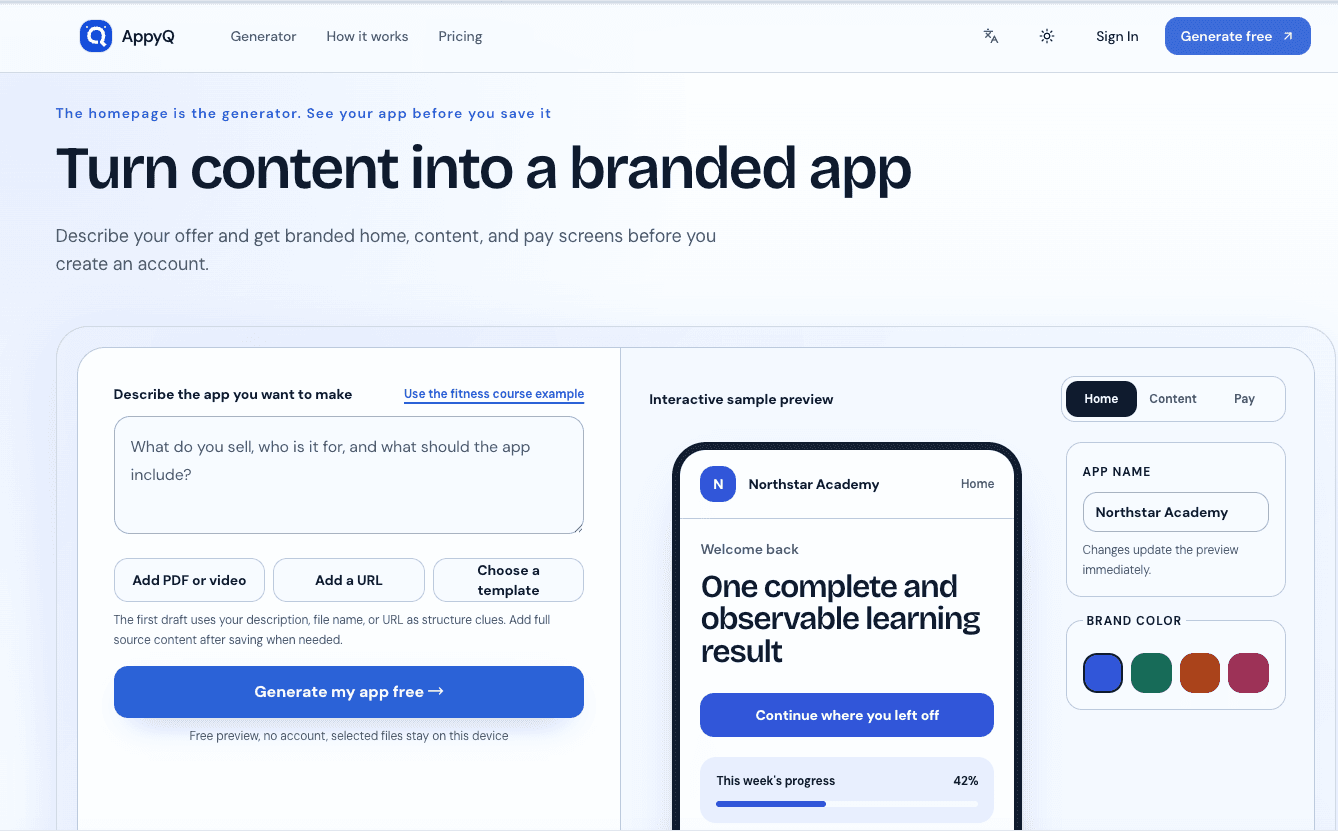
About this app
AppyQ is a creator-focused platform that transforms your educational content—like PDFs, videos, and URLs—into a branded mobile experience. I was genuinely surprised by how easy it is: you describe your offer, and within moments you have interactive preview screens that show home, content, and pay layouts. It's not just a website; it's essentially a learner portal designed for phones, complete with your branding, lesson progress, and even day-based content releases. What stood out to me is that AppyQ doesn't just give you an app front-end—it provides a whole delivery system. You can manage cohorts, track learner progress, spot at-risk learners, and even set up automatic reminders (though currently they're stored and not dispatched automatically). The tool is built for guided programs like online courses, coaching, and language learning, where structure and follow-up matter for keeping learners engaged. The free preview is a real game-changer. You can see your app before even creati...
Key features
- 1Free preview: describe your offer and see branded home, content, and pay screens before creating an account
- 2Cohort-based delivery with day-based content releases and access windows
- 3Risk detection: progress and last-active signals identify at-risk learners for follow-up
Target customer profile
Drawn from the product itself, not from a survey.
Demographic
Online course creators and educators
Pain points
Difficulty managing course content across multiple platforms, high refund rates due to disorganized delivery, lack of learner engagement tracking
Primary needs
A branded mobile app, easy content organization, progress tracking, and automated follow-ups to reduce churn
Demographic
Coaches and consultants running cohort-based programs
Pain points
Time-consuming manual enrollment and access management, fragmented communication via email and chat, inability to see which learners are falling behind
Primary needs
Streamlined cohort delivery, day-based content release, at-risk learner alerts, and a unified dashboard for participant progress
Demographic
Language schools and tutoring centers
Pain points
Outdated delivery methods, limited visibility into student progress, and challenges in personalizing learning paths
Primary needs
A structured learner portal, lesson tracking, content release scheduling, and a way to intervene early with struggling students
Scout Review
Written by AI from measured evidence, scored out of 100.
AppyQ is a thoughtfully designed platform for creators running structured, cohort-based programs. Its standout feature is the free preview — you describe your offer and see branded home, content, and pay screens before creating an account. The design is polished and coherent, with a live phone preview that makes the value tangible. The focus on learner progress tracking, risk detection, and day-based content releases differentiates it from generic course platforms like Teachable or Thinkific. Performance on mobile needs work (LCP 4.8s), and the below-fold content could be better organized. Security is solid for the stage, and accessibility is above average. For coaches, language schools, and cohort owners tired of managing delivery through spreadsheets and group chats, AppyQ offers a compelling, purpose-built alternative.
Measure by measure
Usability
68Free preview without account is a genuine differentiator — see your app before committing. Interactive tabs and color swatches make the value immediately testable. Below-fold four-quadrant layout risks overwhelming first-time visitors.
Design
72Coherent, modern design with tight hero integration of live phone preview and brand color picker. Consistent card styling and rounded corners. Some cramped hero form elements and repetitive section patterns below fold.
Speed
58Mobile performance 71/100 with LCP 4.8s and FCP 3.9s — noticeably slow on mobile. Desktop 81/100 is solid. CLS of 0 and TBT of 97ms show good stability and responsiveness once loaded.
Security
72Strong baseline: HTTPS, HSTS, CSP, frame protection all enforced. 10/12 checklist points. Missing SPF and DMARC records for email security. No SOC 2 or third-party certifications mentioned on site.
Accessibility
80Lighthouse accessibility 96/100 — strong. Only two failing audits: contrast ratio on some elements and heading order not sequential. No explicit WCAG statement, but multi-language toggle suggests broader reach.
Growth
72Clear wedge: cohort delivery with risk detection — something Teachable, Thinkific, and Podia don't focus on. Targets specific paid-program segments with a retention calculator to quantify ROI.
Improvement areas
- Automated reminders are stored but not dispatched — needs actual automation
- Mobile performance: LCP 4.8s is slow for a phone-first product
- Missing SPF and DMARC records for email security and deliverability
Design & Usability
AppyQ's design is genuinely above average for the course-platform category. The hero's live phone preview that updates as you type your description and pick brand colors is a tangible 'aha' moment — you see your app before you've even created an account. The visual language is consistent: rounded corners, soft shadows, coherent palette. Usability follows the same thoughtful pattern: the free preview removes the biggest friction point (signup before value), and interactive tabs let you explore home/content/pay screens immediately. The weaknesses are in the details: the hero form feels cramped, the below-fold four-quadrant layout is dense, and sections repeat similar card patterns without enough visual differentiation. For a platform targeting non-technical course creators, the learning curve is gentle — but the information density below the fold might intimidate the exact audience it's trying to attract.
Speed & Security
Performance is a mixed bag. Mobile Lighthouse at 71/100 with LCP of 4.8 seconds is noticeably slow — ironic for a product whose entire pitch is 'built for phones.' Desktop at 81/100 is respectable, and the CLS of 0 and TBT of 97ms show the page is stable and responsive once it loads. Security posture is solid for an early-stage product: HTTPS, HSTS, CSP, frame protection, and X-Content-Type-Options all enforced, hitting 10/12 on the checklist. The gaps are SPF and DMARC records, which matter for email deliverability and phishing protection — relevant for a platform that promises automated reminders. No SOC 2 or third-party certifications yet, which is typical for this stage but worth noting for enterprise buyers.
Accessibility & Growth
Accessibility is a genuine strength: 96/100 on Lighthouse with only two minor audit failures (contrast ratio on some elements, heading order). The multi-language toggle suggests the team thinks about global users. No formal WCAG statement yet, but the automated score indicates solid fundamentals. On growth: AppyQ has identified a real gap in the market. Teachable, Thinkific, and Podia all handle course hosting, but none focus on cohort-based delivery with risk detection and day-based content releases. The target segments — paid cohorts, coaching programs, language schools — have specific pain points around learner engagement and refund pressure that generic course platforms don't address. The retention calculator on the homepage is a smart move: it quantifies the value proposition in dollars. The honest limit: this is a feature-rich niche, and the incumbents could add cohort features. But the focus on 'guided programs' with observable outcomes is a defensible wedge.
Conclusion
AppyQ isn't trying to be another course marketplace — it's building the operating system for guided programs where structure and follow-up determine success. The free preview is the kind of friction-killing move that wins early adopters. The real test will be whether the automated reminders actually dispatch (currently stored, not sent) and whether the platform can scale beyond its initial niche. If you run paid cohorts and your current system is 'PDFs in a Google Drive folder plus a WhatsApp group,' AppyQ is worth a serious look. The retention calculator on their homepage might be optimistic, but the problem it addresses — learners disappearing because they don't know what to do next — is very real.
Suggestions for improvement
- Add SPF and DMARC records to improve email deliverability for the promised automated reminders
- Optimize mobile performance — LCP of 4.8s is too slow for a phone-first product; consider lazy-loading below-fold content
- Fix the two accessibility audit failures: contrast ratio on specific elements and heading order sequence
- Consider a 'how it works' video or interactive demo to reduce the density of the below-fold four-quadrant layout
Alternatives comparison
Named competitors, point by point. Nobody paid to appear here or to be left out.
 AppyQ AppyQ | Teachable |  Thinkific Thinkific |  Podia Podia | |
|---|---|---|---|---|
| Free preview before signup | Yes — describe your offer and see branded app screens before creating an account | No — requires account creation before seeing the platform | No — requires account creation before seeing the platform | No — requires account creation before seeing the platform |
| Cohort-based delivery with day-based content releases | Yes — release sections immediately or by day, manage cohorts from one system | Limited — course content can be dripped, but no cohort management | Limited — content scheduling available, but no cohort focus | No — no cohort-based delivery features |
| At-risk learner detection | Yes — progress and last-active signals identify stalled learners in a risk inbox | No — basic progress tracking only, no risk detection | No — basic progress tracking only, no risk detection | No — no learner engagement tracking features |
| Branded mobile app experience | Yes — branded learner portal with logo, colors, lessons, and progress tracking | Partial — custom branding available, but not a dedicated mobile app experience | Partial — custom branding available, but not a dedicated mobile app experience | Partial — custom branding available, but not a dedicated mobile app experience |
| Automated follow-up reminders | Planned — reminders are stored but not yet dispatched automatically | No — no automated follow-up features | No — no automated follow-up features | No — no automated follow-up features |
Teachable
A popular course platform that lets creators build and sell courses with custom branding, though it lacks advanced learner progress tracking.
Thinkific
Similar to Teachable, offers course creation with built-in website builder and payment processing, but does not focus on cohort delivery.
Podia
Another course platform that allows selling digital products and memberships, with less emphasis on learner engagement features.
Comparing options? See AppyQ alternatives, scored side by side
More Education apps
View all Education
The Stack Newsletter
92A weekly newsletter delivering curated tech jobs, intervi...

TranscriptYou
88Free YouTube transcript generator with timestamps and AI ...

Startup Science
88A unified platform replacing 12-20 disconnected tools for...

Coloring Pages Pro
87A massive collection of free printable coloring pages for...

RBQ Exam
87Online practice for the RBQ contractor licence exams in Québec: original questions, timed mock exams and lessons, in French or English.

CertWorthIt
87Data-driven tool revealing which certifications actually ...

Case Cub
85AI-powered law school study platform with 20,000+ case br...

HireVue Practice
85AI-powered HireVue practice with timed mock interviews, role-specific questions, transcripts, scoring, and actionable feedback.

Aptitude Test Prep
84Free timed practice for SHL, numerical, and logical tests...

WellWired
84AI explained simply for older adults, with safety lessons...

PageCub
84Custom illustrated children's books created around your c...

Ciroexam
84All-in-one CIRO exam prep for CIRE and 8 other exams, wit...


A platform dedicated to providing unbiased reviews of newly launched applications, analyzing everything from their features to their full potential.
info@scoutforge.net© 2026 Scoutforge. All rights reserved.
