Cycling through all six. Tap any point to stop.
Measured on six things
Repair corrupt MS Access MDB & ACCDB files with dual reco...
Design
46Dated download-site styling: software-box hero, mixed white/blue/navy sections, and a chat popover clipping the headline. The real app screenshot and prominent CTAs are the bright spots.
Screenshots
1 / 1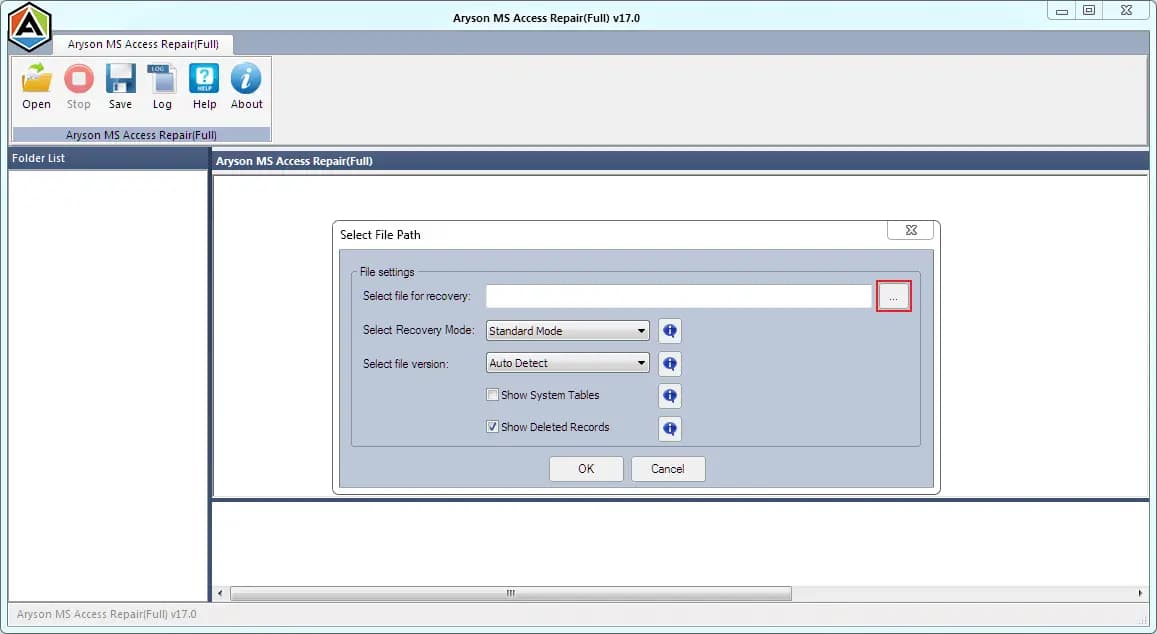
About this app
Aryson Access Database Recovery is a specialized Windows utility designed to repair and restore corrupted Microsoft Access database files (MDB and ACCDB). It caters to database administrators, IT professionals, and businesses that rely on Access for critical data storage. The tool stands out with its dual recovery modes—Standard for minor corruption and Advanced for severe damage—and supports all Access versions from 95 to Office 365. Key features include a tree-structure preview of recoverable objects, auto-detection of database versions, recovery of OLE, MEMO, and BLOB data types, and the ability to save recovered data as schema or with schema data. The intuitive interface makes it accessible even to non-technical users, while the free demo version allows scanning and previewing before purchase. With positive reviews and awards from CNET, Softpedia, and Softonic, Aryson Access Database Recovery is a reliable solution for rescuing valuable Access databases from corruption errors li...
Key features
- 1Dual recovery modes: Standard for minor corruption, Advanced for severe damage.
- 2Tree-structure preview of recoverable tables, queries, forms, reports and indexes before saving.
- 3Supports MDB and ACCDB across Access 95 through Office 365, with auto version detection.
- 4Recovers OLE objects, MEMO and BLOB data; saves as schema or schema-with-data.
Target customer profile
Drawn from the product itself, not from a survey.
Demographic
Database administrators and IT professionals managing MS Access databases
Pain points
Corruption errors causing data inaccessibility, risk of permanent data loss
Primary needs
Fast, reliable repair of MDB/ACCDB files with minimal downtime
Demographic
Small to medium business owners using Access for inventory or customer data
Pain points
Sudden database corruption from system crashes or virus attacks
Primary needs
Affordable, easy-to-use recovery tool without technical expertise
Demographic
Non-technical users (e.g., office managers) relying on Access for record-keeping
Pain points
Fear of losing critical data, confusion over manual repair methods
Primary needs
Simple, guided recovery process with preview before saving
Scout Review
Written by AI from measured evidence, scored out of 100.
Aryson Access Database Recovery is a competent, long-running Windows utility (domain live since 2013) wrapped in a landing page that hasn't been redesigned since roughly then. The technical fundamentals are solid — fast LCP, a perfect security-header score, a clear self-serve path with demo and walkthrough. The problems are presentation and trust: a chat widget covering the headline, dense text walls, typos, and zero compliance certifications to back the 'safe and clean' claim. It works; it just doesn't look or read like it should in 2025.
Measure by measure
Usability
60Clear self-serve path with a 9-step walkthrough, demo/trial note, and full nav (Features, Specs, Screenshots, Video, FAQs). Undone by dense small-text walls that bury the actual steps.
Design
46Dated download-site styling: software-box hero, mixed white/blue/navy sections, and a chat popover clipping the headline. The real app screenshot and prominent CTAs are the bright spots.
Speed
68Lighthouse mobile 76/100 (LCP 1.8s, CLS 0.094) and desktop 81/100 — fast first paint, but a 893ms TBT shows the page still grinds on mobile. Solid, not snappy.
Security
76Clean 12/12 header checklist: HTTPS+HSTS, CSP, frame protection, Referrer/Permissions-Policy, SPF and DMARC all present. No SOC 2, ISO, or bug-bounty page found.
Accessibility
58Lighthouse 82/100 but real failures: low contrast, non-sequential headings, missing alt text, unnamed links, and a viewport that blocks pinch-zoom. No a11y statement.
Growth
52Real, painful problem (corrupt Access files = data loss) with concrete differentiators like dual modes and schema-only save. But Access is a legacy platform and Stellar/Kernel already own this niche.
Improvement areas
- Dated landing page: chat popover clips the headline, mixed section styles, visible typos.
- Accessibility failures: disabled pinch-zoom, low contrast, missing alt text, no main landmark.
- No published security audit, SOC 2, or bug-bounty program to back the 'safe and clean' claim.
- Dense small-text walls bury the 9-step walkthrough and feature explanations.
Design & Usability
The homepage is a time capsule. A software-box hero mockup, award badges, and a chat popover that physically covers the headline put the first impression somewhere around 2012. It's not unusable — the Download and Purchase buttons are big, colored, and impossible to miss, and the real app screenshot with labeled options is genuinely helpful. But the page then buries you in two dense bulleted columns of small grey-blue text under saturated blue headers, and typos like 'Reports & Quires' leak through. The 9-step walkthrough and the honest demo note (repairs but won't save) are good usability instincts fighting a layout that makes you work for them.
Speed & Security
Speed is the strongest measured dimension: Lighthouse mobile 76 and desktop 81, with a 1.8s LCP and healthy 0.094 CLS. The 893ms total blocking time is the one blemish — the page paints fast then stalls on mobile. Security is quietly excellent on the technical layer: a full 12/12 header checklist including HSTS, CSP, frame protection, Referrer-Policy, Permissions-Policy, plus SPF and DMARC. What's missing is the trust layer — no SOC 2, ISO, or bug-bounty page, so a buyer has to take the '100% safe and clean' claim on faith. For a desktop utility handling business-critical data, that gap matters more than the headers.
Accessibility & Growth
Accessibility scores 82 on Lighthouse but the failing audits are the ones that actually hurt: insufficient color contrast, non-sequential headings, images without alt text, links with no discernible name, and a viewport meta tag that disables pinch-zoom entirely. That last one is a deliberate choice against low-vision users, and there's no accessibility statement anywhere. Growth is a judgment on the idea: repairing corrupt MDB/ACCDB files is a real, high-stakes problem, and the dual Standard/Advanced modes plus schema-only save are concrete differentiators. But Microsoft Access is a legacy platform, and Stellar and Kernel already occupy this exact niche with near-identical feature sets. The wedge is real but narrow, and the ceiling is the size of the Access install base.
Conclusion
If you have a corrupted .accdb and a deadline, this will probably do the job — the dual recovery modes, tree preview, and schema-only save are the right features for the task, and the demo lets you verify before paying. Just don't expect the experience around it to match. The site needs a real redesign, the accessibility failures (especially the disabled zoom) need fixing, and a published security audit would do more for conversion than another Softpedia badge. A solid tool hiding behind a dated storefront.
Suggestions for improvement
- Fix the chat popover so it stops covering the hero headline on first load.
- Remove [user-scalable=no] from the viewport and raise text contrast to pass WCAG AA.
- Publish a security/trust page — even a third-party scan report beats an unverified badge.
- Consolidate the dense bulleted columns into scannable cards with real screenshots.
Alternatives comparison
Named competitors, point by point. Nobody paid to appear here or to be left out.
 Aryson Access Database Recovery |  Stellar Repair for Access |  Kernel for Access Repair | |
|---|---|---|---|
| Dual recovery modes (Standard / Advanced) | Yes — Standard and Advanced modes | Yes — Standard and Advanced modes | Yes — multiple recovery modes |
| Preview recovered objects before saving | Yes — tree-structure preview | Yes — preview before save | Yes — preview supported |
| Supported Access versions | Access 95 through Office 365 | Broad Access version support incl. 365 | Broad Access version support incl. 365 |
| Free demo / trial before purchase | Yes — demo scans/previews but cannot save | Yes — free demo available | Yes — free demo available |
| Save as schema or schema-with-data | Yes — both options offered | Yes — schema and data save options | Yes — schema and data save options |
Stellar Repair for Access
A popular tool for repairing corrupt Access databases, offering similar dual recovery modes and preview features.
Kernel for Access Repair
Another reputable Access recovery software that supports MDB and ACCDB files, with advanced recovery options.
Comparing options? See Aryson Access Database Recovery alternatives, scored side by side
More Productivity apps
View all Productivity
Puzzly – B2B Lead Generation & Sales Intelligence Platform
92Puzzly is an all-in-one B2B lead generation platform that...

Qamarero
92An all-in-one hospitality software for restaurants and ba...

EmbedMyReviews
92White-label reputation management software for agencies s...

StoryPad
92Privacy-first open source journal app with a continuous t...

Notion
92All-in-one AI workspace for docs, projects, and knowledge...

The Stack Newsletter
92A weekly newsletter delivering curated tech jobs, intervi...

Vibe Coding Agent Skills
92A free, open-source platform offering 110 AI agent skills...

QRBliss
91Branded QR codes with AI Brand Sync, 15 free dynamic code...

Gerty
91Private, local AI assistant for Mac that runs offline

Strukchad Property Management
91Property management for Kenyan letting agents: rent invoices raised every month, M-Pesa rent prompts to tenants, arrears tracking and landlord statements.

CC Switch
91Open-source desktop app for switching AI coding providers...

PitchWhip
90AI cold call scripts & direct dials from LinkedIn


A platform dedicated to providing unbiased reviews of newly launched applications, analyzing everything from their features to their full potential.
info@scoutforge.net© 2026 Scoutforge. All rights reserved.
