Cycling through all six. Tap any point to stop.
Measured on six things
Migrate AOL Mail to PST, Gmail, IMAP & more with full dat...
Design
46Dated landing page: a decent 3D box render is undercut by a queries popup covering the hero copy, typos ('Window OS'), inconsistent product naming, and a weak purchase CTA. The Windows app UI itself is standard and legible.
Screenshots
1 / 1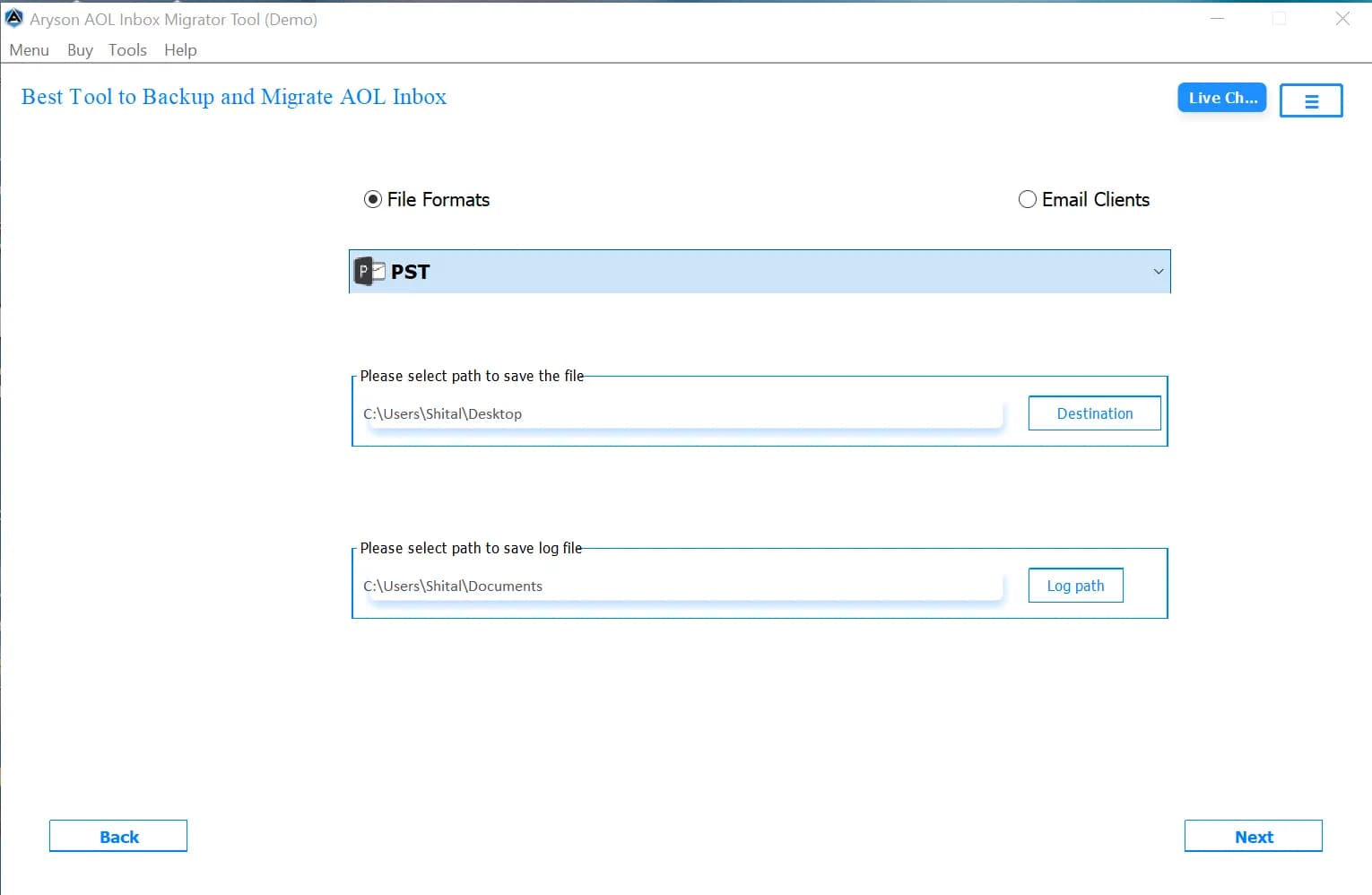
About this app
Aryson AOL Inbox Migrator Tool is a Windows-based utility designed to simplify the migration of AOL Mail inbox data to a variety of destinations. It enables users to export AOL emails to popular file formats like PST, EML, MSG, PDF, and MBOX, or directly migrate them to Gmail, IMAP, and Google Workspace accounts. The tool is built with data integrity at its core, ensuring that email metadata, folder structure, and attachments remain intact throughout the process. Key features include duplicate email removal, date-based filtering, optional attachment exclusion, PST splitting, and the ability to skip previously migrated emails. A detailed migration log and custom folder naming option provide better organization and traceability. The software boasts a user-friendly interface, making it accessible to both technical and non-technical users. With compatibility across all major Windows versions and a free trial version available, Aryson AOL Inbox Migrator Tool is a robust solution for indi...
Key features
- 1Export AOL Mail to PST, EML, MSG, PDF, MBOX and other formats with metadata, folders and attachments preserved
- 2Direct migration to Gmail, IMAP servers and Google Workspace (admin-authorized accounts)
- 3Duplicate removal, date-range filtering, attachment exclusion, PST splitting and skip-previously-migrated options
- 4Detailed migration logs and custom folder naming for traceability and organization
- 5Free demo version available; compatible with all major Windows versions
Target customer profile
Drawn from the product itself, not from a survey.
Demographic
Individual AOL users looking to switch to Gmail or another email client
Pain points
Manual migration is tedious and error-prone; risk of losing important emails and attachments
Primary needs
A simple, reliable tool to transfer entire AOL inbox to a new platform without data loss
Demographic
IT administrators and support teams managing multiple email accounts
Pain points
Migrating large volumes of AOL mailboxes while maintaining data integrity and meeting compliance
Primary needs
Batch migration, detailed logs, and features to handle duplicates and large PST files efficiently
Demographic
Small businesses and enterprises using Google Workspace needing to consolidate legacy AOL accounts
Pain points
Complex migration process; need to preserve email metadata and folder structure for legal or operational reasons
Primary needs
Direct migration to Google Workspace with admin authorization and options to filter emails by date
Scout Review
Written by AI from measured evidence, scored out of 100.
Aryson AOL Inbox Migrator Tool is a Windows utility for moving AOL Mail into PST, EML, MSG, PDF, MBOX, Gmail, IMAP or Google Workspace while keeping metadata, folders and attachments intact. The marketing site is fast and well-secured at the header level, but visually dated and sloppy in copy. The app flow is straightforward. The core problem is differentiation: the feature list is nearly identical to SysTools and MailsDaddy, and the site leans on unverifiable review counts and press blurbs instead of a clear reason to pick it. A competent tool in a crowded, shrinking niche.
Measure by measure
Usability
60Solid self-serve set — Features, Specs, Screenshots, Video, FAQs, Guide, EULA — and the app flow uses clear Back/Next with labeled fields. Undercut by a hero bullet list too long to scan and a Free Demo buried in a small red caption.
Design
46Dated landing page: a decent 3D box render is undercut by a queries popup covering the hero copy, typos ('Window OS'), inconsistent product naming, and a weak purchase CTA. The Windows app UI itself is standard and legible.
Speed
88Lighthouse mobile 99/100 (LCP 1.1s, CLS 0, TBT 133ms) and desktop 90/100. The marketing site is genuinely fast and stable — no layout shift, quick first paint. No lag complaints surfaced in the collected evidence.
Security
76Strong header hygiene: HTTPS enforced, HSTS, CSP, frame protection, Referrer-Policy, Permissions-Policy, plus SPF and DMARC — 12/12 on the probe. No SOC 2/ISO/pen-test page found, so compliance depth is unverified rather than absent.
Accessibility
70Lighthouse a11y 90/100, but real failures remain: low color contrast, non-sequential headings, small touch targets, no main landmark, and role=presentation conflicts. No WCAG statement or a11y page found; multi-language support not evidenced.
Growth
52A real, narrow problem — AOL-to-Gmail/IMAP migration with metadata and folders intact — but the differentiators (filters, dedupe, PST split, logs) are the same list SysTools and MailsDaddy already print. Competent, not distinctive.
Improvement areas
- Landing page design is dated and self-sabotaging — popup over hero copy, typos, inconsistent product naming, weak purchase CTA
- No published security/compliance documentation (SOC 2, ISO, pen-test) despite targeting IT admins and compliance use cases
- Accessibility gaps: low contrast, non-sequential headings, small touch targets, no main landmark, no WCAG statement
- Weak differentiation from SysTools and MailsDaddy — nearly identical feature lists with no clear reason to choose this one
Design & Usability
The site is dated and slightly self-sabotaging: a queries popup covers the hero copy on load, typos sit in the first screen, and the product name flips between 'Migrator Tool' and 'Backup Software.' The purchase button is visually weaker than Download, which is a strange thing to do to the thing that makes money. Usability is better than design — the nav covers Features, Specs, Screenshots, Video, FAQs, Guide and EULA, and the app itself uses a clear Back/Next flow with labeled path fields. The two real friction points are a hero bullet list too long to scan and a Free Demo relegated to a small red caption, so the trial is easy to miss.
Speed & Security
Speed is the standout: Lighthouse mobile 99/100 with LCP 1.1s, CLS 0 and TBT 133ms, desktop 90/100. The marketing site loads fast and doesn't jump around. Security is solid on the transport layer — HTTPS enforced, HSTS, CSP, frame protection, Referrer-Policy, Permissions-Policy, plus SPF and DMARC, a clean 12/12 on the header probe. What's missing is depth: no SOC 2, ISO, pen-test summary or bug bounty page turned up, so buyers in the IT-admin and compliance segment the site courts have to take data-handling on faith. Good hygiene, unproven assurance.
Accessibility & Growth
Accessibility scores 90/100 on Lighthouse but the failing audits are substantive: insufficient color contrast, non-sequential heading order, undersized touch targets, no main landmark, and role=presentation conflicts. There's no WCAG conformance statement and no evidence of multi-language support, so the 90 is a floor, not a ceiling. Growth is the harder call. The problem is real — AOL users moving to Gmail/IMAP/Google Workspace who need metadata, folders and attachments intact — and the feature set (dedupe, date filters, PST splitting, skip-previously-migrated, logs, admin-authorized Workspace migration) is genuinely useful. But it's the same list SysTools and MailsDaddy publish, aimed at a shrinking legacy-mailbox population. The 13-year-old domain and single YouTube profile suggest a long-running business rather than a growing one.
Conclusion
If you're an individual AOL user with a mailbox to rescue, this will likely do the job, and the free demo lets you test before paying. If you're an IT admin evaluating it for a Workspace consolidation, ask Aryson directly for their data-handling and compliance documentation — the site doesn't publish it. And compare against SysTools and MailsDaddy line by line first, because on paper the three are nearly interchangeable and price and support will be the real tiebreakers.
Suggestions for improvement
- Fix the hero: remove or reposition the 'Click Here for Queries' popup so it stops covering the product description on first load.
- Proofread the front page — 'Window OS', 'earlier and major once', and the Migrator/Backup naming inconsistency all read as carelessness.
- Promote the Free Demo out of the tiny red caption into a real third CTA next to Download and Purchase.
- Publish a security/data-handling page (SOC 2 status, encryption, retention) to back the IT-admin and compliance positioning.
Alternatives comparison
Named competitors, point by point. Nobody paid to appear here or to be left out.
 Aryson AOL Inbox Migrator Tool |  SysTools AOL Backup Tool |  MailsDaddy AOL Backup Tool | |
|---|---|---|---|
| Export AOL emails to PST, EML, MSG, MBOX formats | Yes — PST, EML, MSG, PDF, MBOX and more | Yes — PST, MSG, EML and other formats | Yes — PST, EML, MSG, MBOX |
| Direct migration to Gmail / IMAP / Google Workspace | Yes — Gmail, IMAP, Google Workspace (admin accounts) | Backup-focused; direct client migration not the primary pitch | Backup-focused; direct client migration not the primary pitch |
| Duplicate email removal | Yes — by Subject, Body, From, To | Not listed as a headline feature | Not listed as a headline feature |
| Date-range / selective filtering | Yes — Start/End date filter plus attachment exclusion | Yes — advanced filters | Yes — selective backup options |
| PST splitting and migration logs | Yes — user-defined MB/GB split plus detailed logs | PST splitting not listed as headline; logs vary | PST splitting not listed as headline; logs vary |
| Free trial / demo version | Yes — free demo version | Yes — trial version typically offered | Yes — trial version typically offered |
SysTools AOL Backup Tool
A tool that allows backup of AOL emails to PST, MSG, EML, and other formats with advanced filters.
MailsDaddy AOL Backup Tool
Software to backup AOL emails to PST, EML, MSG, and MBOX formats with selective backup options.
Comparing options? See Aryson AOL Inbox Migrator Tool alternatives, scored side by side
More Productivity apps
View all Productivity
Puzzly – B2B Lead Generation & Sales Intelligence Platform
92Puzzly is an all-in-one B2B lead generation platform that...

Qamarero
92An all-in-one hospitality software for restaurants and ba...

EmbedMyReviews
92White-label reputation management software for agencies s...

StoryPad
92Privacy-first open source journal app with a continuous t...

Notion
92All-in-one AI workspace for docs, projects, and knowledge...

The Stack Newsletter
92A weekly newsletter delivering curated tech jobs, intervi...

Vibe Coding Agent Skills
92A free, open-source platform offering 110 AI agent skills...

QRBliss
91Branded QR codes with AI Brand Sync, 15 free dynamic code...

Gerty
91Private, local AI assistant for Mac that runs offline

Strukchad Property Management
91Property management for Kenyan letting agents: rent invoices raised every month, M-Pesa rent prompts to tenants, arrears tracking and landlord statements.

CC Switch
91Open-source desktop app for switching AI coding providers...

PitchWhip
90AI cold call scripts & direct dials from LinkedIn


A platform dedicated to providing unbiased reviews of newly launched applications, analyzing everything from their features to their full potential.
info@scoutforge.net© 2026 Scoutforge. All rights reserved.
