Cycling through all six. Tap any point to stop.
Measured on six things
Convert Exchange EDB mailboxes to PST and other formats w...
Design
45Dated, assembled-looking homepage: overlapping hero popup truncates the subtitle, and mismatched box styles fight each other. The below-fold feature card grid is the one disciplined section.
Screenshots
1 / 1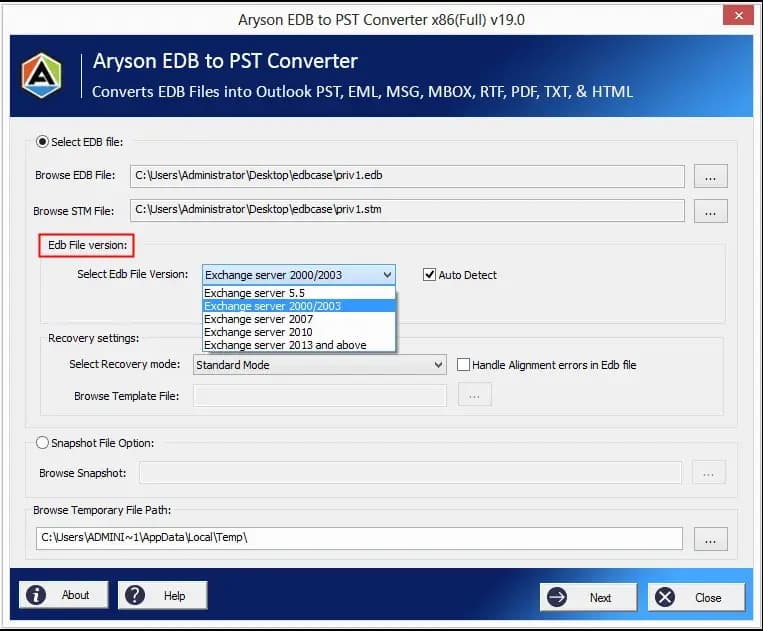
About this app
Aryson EDB to PST Converter is a specialized tool designed to extract mailboxes from Exchange Server EDB files and convert them into Outlook PST files, as well as other formats like EML, MSG, MBOX, PDF, TXT, RTF, and HTML. It supports all versions of Exchange Server, including 2019, 2016, 2013, 2010, 2007, 2003, 2000, and 5.5, and can handle both online and offline EDB files. The software offers three recovery modes—Standard, Advanced, and Deep—to address varying levels of corruption, and includes features like previewing mailboxes before conversion, removing duplicate items, and maintaining data integrity with original folder hierarchy. It also allows taking snapshots of the database for future rollback. With a user-friendly interface, the tool simplifies the conversion process into a few steps, making it accessible to both IT administrators and novice users. Aryson EDB to PST Converter is widely compatible with Windows operating systems and Outlook versions, and it provides a demo...
Key features
- 1Three recovery modes (Standard, Advanced, Deep) for varying levels of EDB corruption.
- 2Exports to PST, EML, MSG, MBOX, PDF, TXT, RTF and HTML with original folder hierarchy preserved.
- 3Snapshot rollback of the Exchange database plus duplicate-item removal by To/From/Subject/Date.
Target customer profile
Drawn from the product itself, not from a survey.
Demographic
IT Administrators in enterprises
Pain points
Manual PowerShell commands slow, risk server performance, and fail on corrupt EDBs.
Primary needs
Efficient, safe EDB to PST conversion without server downtime or data loss.
Demographic
Small business owners managing Exchange servers
Pain points
Limited IT resources; need reliable backup and migration solution for email data.
Primary needs
Cost-effective, easy-to-use tool to convert EDB to PST and other formats.
Demographic
Data recovery professionals and forensic experts
Pain points
Corrupt EDB files require advanced recovery modes and precise extraction.
Primary needs
Advanced recovery options and support for multiple file formats for analysis.
Scout Review
Written by AI from measured evidence, scored out of 100.
Aryson EDB to PST Converter is a competent, long-lived Windows utility wrapped in a homepage that undersells it. The engineering basics are fine — 83/100 mobile Lighthouse, a full security header stack, 12/12 on the probe — and the feature set is genuinely deep: three recovery modes, snapshot rollback, duplicate removal, and export to eight formats. Where it stumbles is presentation and polish. The hero popup truncates the product's own subtitle, the visual system is a patchwork of box styles, and the accessibility audit flags contrast, color-only links and a blocked pinch-zoom. Against Stellar, Kernel and SysTools it's on par on capability and behind on marketing craft. Buy it for the function, not the page.
Measure by measure
Usability
58Clear Download/Purchase CTAs and a free-update support note help, but a ~20-item feature list, a dot-only review carousel and tiny 'Read More' pills make scanning a chore.
Design
45Dated, assembled-looking homepage: overlapping hero popup truncates the subtitle, and mismatched box styles fight each other. The below-fold feature card grid is the one disciplined section.
Speed
71Lighthouse mobile 83/100 (LCP 1.7s, CLS 0.087) and desktop 98/100. Snappy enough; the 537ms total blocking time is the only real mobile drag.
Security
76Full header stack: HTTPS enforced, HSTS, CSP, frame protection, Referrer and Permissions policies, plus SPF and DMARC — 12/12 on the probe. No published SOC 2 or audit.
Accessibility
58Lighthouse 87/100, but failing contrast, color-only links, a blocked pinch-zoom viewport and no main landmark. No accessibility statement or multi-language support found.
Growth
54Real, specific pain (PowerShell exports failing on corrupt or bulk EDBs) with concrete differentiators — three recovery modes, snapshots, multi-format export — in a crowded Stellar/Kernel/SysTools field.
Improvement areas
- Dated, inconsistent visual system and a hero popup that truncates the product subtitle.
- Accessibility gaps: low contrast, color-only links, blocked pinch-zoom, no main landmark.
- No published compliance documentation (SOC 2, ISO, pen-test) for enterprise buyers.
Design & Usability
The homepage reads like it was built in layers over a decade — which, given a 2013 domain, it probably was. A floating query popup sits on top of the hero subtitle and cuts it off, and the page cycles through dark blue headers, pale blue panels, white cards and a slate band with no unifying system. The one bright spot is the below-fold Prominent Features grid: consistent icons, even padding, actually considered. Usability is workmanlike. Download Now and Purchase Now are unmissable in the first viewport, and the note promising a free updated build for reported issues is a genuinely good support signal. But the Key Features list runs about twenty items, the feature grid repeats many of the same benefits, and the review carousel is a single card with four dots and no arrows. For a tool aimed at IT admins who want to confirm it does the job and buy, that's friction where there shouldn't be any.
Speed & Security
Speed is the strongest measured dimension. Lighthouse puts the site at 83/100 on mobile with a 1.7s LCP and 0.087 CLS, and 98/100 on desktop. The only real mobile cost is 537ms of total blocking time, likely script overhead. No published benchmarks or user complaints about lag surfaced, so this is a clean, unremarkable-but-solid result. Security is better than the category norm: the probe found HTTPS enforced with HSTS, a Content-Security-Policy, frame protection, X-Content-Type-Options, Referrer-Policy and Permissions-Policy all set, plus SPF and DMARC records — 12/12 on the checklist. What's missing is the paper trail: no SOC 2, ISO 27001, pen-test summary or bug bounty page was found. For a utility that handles mailbox data and runs locally on Windows, that's a reasonable gap at this stage, but enterprise buyers will ask.
Accessibility & Growth
Accessibility lands at 87/100 on Lighthouse, which sounds better than it is. The failing audits are the ones that actually bite: insufficient color contrast, links distinguishable only by color, a viewport that blocks pinch-zoom, and no main landmark for screen-reader navigation. No accessibility statement or multi-language support was found. On growth, the idea holds up. The named problem is specific and real — PowerShell exports that hang for days or bloat a 2-3GB mailbox into a 20GB PST — and the product answers it with three recovery modes, snapshot rollback and export to PST, EML, MSG, MBOX, PDF, TXT, RTF and HTML. That's a legitimate wedge for admins and forensic users. The limit is the field: Stellar, Kernel and SysTools sell the same promise with louder marketing, and nothing here is structurally hard for them to copy. A 13-year-old domain and LinkedIn/YouTube presence show staying power, not a moat.
Conclusion
If you're an Exchange admin staring down a corrupt EDB and a PowerShell job that's been 'in progress' for three days, this does the job and the demo lets you verify it before paying. If you're choosing on brand polish or enterprise compliance paperwork, the competitors have more to show. The honest verdict: solid tool, dated storefront, and a security posture that's technically tight but undocumented.
Suggestions for improvement
- Fix the floating query popup so it stops overlapping and truncating the hero subtitle.
- Unify the visual system — pick one card style and one header treatment across the page.
- Cut the Key Features list to the ten that matter and let the feature grid carry the rest.
- Publish an accessibility statement and remove user-scalable=no from the viewport meta.
Alternatives comparison
Named competitors, point by point. Nobody paid to appear here or to be left out.
 Aryson EDB to PST Converter |  Stellar EDB to PST Converter |  Kernel for Exchange Server |  SysTools EDB to PST Converter | |
|---|---|---|---|---|
| Recovery modes for corrupt EDB files | Standard, Advanced and Deep | Multiple recovery options | Multiple recovery modes | Recovery options included |
| Export formats beyond PST | PST, EML, MSG, MBOX, PDF, TXT, RTF, HTML | PST, EML, MSG, HTML, RTF, PDF | PST, EML, MSG, HTML, TXT | PST, EML, MSG, HTML, RTF, PDF |
| Free demo / preview before purchase | Yes — live demo and preview | Yes — free trial with preview | Yes — free trial version | Yes — demo with preview |
| Duplicate item removal | Yes — by To, From, Subject, Date | Not a headline feature | Available in recovery options | Available |
| Database snapshot / rollback | Yes — snapshot for future rollback | Not advertised | Not advertised | Not advertised |
Stellar EDB to PST Converter
A well-known tool for converting Exchange EDB files to PST and other formats, with recovery features.
Kernel for Exchange Server
Provides EDB to PST conversion, recovery, and migration capabilities for Exchange databases.
SysTools EDB to PST Converter
Converts EDB to PST, EML, MSG, and other formats with recovery options and preview features.
Comparing options? See Aryson EDB to PST Converter alternatives, scored side by side
More Productivity apps
View all Productivity
Puzzly – B2B Lead Generation & Sales Intelligence Platform
92Puzzly is an all-in-one B2B lead generation platform that...

Qamarero
92An all-in-one hospitality software for restaurants and ba...

EmbedMyReviews
92White-label reputation management software for agencies s...

StoryPad
92Privacy-first open source journal app with a continuous t...

Notion
92All-in-one AI workspace for docs, projects, and knowledge...

The Stack Newsletter
92A weekly newsletter delivering curated tech jobs, intervi...

Vibe Coding Agent Skills
92A free, open-source platform offering 110 AI agent skills...

QRBliss
91Branded QR codes with AI Brand Sync, 15 free dynamic code...

Gerty
91Private, local AI assistant for Mac that runs offline

Strukchad Property Management
91Property management for Kenyan letting agents: rent invoices raised every month, M-Pesa rent prompts to tenants, arrears tracking and landlord statements.

CC Switch
91Open-source desktop app for switching AI coding providers...

PitchWhip
90AI cold call scripts & direct dials from LinkedIn


A platform dedicated to providing unbiased reviews of newly launched applications, analyzing everything from their features to their full potential.
info@scoutforge.net© 2026 Scoutforge. All rights reserved.
