Cycling through all six. Tap any point to stop.
Measured on six things
Migrate IMAP mailboxes to Office 365 securely and efficie...
Design
44Dated homepage with a hero obscured by chat and query popups, three competing OS download buttons, and a maker screenshot carrying an 'Activate Windows' watermark. The Core Functionalities card grid is the one tidy section.
Screenshots
1 / 1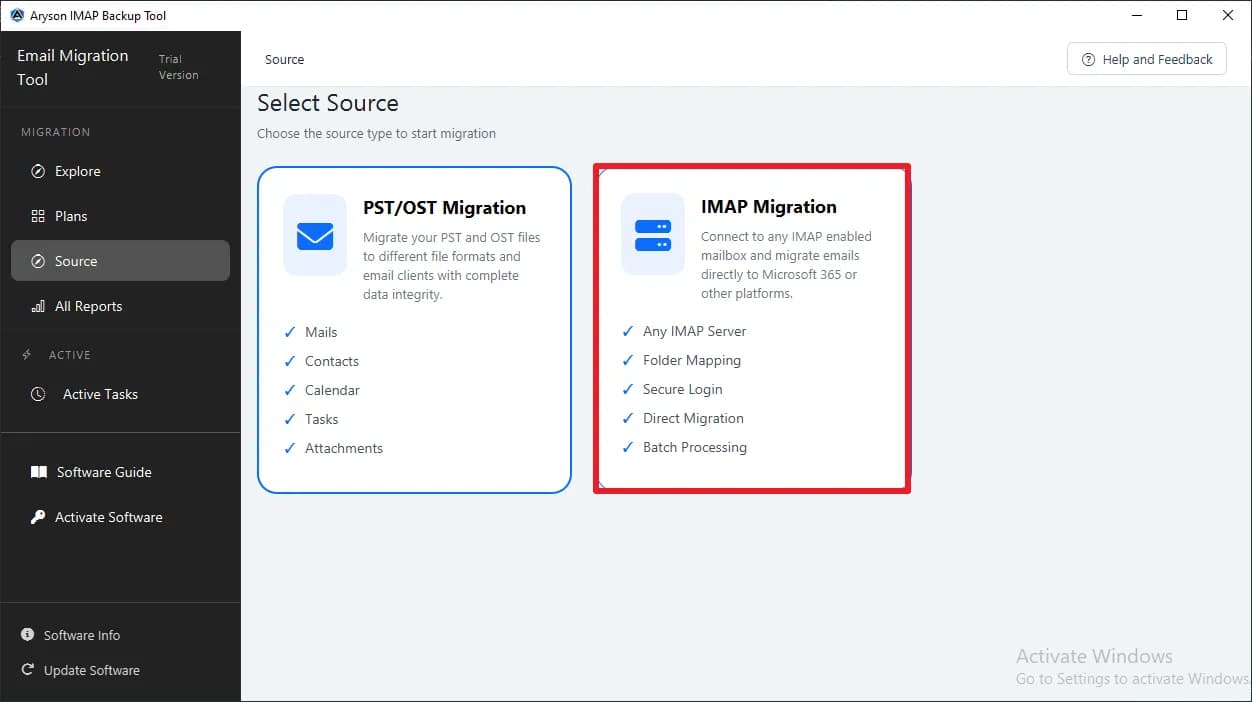
About this app
Aryson IMAP to Office 365 Migration Tool is a specialized utility designed to help IT professionals and businesses transfer emails from any IMAP-enabled account to Microsoft Office 365. The software supports both single and bulk migration, allowing users to import multiple IMAP accounts via CSV for large-scale projects. It preserves folder structure, attachments, and metadata, and includes advanced features like date range filters, duplicate removal, and selective migration. With support for Modern Authentication (OAuth 2.0) and Impersonation, it ensures secure and authorized access. The tool also offers options to free up server space, exclude deleted emails, and handle attachments efficiently. Compatible with Windows, Mac, and Linux, it provides a user-friendly interface and a free demo version for testing.
Key features
- 1Bulk IMAP to Office 365 migration via CSV import of multiple accounts
- 2OAuth 2.0 Modern Authentication and Impersonation login support
- 3Date range, subject/from/to filters, duplicate removal, and skip-previously-migrated options
- 4Preserves folder hierarchy, attachments and metadata; free demo migrates up to 50 emails/folders
Target customer profile
Drawn from the product itself, not from a survey.
Demographic
IT administrators and system analysts in mid to large enterprises
Pain points
Manual migration is time-consuming and error-prone; need to migrate multiple mailboxes quickly while ensuring data integrity and security.
Primary needs
Bulk migration with CSV support, secure authentication, preservation of folder structure and metadata, and minimal downtime.
Demographic
Small business owners and operations managers
Pain points
Limited technical expertise; need a simple, reliable tool to move email from hosted IMAP to Office 365 without data loss.
Primary needs
User-friendly interface, selective migration filters, affordable pricing, and reliable customer support.
Demographic
Managed service providers (MSPs) and IT consultants
Pain points
Managing multiple client migrations efficiently; need a scalable solution that handles diverse IMAP servers and large mailboxes.
Primary needs
Multi-account migration, customizable folder mapping, advanced filtering, and the ability to skip previously migrated items.
Scout Review
Written by AI from measured evidence, scored out of 100.
Aryson IMAP to Office 365 Migration Tool is a workmanlike desktop utility wrapped in a dated, cluttered website. The functional story is credible — bulk CSV import, OAuth 2.0 and Impersonation, date-range and duplicate filters, folder mapping, a 50-email free demo — and the site itself is fast and well-secured at the header level. The problems are presentation and proof: a hero hidden behind popups, competing CTAs, a watermarked screenshot, inconsistent product naming, no accessibility statement, and no published security certifications. Against a free Microsoft tool and MigrationWiz, it needs to be visibly simpler and cheaper, and the site doesn't make that case cleanly.
Measure by measure
Usability
58Clear nav (Features, Screenshots, Video, FAQs, Buy) and a 50-email free demo lower the barrier, but ~20 ungrouped feature bullets and a popup blocking the value prop make scanning a chore.
Design
44Dated homepage with a hero obscured by chat and query popups, three competing OS download buttons, and a maker screenshot carrying an 'Activate Windows' watermark. The Core Functionalities card grid is the one tidy section.
Speed
88Lighthouse mobile 100/100 with LCP 1.1s, CLS 0.004 and TBT 82ms; desktop 81/100. The marketing site loads fast and cleanly, with no lag complaints in the collected evidence.
Security
76Full header stack verified (HSTS, CSP, frame protection, Referrer/Permissions-Policy) plus SPF and DMARC, 12/12 on the probe. OAuth 2.0 and Impersonation claimed, but no SOC 2, ISO or pen-test page found.
Accessibility
70Lighthouse a11y 90/100, but failing audits include insufficient color contrast, non-sequential headings, small touch targets and a missing main landmark. No WCAG statement or a11y page published.
Growth
56Real, recurring problem (IMAP→365 migrations) with a specific wedge: CSV bulk import, OAuth 2.0, filters and folder mapping for MSPs. But it competes with a free Microsoft tool and a stronger cloud rival.
Improvement areas
- Hero is obscured by chat and query popups; competing download/purchase CTAs dilute the primary action
- No published SOC 2, ISO 27001, pen-test or bug bounty information for enterprise buyers
- No accessibility statement or WCAG conformance claim despite failing contrast and heading-order audits
- Dated visual design, watermarked screenshot, and inconsistent product naming across the page
Design & Usability
The homepage reads like it was built in 2014 and patched ever since. A chat bubble and a query popup sit directly on top of the H1, so the first thing a visitor sees is a half-hidden headline. Below that, three OS-specific download buttons fight a second Download/Purchase pair for attention. The maker's own screenshot still shows an 'Activate Windows' watermark and a hand-drawn red box, and the app window calls itself 'Aryson IMAP Backup Tool' while the page sells an 'IMAP to Office 365 Migration Tool'. Usability is better than the design: navigation is clear, there's a video, FAQs and a free 50-email demo, and the Core Functionalities grid is genuinely tidy. But the ~20 ungrouped feature bullets are a spec dump, and small grey body copy makes the guide harder to read than it needs to be.
Speed & Security
Speed is the standout. Lighthouse mobile scores a perfect 100 with a 1.1s LCP, 0.004 CLS and 82ms TBT; desktop lands at 81. The site is lean and snappy, and nothing in the collected evidence suggests lag. Security is solid on the transport layer: HTTPS enforced, HSTS, CSP, frame protection, X-Content-Type-Options, Referrer-Policy and Permissions-Policy all present, plus SPF and DMARC — a clean 12/12 on the header probe. The product itself claims OAuth 2.0 Modern Authentication and Impersonation, which is the right posture for mailbox migration. What's missing is third-party assurance: no SOC 2, ISO 27001, pen-test report or bug bounty page turned up, and 'Fully Secured Software' is a slogan, not a certificate. For an enterprise IT buyer, that gap matters.
Accessibility & Growth
Accessibility lands at 90/100 on Lighthouse, but the failing audits are the usual suspects: insufficient color contrast, headings out of sequential order, touch targets too small, no main landmark, and role=none/presentation conflicts. There's no accessibility statement or WCAG conformance claim anywhere on the site, so a procurement team has nothing to point at. Growth is a judgement on the idea: migrating IMAP mailboxes to Office 365 is a real, recurring, budgeted problem, and Aryson aims at a specific segment — IT admins and MSPs who need CSV bulk import, OAuth 2.0, date filters and folder mapping. That's a genuine wedge. The ceiling is the competition: Microsoft's built-in migration is free, and MigrationWiz is the cloud-native default for larger shops. Aryson's pitch is a cheaper desktop utility, which can win on price and simplicity but is structurally easy to copy.
Conclusion
If you're an IT admin with a handful of IMAP accounts to move and you want a GUI instead of PowerShell, the free demo is a low-risk way to test the core claim. If you're an MSP running large, compliance-sensitive migrations, ask Aryson directly for their security documentation before you commit — the header hygiene is good, but there's no audit trail on the page. Either way, the product deserves a cleaner storefront than the one it currently has.
Suggestions for improvement
- Fix the hero: move the chat widget and query popup off the H1 so the value proposition is readable on first load.
- Collapse the three OS download buttons and the second Download/Purchase pair into one clear primary CTA.
- Replace the watermarked maker screenshot and reconcile the app naming ('IMAP Backup Tool' vs 'IMAP to Office 365 Migration Tool').
- Publish a security and accessibility page: SOC 2 or pen-test status, WCAG conformance, and a real trust section.
Alternatives comparison
Named competitors, point by point. Nobody paid to appear here or to be left out.
 Aryson IMAP to Office 365 Migration Tool |  Microsoft 365 Migration Tool (built-in) |  MigrationWiz by BitTitan | |
|---|---|---|---|
| Graphical interface (no scripting required) | Yes — desktop GUI for Windows, Mac, Linux | No — PowerShell/scripting based | Yes — cloud web console |
| Bulk multi-account migration via CSV import | Yes — CSV import for multiple IMAP accounts | Yes — CSV-based, but script-driven | Yes — bulk projects via console |
| Modern Authentication (OAuth 2.0) / Impersonation | Yes — OAuth 2.0 and Impersonation claimed | Uses Microsoft native auth flow | Yes — modern auth supported |
| Free tier / demo before purchase | Free demo — up to 50 emails/folders | Free — included with Microsoft 365 | Trial available; paid per-mailbox pricing |
| Deployment model | On-premise desktop app (Win/Mac/Linux) | Cloud service run from Microsoft 365 admin | Cloud-hosted SaaS |
Microsoft 365 Migration Tool (built-in)
Microsoft's native migration tool allows IMAP migration to Office 365, but it requires PowerShell scripting and lacks a graphical interface, making it less user-friendly for non-technical users.
MigrationWiz by BitTitan
A cloud-based migration tool that supports IMAP to Office 365 and many other scenarios. It offers a robust feature set but comes at a higher price point and may be overkill for small businesses.
Comparing options? See Aryson IMAP to Office 365 Migration Tool alternatives, scored side by side
More Productivity apps
View all Productivity
Puzzly – B2B Lead Generation & Sales Intelligence Platform
92Puzzly is an all-in-one B2B lead generation platform that...

Qamarero
92An all-in-one hospitality software for restaurants and ba...

EmbedMyReviews
92White-label reputation management software for agencies s...

StoryPad
92Privacy-first open source journal app with a continuous t...

Notion
92All-in-one AI workspace for docs, projects, and knowledge...

The Stack Newsletter
92A weekly newsletter delivering curated tech jobs, intervi...

Vibe Coding Agent Skills
92A free, open-source platform offering 110 AI agent skills...

QRBliss
91Branded QR codes with AI Brand Sync, 15 free dynamic code...

Gerty
91Private, local AI assistant for Mac that runs offline

Strukchad Property Management
91Property management for Kenyan letting agents: rent invoices raised every month, M-Pesa rent prompts to tenants, arrears tracking and landlord statements.

CC Switch
91Open-source desktop app for switching AI coding providers...

PitchWhip
90AI cold call scripts & direct dials from LinkedIn


A platform dedicated to providing unbiased reviews of newly launched applications, analyzing everything from their features to their full potential.
info@scoutforge.net© 2026 Scoutforge. All rights reserved.
