Cycling through all six. Tap any point to stop.
Measured on six things
Convert JSON chat files to 12+ formats with backup and fi...
Design
44Dated marketing page: a 10-bullet hero list with no grouping, three competing CTAs, and an app screenshot showing an empty table. The product box render and app icons are crisp, but hierarchy is absent.
Screenshots
1 / 1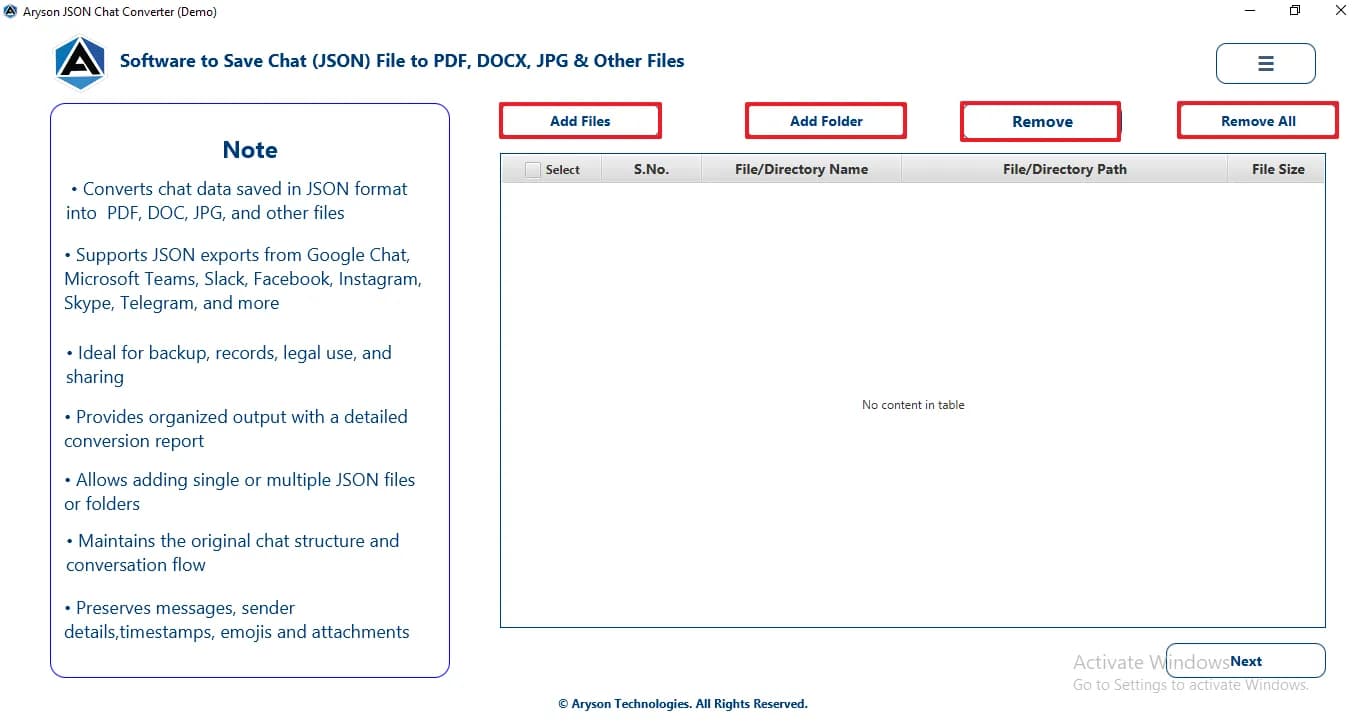
About this app
Aryson JSON Chat Converter is a desktop utility that simplifies the conversion of JSON chat files from popular messaging apps like Slack, Microsoft Teams, and Instagram into 12+ formats including PDF, DOCX, JPG, and HTML. It supports batch conversion, date range filtering, and custom output naming, making it ideal for data analysts and support teams who need to archive or migrate chat data efficiently. The tool is compatible with Windows, Mac, and Linux, and offers a free demo version that converts the first 25 files with a watermark.
Key features
- 1Converts JSON chat exports from Slack, Teams, Instagram, Telegram and others into 12+ formats including PDF, DOCX, HTML, JPG and EPUB.
- 2Batch conversion with date-range filtering, custom output folder naming and configurable destination paths.
- 3Fully local/offline processing — chat data never leaves the machine — with Windows, Mac and Linux builds.
- 4Free demo converts the first 25 files with a watermark before requiring a paid license.
Target customer profile
Drawn from the product itself, not from a survey.
Demographic
Data analysts
Pain points
Manual formatting of JSON chat logs is time-consuming and error-prone.
Primary needs
Fast, accurate conversion of large chat datasets into readable formats.
Demographic
Customer support teams
Pain points
Managing and archiving hundreds of chat logs daily for quality assurance.
Primary needs
Efficient backup and export of chats to PDF/DOCX for analysis.
Demographic
IT administrators
Pain points
Need to migrate chat data from various platforms securely and locally.
Primary needs
Batch conversion and secure local storage of chat archives.
Scout Review
Written by AI from measured evidence, scored out of 100.
Aryson JSON Chat Converter is a competent, narrowly-scoped desktop utility wrapped in a dated marketing site. The core proposition is sound: take JSON chat exports from Slack, Teams, Instagram and others, and turn them into PDF, DOCX, HTML and nine more formats, in batch, with date filtering, entirely locally. The alternatives listed are narrower — a generic JSON-to-CSV web converter and an open-source chat viewer with fewer output formats — so the format breadth and batch handling are a real differentiator. The site itself is fast (Lighthouse 98 mobile) and technically well-secured (12/12 headers), but the design is stuck in an older era, accessibility fails seven audits, and there's no published compliance documentation. The free demo's 25-file watermark limit is buried in fine print. It works; it just doesn't look or read like it wants to be found.
Measure by measure
Usability
58Full support surface (features, specs, screenshots, video, FAQs, guide) and a 25-file free demo, but no live web trial, unlabeled app icons, and the demo watermark limit is buried in fine print.
Design
44Dated marketing page: a 10-bullet hero list with no grouping, three competing CTAs, and an app screenshot showing an empty table. The product box render and app icons are crisp, but hierarchy is absent.
Speed
90Lighthouse mobile 98/100 (LCP 2.3s, CLS 0, TBT 55ms) and desktop 93/100. The marketing site is genuinely fast and stable, with no layout shift and low blocking time.
Security
76Full 12/12 header checklist: HTTPS enforced, HSTS, CSP, frame protection, Referrer-Policy, Permissions-Policy, plus SPF and DMARC. No published SOC 2, ISO or pen-test documentation found.
Accessibility
58Lighthouse a11y 83/100 but seven failing audits: contrast, heading order, missing alt text, unnamed links, small touch targets, no main landmark. No WCAG statement published.
Growth
62Real, specific pain — turning exported JSON chat logs into readable PDF/DOCX for archiving and QA — with a genuine wedge: 12+ formats, batch, date filtering, fully local. Narrow but defensible niche.
Improvement areas
- Dated landing page: 10-bullet hero, three competing CTAs, empty-table screenshot, six-dropdown nav.
- Seven failing accessibility audits (alt text, link names, heading order, contrast, touch targets, landmark).
- No published SOC 2, ISO, pen-test or data-handling documentation despite processing sensitive chat logs.
- Demo watermark limit buried in fine print; no live web trial or interactive preview before download.
Design & Usability
The homepage is stuck in 2015: a 10-bullet hero list with zero visual grouping, three primary CTAs (blue Download, red Purchase, Microsoft Store badge) all shouting at once, and a product screenshot that shows an empty table — the least convincing possible hero art. The 3D box render and consistently sized app icons are the only craft on display. Usability is better than design: there's a real support surface (features, specs, screenshots, video, FAQs, guide) and a 25-file free demo, but no live web trial, unlabeled app icons in the supported-apps band, and the watermark limit hidden in fine print under the OS buttons. First-time visitors have to download an installer before they learn anything.
Speed & Security
Speed is the standout: Lighthouse mobile 98/100 with LCP 2.3s, CLS 0 and TBT 55ms, desktop 93/100. The marketing site is lightweight, stable and snappy — no complaints to be found. Security is solid on the technical side: the probe returned a perfect 12/12, with HTTPS enforced, HSTS, CSP, frame protection, X-Content-Type-Options, Referrer-Policy and Permissions-Policy all set, plus SPF and DMARC on the domain. What's missing is the paperwork — no SOC 2, ISO 27001, pen-test summary or bug-bounty page anywhere in the collected evidence. For a tool that handles exported chat logs (which routinely contain personal and business-confidential content), a published data-handling and security page would be the obvious next step.
Accessibility & Growth
Accessibility is the weak link: Lighthouse scores 83/100 but fails seven audits — insufficient color contrast, non-sequential heading order, images without alt attributes, links with no discernible name, undersized touch targets, no main landmark, and role=presentation conflicts. There's no accessibility statement or WCAG claim on the site. On growth, the idea holds up better than the execution: converting exported JSON chat logs into readable PDF/DOCX for archiving and QA is a real, specific pain, and the wedge — 12+ output formats, batch conversion, date-range filtering, fully local processing — is genuinely broader than the listed alternatives (a generic JSON-to-CSV web tool and an open-source chat viewer with fewer formats). The niche is narrow and the buyer is a data analyst or support lead, not a mass market, but within that niche the product is clearly positioned. The 13-year-old domain suggests an established vendor rather than a fresh launch.
Conclusion
If you're a data analyst or support lead drowning in exported chat logs and you need them as readable PDFs or DOCX in bulk, this does the job and does it locally. Just budget for the paid license — the 25-file demo won't get you far — and don't expect the website to sell it to you. The product is more capable than its landing page suggests.
Suggestions for improvement
- Rebuild the hero: one primary CTA, a grouped feature list of 3-4 items, and a real populated screenshot instead of an empty table.
- Publish a security and data-handling page — local processing is a selling point, so say it loudly with a compliance summary.
- Fix the seven Lighthouse a11y failures: alt text, link names, heading order, contrast, touch targets, main landmark.
- Surface the 25-file demo limit next to the download buttons instead of burying it in fine print.
Alternatives comparison
Named competitors, point by point. Nobody paid to appear here or to be left out.
 Aryson JSON Chat Converter Aryson JSON Chat Converter |  JSON to CSV Converter JSON to CSV Converter |  ChatViewer ChatViewer | |
|---|---|---|---|
| Output formats supported | 12+ (PDF, DOCX, HTML, JPG, EPUB, XPS, SVG, PNG, BMP, RTF, TIFF, PCL) | CSV (plus a few tabular variants) | Fewer formats; primarily viewing and basic export |
| Batch conversion | Yes — add multiple JSON files and convert at once | No — single-file web conversion | Limited; not a batch-first workflow |
| Date range filtering | Yes — built-in advanced date range filter | No | No advanced filtering |
| Chat-app awareness (Slack, Teams, Instagram) | Yes — Slack, Teams, Instagram, Telegram, Google Chat, Skype and more | No — generic JSON, no chat-specific handling | Yes — multi-messenger viewing, but fewer export options |
| Local / offline processing | Yes — desktop app, data stays on device | No — browser-based upload | Yes — open-source desktop app |
| Pricing model | Paid license; free demo limited to 25 files with watermark | Free web tool | Free / open source |
JSON to CSV Converter
Online tool that converts JSON to CSV format, suitable for simple data extraction but lacks chat-specialized features and batch processing.
ChatViewer
Open-source application for viewing and exporting chat logs from various messengers, but supports fewer output formats and lacks advanced filtering.
Comparing options? See Aryson JSON Chat Converter alternatives, scored side by side
More Productivity apps
View all Productivity
Qamarero
92An all-in-one hospitality software for restaurants and ba...

The Stack Newsletter
92A weekly newsletter delivering curated tech jobs, intervi...

EmbedMyReviews
92White-label reputation management software for agencies s...

StoryPad
92Privacy-first open source journal app with a continuous t...

Puzzly – B2B Lead Generation & Sales Intelligence Platform
92Puzzly is an all-in-one B2B lead generation platform that...

Notion
92All-in-one AI workspace for docs, projects, and knowledge...

Vibe Coding Agent Skills
92A free, open-source platform offering 110 AI agent skills...

CC Switch
91Open-source desktop app for switching AI coding providers...

username.md
90One verified handle for your online identity, readable by...

What the GIF
89Frame-perfect video-to-GIF maker that runs entirely in yo...

AuditCloser
89White-label website audits that close deals for digital a...

NudgeWin
89Automated quote follow-up for trades and service businesses.


A platform dedicated to providing unbiased reviews of newly launched applications, analyzing everything from their features to their full potential.
info@scoutforge.net© 2026 Scoutforge. All rights reserved.
