Cycling through all six. Tap any point to stop.
Measured on six things
Convert Mac Outlook OLM files to EMLX and other formats w...
Design
44Dated landing page with three competing CTAs, visible copy errors ('Window OS', 'Mcc Outlook'), and a grey Windows-classic demo UI. The comparison table is the one clean, well-structured block.
Screenshots
1 / 1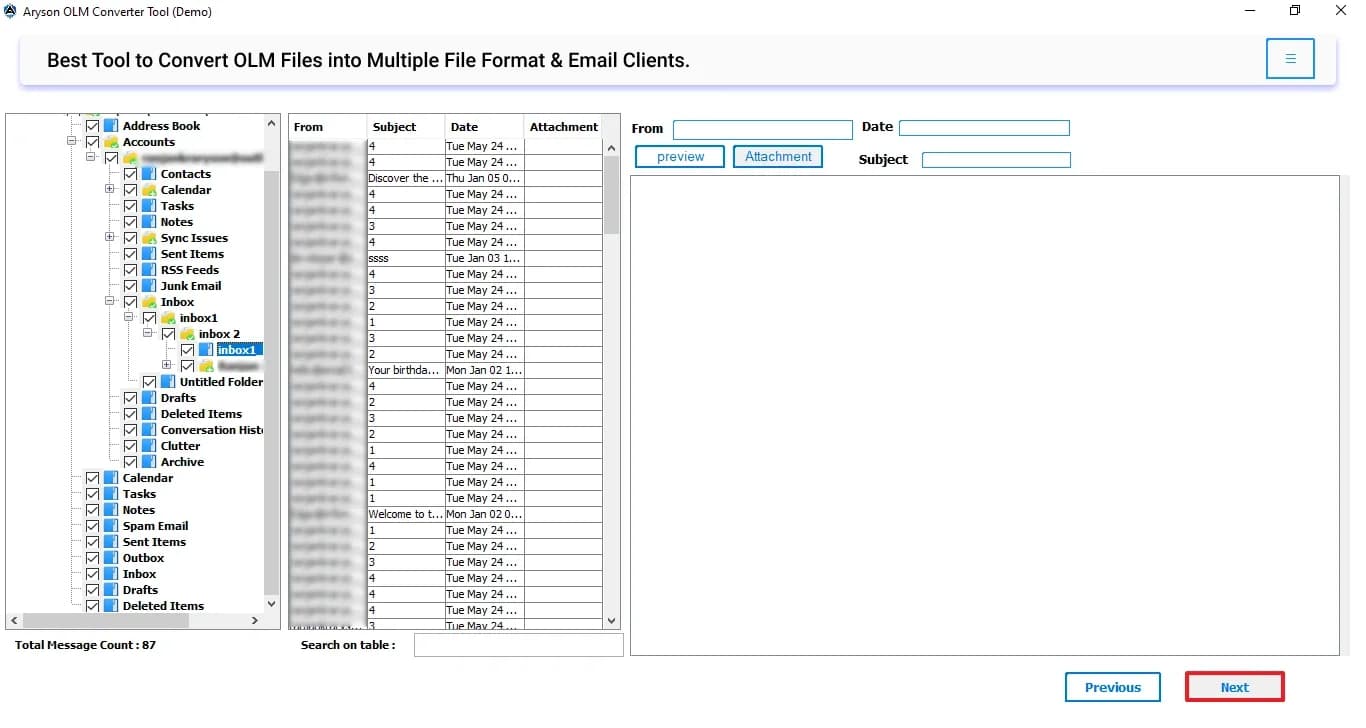
About this app
Aryson Mac OLM to EMLX Converter is a specialized tool for converting Mac Outlook OLM files to EMLX format, enabling seamless migration to Apple Mail. It supports bulk conversion, preserves email metadata and attachments, and offers advanced features like date-range filtering and duplicate removal. The software is compatible with all Windows OS versions and also available for Mac and Linux, making it a versatile solution for email migration needs.
Key features
- 1Bulk OLM to EMLX conversion with metadata and attachment preservation
- 2Date-range filtering and duplicate email removal
- 3Skip attachments or save them to a separate folder
- 4Converts OLM to PST, MBOX, EML, MSG, CSV, HTML and PDF
- 5Works without Outlook installed; Windows, Mac and Linux builds
Target customer profile
Drawn from the product itself, not from a survey.
Demographic
IT professionals managing email migrations
Pain points
Compatibility issues between Outlook for Mac and Apple Mail
Primary needs
Reliable, fast conversion of OLM to EMLX without data loss
Demographic
Researchers with large email archives
Pain points
Difficulty retrieving specific emails from OLM files
Primary needs
Efficient bulk conversion with date-range filtering
Demographic
Small business owners switching email clients
Pain points
Limited technical expertise for manual conversion
Primary needs
User-friendly tool with preview and selective conversion
Scout Review
Written by AI from measured evidence, scored out of 100.
Aryson Mac OLM to EMLX Converter is a functional utility wrapped in a dated, typo-ridden marketing page. The measured fundamentals are strong — 99/100 mobile Lighthouse, full security header stack, 91/100 accessibility audit — but the product surface is a grey Windows-classic three-pane UI, the hero is a 14-line spec dump, and three CTAs compete for the same click. The free tier's 50-items-per-folder cap means you can't really test it before buying. Against SysTools and Stellar it's on par on features and behind on polish and trust signals.
Measure by measure
Usability
55Sections are findable and the FAQ accordion keeps things compact, but the hero dumps ~14 ungrouped bullets and the free tier caps at 50 items per folder, so evaluating it properly takes effort.
Design
44Dated landing page with three competing CTAs, visible copy errors ('Window OS', 'Mcc Outlook'), and a grey Windows-classic demo UI. The comparison table is the one clean, well-structured block.
Speed
88Lighthouse mobile 99/100 with LCP 1.1s, CLS 0 and TBT 92ms; desktop 93/100. Genuinely fast, lightweight marketing page with no measured lag complaints.
Security
76Full header stack verified: HTTPS enforced, HSTS, CSP, frame protection, Referrer-Policy, Permissions-Policy, plus SPF and DMARC (12/12). No published audits or security page found.
Accessibility
70Lighthouse a11y 91/100, but real failures remain: insufficient color contrast, non-sequential headings, small touch targets, no main landmark, and role=presentation conflicts. No WCAG statement found.
Growth
52Real, narrow problem (OLM→EMLX for Apple Mail) with concrete features like date-range filtering and duplicate removal, but it's a commodity converter in a crowded field with no wedge incumbents can't copy.
Improvement areas
- Dated landing page with copy errors and three competing CTAs
- Free tier capped at 50 items per folder — hard to evaluate
- No security page, SOC 2, or data-handling transparency
- Grey Windows-classic demo UI undermines the 'Mac-first' positioning
Design & Usability
The homepage is a dated, spec-sheet-style page: a hero split between a boxed product render and ~14 ungrouped bullets, three CTAs (Download Now, Purchase Now, Download Live Demo) fighting for the same click, and a floating chat bubble overlapping the first screen. Copy errors like 'Window OS' and 'Mcc Outlook' undercut trust on a paid product. The comparison table is the standout — clean checkmarks and a 30-day money-back badge make the free-vs-paid choice legible. Usability is competent but not smooth: sections are findable and the FAQ accordion works, but the free tier caps at 50 items per folder, so real evaluation requires a purchase decision first.
Speed & Security
Speed is the strongest measured dimension: Lighthouse mobile 99/100 with LCP 1.1s, CLS 0 and TBT 92ms, desktop 93/100 — a genuinely lightweight marketing page with no lag complaints in the collected evidence. Security is solid plumbing without the paperwork: HTTPS enforced, HSTS, CSP, frame protection, X-Content-Type-Options, Referrer-Policy and Permissions-Policy all present, plus SPF and DMARC (12/12 on the probe). What's missing is the trust layer buyers of migration tools actually ask for — no SOC 2, ISO, pen-test summary, security page or bug bounty was found, so the compliance story rests entirely on headers.
Accessibility & Growth
Accessibility scores 91/100 on Lighthouse but the failing audits are real: insufficient color contrast, non-sequential heading order, undersized touch targets, a missing main landmark and role=presentation conflicts. No WCAG statement or accessibility page was found. Growth is a judgement on the idea: OLM→EMLX migration for Mac Outlook to Apple Mail is a real, specific problem, and the feature set (bulk conversion, date-range filter, duplicate removal, skip/separate attachments, no Outlook install needed) is concrete. But it's a commodity converter in a crowded category alongside SysTools and Stellar, with no structural wedge — the vendor's own site sells a dozen sibling converters, which signals portfolio breadth rather than product depth.
Conclusion
If you need OLM→EMLX conversion and the price is right, this will probably do the job — the feature list is real and the site loads instantly. But nothing here explains why you'd pick it over SysTools or Stellar, and the copy errors on the sales page don't inspire confidence in the conversion engine behind it. Download the demo, test it against your actual OLM archive, and let the 50-item cap tell you whether it's worth the purchase.
Suggestions for improvement
- Fix the visible copy errors ('Window OS', 'Mcc Outlook', garbled FAQ title) — they're free to fix and cost real trust.
- Consolidate the hero to one primary CTA and move the 14 bullets into grouped feature cards.
- Raise the free-tier cap or offer a time-limited full trial so buyers can test on real archives.
- Publish a security/trust page (data handling, no-upload claims, any audits) to back the strong header stack.
Alternatives comparison
Named competitors, point by point. Nobody paid to appear here or to be left out.
 Aryson Mac OLM to EMLX Converter |  SysTools OLM to EMLX Converter |  Stellar Converter for OLM | |
|---|---|---|---|
| OLM to EMLX conversion | Yes | Yes | Yes |
| Bulk / batch conversion | Yes | Yes | Yes |
| Date-range filtering | Yes | Not stated | Yes (advanced filters) |
| Duplicate email removal | Yes | Not stated | Not stated |
| Converts to other formats (PST, MBOX, EML, MSG, PDF) | Yes | EMLX focus | Yes (PST, EML, MSG, EMLX) |
| Free trial / demo | Yes (50 items per folder) | Yes (limited) | Yes (limited) |
| Platform support | Windows, Mac, Linux | Windows | Windows |
SysTools OLM to EMLX Converter
A tool that converts OLM files to EMLX format with support for batch conversion and attachment preservation.
Stellar Converter for OLM
Software that converts OLM files to PST, EML, MSG, and other formats, including EMLX, with advanced filtering options.
Comparing options? See Aryson Mac OLM to EMLX Converter alternatives, scored side by side
More Productivity apps
View all Productivity
Puzzly – B2B Lead Generation & Sales Intelligence Platform
92Puzzly is an all-in-one B2B lead generation platform that...

Qamarero
92An all-in-one hospitality software for restaurants and ba...

EmbedMyReviews
92White-label reputation management software for agencies s...

StoryPad
92Privacy-first open source journal app with a continuous t...

Notion
92All-in-one AI workspace for docs, projects, and knowledge...

The Stack Newsletter
92A weekly newsletter delivering curated tech jobs, intervi...

Vibe Coding Agent Skills
92A free, open-source platform offering 110 AI agent skills...

QRBliss
91Branded QR codes with AI Brand Sync, 15 free dynamic code...

Gerty
91Private, local AI assistant for Mac that runs offline

Strukchad Property Management
91Property management for Kenyan letting agents: rent invoices raised every month, M-Pesa rent prompts to tenants, arrears tracking and landlord statements.

CC Switch
91Open-source desktop app for switching AI coding providers...

PitchWhip
90AI cold call scripts & direct dials from LinkedIn


A platform dedicated to providing unbiased reviews of newly launched applications, analyzing everything from their features to their full potential.
info@scoutforge.net© 2026 Scoutforge. All rights reserved.
