Cycling through all six. Tap any point to stop.
Measured on six things
Merge multiple Mac PST files into one safely and easily.
Design
46Dated homepage with competing CTAs (orange Select, blue Download, outlined Purchase) and no clear primary action. Stale spec copy (Pentium, Mountain Lion) and a Windows toggle on a Mac-only tool hurt credibility, though the in-app screenshot is coherent.
Screenshots
1 / 1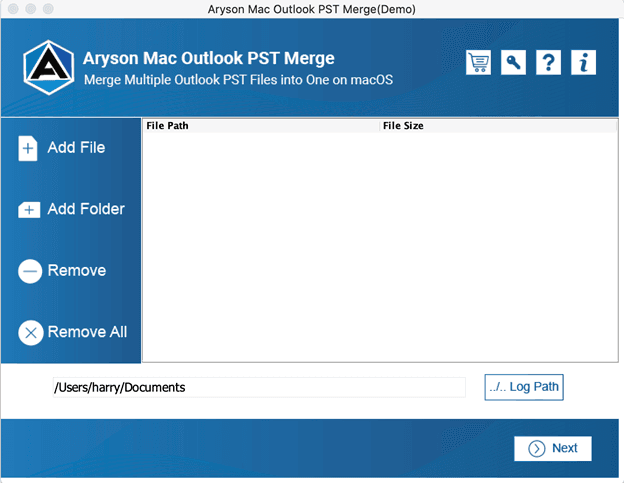
About this app
Aryson Mac Outlook PST Merge is a dedicated utility for macOS that combines multiple Outlook PST files into a single PST file without data loss. It preserves the original folder hierarchy and supports all Outlook items including emails, contacts, calendars, tasks, and notes. Key features include merging into a new or existing PST, applying date range filters, removing duplicate emails based on To/From/Subject/Date, stripping attachments, and adding password protection to the merged file. The tool handles both ANSI and UNICODE PST formats, supports password-protected PSTs, and is compatible with Outlook 2019 and earlier. It works on Mac OS X 10.8 and above. A free demo version allows merging 25 emails per folder, while the full license costs $34. The software offers a simple three-step process: add PST files, choose merge options, and save. It does not require Microsoft Outlook to be installed. Ideal for users who need to consolidate PST archives, remove duplicates, or prepare clean ...
Key features
- 1Merge multiple Outlook PST files into one new or existing PST on macOS, preserving folder hierarchy.
- 2Remove duplicate emails based on To/From/Subject/Date and strip attachments before merging.
- 3Apply date-range filters and password-protect the merged PST; supports ANSI and UNICODE formats.
Target customer profile
Drawn from the product itself, not from a survey.
Demographic
IT administrators and support teams managing email archives
Pain points
Multiple scattered PST files, duplicate emails, risk of data loss during manual merging
Primary needs
Batch merge PST files while preserving folder structure and removing duplicates
Demographic
Small business owners and professionals using Outlook on Mac
Pain points
Difficulty consolidating PST backups, no native Mac tool for PST merging
Primary needs
Simple, reliable tool to combine PST files into one organized archive
Demographic
Legal and compliance officers handling email evidence
Pain points
Need to filter emails by date range, remove attachments, and secure merged PSTs
Primary needs
Date filtering, attachment removal, and password protection for merged PST files
Scout Review
Written by AI from measured evidence, scored out of 100.
Aryson Mac Outlook PST Merge is a functional niche utility wrapped in a dated storefront. The core promise — merge multiple PSTs on macOS with dedupe, date filtering, attachment stripping and password protection — is real, and the Windows-only competition gives it a legitimate wedge. The in-app flow is linear and the security headers are genuinely well configured (12/12). But the homepage is stuck in 2014 with competing CTAs, stale Pentium-era specs and a Windows toggle on a Mac-only product, mobile performance lags at 70/100 with a 4.4s LCP, and accessibility fails seven audits with no statement in sight. At $34 with a 25-email-per-folder demo, it's a reasonable buy for a Mac admin with a PST pile — just don't expect the site to inspire confidence.
Measure by measure
Usability
58Download and platform selection sit high on the page, and the in-app flow is linear (Add File → options → Next). But the FAQ hides answers behind clicks, the empty file list gives no drag-and-drop cue, and dense small body text makes long sections a slog.
Design
46Dated homepage with competing CTAs (orange Select, blue Download, outlined Purchase) and no clear primary action. Stale spec copy (Pentium, Mountain Lion) and a Windows toggle on a Mac-only tool hurt credibility, though the in-app screenshot is coherent.
Speed
57Desktop Lighthouse score of 99/100 is excellent, but mobile drags at 70/100 with a 4.4s LCP and 0.188 CLS — both past Google's 'good' thresholds. The site is fast on a laptop and sluggish on a phone.
Security
76Full 12/12 security-header checklist: HTTPS enforced, HSTS, CSP, frame protection, Referrer-Policy, Permissions-Policy, plus SPF and DMARC. No published SOC 2/ISO or dedicated security page, which keeps it out of the top tier for a tool handling email archives.
Accessibility
46Lighthouse accessibility 74/100 with seven failing audits: unnamed buttons and links, insufficient contrast, non-sequential headings, user-scalable=no, positive tabindex, and no main landmark. No accessibility statement or WCAG claim anywhere on the site.
Growth
56Real niche: no native macOS PST-merge tool, and both listed alternatives are Windows-based. Concrete differentiators (date filter, dedupe by To/From/Subject/Date, attachment stripping, password protection) give a Mac wedge, but the category is shrinking as archives move to cloud.
Improvement areas
- Homepage design is dated with competing CTAs and stale Pentium/Mountain Lion spec copy.
- Mobile performance lags (Lighthouse 70/100, LCP 4.4s) versus a 99/100 desktop score.
- Seven accessibility failures including unnamed buttons/links, contrast, and blocked pinch-zoom.
- No published SOC 2/ISO or security page despite handling full email archives.
Design & Usability
The homepage reads like a 2014 software store page that never got the memo. Three competing CTAs at the top — an orange Select arrow, a blue Download Now, an outlined Purchase Now — mean the eye has nowhere to land, and the spec table still advertises a Pentium processor and Mountain Lion through Mojave. The in-app screenshot is the one polished thing here: clear blue header, obvious icon buttons, a linear Add File → options → Next flow. Usability is competent once you're inside, but the FAQ hides every answer behind a click and the empty file list offers no drag-and-drop hint, so first-timers get no help exactly where they need it.
Speed & Security
Speed is a tale of two devices: desktop Lighthouse hits 99/100, mobile limps to 70/100 with a 4.4s LCP and 0.188 CLS — both outside Google's 'good' range. For a download-heavy utility page, that mobile gap matters. Security is the strongest dimension: all 12 header checks pass (HTTPS, HSTS, CSP, frame protection, Referrer-Policy, Permissions-Policy) plus SPF and DMARC. What's missing is the paperwork — no SOC 2, no ISO, no security page — which is a real gap for software that ingests entire email archives, even if the transport layer is well configured.
Accessibility & Growth
Accessibility is the weak spot: 74/100 with seven failing audits, including unnamed buttons and links, insufficient contrast, non-sequential headings, a user-scalable=no viewport that blocks pinch-zoom, positive tabindex, and no main landmark. There's no accessibility statement or WCAG claim to suggest these are on anyone's roadmap. Growth is more interesting: the product names a genuine gap — no native macOS PST merger, and both listed alternatives (SysTools, Stellar) are Windows tools. The feature set (date-range filter, dedupe by To/From/Subject/Date, attachment stripping, password protection, ANSI/UNICODE support) is a real differentiator for Mac users. The honest limit is the category itself: PST consolidation is a legacy-archive chore that shrinks as organizations move to cloud mailboxes.
Conclusion
If you're a Mac user staring at a folder of scattered PST archives and both your realistic alternatives are Windows-only, Aryson earns its $34 on functionality alone. The demo caps at 25 emails per folder, which is enough to confirm the merge works before you pay. Go in expecting a competent tool behind an aging website: verify the merge output on a small batch first, keep a backup of the originals, and don't judge the software by the Pentium processor listed in its own spec table.
Suggestions for improvement
- Rebuild the homepage around one primary CTA and remove the Windows toggle from a Mac-only product page.
- Update the Software Specification table — Pentium processors and Mountain Lion–Mojave ranges read as abandoned copy.
- Fix the seven Lighthouse accessibility failures: name buttons and links, raise contrast, add a main landmark, allow pinch-zoom.
- Improve mobile LCP (currently 4.4s) by compressing hero images and deferring non-critical scripts.
Alternatives comparison
Named competitors, point by point. Nobody paid to appear here or to be left out.
 Aryson Mac Outlook PST Merge |  SysTools PST Merge |  Stellar Merge Mailbox for Outlook | |
|---|---|---|---|
| Platform support | macOS (OS X 10.8+) | Windows | Windows |
| Merge into new or existing PST | Yes | Yes | Yes |
| Duplicate email removal | Yes (To/From/Subject/Date) | Yes | Yes |
| Date range filter | Yes | Yes | Yes |
| Remove attachments before merge | Yes | Yes | Yes |
| Password protection on merged PST | Yes | Yes | Yes |
| Free demo limit | 25 emails per folder | Limited demo | Limited demo |
| Starting price | $34 | Paid license | Paid license |
SysTools PST Merge
A Windows-based tool to merge Outlook PST files with options to join, merge, or combine folders.
Stellar Merge Mailbox for Outlook
Merges multiple PST files into one while preserving meta properties and removing duplicates.
Comparing options? See Aryson Mac Outlook PST Merge alternatives, scored side by side
More Productivity apps
View all Productivity
Puzzly – B2B Lead Generation & Sales Intelligence Platform
92Puzzly is an all-in-one B2B lead generation platform that...

Qamarero
92An all-in-one hospitality software for restaurants and ba...

EmbedMyReviews
92White-label reputation management software for agencies s...

StoryPad
92Privacy-first open source journal app with a continuous t...

Notion
92All-in-one AI workspace for docs, projects, and knowledge...

The Stack Newsletter
92A weekly newsletter delivering curated tech jobs, intervi...

Vibe Coding Agent Skills
92A free, open-source platform offering 110 AI agent skills...

QRBliss
91Branded QR codes with AI Brand Sync, 15 free dynamic code...

Gerty
91Private, local AI assistant for Mac that runs offline

Strukchad Property Management
91Property management for Kenyan letting agents: rent invoices raised every month, M-Pesa rent prompts to tenants, arrears tracking and landlord statements.

CC Switch
91Open-source desktop app for switching AI coding providers...

PitchWhip
90AI cold call scripts & direct dials from LinkedIn


A platform dedicated to providing unbiased reviews of newly launched applications, analyzing everything from their features to their full potential.
info@scoutforge.net© 2026 Scoutforge. All rights reserved.
