Cycling through all six. Tap any point to stop.
Measured on six things
Convert Outlook PST files to 12+ formats and email client...
Design
44Dated landing page: chat bubble covers the hero subtitle, workflow diagram text is clipped, hero has typos ('tostr Microsoft 365') and a 17-bullet wall repeated below. The app screenshot itself shows clean macOS chrome and a clear drop zone.
Screenshots
1 / 1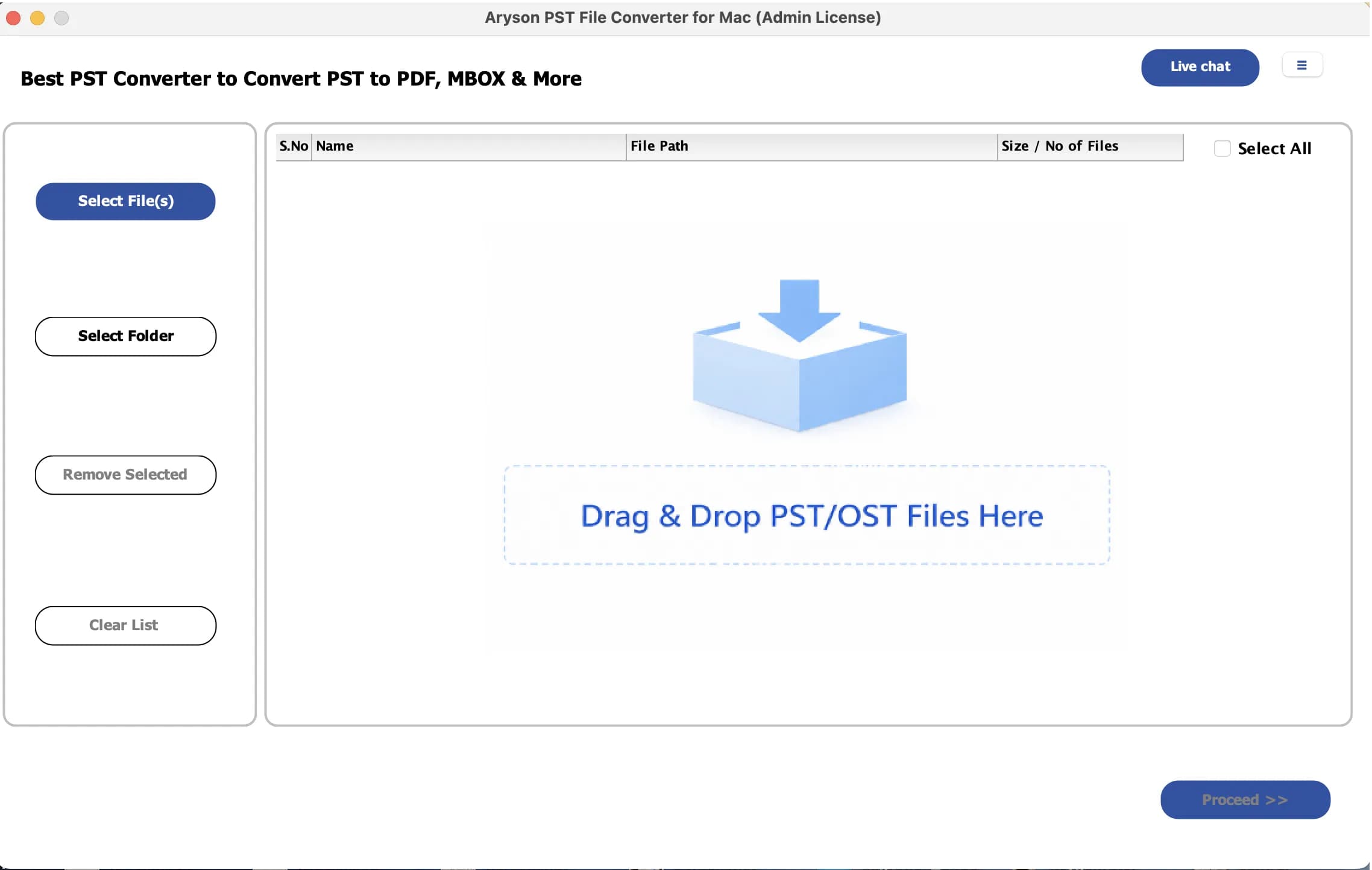
About this app
Aryson Mac PST Converter is a native macOS utility built for users who need to break free from Outlook's Windows-only ecosystem. It converts Outlook PST and OST files into PST, MBOX, EML, MSG, PDF, DOCX, CSV, JSON, MD, ICS, VCF, and PNG, and migrates mailboxes directly into Microsoft 365, Google Workspace, Gmail, Outlook.com, Yahoo Mail, Thunderbird, IMAP, and other email services. Unlike many PST tools that rely on emulators, virtual machines, or a Windows dual-boot, this one runs natively on Intel Macs and Apple Silicon chips (M1 through M4). The tool exports emails, attachments, contacts, calendars, tasks, notes, and custom folders while preserving folder hierarchy, metadata, and formatting. Standout features include batch conversion, an advanced preview panel, date-range filtering, duplicate removal, custom folder naming, splitting of large PST and MBOX files, embedded naming conventions, default-folder mapping for migrations, and a detailed conversion report. The interface is c...
Key features
- 1Native macOS PST/OST conversion on Intel and Apple Silicon (M1-M4), no emulator or Windows dual-boot required.
- 2Exports to PST, MBOX, EML, MSG, PDF, DOCX, CSV, JSON, MD, ICS, VCF and PNG with folder hierarchy preserved.
- 3Direct migration into Microsoft 365, Google Workspace, Gmail, Outlook.com, Yahoo Mail, Thunderbird and IMAP.
Target customer profile
Drawn from the product itself, not from a survey.
Demographic
IT administrators managing Mac migrations in mid-size companies
Pain points
Legacy Outlook PST archives won't open natively on macOS without workarounds or emulators
Primary needs
Reliable batch conversion with intact attachments and folder hierarchy
Demographic
Compliance and legal teams needing archived mailbox exports for audits
Pain points
Converting years of PST data to PDF with verifiable reports is tedious and error-prone
Primary needs
Detailed conversion reports and accurate, timestamped PDF exports
Demographic
Small businesses switching from Windows/Outlook to Google Workspace
Pain points
Manual migration of old PST files into cloud mailboxes is slow and risks misplaced folders
Primary needs
Direct cloud migration with default-folder mapping and duplicate prevention
Demographic
Freelance consultants and power users on Apple Silicon Macs
Pain points
Most PST tools are Windows-first and crash or lag on M-series chips
Primary needs
Native, stable performance and flexible output formats like MBOX, EML, and JSON
Scout Review
Written by AI from measured evidence, scored out of 100.
Aryson Mac PST Converter is a competent niche utility with a genuinely useful premise: convert Outlook PST/OST archives on a Mac without emulators, VMs, or a Windows dual-boot, and push the results straight into Microsoft 365, Google Workspace, Gmail, IMAP or a dozen file formats. The app's own UI — clean macOS chrome, a clear three-column layout, an obvious drag-and-drop target, and a Proceed button that stays disabled until you've added files — is the best thing about it. The marketing site is where it falls apart: a chat bubble covering the hero subtitle, clipped diagram text, a typo in the headline copy, and a 17-bullet feature list repeated verbatim in the grid below. Technically it's solid on security headers (12/12) and acceptable on speed (76/100, though CLS 0.375 is bad), and it's missing the enterprise paperwork — no SOC 2, no ISO, no pen-test — that its stated IT-admin buyer would want before feeding it a corporate mailbox.
Measure by measure
Usability
58CTAs and platform toggle are above the fold, the app's empty state (Select File(s)/Folder, big drop zone, disabled Proceed) is genuinely clear, and a 50-file free trial lowers the bar. The site itself buries the next step under duplicated copy.
Design
44Dated landing page: chat bubble covers the hero subtitle, workflow diagram text is clipped, hero has typos ('tostr Microsoft 365') and a 17-bullet wall repeated below. The app screenshot itself shows clean macOS chrome and a clear drop zone.
Speed
66Lighthouse 76/100 on both mobile and desktop, LCP 1.8s and TBT 203ms are fine, but CLS 0.375 is nearly four times the 'good' threshold — the overlapping chat bubble and tooltip are shifting the hero around on load.
Security
74Clean technical posture: HTTPS enforced, HSTS, CSP, frame protection, X-Content-Type-Options, Referrer-Policy, Permissions-Policy, SPF and DMARC all present (12/12 probe points). No SOC 2, ISO, or pen-test claim surfaced in the collected content.
Accessibility
70Lighthouse 88/100 with real failures: invalid aria-* values, insufficient color contrast, undersized touch targets, no main landmark, and role=none/presentation conflicts. No WCAG statement or a11y page found. Multi-platform coverage (Mac/Windows/Linux) is a plus.
Growth
58Real, specific pain — PST archives don't open on macOS without emulators — and native Apple Silicon plus direct cloud migration is a genuine wedge. But SysTools, Stellar, Kernel and BitRecover all sell the same thing, so the moat is thin.
Improvement areas
- Landing page has a hero typo, clipped diagram text, and a chat bubble covering the subtitle.
- No SOC 2, ISO 27001, or pen-test documentation for a tool handling corporate mailboxes.
- Accessibility failures: invalid aria values, low contrast, small touch targets, no main landmark.
- Feature list is duplicated between the hero bullets and the grid below, with no grouping.
Design & Usability
The product's own interface is the strongest design asset here: the screenshot shows disciplined macOS chrome, a three-column layout with a left action rail, and a dashed drop zone that makes the first action obvious. The website is the weak link. A floating chat bubble and its tooltip cover the hero subtitle on load, the workflow diagram's TARGETS text is clipped at the right edge, the hero carries a typo ('tostr Microsoft 365') and inconsistent product naming, and a 17-bullet feature list is immediately repeated in the grid below. Usability inside the app is better than usability on the site: Select File(s)/Folder plus a large drop target and a correctly disabled Proceed button is a clean empty state, and a 50-file free trial lets people test before buying. The site just makes you read everything twice before you can act.
Speed & Security
Speed is middling and uneven. Lighthouse returns 76/100 on both mobile and desktop, with LCP 1.8s and TBT 203ms both comfortably fine — but CLS 0.375 is nearly four times the 0.1 'good' threshold, and the overlapping chat bubble/tooltip in the hero is the obvious suspect. Fix the widget placement and this dimension improves for free. Security is the strongest measured result: the HTTP/DNS probe scored 12/12, with HTTPS enforced, HSTS, CSP, frame protection, X-Content-Type-Options, Referrer-Policy, Permissions-Policy, SPF and DMARC all in place. What's missing is the paperwork enterprises actually ask for. A tool that ingests whole corporate mailboxes and pushes them into Microsoft 365 or Google Workspace has no SOC 2, ISO 27001, or pen-test claim anywhere in the collected content, which is a real gap for the IT-admin buyer the site names as a target.
Accessibility & Growth
Accessibility lands at 88/100 on Lighthouse, which sounds better than it is once you read the failing audits: invalid aria-* values, insufficient color contrast, touch targets too small or too close, no main landmark, and role=none/presentation conflicts. There's no accessibility statement or WCAG conformance claim on the site, and no evidence of keyboard-navigation testing. Multi-platform coverage (Mac, Windows, Linux) is a genuine plus. On growth, the idea holds up: PST and OST files genuinely don't open natively on macOS without emulators or a Windows dual-boot, and native Apple Silicon support (M1 through M4) plus direct migration into Microsoft 365, Google Workspace, Gmail and IMAP is a specific, demonstrable wedge. The problem is the peer set. SysTools, Stellar, Kernel and BitRecover all sell PST conversion with Mac editions and cloud migration, so Aryson's advantage is execution and price rather than anything structurally defensible. A 13-year-old domain and LinkedIn/YouTube presence show staying power, but the category is crowded and the differentiation is incremental.
Conclusion
If you're a Mac user with a pile of PST files and no interest in spinning up a Windows VM, this does the job and the 50-file free trial lets you confirm that before paying. If you're an IT admin evaluating it for a mid-size migration, ask for security documentation first — the header hygiene is excellent but there's no published audit. And if you're the maker: kill the chat bubble, fix the hero typo, and group the feature list. Those three changes cost nothing and would move the design score more than any redesign.
Suggestions for improvement
- Move or delay the chat bubble so it stops covering the hero subtitle and causing the 0.375 CLS.
- Fix the 'tostr Microsoft 365' typo and standardize the product name across the page.
- Group the 17-bullet hero list into 4-5 themed categories and delete the duplicate feature grid.
- Publish a security page with SOC 2 status, data-handling details, and a pen-test summary for IT buyers.
Alternatives comparison
Named competitors, point by point. Nobody paid to appear here or to be left out.
 Aryson Mac PST Converter |  SysTools Outlook PST Converter |  Stellar Converter for PST |  Kernel for PST Converter |  MBOX to PST Converter by BitRecover | |
|---|---|---|---|---|---|
| Native macOS support (no VM/emulator) | Yes — native on Intel and Apple Silicon M1-M4 | Separate Mac edition available | Mac edition available | Primarily Windows; Mac via separate tool | Cross-platform toolkit |
| Direct cloud migration (Microsoft 365, Google Workspace, IMAP) | Yes — M365, Google Workspace, Gmail, Outlook.com, Yahoo, IMAP, Thunderbird | Yes — cloud migrations supported | Yes — exports to email clients and cloud | Yes — cloud platforms supported | Yes — direct imports into webmail and IMAP |
| Batch conversion with duplicate removal and date filters | Yes — batch, duplicate removal, date range, splitting, custom naming | Yes — batch processing | Yes — batch conversion | Yes — enterprise-friendly batch processing | Yes — batch migration |
| Free trial available | Yes — 50 files/folders | Trial version available | Trial version available | Trial version available | Trial version available |
| Published security/compliance certification | Not found in collected content | Not verified in this review | Not verified in this review | Not verified in this review | Not verified in this review |
SysTools Outlook PST Converter
A popular cross-platform PST conversion suite that handles PST to MBOX, EML, PDF, and cloud migrations, with a separate Mac edition available.
Stellar Converter for PST
Well-known PST conversion and repair tool that exports mailboxes to multiple formats and email clients, often used alongside Stellar's data recovery lineup.
Kernel for PST Converter
A long-standing PST export tool that converts to PDF, MBOX, EML, MSG, and cloud platforms, with enterprise-friendly batch processing.
MBOX to PST Converter by BitRecover
Broad email migration toolkit that covers PST and MBOX conversions and direct imports into webmail and IMAP accounts.
Comparing options? See Aryson Mac PST Converter alternatives, scored side by side
More Productivity apps
View all Productivity
Puzzly – B2B Lead Generation & Sales Intelligence Platform
92Puzzly is an all-in-one B2B lead generation platform that...

Qamarero
92An all-in-one hospitality software for restaurants and ba...

EmbedMyReviews
92White-label reputation management software for agencies s...

StoryPad
92Privacy-first open source journal app with a continuous t...

Notion
92All-in-one AI workspace for docs, projects, and knowledge...

The Stack Newsletter
92A weekly newsletter delivering curated tech jobs, intervi...

Vibe Coding Agent Skills
92A free, open-source platform offering 110 AI agent skills...

QRBliss
91Branded QR codes with AI Brand Sync, 15 free dynamic code...

Gerty
91Private, local AI assistant for Mac that runs offline

Strukchad Property Management
91Property management for Kenyan letting agents: rent invoices raised every month, M-Pesa rent prompts to tenants, arrears tracking and landlord statements.

CC Switch
91Open-source desktop app for switching AI coding providers...

PitchWhip
90AI cold call scripts & direct dials from LinkedIn


A platform dedicated to providing unbiased reviews of newly launched applications, analyzing everything from their features to their full potential.
info@scoutforge.net© 2026 Scoutforge. All rights reserved.
