Cycling through all six. Tap any point to stop.
Measured on six things
Migrate MBOX files to Microsoft 365 mailboxes with mappin...
Design
44Dated homepage with a dense 17-bullet hero, a duplicated 'Step 03' label, and a chat popup that covers the intro copy. Consistent brand blue and tidy stat tiles are the bright spots.
Screenshots
1 / 1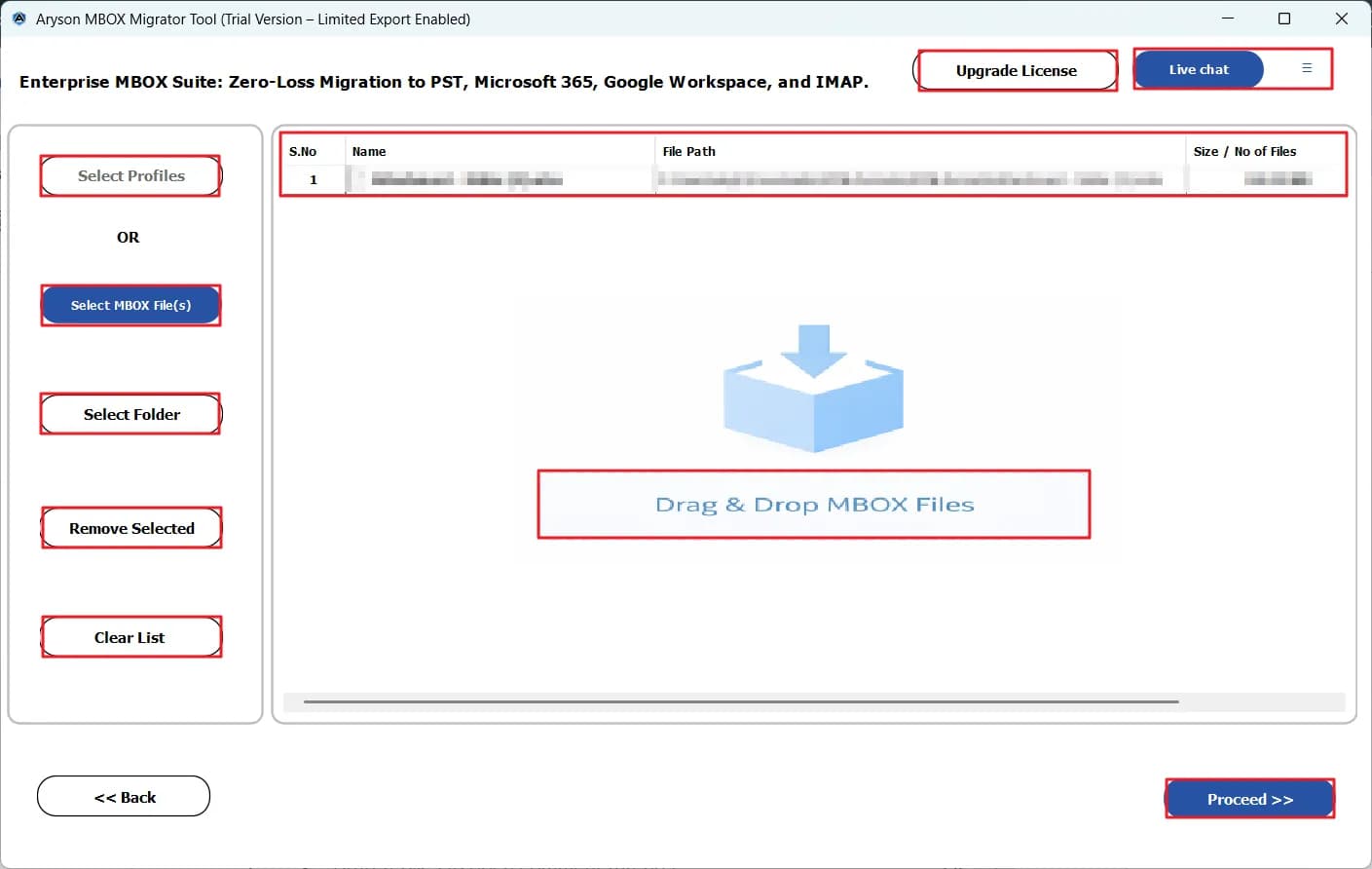
About this app
Aryson MBOX to Office 365 Migration Tool is a Windows application built to move mailbox data from MBOX-based email clients into Microsoft 365 user mailboxes. It supports MBOX files from Thunderbird, Apple Mail, Google Takeout, Eudora, Entourage, Opera Mail, SeaMonkey, and many other clients, and can load complete Thunderbird profiles automatically. The tool provides bulk migration of multiple MBOX files, mailbox mapping for 1:1, 1:M, M:1 and M:M scenarios, CSV-based mapping for multiple users, date-range filters, duplicate removal, and skip-previously-migrated options. It preserves folder hierarchy, attachments, headers, HTML and plain-text formatting, and offers previews of emails, attachments and MIME details before migration. Office 365 authentication uses OAuth 2.0 or client/secret credentials, and a monitoring panel tracks processed, completed and failed items. The free trial allows migration of up to 50 emails per MBOX file, while the full version removes that limit. It runs o...
Key features
- 1Bulk MBOX to Microsoft 365 migration with 1:1, 1:M, M:1 and M:M mailbox mapping plus CSV-based mapping for multiple users.
- 2Preserves folder hierarchy, attachments, headers, HTML/plain-text formatting; supports Thunderbird profiles and .sbd folders.
- 3Date-range filters, duplicate removal, skip-previously-migrated, attachment options, and OAuth 2.0 / client-secret authentication.
- 4Free trial migrates up to 50 emails per MBOX file; full version removes the limit.
Target customer profile
Drawn from the product itself, not from a survey.
Demographic
IT administrators managing Microsoft 365 tenants
Pain points
Manual mailbox migration is slow and error-prone across many users
Primary needs
Bulk MBOX migration with mailbox mapping and progress monitoring
Demographic
Small and mid-sized businesses migrating from Thunderbird or Apple Mail
Pain points
Losing folder structure and attachments during email migration
Primary needs
Preserve email data, folders and attachments into Office 365
Demographic
Microsoft 365 consultants and migration service providers
Pain points
Handling large or repeated migrations without duplicates
Primary needs
Filters, duplicate removal, skip-existing and CSV-based mapping
Scout Review
Written by AI from measured evidence, scored out of 100.
Aryson's MBOX to Office 365 Migration Tool is a workmanlike Windows utility for a real problem: getting Thunderbird, Apple Mail and Google Takeout mailboxes into Microsoft 365 without losing folder structure or attachments. The feature set is genuinely deep — mailbox mapping across four scenarios, CSV mapping, date filters, duplicate removal, skip-existing, OAuth 2.0 — and the 50-email trial lets buyers test before paying. The website, however, is dated and slightly sloppy (duplicated step labels, a chat popup over the hero, a 17-bullet spec-sheet hero), and the security story is all claims and no certificates. It's a competent tool wrapped in a mediocre storefront.
Measure by measure
Usability
62Primary Download/Purchase CTAs sit above the fold, the desktop app groups actions cleanly, and the 50-email trial limit is stated everywhere. Long wrapping tab labels and a cramped 'Download Live Demo' line drag it down.
Design
44Dated homepage with a dense 17-bullet hero, a duplicated 'Step 03' label, and a chat popup that covers the intro copy. Consistent brand blue and tidy stat tiles are the bright spots.
Speed
68Lighthouse mobile 77/100 with a fast 1.8s LCP and low 32ms TBT, but a 0.477 CLS means the page visibly jumps around as it loads. Desktop score of 67 is softer.
Security
56HTTPS, a privacy/EULA link, OAuth 2.0 and client/secret auth for M365, and a 'GDPR Compliant' claim. No published SOC 2/ISO audit, security page, or bug bounty found — normal for this vendor tier.
Accessibility
58Lighthouse a11y 81/100, but failing audits include unnamed buttons, insufficient color contrast, non-sequential headings, broken ARIA roles and a missing main landmark. No WCAG statement published.
Growth
58Real, specific problem (bulk MBOX→M365 with mapping and dedupe) aimed at a clear buyer, with genuine differentiators over Microsoft's free importer. But it's a crowded utility niche with no network effect.
Improvement areas
- Dated homepage with a duplicated 'Step 03' label and a chat popup overlapping the hero copy.
- No published security audit, security page, or bug bounty despite handling tenant credentials.
- Accessibility failures: unnamed buttons, insufficient contrast, non-sequential headings, broken ARIA roles.
- 17-bullet hero reads as a spec sheet; needs outcome-focused copy and a clearer value pitch.
Design & Usability
The homepage is functional but shows its age: a 17-bullet hero, a duplicated 'Step 03' card, and a live-chat popup parked over the intro sentence make the top of the page feel unfinished. The consistent brand blue and orderly stat tiles are the strongest visual moments. Usability is better than design — Download and Purchase CTAs are above the fold, the desktop app groups its actions cleanly, and the 50-email trial limit is stated in three places so buyers aren't surprised. Long wrapping tab labels and a cramped red 'Download Live Demo' line are the weak spots. Competent, not polished.
Speed & Security
Speed is a mixed bag: Lighthouse mobile scores 77/100 with a strong 1.8s LCP and low 32ms TBT, but a 0.477 CLS means the page visibly shifts as it loads, and desktop drops to 67. Security is table-stakes for this vendor tier — HTTPS, a privacy/EULA link, OAuth 2.0 and client/secret auth for M365, and a 'GDPR Compliant' claim. What's missing is anything verifiable: no SOC 2, no ISO, no security page, no bug bounty. For an IT-admin tool that touches tenant credentials, that's a gap worth noting, though not unusual for a utility vendor of this size.
Accessibility & Growth
Accessibility lands at 81/100 on Lighthouse, but the failing audits are the ones that actually bite: buttons without accessible names, insufficient color contrast, headings out of order, broken ARIA roles and no main landmark. No WCAG statement is published. Growth is the more interesting question — the problem is real (bulk MBOX→M365 with 1:1/1:M/M:1/M:M mapping, CSV mapping, dedupe, skip-existing) and the buyer is specific. But it competes with Microsoft's free Import Service and Stellar's near-identical pitch, and the differentiators are features, not a moat. A solid niche utility, not a category-definer.
Conclusion
If you're an IT admin with a pile of MBOX files and a Microsoft 365 tenant, this does the job and the trial is honest about its limits. Just don't expect the polish of a modern SaaS product — the site looks like it was last redesigned when Thunderbird was still cool, and the 'GDPR Compliant' tile is a claim, not an audit. Try the 50-email trial on your real data before you buy, and compare against Stellar and Microsoft's free importer first. It's a solid B-minus that knows exactly what it's for.
Suggestions for improvement
- Fix the duplicated 'Step 03' label and the chat popup overlapping the hero intro copy — both are visible trust-killers on first load.
- Replace the 17-bullet hero list with 4-5 outcome-focused bullets and move the rest to a features page.
- Publish a security page with OAuth details, data-handling notes, and any audit status — IT admins will look for it.
- Fix the accessibility failures: name the unnamed buttons, correct heading order, raise contrast, and add a main landmark.
Alternatives comparison
Named competitors, point by point. Nobody paid to appear here or to be left out.
 Aryson MBOX to Office 365 Migration Tool |  Microsoft 365 Import Service |  Stellar Converter for MBOX | |
|---|---|---|---|
| Direct MBOX to Microsoft 365 migration | Yes — direct MBOX to M365 with OAuth 2.0 | No — imports PST files, not MBOX directly | Yes — MBOX to PST and direct export to Office 365 |
| Mailbox mapping (1:1, 1:M, M:1, M:M) and CSV mapping | Yes — all four scenarios plus CSV mapping | Limited — CSV mapping for PST import | Partial — export to Office 365, mapping less granular |
| Duplicate removal and skip-previously-migrated | Yes — both options | No — not a built-in feature | Partial — duplicate handling varies |
| Free trial / free tier | Yes — 50 emails per MBOX file | Free — included with Microsoft 365 subscription | Yes — trial version available |
| Platform | Windows desktop app | Web-based Microsoft 365 admin center | Windows desktop app |
Microsoft 365 Import Service
Microsoft's built-in service for importing PST files and mailbox data into Microsoft 365, often used for enterprise migrations.
Stellar Converter for MBOX
A third-party tool that converts MBOX files to PST and other formats, with options to export directly to Office 365.
Comparing options? See Aryson MBOX to Office 365 Migration Tool alternatives, scored side by side
More Productivity apps
View all Productivity
Puzzly – B2B Lead Generation & Sales Intelligence Platform
92Puzzly is an all-in-one B2B lead generation platform that...

Qamarero
92An all-in-one hospitality software for restaurants and ba...

EmbedMyReviews
92White-label reputation management software for agencies s...

StoryPad
92Privacy-first open source journal app with a continuous t...

Notion
92All-in-one AI workspace for docs, projects, and knowledge...

The Stack Newsletter
92A weekly newsletter delivering curated tech jobs, intervi...

Vibe Coding Agent Skills
92A free, open-source platform offering 110 AI agent skills...

QRBliss
91Branded QR codes with AI Brand Sync, 15 free dynamic code...

Gerty
91Private, local AI assistant for Mac that runs offline

Strukchad Property Management
91Property management for Kenyan letting agents: rent invoices raised every month, M-Pesa rent prompts to tenants, arrears tracking and landlord statements.

CC Switch
91Open-source desktop app for switching AI coding providers...

PitchWhip
90AI cold call scripts & direct dials from LinkedIn


A platform dedicated to providing unbiased reviews of newly launched applications, analyzing everything from their features to their full potential.
info@scoutforge.net© 2026 Scoutforge. All rights reserved.
