Cycling through all six. Tap any point to stop.
Measured on six things
Convert Outlook MSG files to MBOX for Thunderbird, Apple ...
Design
44Dated but organized landing page. The comparison table and feature grid are clean, but a chat tooltip overlaps the hero copy, a card is cut off mid-sentence, and four competing CTAs plus 2009-era requirements undercut credibility.
Screenshots
1 / 1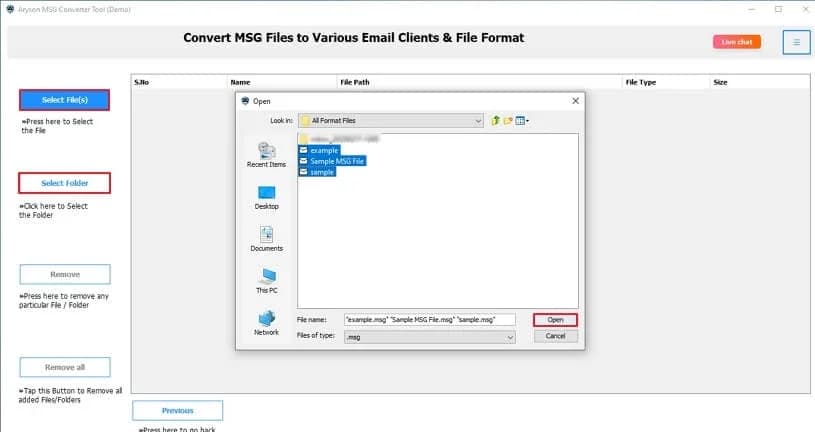
About this app
Aryson MSG to MBOX Converter is a dedicated utility that converts Outlook MSG files into MBOX format, making it easy to migrate emails to Thunderbird, Apple Mail, SeaMonkey, and other MBOX-compatible clients. It also supports exporting MSG to PST, PDF, EML, EMLX, HTML, CSV, DOC, and image formats, as well as direct migration to Gmail, G Suite, Office 365, and IMAP accounts. Key features include batch conversion, preview before export, date filters, duplicate removal, and support for both ANSI and Unicode MSG files. The tool works independently of Outlook and is available for Windows, Mac, and Linux, with a free version that converts up to 50 emails per folder.
Key features
- 1Batch converts Outlook MSG files to MBOX without requiring Outlook installed
- 2Preview emails and attachments before export, with date filters and duplicate removal
- 3Exports to PST, PDF, EML, EMLX, HTML, CSV, DOC, and images; migrates to Gmail, Office 365, IMAP
- 4Free version converts up to 50 emails per folder; Windows, Mac, and Linux builds
Target customer profile
Drawn from the product itself, not from a survey.
Demographic
IT administrators and email migration specialists
Pain points
Migrating large volumes of MSG files manually is slow and error-prone; preserving folder structure and metadata is critical.
Primary needs
Batch conversion, data integrity, support for multiple formats and platforms, and a reliable, repeatable process.
Demographic
Legal professionals and compliance officers
Pain points
Email evidence must be preserved with metadata intact; converting to MBOX for archiving or review is often required.
Primary needs
Accurate conversion with metadata retention, secure handling, and the ability to filter by date or remove duplicates.
Demographic
Small business owners and non-technical users switching email clients
Pain points
Limited technical knowledge makes complex migration tools intimidating; fear of losing attachments or emails during conversion.
Primary needs
A simple, intuitive interface, preview before conversion, and a free trial to test the tool before purchasing.
Scout Review
Written by AI from measured evidence, scored out of 100.
Aryson MSG to MBOX Converter is a competent, long-running utility from a 13-year-old vendor, wrapped in a dated but functional marketing site. The technical fundamentals are strong — a 100/100 mobile Lighthouse score and a clean 12/12 security-header sweep — while design and accessibility lag behind. The product itself covers the table stakes for this category: batch conversion, preview, date filters, duplicate removal, ANSI/Unicode support, and a free 50-email trial. Against SysTools, Stellar, and GainTools it's on par rather than ahead, and the missing compliance documentation is the clearest gap for the legal and enterprise buyers it targets.
Measure by measure
Usability
58Clear labelled nav (Features, Specs, Screenshots, Video, FAQs) and a free 50-email-per-folder trial help technical buyers. But the OS toggles are easy to miss and dense feature paragraphs slow scanning for non-technical users.
Design
44Dated but organized landing page. The comparison table and feature grid are clean, but a chat tooltip overlaps the hero copy, a card is cut off mid-sentence, and four competing CTAs plus 2009-era requirements undercut credibility.
Speed
88Lighthouse mobile 100/100 (LCP 1.1s, CLS 0, TBT 62ms) and desktop 95/100. The marketing site is genuinely fast and stable, with no lag complaints found in the collected evidence.
Security
74Full header hygiene: HTTPS enforced, HSTS, CSP, frame protection, Referrer and Permissions policies, plus SPF and DMARC (12/12 checklist). No published SOC 2, ISO, or bug bounty found, so it stays mid-band.
Accessibility
68Lighthouse a11y 91/100, but real failures remain: low color contrast, non-sequential headings, small touch targets, and no main landmark. No accessibility statement or WCAG claim on the site.
Growth
54A real, recurring migration problem with a specific wedge: Outlook-independent batch conversion with date filters and duplicate removal. But it's a crowded commodity niche against SysTools, Stellar, and GainTools with little structural moat.
Improvement areas
- Hero layout: tooltip overlaps copy, a card is truncated, and four competing CTAs dilute the primary action
- No published SOC 2, ISO 27001, or bug bounty page for legal and enterprise buyers
- Accessibility gaps: contrast, heading order, touch targets, no main landmark, no WCAG statement
- Dated system requirements and generic stock-silhouette 'expert reviews' weaken credibility
Design & Usability
The site is organized like someone who knows their buyer: Features, Specifications, Screenshots, Video, FAQs all labelled and findable. The comparison table is genuinely scannable. But the hero is a traffic jam — Download Now, Purchase Now, a Live Demo link, and OS toggles all fighting for the same click, with a chat tooltip parked on top of the intro copy and a feature card that ends mid-sentence. For the non-technical SMB switcher this product claims to serve, that's a rough first impression. The free 50-emails-per-folder trial is the right hook; it just needs a hero that points at it.
Speed & Security
Speed is the standout: Lighthouse mobile 100/100 with a 1.1s LCP and zero layout shift, desktop 95. The marketing site is fast and stable, and no lag complaints surfaced in the collected evidence. Security is solid on the fundamentals — HTTPS enforced, HSTS, CSP, frame protection, Referrer and Permissions policies, SPF and DMARC, a clean 12/12 on the header checklist. What's missing is the paperwork enterprise buyers ask for: no SOC 2, ISO 27001, or bug bounty page was found. For a tool handling legal and compliance email archives, that documentation gap is the thing to close.
Accessibility & Growth
Accessibility scores 91/100 on Lighthouse but the failing audits are real: insufficient contrast, headings out of sequence, touch targets too small, no main landmark. There's no accessibility statement or WCAG claim anywhere on the site, so buyers with procurement requirements have nothing to point at. Growth is the harder question. MSG-to-MBOX conversion is a genuine, recurring pain for IT admins and legal teams, and Aryson's wedge — Outlook not required, batch processing, date filters, duplicate removal, multi-format and cloud export — is concrete. But the category is a commodity: SysTools, Stellar, and GainTools sell near-identical tools, and migration is a one-time purchase per customer. The idea can sustain a business; it won't compound.
Conclusion
If you need to move Outlook MSG files into Thunderbird, Apple Mail, or an archive without installing Outlook, this does the job and lets you test 50 emails per folder first. The site loads fast and the security headers are properly configured. Where it falls short is polish and proof: a crowded hero, a broken card, no accessibility statement, and no SOC 2 or ISO page for compliance-minded buyers. Compare the free-trial limits and export formats against SysTools and Stellar before you buy — the feature sets are close enough that price and support will decide it.
Suggestions for improvement
- Fix the hero: one primary CTA, move the chat tooltip off the intro copy, and repair the truncated feature card.
- Publish a security/compliance page with SOC 2 or ISO status and a vulnerability contact to satisfy legal and enterprise buyers.
- Add an accessibility statement and fix the failing audits: contrast, heading order, touch targets, main landmark.
- Update the system requirements section — 2009-era processor and server versions undercut credibility on a current product.
Alternatives comparison
Named competitors, point by point. Nobody paid to appear here or to be left out.
 Aryson MSG to MBOX Converter |  SysTools MSG to MBOX Converter |  Stellar Converter for MSG |  GainTools MSG to MBOX Converter | |
|---|---|---|---|---|
| Batch conversion of multiple MSG files at once | Yes, unlimited batch conversion | Yes, batch support | Yes, batch conversion | Yes, batch conversion |
| Preview emails and attachments before export | Yes | Yes | Yes | Yes |
| Date filter and duplicate removal | Yes, both | Yes, filtering options | Yes | Yes, advanced filtering |
| Additional export formats beyond MBOX | PST, PDF, EML, EMLX, HTML, CSV, DOC, images | MBOX and other formats | MBOX, PST, EML and more | MBOX focused |
| Free trial limit | 50 emails per folder | Limited free trial | Free demo version | Free trial available |
| Platform support | Windows, Mac, Linux | Windows | Windows | Windows |
SysTools MSG to MBOX Converter
A popular tool for converting MSG files to MBOX with batch support and preview features.
Stellar Converter for MSG
Converts MSG files to MBOX, PST, EML, and other formats with a user-friendly interface.
GainTools MSG to MBOX Converter
An affordable option for batch MSG to MBOX conversion with advanced filtering options.
Comparing options? See Aryson MSG to MBOX Converter alternatives, scored side by side
More Productivity apps
View all Productivity
Puzzly – B2B Lead Generation & Sales Intelligence Platform
92Puzzly is an all-in-one B2B lead generation platform that...

Qamarero
92An all-in-one hospitality software for restaurants and ba...

EmbedMyReviews
92White-label reputation management software for agencies s...

StoryPad
92Privacy-first open source journal app with a continuous t...

Notion
92All-in-one AI workspace for docs, projects, and knowledge...

The Stack Newsletter
92A weekly newsletter delivering curated tech jobs, intervi...

Vibe Coding Agent Skills
92A free, open-source platform offering 110 AI agent skills...

QRBliss
91Branded QR codes with AI Brand Sync, 15 free dynamic code...

Gerty
91Private, local AI assistant for Mac that runs offline

Strukchad Property Management
91Property management for Kenyan letting agents: rent invoices raised every month, M-Pesa rent prompts to tenants, arrears tracking and landlord statements.

CC Switch
91Open-source desktop app for switching AI coding providers...

PitchWhip
90AI cold call scripts & direct dials from LinkedIn


A platform dedicated to providing unbiased reviews of newly launched applications, analyzing everything from their features to their full potential.
info@scoutforge.net© 2026 Scoutforge. All rights reserved.
