Cycling through all six. Tap any point to stop.
Measured on six things
Bulk manage Office 365 users, signatures, and disclaimers
Design
46Dated, assembled-from-parts landing page: overlapping chat tooltip, mismatched container styles, keyword-stuffed copy and a Windows 98/NT/95 support table undercut a coherent blue-orange brand.
Screenshots
1 / 1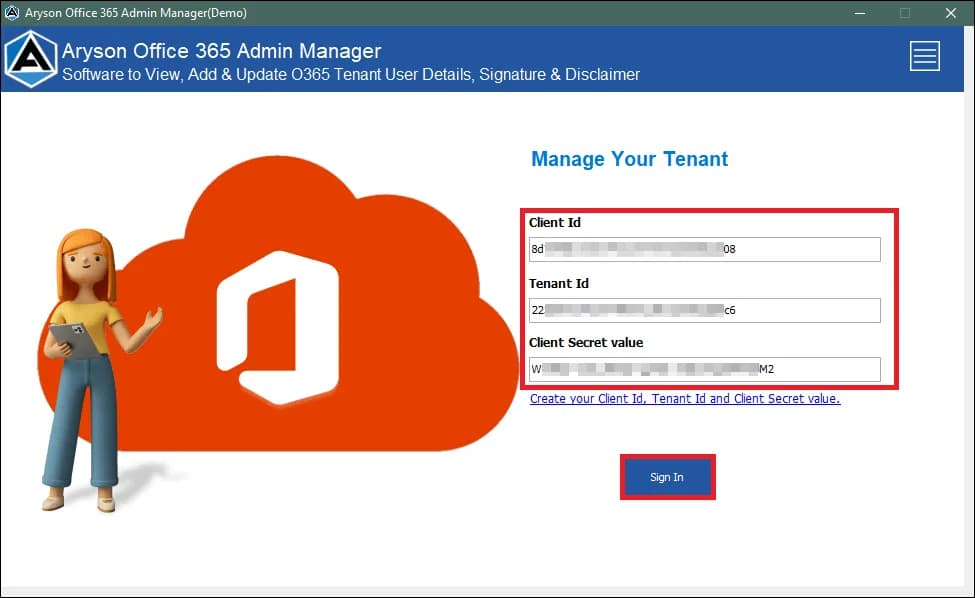
About this app
Aryson Office 365 Admin Manager is a Windows-based tool for IT admins and managed service providers who need to efficiently manage Office 365 tenant users. It allows bulk addition, editing, and export of user details, applies custom email signatures and disclaimers across accounts, and imports external contacts via CSV into the Global Address List. With a free version covering up to 5 users or 25 emails, it offers a practical solution for organizations looking to streamline Office 365 administration without complex scripting.
Key features
- 1Bulk view, add and edit Office 365 tenant users through a GUI instead of PowerShell
- 2Apply custom email signatures and disclaimers across multiple users at once
- 3Import external CSV contacts into the Global Address List and manage user details
Target customer profile
Drawn from the product itself, not from a survey.
Demographic
IT administrators in mid-sized enterprises
Pain points
Manual user management, inconsistent signatures, time-consuming bulk updates
Primary needs
Efficient bulk user management, centralized signature and disclaimer control
Demographic
Managed service providers (MSPs)
Pain points
Managing multiple tenants, lack of automation, inconsistent branding across clients
Primary needs
Multi-tenant support, quick deployment of signatures and disclaimers, CSV import/export
Demographic
Small business owners with limited IT staff
Pain points
Complex PowerShell commands, limited time for administrative tasks
Primary needs
Simple GUI tool, one-click signature application, easy user import/export
Scout Review
Written by AI from measured evidence, scored out of 100.
Aryson Office 365 Admin Manager is a Windows desktop utility that wraps common Office 365 tenant chores — viewing and editing users, applying signatures and disclaimers in bulk, and importing external CSV contacts into the Global Address List — in a GUI instead of PowerShell. The free tier covers 5 users or 25 emails, which is enough to evaluate but not to run a real tenant. The product's core value proposition is legitimate: scripting tenant changes is error-prone, and a click-through tool lowers the bar for smaller IT teams and MSPs. The execution around it is uneven. The website is dated and keyword-heavy, the free demo is visually buried, and the trial limits are hard to find. Security headers are excellent but unbacked by audits. Accessibility is strong on automated checks with a few structural gaps. Against ManageEngine and CodeTwo, it's a narrower tool with a simpler pitch and a much weaker marketing surface.
Measure by measure
Usability
54Clear step-by-step setup and a GUI over PowerShell is genuinely useful, but the free demo hides under the buy button and the 5-user/25-email limit is buried in a prerequisites table.
Design
46Dated, assembled-from-parts landing page: overlapping chat tooltip, mismatched container styles, keyword-stuffed copy and a Windows 98/NT/95 support table undercut a coherent blue-orange brand.
Speed
78Lighthouse mobile 91/100 with 2.0s LCP and 36ms TBT is genuinely snappy; desktop drops to 62/100, so the win is real but uneven across devices.
Security
74Full 12/12 header checklist with HSTS, CSP, SPF and DMARC is solid hygiene, but there's no SOC 2, ISO, pen-test or bug-bounty page to back the 'fully secured' claim.
Accessibility
70Lighthouse 94/100 is strong, but contrast failures, broken heading order and a missing main landmark remain, and there's no WCAG statement or multi-language support.
Growth
58A real admin pain (bulk O365 users, signatures, CSV import) with a GUI-over-PowerShell wedge, but it's squeezed between ManageEngine's suite and CodeTwo's dedicated signature cloud.
Improvement areas
- Dated, inconsistent landing page with overlapping chat tooltip and legacy Windows 98/NT/95 support table
- Free demo and 5-user/25-email limits are buried rather than stated up front
- No SOC 2, ISO, pen-test or bug-bounty documentation despite 'Fully Secured Software' claim
- Accessibility gaps: contrast failures, non-sequential headings, missing main landmark
Design & Usability
The site looks like it was built in 2013 and maintained by adding panels: a chat tooltip sits on top of the hero tagline, each band uses a different container style, and the prerequisites table still lists Windows 98, NT and 95. The copy repeats 'Office 365 Admin Manager' and 'Tenant' so often it reads as SEO filler, and the product name drifts between Global Admin Manager, Exchange Management Tool and Admin Manager. Usability is better than the marketing: the setup is a clear numbered flow, and a GUI over PowerShell is a real convenience for admins. But the free demo is a tiny red line under two large buy buttons, and the 5-user/25-email limit is buried in a table rather than stated up front.
Speed & Security
Speed is a genuine bright spot on mobile: Lighthouse scores 91/100 with a 2.0s LCP, 0.087 CLS and 36ms TBT, so the page feels quick on a phone. Desktop drops to 62/100, which suggests heavier assets or scripts kicking in on larger viewports. Security hygiene is strong on paper — HTTPS enforced with HSTS, CSP, frame protection, Referrer-Policy, Permissions-Policy, plus SPF and DMARC, a full 12/12 on the header checklist. What's missing is proof: no SOC 2, ISO 27001, penetration-test summary or bug-bounty program, despite the page calling the free version 'Fully Secured Software'. The tool also handles Azure AD Client ID, Tenant ID and Client Secret credentials, so data-handling transparency matters more than usual here.
Accessibility & Growth
Accessibility lands at 94/100 on the automated Lighthouse audit, which is well above average for a vendor site this age. The remaining failures are real but fixable: insufficient color contrast, headings that skip levels, and no main landmark for screen-reader navigation. There's no accessibility statement, no WCAG conformance claim, and no multi-language support mentioned, and the product itself is Windows-only. On growth, the idea is sound: bulk user management, signature and disclaimer application, and CSV import into the Global Address List are recurring admin chores, and a GUI is a legitimate wedge against PowerShell. But the positioning is generic — it doesn't name a segment it serves better than ManageEngine ADManager Plus or CodeTwo, and the site leans on a 4.9/1320-review badge rather than a specific customer story.
Conclusion
If you're a small IT team or MSP who dreads writing PowerShell for bulk signature rollouts and CSV contact imports, this is a plausible shortcut — download the free version, test it against a non-production tenant, and confirm exactly what the 5-user/25-email cap covers before you buy. If you need enterprise-grade reporting, multi-tenant orchestration or audited compliance, ManageEngine ADManager Plus is the safer bet, and if signatures are the whole job, CodeTwo does it in the cloud with a proper template designer. The tool itself is competent; the website and the missing security documentation are what hold the score down.
Suggestions for improvement
- Move the free demo link above the buy buttons and state the 5-user/25-email limit in the hero, not a prerequisites table.
- Remove Windows 98/NT/95 from the prerequisites table and unify the product name to one term across the page.
- Fix the chat tooltip overlap on the hero and standardize on one card/band container style across sections.
- Publish a security page with data-handling details for Client ID/Secret credentials and any audit or pen-test results.
Alternatives comparison
Named competitors, point by point. Nobody paid to appear here or to be left out.
 Aryson Office 365 Admin Manager | ManageEngine ADManager Plus | CodeTwo Email Signatures for Office 365 | |
|---|---|---|---|
| Bulk Office 365 user management | Yes — GUI-based add, edit and view of tenant users | Yes — bulk provisioning across AD and Office 365 | No — focused on signatures, not user provisioning |
| Email signature and disclaimer management | Yes — apply signatures and disclaimers in bulk | Yes — signature management included | Yes — dedicated cloud signature and disclaimer designer |
| Deployment model | Windows desktop application | On-premises web-based enterprise suite | Cloud-based SaaS |
| Free tier / trial | Free version limited to 5 users or 25 emails | Free edition available with feature limits | Free trial available |
| CSV import of external contacts to GAL | Yes — bulk CSV import into Global Address List | Yes — bulk import via CSV templates | Not a core feature |
| Compliance and audit documentation | No public SOC 2 / ISO / pen-test documentation found | Enterprise vendor with published compliance programs | Cloud vendor with published security and compliance info |
ManageEngine ADManager Plus
Comprehensive Active Directory and Office 365 management with bulk user provisioning, signature management, and reporting.
CodeTwo Email Signatures for Office 365
Cloud-based email signature and disclaimer solution for Office 365 with centralized management and template designer.
Comparing options? See Aryson Office 365 Admin Manager alternatives, scored side by side
More Productivity apps
View all Productivity
Puzzly – B2B Lead Generation & Sales Intelligence Platform
92Puzzly is an all-in-one B2B lead generation platform that...

Qamarero
92An all-in-one hospitality software for restaurants and ba...

EmbedMyReviews
92White-label reputation management software for agencies s...

StoryPad
92Privacy-first open source journal app with a continuous t...

Notion
92All-in-one AI workspace for docs, projects, and knowledge...

The Stack Newsletter
92A weekly newsletter delivering curated tech jobs, intervi...

Vibe Coding Agent Skills
92A free, open-source platform offering 110 AI agent skills...

QRBliss
91Branded QR codes with AI Brand Sync, 15 free dynamic code...

Gerty
91Private, local AI assistant for Mac that runs offline

Strukchad Property Management
91Property management for Kenyan letting agents: rent invoices raised every month, M-Pesa rent prompts to tenants, arrears tracking and landlord statements.

CC Switch
91Open-source desktop app for switching AI coding providers...

PitchWhip
90AI cold call scripts & direct dials from LinkedIn


A platform dedicated to providing unbiased reviews of newly launched applications, analyzing everything from their features to their full potential.
info@scoutforge.net© 2026 Scoutforge. All rights reserved.
