Cycling through all six. Tap any point to stop.
Measured on six things
Export O365 mailboxes to PST, PDF, MBOX & more with filters
Design
57Consistent blue brand and a clean export-format tab component, but the hero is overloaded and a chat popup covers the product copy. App screenshot shows a Windows activation watermark.
Screenshots
1 / 1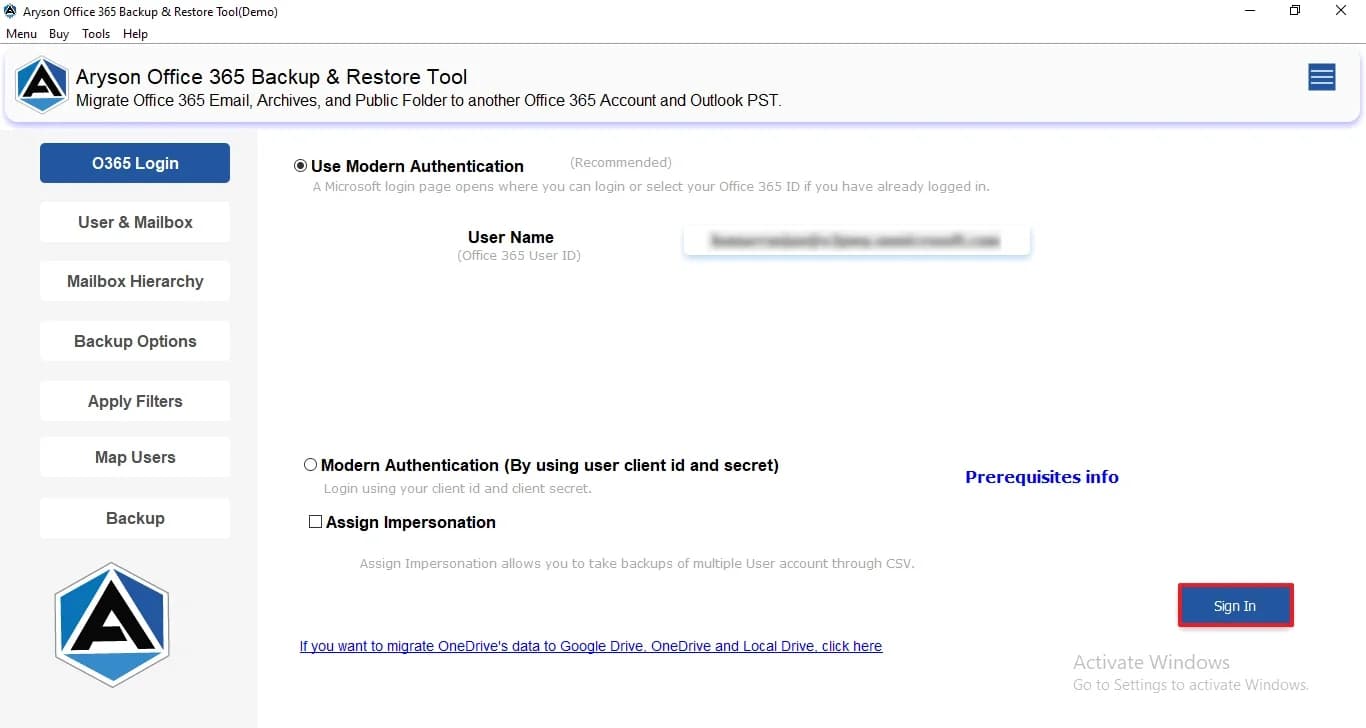
About this app
Aryson Office 365 Export Tool is a specialized utility for extracting and backing up Office 365 mailbox data locally. It supports exporting emails, calendars, contacts, and attachments to multiple formats including PST, MBOX, EML, MSG, PDF, and CSV. The tool offers bulk export of multiple user mailboxes via Assign Impersonation rights, a tree-structure preview, date filters, duplicate removal, and the option to free up server space after backup. It supports both Modern Authentication and Client Secret ID login methods, and is compatible with Windows, Mac, and Linux. A free version allows exporting up to 50 items per folder for evaluation.
Key features
- 1Export Office 365 mailboxes to PST, MBOX, EML, MSG, PDF and CSV with folder hierarchy and metadata preserved.
- 2Bulk multi-mailbox export via Assign Impersonation Rights, with tree-structure preview and date filters.
- 3Modern Authentication and Client Secret ID login, duplicate removal, and free-up-server-space after backup.
Target customer profile
Drawn from the product itself, not from a survey.
Demographic
IT administrators in mid-sized to large enterprises
Pain points
Complex and time-consuming Office 365 data migrations; risk of data loss during bulk exports
Primary needs
Efficient bulk export of multiple mailboxes with data integrity and minimal downtime
Demographic
Data migration specialists and consultants
Pain points
Need to export data from multiple client accounts quickly and securely into various formats
Primary needs
Comprehensive export options (PST, PDF, MBOX, etc.) with folder hierarchy preservation and impersonation rights
Demographic
Small business owners and individual users
Pain points
Lack of technical expertise for complex export processes; need for affordable and easy-to-use backup solution
Primary needs
User-friendly interface, selective export with date filters, and local backup of critical mailbox data
Scout Review
Written by AI from measured evidence, scored out of 100.
Aryson Office 365 Export Tool is a competent, long-running utility (domain live since 2013) for pulling Exchange Online mailboxes down to PST, MBOX, EML, MSG, PDF or CSV. The feature set is real and specific: impersonation-based bulk export, folder-hierarchy preservation, date filters, duplicate removal and post-backup server cleanup, with Modern Authentication and Client Secret login. The marketing site is fast and the security headers are complete, but the design is cluttered, the accessibility audit has real fails, and there's no published compliance certification. Against Microsoft 365 Backup, Stellar and Kernel, it holds its own on features but doesn't clearly out-position them.
Measure by measure
Usability
63Clear primary path with Download Now and OS selector, trial limit stated up front, and a labelled sidebar walking through the export workflow. FAQ text is small and easy to miss.
Design
57Consistent blue brand and a clean export-format tab component, but the hero is overloaded and a chat popup covers the product copy. App screenshot shows a Windows activation watermark.
Speed
88Lighthouse mobile 97/100 (LCP 1.1s, CLS 0, TBT 193ms) and desktop 94/100. The marketing site is genuinely fast and stable.
Security
74Full security-header sweep passes 12/12 (HSTS, CSP, frame protection, Referrer-Policy, Permissions-Policy) plus SPF and DMARC. No published SOC 2/ISO or security page found.
Accessibility
70Lighthouse a11y 91/100, but contrast, heading order, touch-target size, missing main landmark and role=presentation conflicts all fail. No WCAG statement or multi-language support visible.
Growth
58Real, specific problem (O365 mailbox export/backup) with concrete differentiators — impersonation-based bulk export, multi-format output, free-up-server-space. Crowded category with strong incumbents.
Improvement areas
- Hero is overloaded and a floating query popup covers the product description; app screenshot shows an activation watermark.
- No published SOC 2/ISO certification or security page despite strong HTTP header hygiene.
- Accessibility fails on contrast, heading order, touch-target size and missing main landmark; no WCAG statement.
Design & Usability
The site carries a coherent blue identity and one genuinely well-built component — the export-format tab switcher — but the hero tries to say everything at once: ten bullets, a star rating, two competing CTAs and three trust seals in one viewport. A floating query popup literally covers the product description, and the app screenshot ships with a Windows activation watermark. Usability is stronger: the Download Now path is obvious, the 50-item free limit is disclosed before download, and the desktop app's labelled sidebar walks users through login, mailbox, hierarchy, options, filters, mapping and backup. The FAQ is the weak spot — small text tucked under a table.
Speed & Security
Speed is the standout: Lighthouse mobile 97/100 with a 1.1s LCP, zero layout shift and 193ms total blocking time; desktop lands at 94/100. The marketing site is lean and stable. Security is solid on the fundamentals — HTTPS enforced with HSTS, CSP, frame protection, X-Content-Type-Options, Referrer-Policy and Permissions-Policy all present, plus SPF and DMARC, a clean 12/12 header sweep. What's missing is the paperwork enterprises ask for: no SOC 2, ISO 27001 or dedicated security page was found, so procurement teams will have questions the site doesn't answer.
Accessibility & Growth
Accessibility scores 91/100 on Lighthouse, but the failing audits matter: insufficient color contrast, non-sequential headings, undersized touch targets, no main landmark and role=presentation conflicts. There's no WCAG statement and no visible multi-language support. Growth is a judgement on the idea: exporting Office 365 mailboxes to PST, MBOX, PDF and CSV is a real, recurring IT problem, and Aryson differentiates with impersonation-rights bulk export, tree preview, date filters, duplicate removal and a free-up-server-space option. But it competes with Microsoft's native backup and two entrenched third-party tools, and nothing in the positioning names a segment it serves better than they do.
Conclusion
If you're an IT admin or migration consultant who needs multi-mailbox O365 exports in several formats and wants a free 50-item trial before paying, Aryson is a reasonable shortlist entry — the workflow is well-structured and the site is honest about the trial limit. Go in expecting to validate data integrity yourself on a pilot mailbox, and ask the vendor directly for security documentation since none is published. Compare pricing against Stellar and Kernel before committing; the feature overlap is high and the deciding factor will likely be support responsiveness and per-mailbox cost rather than capability.
Suggestions for improvement
- Remove or reposition the floating query popup so it stops covering the hero product description and feature bullets.
- Replace the app screenshot that shows a Windows activation watermark and fix the serif 'Prerequisites info' label.
- Publish a security/compliance page covering data handling, SOC 2 or ISO status, and how credentials are stored.
- Fix the accessibility fails: contrast ratios, heading order, touch-target sizing and a main landmark.
Alternatives comparison
Named competitors, point by point. Nobody paid to appear here or to be left out.
 Aryson Office 365 Export Tool |  Microsoft 365 Backup |  Stellar Email Backup |  Kernel Office 365 Backup & Restore | |
|---|---|---|---|---|
| Export formats supported | PST, MBOX, EML, MSG, PDF, CSV | Native backup/restore; limited export formats | Multiple formats (PST, EML, MSG, PDF, HTML) | PST, EML, MSG, PDF and more |
| Bulk multi-mailbox export | Yes, via Assign Impersonation Rights | Yes, tenant-level backup | Yes, multiple mailbox backup | Yes, multiple mailbox support |
| Free trial / evaluation | Free version: 50 items per folder | Included with M365 licensing | Free trial available | Demo version available |
| Cross-platform support | Windows, Mac, Linux | Browser-based admin portal | Windows primarily | Windows primarily |
Microsoft 365 Backup
Native Microsoft solution for backing up Exchange Online mailboxes, but limited in export formats and customization.
Stellar Email Backup
A third-party tool for backing up Office 365 mailboxes to various formats, with similar features but different pricing.
Kernel Office 365 Backup & Restore
Another third-party utility for Office 365 backup and export, offering multiple format support and filtering options.
Comparing options? See Aryson Office 365 Export Tool alternatives, scored side by side
More Productivity apps
View all Productivity
Puzzly – B2B Lead Generation & Sales Intelligence Platform
92Puzzly is an all-in-one B2B lead generation platform that...

Qamarero
92An all-in-one hospitality software for restaurants and ba...

EmbedMyReviews
92White-label reputation management software for agencies s...

StoryPad
92Privacy-first open source journal app with a continuous t...

Notion
92All-in-one AI workspace for docs, projects, and knowledge...

The Stack Newsletter
92A weekly newsletter delivering curated tech jobs, intervi...

Vibe Coding Agent Skills
92A free, open-source platform offering 110 AI agent skills...

QRBliss
91Branded QR codes with AI Brand Sync, 15 free dynamic code...

Gerty
91Private, local AI assistant for Mac that runs offline

Strukchad Property Management
91Property management for Kenyan letting agents: rent invoices raised every month, M-Pesa rent prompts to tenants, arrears tracking and landlord statements.

CC Switch
91Open-source desktop app for switching AI coding providers...

PitchWhip
90AI cold call scripts & direct dials from LinkedIn


A platform dedicated to providing unbiased reviews of newly launched applications, analyzing everything from their features to their full potential.
info@scoutforge.net© 2026 Scoutforge. All rights reserved.
