Cycling through all six. Tap any point to stop.
Measured on six things
Split oversized Mac Outlook OLM files by size, date, send...
Design
46Dated but functional: consistent blue/white palette and a genuinely clear manual-vs-tool comparison table, undermined by five competing CTAs and a chat popup covering the hero copy.
Screenshots
1 / 1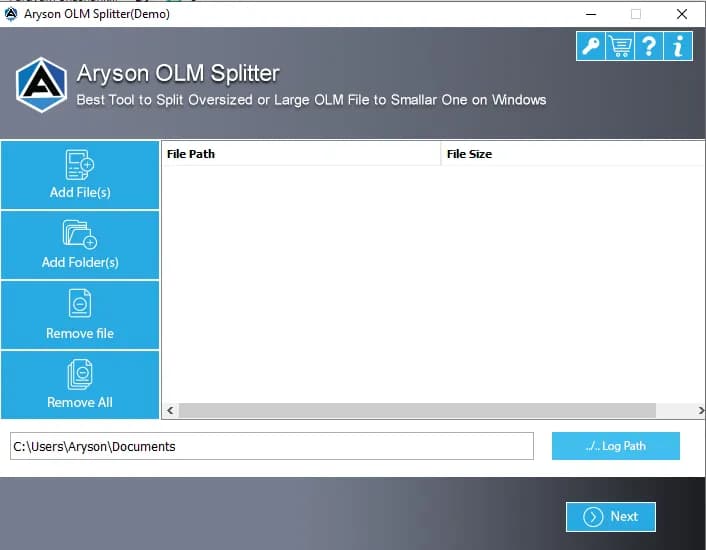
About this app
Aryson OLM Splitter is a desktop utility for Windows and Mac that divides large or oversized Mac Outlook OLM mailbox archives into smaller, manageable OLM files. It offers four splitting parameters—size, date, sender, and folder—along with bulk processing, a preview pane, duplicate email removal, and optional password protection for output files. The tool runs fully offline, preserves the original folder hierarchy and metadata, and works without requiring Mac Outlook or any additional email client. It suits IT admins, legal and compliance teams, and power users who need to tame unwieldy OLM archives. A free demo lets you split 50 items per folder; the full license costs $49.
Key features
- 1Splits OLM archives by size, date, sender or folder with original hierarchy and metadata preserved.
- 2Bulk processing of multiple OLM files plus duplicate email removal and optional password protection.
- 3Fully offline operation — no Mac Outlook or additional email client required; free demo splits 50 items per folder.
Target customer profile
Drawn from the product itself, not from a survey.
Demographic
IT administrators and enterprise mailbox managers
Pain points
Oversized OLM archives cause Outlook lag and slow handling of many files
Primary needs
Bulk splitting of multiple OLM files with structure kept intact
Demographic
Legal and compliance specialists
Pain points
Hard to pull specific records for audits, litigation, or GDPR requests
Primary needs
Date- and folder-based splitting that preserves metadata
Demographic
Mac systems support engineers
Pain points
Huge OLM files degrade Mac Outlook performance and cause loading issues
Primary needs
Safe size-based splitting without data loss or folder disruption
Scout Review
Written by AI from measured evidence, scored out of 100.
Aryson OLM Splitter is a $49 Windows/Mac desktop utility that carves oversized Mac Outlook OLM archives into smaller files by size, date, sender or folder, with bulk processing, preview, duplicate removal and optional password protection — all offline. The marketing site is fast and secure on paper but visually dated, with a cluttered hero and buried demo terms. The product itself addresses a genuine IT-admin pain, but it competes against established names (SysTools, Stellar) doing much the same thing, and the site does little to explain why it wins. A solid, unremarkable niche tool that works but doesn't stand out.
Measure by measure
Usability
58Step-numbered How it Works and a conventional nav help evaluators, but the free-demo limit (50 items/folder) is buried in a 17-bullet wall and the primary action is ambiguous.
Design
46Dated but functional: consistent blue/white palette and a genuinely clear manual-vs-tool comparison table, undermined by five competing CTAs and a chat popup covering the hero copy.
Speed
88Lighthouse mobile 99/100 with 1.2s LCP and 118ms TBT; desktop 93/100. Genuinely fast, lightweight marketing site with no measured lag complaints.
Security
76Full header stack (HSTS, CSP, frame protection, Referrer-Policy, Permissions-Policy), SPF and DMARC configured, 12/12 checklist. Offline processing and a no-storage claim help; no SOC 2 or audit found.
Accessibility
70Lighthouse 90/100, but failing contrast, non-sequential headings, small touch targets and a missing main landmark. No WCAG statement or a11y page found.
Growth
56Real, narrow pain — oversized OLM archives that choke Mac Outlook — with four split parameters and offline operation as the wedge. Solid niche, but SysTools and Stellar cover the same ground.
Improvement areas
- Homepage has five competing CTAs and a chat popup covering the hero copy; primary action is unclear.
- Free-demo limit is buried in a 17-bullet feature wall instead of surfaced as a trust signal.
- No SOC 2/ISO certification or accessibility statement to back the security and a11y claims.
Design & Usability
The homepage is a study in legacy-directory design: a consistent blue/white palette and one genuinely good device — the manual-vs-tool comparison table with red crosses and green checks — surrounded by noise. Five competing calls to action sit above the fold, a floating chat bubble and a 'Click Here for Queries' popup cover the hero subtitle, and the feature list runs to roughly 17 bullets that restate the same splitting claim three times. Usability is better than the visuals suggest: the How it Works section is step-numbered and easy to follow, and the nav is conventional. But the free-demo limit of 50 items per folder is buried in the bullet wall and footer, so an evaluator has to hunt for the thing that would convince them to try it.
Speed & Security
Speed is the standout: Lighthouse mobile 99/100 with a 1.2s LCP, 0.044 CLS and 118ms TBT, desktop 93/100. The marketing site is genuinely lightweight and snappy, and no lag complaints surfaced in the collected evidence. Security is solid on the fundamentals — HTTPS enforced with HSTS, CSP, frame protection, X-Content-Type-Options, Referrer-Policy and Permissions-Policy all present, SPF and DMARC configured, a clean 12/12 header checklist. The product runs fully offline and the site claims it stores no credentials, mailbox content or organizational data. What's missing is third-party assurance: no SOC 2, ISO certification or bug bounty was found, so buyers relying on audits have to take the offline claim on faith.
Accessibility & Growth
Accessibility scores 90/100 on Lighthouse but the failing audits are telling: insufficient color contrast, non-sequential heading order, small touch targets, a missing main landmark and role=none/presentation conflicts. There's no WCAG conformance statement or dedicated accessibility page, so the automated score is the whole story. Growth is a judgement on the idea: splitting oversized OLM archives is a real, specific pain for IT admins and compliance teams, and four split parameters plus bulk processing and offline operation give it a defensible wedge. But SysTools OLM Splitter and Stellar Splitter for Outlook cover nearly identical ground, and nothing in the material explains why a buyer picks Aryson over them beyond breadth of parameters. It's a competent niche tool in a crowded niche.
Conclusion
If you're an IT admin drowning in a 40GB OLM file and need it split by date for a legal hold, this does the job and does it offline, which matters for compliance-sensitive shops. The 50-items-per-folder demo is enough to test the workflow before committing $49. Just don't expect the site to sell it to you — the comparison table is the best argument on the page, and the rest is noise. Compare the parameter set against SysTools and Stellar before you buy; the differences are narrower than the landing page implies.
Suggestions for improvement
- Collapse the five above-fold CTAs into one primary action with a clear platform auto-detect.
- Move the free-demo limit (50 items/folder) into the hero as a visible trust signal.
- Fix the chat bubble and query popup so they stop covering the hero headline and subtitle.
- Add an accessibility statement and fix the contrast, heading-order and main-landmark failures.
Alternatives comparison
Named competitors, point by point. Nobody paid to appear here or to be left out.
 Aryson OLM Splitter Tool |  SysTools OLM Splitter |  Stellar Splitter for Outlook | |
|---|---|---|---|
| Splitting parameters | Size, date, sender, folder | Size, date, folder | Size, date, folder |
| Bulk processing of multiple files | Yes | Yes | Not stated |
| Preview before splitting | Yes | Yes | Yes |
| Platform support | Windows and Mac | Windows | Windows |
| Free demo limit | 50 items per folder | Limited demo available | Limited demo available |
| Starting price | $49 | Varies by license | Varies by license |
SysTools OLM Splitter
A Windows tool that splits large Mac Outlook OLM files by size, date, and folder with a preview option and bulk processing.
Stellar Splitter for Outlook
Splits oversized Outlook data files (PST/OLM) into smaller parts by size, date, or folder while keeping mailbox integrity.
Comparing options? See Aryson OLM Splitter Tool alternatives, scored side by side
More Productivity apps
View all Productivity
Puzzly – B2B Lead Generation & Sales Intelligence Platform
92Puzzly is an all-in-one B2B lead generation platform that...

Qamarero
92An all-in-one hospitality software for restaurants and ba...

EmbedMyReviews
92White-label reputation management software for agencies s...

StoryPad
92Privacy-first open source journal app with a continuous t...

Notion
92All-in-one AI workspace for docs, projects, and knowledge...

The Stack Newsletter
92A weekly newsletter delivering curated tech jobs, intervi...

Vibe Coding Agent Skills
92A free, open-source platform offering 110 AI agent skills...

QRBliss
91Branded QR codes with AI Brand Sync, 15 free dynamic code...

Gerty
91Private, local AI assistant for Mac that runs offline

Strukchad Property Management
91Property management for Kenyan letting agents: rent invoices raised every month, M-Pesa rent prompts to tenants, arrears tracking and landlord statements.

CC Switch
91Open-source desktop app for switching AI coding providers...

PitchWhip
90AI cold call scripts & direct dials from LinkedIn


A platform dedicated to providing unbiased reviews of newly launched applications, analyzing everything from their features to their full potential.
info@scoutforge.net© 2026 Scoutforge. All rights reserved.
