Cycling through all six. Tap any point to stop.
Measured on six things
Convert Mac Outlook OLM files to MBOX with attachments, b...
Design
45Dated landing page: a stray '/td>' fragment in the comparison table, a 'Window OS' typo, and a chat widget parked on top of the hero copy. Three clashing CTA colours and a ten-bullet hero bury the actual pitch.
Screenshots
1 / 1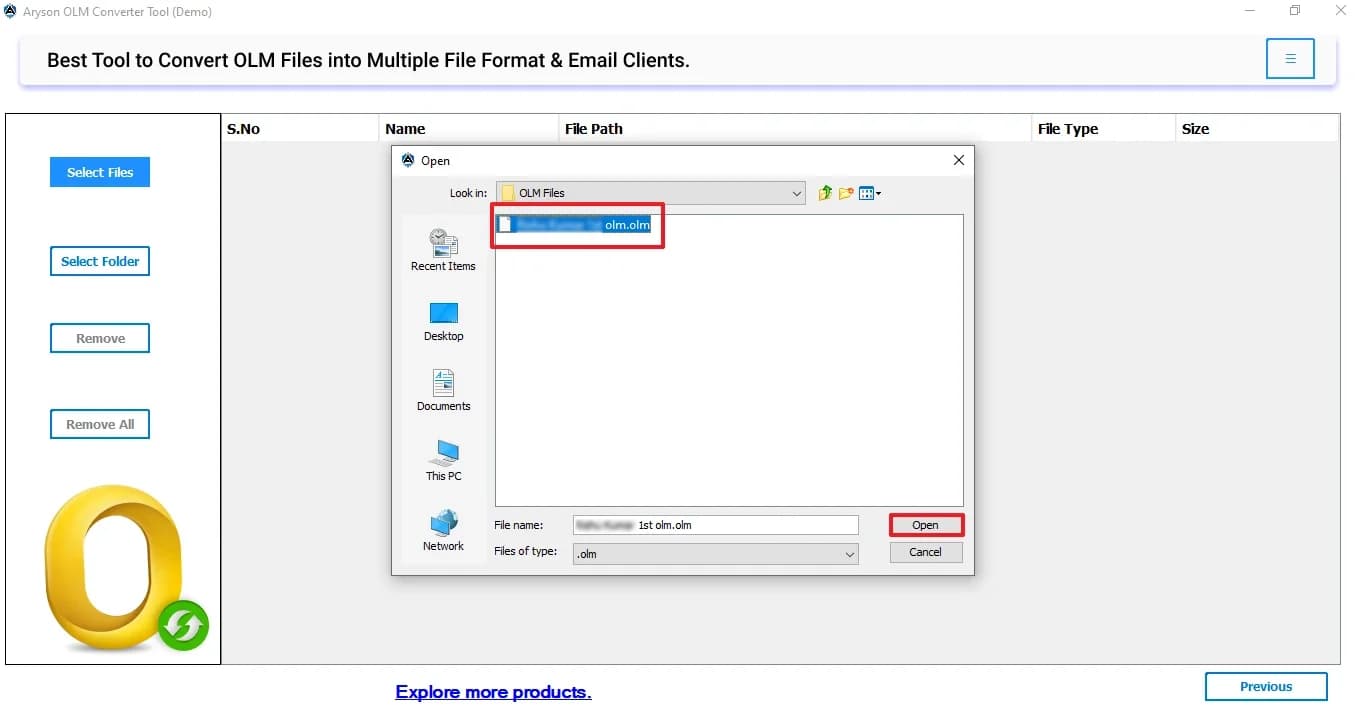
About this app
Aryson OLM to MBOX Converter is a dedicated utility that converts Mac Outlook OLM files into MBOX format, making Outlook for Mac data accessible in Thunderbird, Apple Mail, SeaMonkey, and other MBOX-compatible clients. It handles bulk conversions of large OLM files and attachments, previews OLM emails and attachments in a tree structure prior to export, and preserves the original folder hierarchy. Beyond MBOX, the tool can save OLM data to PST, PDF, EML, EMLX, MSG, CSV, HTML, DOC, DOCX, and even VCF/ICS for contacts and calendars. Useful extras include duplicate removal, a date-range filter for selective migration, three attachment-handling modes (exclude, save separately, or convert to PDF), and the option to store output in the same folder as the source OLM. It supports OLM files from Outlook 2011, 2016, 2019, and Office 365, and runs on Windows, with separate Mac and Linux builds available. The free version lets you try the workflow but caps conversion at 50 emails per folder; th...
Key features
- 1Bulk OLM to MBOX conversion with folder hierarchy and metadata preserved; also exports to PST, PDF, EML, EMLX, MSG, CSV, HTML, DOC/DOCX.
- 2Tree-structure preview of emails and attachments before export, plus date-range filter and duplicate removal for selective migration.
- 3Three attachment-handling modes (exclude, save separately, convert to PDF) and VCF/ICS export for contacts and calendars.
Target customer profile
Drawn from the product itself, not from a survey.
Demographic
IT consultants and system administrators managing Mac Outlook migrations
Pain points
Converting large OLM files reliably without data loss; preserving folder structure and metadata
Primary needs
Batch conversion, duplicate removal, error-free migration with intact hierarchy
Demographic
Small business owners and office managers moving from Mac Outlook to Thunderbird or Apple Mail
Pain points
Limited technical skills; risk of losing emails, contacts, and calendars during migration
Primary needs
Beginner-friendly interface, attachment handling options, contact/calendar export to VCF/ICS
Demographic
Archivists and compliance teams maintaining long-term email backups
Pain points
Messy mailboxes with duplicates; need to export only specific date ranges
Primary needs
Date filter, deduplication, output to open formats like MBOX, PDF, and EML
Scout Review
Written by AI from measured evidence, scored out of 100.
Aryson OLM to MBOX Converter is a workmanlike utility wrapped in a dated, slightly broken marketing site. The core offer is legitimate: bulk OLM conversion to MBOX and a dozen other formats, tree-structure preview, duplicate removal, date filtering, attachment modes, and VCF/ICS export for contacts and calendars. The app flow is legible and the page is genuinely fast (99/100 Lighthouse). But the landing page leaks a '/td>' fragment, misspells 'Window OS', parks a chat widget on the hero, and hides the 50-email free-tier limit below a wall of feature copy. Security headers are complete; compliance artifacts are absent. Against SysTools and Stellar it's on par on features and behind on polish — a competent tool that needs its front door fixed.
Measure by measure
Usability
58Clear three-step app flow and a real nav (Features, Screenshots, Video, FAQs, Guide, EULA). But the OS selector is tiny beside the CTAs, and the free-tier limit that actually decides a purchase hides far down the page.
Design
45Dated landing page: a stray '/td>' fragment in the comparison table, a 'Window OS' typo, and a chat widget parked on top of the hero copy. Three clashing CTA colours and a ten-bullet hero bury the actual pitch.
Speed
88Lighthouse 99/100 on both mobile and desktop: LCP 1.1s, CLS 0, TBT 114ms. Genuinely snappy for a page this content-heavy, and no lag complaints surfaced in the collected evidence.
Security
76Full header stack verified: HTTPS enforced, HSTS, CSP, frame protection, Referrer-Policy, Permissions-Policy, plus SPF and DMARC — 12/12 on the probe. No published SOC 2, ISO or pen-test claim found.
Accessibility
70Lighthouse a11y 91/100, but real failures remain: low-contrast body text, non-sequential headings, undersized touch targets, and no main landmark. No WCAG statement or accessibility page published.
Growth
52A real, specific migration problem with genuine extras (date filter, dedupe, VCF/ICS). But SysTools and Stellar sell the same conversion, and Thunderbird is free — no wedge the incumbents can't copy.
Improvement areas
- Landing page ships visible bugs: a stray '/td>' in the comparison table and a 'Window OS' typo in the requirements.
- Free-tier limit (50 emails per folder) and the comparison table are buried far below the hero; OS selector is easy to miss.
- No published compliance artifacts (SOC 2, ISO, pen-test) and no accessibility statement despite four failing Lighthouse audits.
Design & Usability
The site is a legacy template wearing a fresh coat of paint. The hero is a product-box mockup buried under ten bullet points, a floating chat widget and a query popup that overlap the description, and three unrelated CTA colours (orange, blue, red) that give no clear next step. Worse, the comparison table — the single most useful element for a buyer — renders a stray '/td>' fragment, and the requirements table still says 'Window OS' and lists an Intel Core 2 Duo. The app itself is more competent: a three-step Select Files → table → Open flow that mirrors native Windows dialogs, with a clear empty state. But the OS selector beside the CTAs is tiny, so Mac and Linux users can easily miss their builds, and the free-tier cap that decides the purchase sits far down the page.
Speed & Security
Speed is the standout: Lighthouse scores 99/100 on both mobile and desktop with LCP 1.1s, CLS 0 and TBT 114ms — impressive for a page carrying this much copy, and no lag complaints turned up in the collected evidence. Security is solid on the transport layer: HTTPS enforced, HSTS, CSP, frame protection, X-Content-Type-Options, Referrer-Policy, Permissions-Policy, plus SPF and DMARC, for a clean 12/12 on the header probe. What's missing is the layer above headers — no SOC 2, ISO 27001, pen-test summary or bug bounty is published anywhere in the collected content, which is normal for a tool at this scale but leaves enterprise buyers without a compliance artifact to point at.
Accessibility & Growth
Accessibility lands at 91/100 on Lighthouse, but the failing audits are the cheap ones: insufficient colour contrast, non-sequential heading order, undersized touch targets, a missing main landmark and role=presentation conflicts. There's no WCAG conformance statement or accessibility page, so buyers relying on assistive tech get no commitment. Growth is the harder question. The problem is real — Mac Outlook users genuinely need their OLM data in Thunderbird or Apple Mail — and the tool ships meaningful extras: a date-range filter, duplicate removal, three attachment-handling modes, VCF/ICS export and same-folder output. But the category is crowded: SysTools and Stellar sell near-identical converters, and Thunderbird is the free destination. Nothing in the positioning names a segment it serves better than those peers, so it competes on price and feature checkboxes rather than a wedge.
Conclusion
If you're an IT admin with a stack of OLM files and a Thunderbird deadline, this will get the job done — the conversion engine and the extras (date filter, dedupe, VCF/ICS) are real. Try the 50-email free tier first and confirm your folder structure survives. But shop it against SysTools and Stellar before you pay: the feature lists are near-identical, and the deciding factor will be support and price, not capability. The site's dated presentation and the raw HTML in its comparison table don't inspire confidence in the QA behind the installer — verify on a test mailbox before committing a production migration.
Suggestions for improvement
- Fix the stray '/td>' fragment in the comparison table and the 'Window OS' typo — these are visible production bugs on the buying page.
- Move the free-tier limit ('Only 50 Emails') and the comparison table up near the hero, where purchase decisions actually happen.
- Make the Windows/Mac/Linux selector prominent instead of a tiny radio button beside the Download CTA.
- Publish a short accessibility statement and fix the contrast, heading order and main-landmark failures Lighthouse already flagged.
Alternatives comparison
Named competitors, point by point. Nobody paid to appear here or to be left out.
 Aryson OLM to MBOX Converter |  SysTools OLM to MBOX Converter |  Stellar Converter for OLM |  Thunderbird | |
|---|---|---|---|---|
| Primary conversion output | MBOX plus PST, PDF, EML, EMLX, MSG, CSV, HTML, DOC/DOCX, VCF/ICS | MBOX with batch processing and preview options | PST, MBOX, EML, PDF, plus direct Office 365 migration | Native MBOX import/management (no OLM conversion) |
| Free tier / trial | Free version capped at 50 emails per folder | Free trial with limited item conversion | Free trial with preview and limited save | Fully free and open source |
| Duplicate removal and date filtering | Yes — duplicate removal plus date-range filter | Date-range filter available; dedupe not a headline feature | Selective conversion; dedupe not a headline feature | No built-in dedupe or date filter for import |
| Platform support | Windows, with separate Mac and Linux builds | Windows | Windows | Windows, macOS, Linux |
SysTools OLM to MBOX Converter
A widely used OLM converter that exports Mac Outlook mailboxes to MBOX and other formats with batch processing and preview options.
Stellar Converter for OLM
Converts OLM files to PST, MBOX, EML, and PDF, and can migrate directly to Office 365, with preview and selective conversion features.
Thunderbird
A free, open-source email client that can import and manage MBOX files natively, making it a common destination (and free alternative workflow) after OLM conversion.
Comparing options? See Aryson OLM to MBOX Converter alternatives, scored side by side
More Productivity apps
View all Productivity
Puzzly – B2B Lead Generation & Sales Intelligence Platform
92Puzzly is an all-in-one B2B lead generation platform that...

Qamarero
92An all-in-one hospitality software for restaurants and ba...

EmbedMyReviews
92White-label reputation management software for agencies s...

StoryPad
92Privacy-first open source journal app with a continuous t...

Notion
92All-in-one AI workspace for docs, projects, and knowledge...

The Stack Newsletter
92A weekly newsletter delivering curated tech jobs, intervi...

Vibe Coding Agent Skills
92A free, open-source platform offering 110 AI agent skills...

QRBliss
91Branded QR codes with AI Brand Sync, 15 free dynamic code...

Gerty
91Private, local AI assistant for Mac that runs offline

Strukchad Property Management
91Property management for Kenyan letting agents: rent invoices raised every month, M-Pesa rent prompts to tenants, arrears tracking and landlord statements.

CC Switch
91Open-source desktop app for switching AI coding providers...

PitchWhip
90AI cold call scripts & direct dials from LinkedIn


A platform dedicated to providing unbiased reviews of newly launched applications, analyzing everything from their features to their full potential.
info@scoutforge.net© 2026 Scoutforge. All rights reserved.
