Cycling through all six. Tap any point to stop.
Measured on six things
Convert Mac Outlook OLM files to PST and more without Out...
Design
45Dated homepage: a 13-item hero bullet list, a chat tooltip clipping the paragraph, and a product screenshot with an OS activation watermark. The feature card grid is the one tidy section.
Screenshots
1 / 1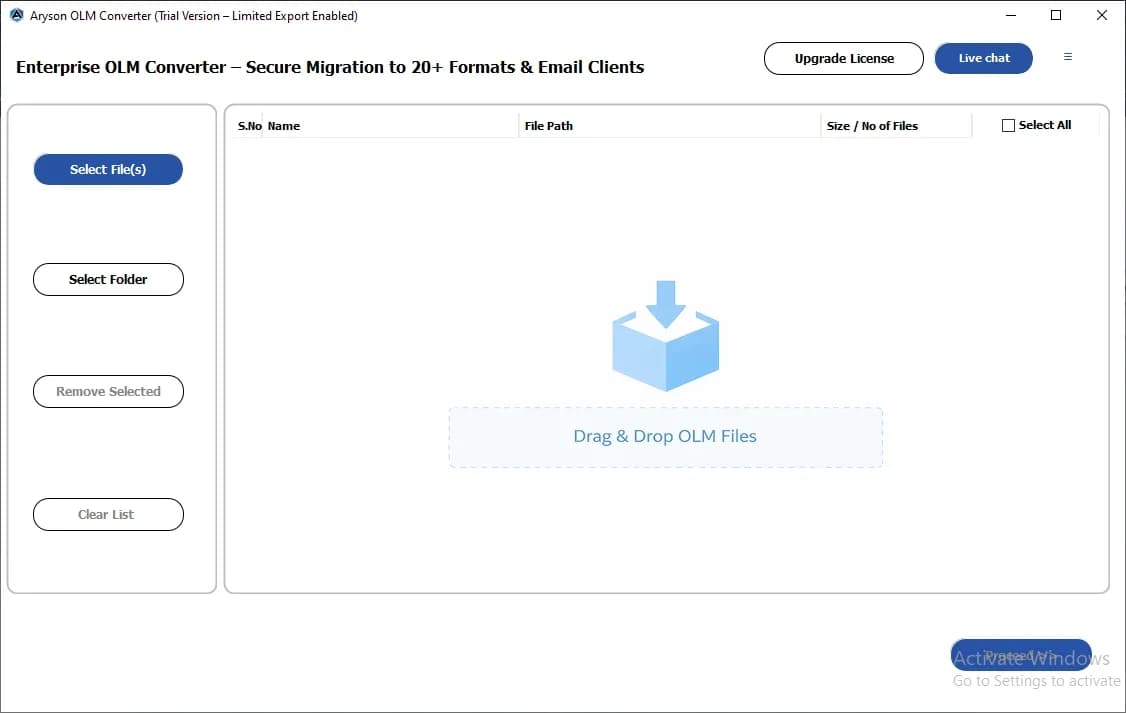
About this app
Aryson OLM to PST Converter is a specialized utility for migrating Mac Outlook data to Windows Outlook and other formats. It supports batch conversion, preview, selective export, and duplicate removal, making it ideal for IT admins and enterprises managing cross-platform email migrations. The tool ensures data integrity and offers a free trial.
Key features
- 1Batch OLM to PST conversion with folder selection, drag-and-drop, and preserved folder hierarchy.
- 2Wide output coverage: PST, MBOX, EML, MSG, PDF, DOCX, CSV, ICS, VCF, PNG.
- 3Direct migration to Microsoft 365, IMAP, Gmail (OAuth/App Auth), Google Workspace, Outlook.com.
- 4Preview panel, date-range filters, subject/from/to search, and duplicate removal before export.
Target customer profile
Drawn from the product itself, not from a survey.
Demographic
IT administrators in enterprises
Pain points
Need to migrate bulk OLM files to PST for compliance and cross-platform use
Primary needs
Batch conversion, data integrity, and duplicate removal
Demographic
System administrators in SMEs
Pain points
Limited time and resources for manual email migration
Primary needs
Automated conversion with selective filters and preview
Demographic
Individual professionals switching from Mac to Windows
Pain points
Need to access Mac Outlook emails on Windows without Outlook installed
Primary needs
Easy conversion of OLM to PST with folder structure preserved
Scout Review
Written by AI from measured evidence, scored out of 100.
Aryson OLM to PST Converter is a workmanlike migration utility that does what it says and does it fast. The measured evidence backs that up: 80/100 mobile and 81/100 desktop Lighthouse performance, a clean 12/12 security header checklist, and a 91/100 accessibility audit. The feature set is genuinely broad — PST, MBOX, EML, MSG, PDF, DOCX, CSV, ICS, VCF, PNG output, plus direct migration to Microsoft 365, IMAP, Gmail, and Google Workspace, with batch conversion, preview, date-range filters, and duplicate removal. Where it falls down is presentation and proof. The homepage is dated, the hero is a thirteen-bullet wall, the product screenshot still carries an OS activation watermark, and the trial cap hides in the specs section. For an enterprise buyer, the missing piece is documentation: no SOC 2, no ISO, no accessibility statement, no visible community. It's a solid tool sold by a page that undersells it.
Measure by measure
Usability
58Primary CTAs are above the fold and the FAQ works, but the 50-item trial cap hides in System Specs and Mac/Linux downloads sit behind a tiny radio button next to the Windows default.
Design
45Dated homepage: a 13-item hero bullet list, a chat tooltip clipping the paragraph, and a product screenshot with an OS activation watermark. The feature card grid is the one tidy section.
Speed
68Lighthouse mobile 80/100 and desktop 81/100, with LCP 1.1s and CLS 0. The 798ms total blocking time is the one metric holding it back from a stronger score.
Security
76Full 12/12 header checklist: HTTPS enforced, HSTS, CSP, frame protection, Referrer-Policy, Permissions-Policy, plus SPF and DMARC. No published SOC 2, ISO, or bug bounty found.
Accessibility
70Lighthouse accessibility 91/100, but failing audits include insufficient color contrast, non-sequential headings, small touch targets, and a missing main landmark. No WCAG statement on site.
Growth
58Real, specific problem — Mac Outlook to Windows migration for compliance — with a broad format and destination list. But it's a crowded utility niche with no wedge the incumbents can't copy.
Improvement areas
- Dated homepage with a 13-item hero list, overlapping chat tooltip, and watermarked product screenshot.
- Trial limit of 50 items per folder is buried in System Specifications instead of beside the CTA.
- No published SOC 2, ISO 27001, pen-test, or accessibility/WCAG statement for enterprise procurement.
- Mac and Linux download paths hidden behind a tiny radio button next to the Windows default.
Design & Usability
The homepage reads as a spec sheet stapled to a screenshot. The hero stacks a title, a 4.9-star line, and thirteen bullets of equal weight, so nothing lands as the reason to buy. A chat tooltip clips the paragraph, the product render still shows an OS activation watermark, and the award badges are too small to read as proof. The feature card grid is the exception — consistent icons, clean two-column layout. Usability is better than the design suggests: Download and Purchase sit above the fold, the FAQ accordion works, and the tool claims an unusually wide output set (PST, MBOX, EML, MSG, PDF, DOCX, CSV, ICS, VCF, PNG) plus direct migration to Microsoft 365, IMAP, Gmail, and Workspace. The friction is in the details: the 50-item-per-folder trial cap is buried in System Specifications, and Mac/Linux users have to spot a tiny radio button next to the Windows default before they can download.
Speed & Security
Speed is a genuine strength. Lighthouse puts mobile at 80/100 and desktop at 81/100, with LCP at 1.1s, CLS at 0, and FCP at 1.1s — the page paints fast and doesn't jump around. The one soft spot is 798ms of total blocking time, which suggests heavier JavaScript than the rest of the metrics imply. Security is the strongest measured dimension: the HTTP probe returned a clean 12/12, with HTTPS enforced, HSTS, CSP, frame protection, X-Content-Type-Options, Referrer-Policy, and Permissions-Policy all present, plus SPF and DMARC on the domain. What's missing is the paperwork — no SOC 2, ISO 27001, pen-test summary, or bug bounty surfaced in the collected content, which matters for an enterprise IT buyer handling mailbox data. The headers say 'we take this seriously'; the absence of an audit says 'trust us.'
Accessibility & Growth
Accessibility scores 91/100 on Lighthouse, which sounds better than it is. The failing audits are the ones that actually bite: insufficient color contrast, headings out of sequential order, touch targets too small or too close, no main landmark, and role=presentation conflicts. There's no accessibility statement or WCAG conformance claim on the site, so a procurement team has nothing to point at. Growth is the more interesting question. The problem is real and specific — Mac Outlook users who need their mail in Windows Outlook for compliance, legal records, or a platform switch — and Aryson names three distinct segments (enterprise IT admins, SME sysadmins, individual switchers). The differentiator is breadth: a long list of output formats plus direct migration to Microsoft 365, IMAP, Gmail, and Google Workspace. That's a competent utility, but it's the same utility SysTools and Stellar sell, and format breadth is the easiest thing for a competitor to match. The domain dates to 2013, so this isn't a flash in the pan — but a 13-year-old product with one social profile and no visible community is a business running on search traffic, not on a moat.
Conclusion
If you're an IT admin with a pile of OLM files and a deadline, this will probably get the job done — the format coverage is wide, the conversion claims are specific, and the site itself is fast and well-secured. Go in knowing the trial is capped at 50 items per folder, so test with a representative sample before you commit. If you're procuring for a regulated enterprise, ask Aryson directly for their security documentation and a data-handling statement; the headers are excellent but the audit trail isn't published. And compare against SysTools and Stellar on price and support before you buy — the feature lists are close enough that the tiebreaker will be licensing terms and responsiveness, not capability.
Suggestions for improvement
- Replace the 13-item hero bullet list with three outcome-led benefits and move the rest into a features section.
- Re-shoot the product screenshot without the OS activation watermark — it undermines credibility on a paid tool.
- Surface the 50-items-per-folder trial limit next to the Download CTA, not buried in System Specifications.
- Publish a security page with data-handling details and, if available, SOC 2 or ISO status for enterprise buyers.
Alternatives comparison
Named competitors, point by point. Nobody paid to appear here or to be left out.
 Aryson OLM to PST Converter |  SysTools OLM to PST Converter |  Stellar OLM to PST Converter | |
|---|---|---|---|
| Batch conversion of multiple OLM files at once | Yes — drag-and-drop plus folder selection for bulk OLM import | Yes — batch conversion with preview | Yes — batch conversion supported |
| Output formats beyond PST | PST, MBOX, EML, MSG, PDF, DOCX, CSV, ICS, VCF, PNG | PST plus several other formats | PST and other formats with advanced filters |
| Direct migration to email clients (365, IMAP, Gmail) | Yes — Microsoft 365, IMAP, Gmail (OAuth/App Auth), Workspace, Outlook.com | Offers migration options to email clients | Offers migration to email clients |
| Preview before conversion | Yes — preview panel with folder tree and metadata | Yes — preview supported | Yes — preview with advanced filters |
| Duplicate removal / incremental migration | Yes — incremental migration and remove duplicate features | Duplicate handling available | Filter-based selection; duplicate handling varies |
| Free trial | Yes — capped at 50 items per folder | Yes — free trial available | Yes — free trial available |
SysTools OLM to PST Converter
A popular tool for converting OLM files to PST with batch support and preview.
Stellar OLM to PST Converter
Professional software to convert OLM to PST and other formats with advanced filters.
Comparing options? See Aryson OLM to PST Converter alternatives, scored side by side
More Productivity apps
View all Productivity
Puzzly – B2B Lead Generation & Sales Intelligence Platform
92Puzzly is an all-in-one B2B lead generation platform that...

Qamarero
92An all-in-one hospitality software for restaurants and ba...

EmbedMyReviews
92White-label reputation management software for agencies s...

StoryPad
92Privacy-first open source journal app with a continuous t...

Notion
92All-in-one AI workspace for docs, projects, and knowledge...

The Stack Newsletter
92A weekly newsletter delivering curated tech jobs, intervi...

Vibe Coding Agent Skills
92A free, open-source platform offering 110 AI agent skills...

QRBliss
91Branded QR codes with AI Brand Sync, 15 free dynamic code...

Gerty
91Private, local AI assistant for Mac that runs offline

Strukchad Property Management
91Property management for Kenyan letting agents: rent invoices raised every month, M-Pesa rent prompts to tenants, arrears tracking and landlord statements.

CC Switch
91Open-source desktop app for switching AI coding providers...

PitchWhip
90AI cold call scripts & direct dials from LinkedIn


A platform dedicated to providing unbiased reviews of newly launched applications, analyzing everything from their features to their full potential.
info@scoutforge.net© 2026 Scoutforge. All rights reserved.
