Cycling through all six. Tap any point to stop.
Measured on six things
Migrate OST files to Office 365, Gmail, and other email c...
Design
57Clean card grid and tidy compatibility tabs, but the hero reads like a spec sheet: dense paragraph, rating line and 10-bullet list before the CTAs, plus a chat tooltip covering the intro text.
Screenshots
1 / 1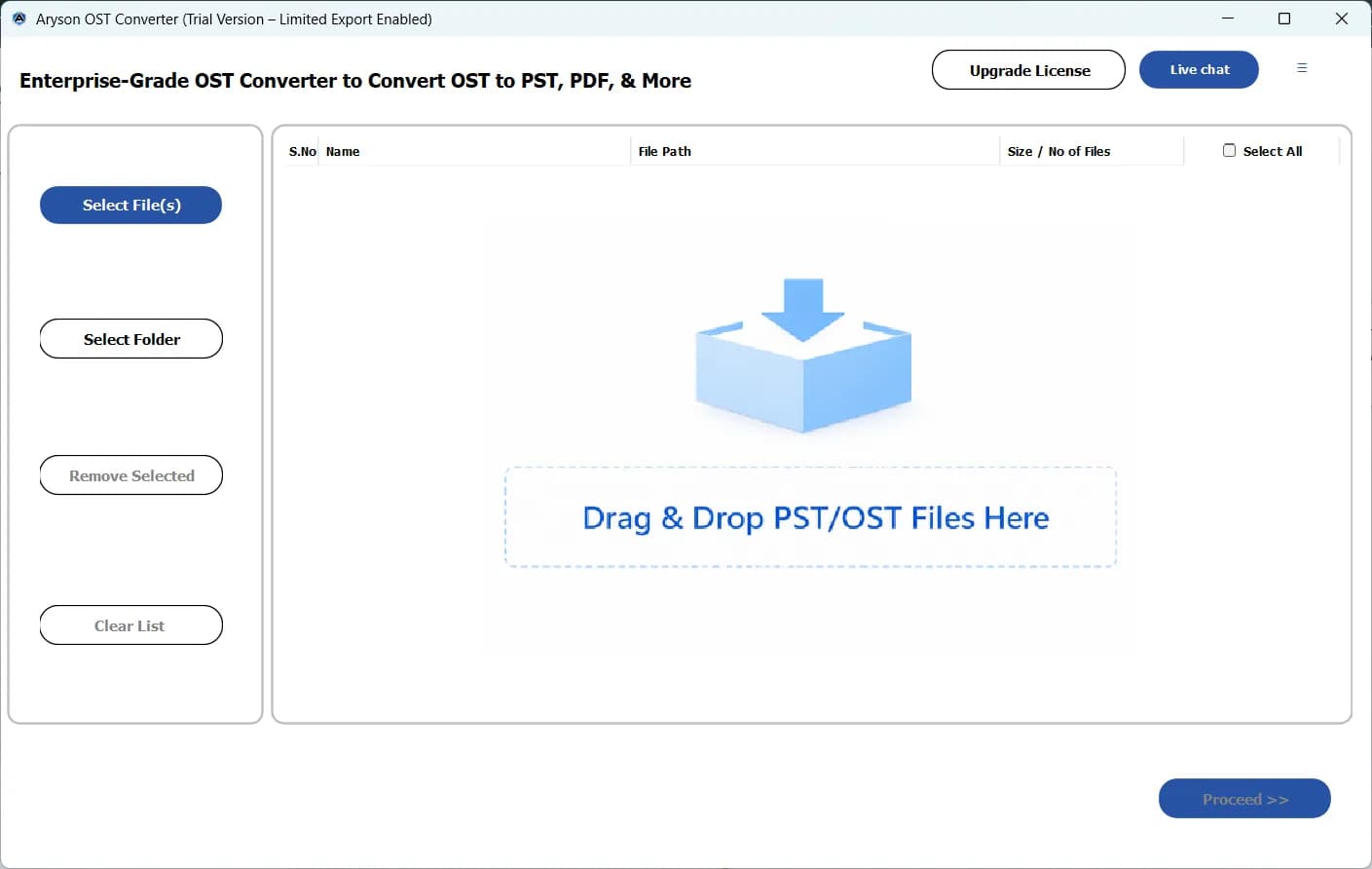
About this app
Aryson OST to Office 365 Migration Tool is a specialized utility designed to simplify the migration of OST files to Microsoft 365, Exchange Online, and other email platforms. It caters to both individual users and organizations, offering flexible mailbox mapping options, batch conversion, and advanced filters. The tool preserves folder structure, metadata, and attachments, ensuring a seamless transition. With support for OAuth and client secret authentication, it ensures secure migrations. Key features include duplicate removal, date-range filters, and a preview panel. The free demo version allows exporting up to 50 items per folder, while the licensed version (starting at $49) unlocks unlimited migration. Ideal for IT administrators and businesses undergoing cloud migration, this tool minimizes manual effort and downtime.
Key features
- 1Batch OST-to-Microsoft 365 migration with CSV mailbox mapping and folder-structure preservation.
- 2OAuth and client secret authentication for secure Exchange Online / M365 connections.
- 3Date-range filters, duplicate removal and skip-already-exported logic for repeat runs.
- 4Multi-destination support including Google Workspace and IMAP, plus preview panel.
- 5Free demo exports up to 50 items per folder; licensed version from $49 unlocks unlimited.
Target customer profile
Drawn from the product itself, not from a survey.
Demographic
IT Managers and Administrators in mid-to-large enterprises
Pain points
Manual OST migration is time-consuming and error-prone; need to preserve data integrity and folder structure.
Primary needs
Batch migration, mailbox mapping, secure authentication, and minimal downtime during cloud migration.
Demographic
Small business owners and startups
Pain points
Limited IT resources; need cost-effective and easy-to-use migration solution without technical expertise.
Primary needs
Affordable pricing, user-friendly interface, and reliable migration of emails, contacts, and calendars.
Demographic
Individual professionals and power users
Pain points
Migrating personal OST files to Office 365 or other clients; dealing with orphaned or corrupted files.
Primary needs
Selective migration with date filters, duplicate removal, and support for multiple destinations like Gmail.
Scout Review
Written by AI from measured evidence, scored out of 100.
Aryson OST to Office 365 Migration Tool is a focused utility with a genuinely fast site (99/100 mobile Lighthouse), clean security headers (12/12) and a feature set that matches the migration job: mailbox mapping via CSV, batch conversion, date filters, duplicate removal and OAuth/client secret auth. The weaknesses are presentation and proof. The hero is a spec sheet with a chat tooltip covering the copy, the free demo is buried, and there's no published audit or accessibility statement to reassure enterprise buyers. Against Stellar, Kernel and SysTools it's a credible price-led alternative rather than a category leader.
Measure by measure
Usability
63Download and purchase CTAs are above the fold with a clear platform selector, and Quick Steps plus video/guide/FAQs help onboarding. The free demo link is tiny red text that's easy to miss.
Design
57Clean card grid and tidy compatibility tabs, but the hero reads like a spec sheet: dense paragraph, rating line and 10-bullet list before the CTAs, plus a chat tooltip covering the intro text.
Speed
88Lighthouse mobile 99/100 with LCP 1.1s, CLS 0 and TBT 92ms; desktop also 99/100. The site is genuinely snappy with no lag complaints in the collected evidence.
Security
76Full header hygiene (HSTS, CSP, frame protection, Referrer-Policy, Permissions-Policy) plus SPF and DMARC, 12/12 on the probe. OAuth and client secret auth claimed; no published SOC 2/ISO audit found.
Accessibility
70Lighthouse a11y 91/100, but contrast failures, non-sequential headings, small touch targets and a missing main landmark remain. No WCAG statement or accessibility page found.
Growth
62Real, specific pain (OST-to-M365 migration) with a concrete wedge: CSV mailbox mapping, duplicate removal, date filters and multi-destination support. Crowded category, but the segment is clearly named.
Improvement areas
- Hero is overloaded with copy, rating and a 10-bullet list; chat tooltip overlaps the intro text.
- Free demo is buried as small red text instead of a visible secondary CTA.
- No published SOC 2/ISO audit or dedicated security/compliance page.
- Accessibility gaps: contrast, heading order, touch targets, missing main landmark, no WCAG statement.
Design & Usability
The homepage is competent but overstuffed. A consistent card grid and a tidy compatibility tab module give the lower page discipline, and the desktop app UI is clean with an obvious drop zone. The hero is the weak spot: a dense paragraph, a 4.8-star line and a ten-bullet list all compete before the CTAs, and a floating chat tooltip overlaps the intro copy — a visible bug on the most-read section. Usability is better than design: download and purchase sit above the fold with a clear platform selector, and Quick Steps, video, guide and FAQs cover onboarding. The free demo — the strongest trust signal — is buried as small red text.
Speed & Security
Speed is the standout. Lighthouse mobile scores 99/100 with LCP 1.1s, CLS 0 and TBT 92ms; desktop matches at 99/100. The page loads fast and stays stable, and no lag complaints surfaced in the collected evidence. Security is solid on the fundamentals: HTTPS enforced, HSTS, CSP, frame protection, X-Content-Type-Options, Referrer-Policy and Permissions-Policy all present, with SPF and DMARC configured — 12/12 on the header/DNS probe. The product claims OAuth and client secret authentication for migrations, which matters for M365 work. What's missing is the compliance layer: no SOC 2, ISO 27001 or published audit page appeared in the collected evidence, so enterprise buyers will have to ask.
Accessibility & Growth
Accessibility lands at 70: Lighthouse scores 91/100, but the failing audits are real — insufficient color contrast, non-sequential heading order, undersized touch targets, a missing main landmark and role=presentation conflicts. No WCAG statement or accessibility page was found, so conformance is unclaimed. Growth is a judgement on the idea: OST-to-Microsoft 365 migration is a genuine, recurring pain for IT admins and SMBs, and Aryson names its segments clearly. The wedge — CSV mailbox mapping, duplicate removal, date filters, multi-destination support to Google Workspace and IMAP, offline operation — is concrete. But Stellar, Kernel and SysTools sell nearly the same feature set with stronger brand recall, so Aryson competes on price ($49 entry) and hand-holding rather than novelty. The category has headroom as cloud migrations continue, but the moat is thin.
Conclusion
If you're an IT admin with a pile of OST files and a Microsoft 365 tenant, this tool does the work and the site won't waste your time loading. The $49 entry and 50-item-per-folder demo make it cheap to trial before committing. What it won't do is hand you a compliance binder — no SOC 2, no ISO, no accessibility statement — so larger enterprises should plan to ask questions the site doesn't answer. Fix the hero, surface the demo, and publish the security posture, and this moves from 'fine' to 'recommended'.
Suggestions for improvement
- Fix the chat tooltip overlapping the hero paragraph and remove the duplicate sentence in the 'Without Installing Outlook' card.
- Promote the free demo from small red text to a proper secondary CTA beside Download Now.
- Publish a security/compliance page covering OAuth flow, data handling and any SOC 2/ISO status.
- Add an accessibility statement and fix the contrast, heading order and touch-target failures flagged by Lighthouse.
Alternatives comparison
Named competitors, point by point. Nobody paid to appear here or to be left out.
 Aryson OST to Office 365 Migration Tool |  Stellar Converter for OST |  Kernel for OST to PST |  SysTools OST to Office 365 Migrator | |
|---|---|---|---|---|
| Direct OST to Office 365 migration | Yes — direct migration via OAuth or client secret | Yes — converts OST and offers Office 365 migration | Yes — recovers/converts OST and allows Office 365 migration | Yes — direct OST to Office 365 migration |
| Mailbox mapping (CSV import) | Yes — CSV import to map OST files to mailboxes | Mapping options available for Office 365 migration | Mapping supported in migration workflow | Advanced mapping supported |
| Duplicate removal and date filters | Yes — duplicate removal plus date-range filters | Filters available; duplicate handling varies | Date filters supported | Advanced filtering supported |
| Free demo limit | 50 items per folder | Limited free trial (per-item cap) | Limited free trial (per-item cap) | Limited free trial (per-item cap) |
| Entry pricing | From $49 | Higher-tier pricing typical | Higher-tier pricing typical | Higher-tier pricing typical |
Stellar Converter for OST
Converts OST to PST and other formats, with options to migrate to Office 365.
Kernel for OST to PST
Recovers and converts OST files to PST, and allows migration to Office 365.
SysTools OST to Office 365 Migrator
Directly migrates OST files to Office 365 with advanced mapping and filtering.
Comparing options? See Aryson OST to Office 365 Migration Tool alternatives, scored side by side
More Productivity apps
View all Productivity
Puzzly – B2B Lead Generation & Sales Intelligence Platform
92Puzzly is an all-in-one B2B lead generation platform that...

Qamarero
92An all-in-one hospitality software for restaurants and ba...

EmbedMyReviews
92White-label reputation management software for agencies s...

StoryPad
92Privacy-first open source journal app with a continuous t...

Notion
92All-in-one AI workspace for docs, projects, and knowledge...

The Stack Newsletter
92A weekly newsletter delivering curated tech jobs, intervi...

Vibe Coding Agent Skills
92A free, open-source platform offering 110 AI agent skills...

QRBliss
91Branded QR codes with AI Brand Sync, 15 free dynamic code...

Gerty
91Private, local AI assistant for Mac that runs offline

Strukchad Property Management
91Property management for Kenyan letting agents: rent invoices raised every month, M-Pesa rent prompts to tenants, arrears tracking and landlord statements.

CC Switch
91Open-source desktop app for switching AI coding providers...

PitchWhip
90AI cold call scripts & direct dials from LinkedIn


A platform dedicated to providing unbiased reviews of newly launched applications, analyzing everything from their features to their full potential.
info@scoutforge.net© 2026 Scoutforge. All rights reserved.
