Cycling through all six. Tap any point to stop.
Measured on six things
Safely de-duplicate Outlook PST files, emails, contacts, ...
Design
44Dated homepage: a glossy 3D box, 150-word paragraph, 8 bullets, two download buttons and a star rating all crammed into one hero band. App screenshot still carries red demo annotations.
Screenshots
1 / 1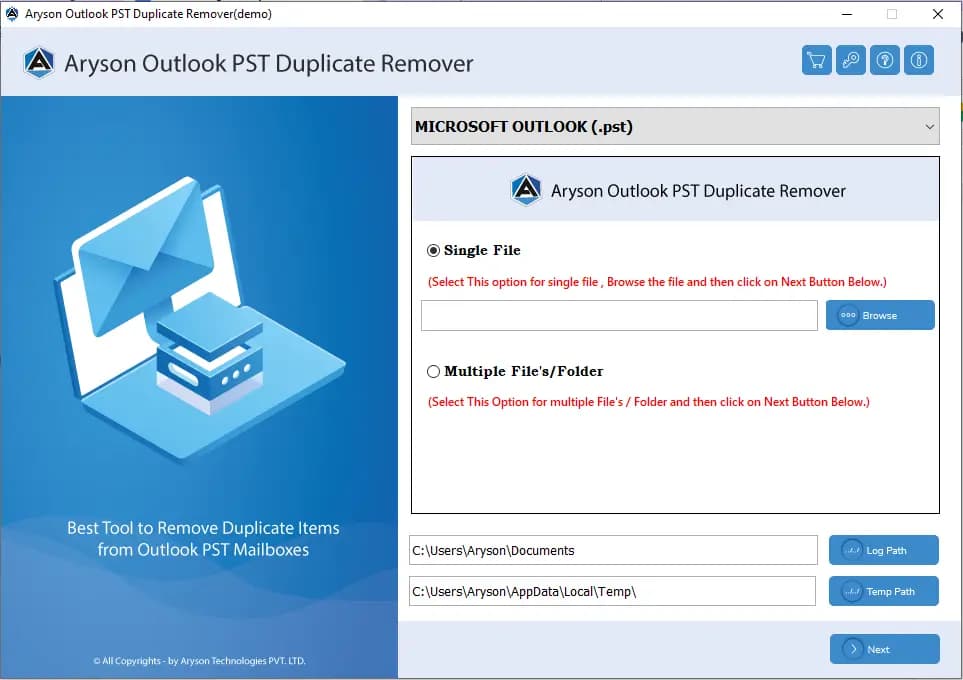
About this app
Aryson Outlook Duplicate Remover is a dedicated utility for cleaning up Microsoft Outlook PST files by finding and removing duplicate emails, contacts, calendar entries, tasks, and journals. It's designed for IT administrators, data managers, and power users who need to keep mailboxes lean and Outlook running smoothly. The tool supports both ANSI and Unicode PST files, works with all modern Outlook versions (2021, 2019, 2016, 2013, 2010, and earlier), and runs on all Windows editions. You can batch-process multiple PST files, define custom duplicate criteria (subject, sender, body, date, categories, and more), and choose how to handle duplicates—move to Deleted Items, delete permanently, create a new folder, mark as expired, or flag them. A preview panel and mail/task date filters give you full control before committing changes. The free demo lets you remove up to 50 duplicate items per folder to test the waters, while the full version unlocks unlimited cleanup. With a simple GUI, 2...
Key features
- 1Removes duplicate emails, contacts, calendars, tasks and journals from ANSI and Unicode PST files.
- 2Batch-processes multiple PST files with custom duplicate criteria (subject, sender, body, date, category).
- 3Five removal actions: move to Deleted Items, delete permanently, new folder, mark expired, or flag.
- 4Free demo removes up to 50 duplicate items per folder; full version unlocks unlimited cleanup.
Target customer profile
Drawn from the product itself, not from a survey.
Demographic
IT administrators managing multiple Outlook mailboxes
Pain points
Bloated PST files slow down Outlook and complicate backups; manual de-duplication is time-consuming and error-prone.
Primary needs
Batch processing, safe duplicate removal, and customizable criteria to clean large volumes of email data efficiently.
Demographic
Small business owners and office managers
Pain points
Duplicate contacts and calendar entries cause confusion and missed appointments; limited IT resources to fix it.
Primary needs
An easy-to-use, affordable tool that cleans duplicates across emails, contacts, and calendars without technical expertise.
Demographic
Data management specialists and IT consultants
Pain points
Clients have complex PST files with duplicates across folders; need to preserve attachments and important data during cleanup.
Primary needs
Advanced filtering, cross-folder scanning, and multiple removal actions to deliver reliable results and maintain data integrity.
Scout Review
Written by AI from measured evidence, scored out of 100.
Aryson Outlook Duplicate Remover is a competent, long-running utility for a real problem: cleaning duplicate emails, contacts, calendars and tasks out of Outlook PST files. It supports ANSI and Unicode PSTs, all modern Outlook versions, batch processing, custom duplicate criteria and five removal actions, with a 50-item free demo. The marketing site is fast (mobile Lighthouse 100) and technically well-secured (12/12 headers, SPF, DMARC), but visually dated and cluttered, with accessibility gaps and no compliance paperwork. Against PCVITA and Kernel it's on par, not ahead — a solid pick if you need the feature set, not a differentiated one.
Measure by measure
Usability
58Clear tab structure (Features, Specs, Screenshots, Video, FAQs), a 50-item free demo, and a straightforward app form. But dense bullet walls bury the CTAs and the real UI screenshot.
Design
44Dated homepage: a glossy 3D box, 150-word paragraph, 8 bullets, two download buttons and a star rating all crammed into one hero band. App screenshot still carries red demo annotations.
Speed
88Lighthouse mobile 100/100 (LCP 1.1s, CLS 0.003, TBT 75ms) and desktop 93/100. The marketing site is genuinely fast despite the visual clutter.
Security
74Full header stack verified: HTTPS, HSTS, CSP, frame protection, X-Content-Type-Options, Referrer-Policy, Permissions-Policy, plus SPF and DMARC (12/12). No published SOC 2/ISO or bug bounty found.
Accessibility
58Lighthouse 83/100, but failing audits include low contrast, non-sequential headings, missing alt text, unnamed links, small touch targets and no main landmark. No WCAG statement or multi-language support found.
Growth
54Real, named problem (bloated PSTs) with concrete differentiators — batch multi-PST, custom criteria, five removal actions. But PCVITA and Kernel offer much the same, and no segment is claimed as uniquely served.
Improvement areas
- Dated, cluttered homepage with leftover red demo annotations on the app screenshot.
- Accessibility fail list: missing alt text, unnamed links, heading order, contrast, touch targets.
- No published SOC 2/ISO/pen-test or bug bounty to back the strong security headers.
- Thin differentiation from PCVITA and Kernel; no segment named as uniquely served.
Design & Usability
The homepage is stuck in 2014: a floating 3D product box next to a 150-word paragraph, eight bullets, two download buttons and a star rating, all in one cramped band. Below the fold, feature cards have uneven text and no borders, and the app screenshot still shows red demo annotations. Usability is better than the design suggests — clear tabs for Features, Specs, Screenshots, Video and FAQs, a 50-item free demo, and a clean radio-based app form. But the dense bullet walls push the CTAs down and bury the actual UI, so the page undersells a tool that's probably fine to use.
Speed & Security
Speed is the standout: Lighthouse mobile 100/100 with LCP 1.1s, CLS 0.003 and TBT 75ms, desktop 93/100. Whatever the visual clutter, the page is genuinely snappy. Security is solid on the technical side — HTTPS enforced, HSTS, CSP, frame protection, X-Content-Type-Options, Referrer-Policy and Permissions-Policy all present, SPF and DMARC configured, 12/12 on the header checklist. What's missing is the paperwork: no SOC 2, ISO, pen-test summary or bug bounty found, so buyers who need compliance evidence have nothing to point at.
Accessibility & Growth
Accessibility lands at 83/100 on Lighthouse but the fail list is long: insufficient contrast, non-sequential headings, images without alt text, links without discernible names, small touch targets, no main landmark and role=presentation conflicts. No WCAG statement or multi-language support surfaced. Growth is a judgment call: the problem — bloated PST files slowing Outlook and backups — is real and worth paying for, and the tool has concrete differentiators (batch multi-PST, custom duplicate criteria, five removal actions, cross-PST search). But PCVITA and Kernel offer broadly the same, and Aryson names no segment it serves uniquely better, so the wedge is thin.
Conclusion
If you're an IT admin with bloated PSTs and a budget, this does the job and the free demo lets you prove it before paying. If you need SOC 2 or accessibility compliance evidence, look elsewhere or ask sales directly. The site is fast and the headers are locked down; the design and a11y are where the years show. Compare the demo against PCVITA and Kernel on your own PSTs — the feature lists are close enough that hands-on testing is the only honest tiebreaker.
Suggestions for improvement
- Rebuild the hero: one headline, one paragraph, one primary CTA. Move the 8 bullets and star rating below the fold.
- Replace the app screenshot's red demo annotations with clean, labeled UI captures.
- Add alt text, fix heading order, raise contrast and enlarge touch targets to clear the Lighthouse fail list.
- Publish a security/compliance page (SOC 2 status, pen-test summary, data handling) to back the strong headers.
Alternatives comparison
Named competitors, point by point. Nobody paid to appear here or to be left out.
 Aryson Outlook Duplicate Remover | Outlook Duplicate Email Remover by PCVITA |  Kernel for Outlook Duplicate Remover | |
|---|---|---|---|
| Duplicate item types supported | Emails, contacts, calendars, tasks, journals | Emails, contacts, calendars, tasks, journals | Emails, contacts, calendars, tasks, journals |
| Batch processing of multiple PST files | Yes — select multiple PST files simultaneously | Yes | Yes — supports multiple PST files |
| Custom duplicate criteria | Subject, body, sender, date, categories, billing info, companies | Filtering and preview options | Multiple filter criteria |
| Free demo limit | 50 duplicate items per folder | Limited demo available | Limited demo available |
| Removal actions | Move to Deleted Items, delete permanently, new folder, mark expired, flag | Delete or move duplicates | Delete duplicates |
Outlook Duplicate Email Remover by PCVITA
A similar tool for removing duplicates from Outlook PST files with filtering and preview options.
Kernel for Outlook Duplicate Remover
Another utility that scans and deletes duplicate Outlook items, supporting multiple PST files.
Comparing options? See Aryson Outlook Duplicate Remover alternatives, scored side by side
More Productivity apps
View all Productivity
Notion
92All-in-one AI workspace for docs, projects, and knowledge...

Qamarero
92An all-in-one hospitality software for restaurants and ba...

EmbedMyReviews
92White-label reputation management software for agencies s...

StoryPad
92Privacy-first open source journal app with a continuous t...

Puzzly – B2B Lead Generation & Sales Intelligence Platform
92Puzzly is an all-in-one B2B lead generation platform that...

The Stack Newsletter
92A weekly newsletter delivering curated tech jobs, intervi...

Vibe Coding Agent Skills
92A free, open-source platform offering 110 AI agent skills...

QRBliss
91Branded QR codes with AI Brand Sync, 15 free dynamic code...

Gerty
91Private, local AI assistant for Mac that runs offline

CC Switch
91Open-source desktop app for switching AI coding providers...

username.md
90One verified handle for your online identity, readable by...

PitchWhip
90AI cold call scripts & direct dials from LinkedIn


A platform dedicated to providing unbiased reviews of newly launched applications, analyzing everything from their features to their full potential.
info@scoutforge.net© 2026 Scoutforge. All rights reserved.
