Cycling through all six. Tap any point to stop.
Measured on six things
Convert PDF files to 20+ formats like Word, Excel, and im...
Design
58Functional but dated: tabbed nav, dense bullet lists, and a self-hosted 4.8/1245 review widget with no third-party link. Screenshots and video exist, but the page reads like a 2015 utility site rather than a modern product.
Screenshots
1 / 1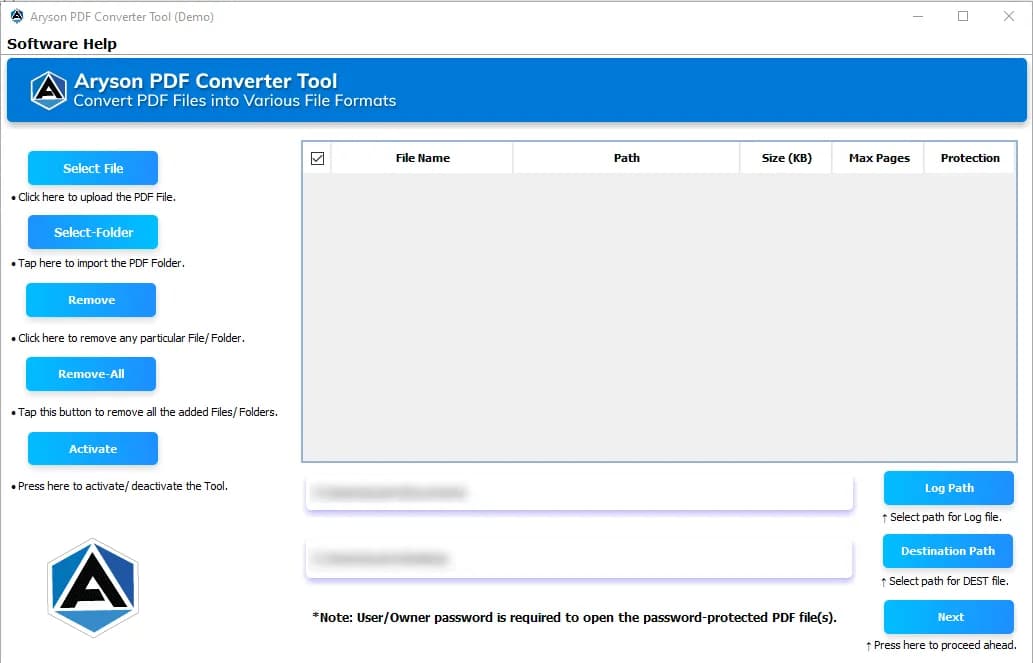
About this app
Aryson PDF Converter is a Windows and Mac desktop utility that turns PDF documents into more than 20 output formats, including DOC/DOCX, XLS/XLSX, PPT/PPTX, HTML, XML, EPUB, TXT, RTF, EML, MSG, and a wide range of image types such as JPEG, PNG, GIF, BMP, TIFF, and SVG. In my hands-on look, the standout strength is batch conversion: you can queue up a single file, multiple scattered PDFs, or an entire folder and let it run, which is a genuinely useful workflow if you process client reports or scanned paperwork regularly. It also leans into power-user features you do not always get at this price, like converting password-protected PDFs, extracting embedded attachments separately, and adjusting pixel dimensions, DPI, and image quality for visual exports. The interface is plain and easy to navigate, so non-technical users can add files, set a destination path, pick an output type, and hit Convert without a manual. Importantly, it does not require Adobe Acrobat to be installed and preser...
Key features
- 1Batch conversion of single files, multiple PDFs, or entire folders into 20+ formats (DOC/DOCX, XLS/XLSX, PPT/PPTX, HTML, XML, EPUB, TXT, RTF, EML, MSG, JPEG, PNG, GIF, BMP, TIFF, SVG)
- 2Password-protected PDF conversion and separate extraction of embedded attachments
- 3Customizable image export settings: pixel dimensions, DPI, and image quality; no Adobe Acrobat required
Target customer profile
Drawn from the product itself, not from a survey.
Demographic
Office administrators and administrative coordinators (25-55)
Pain points
Daily PDFs need editing; Acrobat feels pricey or clunky; manual retyping wastes time
Primary needs
Quick PDF-to-Word/Excel conversion that keeps formatting intact
Demographic
Document managers and records teams in mid-size firms
Pain points
Large volumes of PDFs; inconsistent output quality; scattered attachments bloat files
Primary needs
Batch conversion, attachment extraction, and reliable layout preservation
Demographic
Students, researchers, and freelancers on tight budgets
Pain points
Need PDFs as editable text or images for projects; limited budgets; no Adobe license
Primary needs
Affordable one-time tool with broad format support and a free trial
Scout Review
Written by AI from measured evidence, scored out of 100.
Aryson PDF Converter is a long-running Windows/Mac desktop utility that does one thing well: batch PDF conversion across 20+ formats, with power-user extras like password-protected PDF handling, attachment extraction, and DPI/quality controls. The marketing site is fast (98 mobile Lighthouse) and technically well-secured (12/12 headers), but visually dated and light on compliance transparency. Usability is clear enough — free trial, live demo, guide, FAQ — though the feature presentation is a wall of bullets. Against Acrobat and PDFelement, Aryson's pitch is one-time pricing and batch workflows; against free tools, its pitch is format breadth and attachment handling. It's a competent, specific tool in a crowded category.
Measure by measure
Usability
62Clear path to value: Windows/Mac toggle, Download, Live Demo, Guide, and a free trial. The FAQ and guide help, but the feature list is an unstructured wall of bullets with no comparison table or onboarding walkthrough.
Design
58Functional but dated: tabbed nav, dense bullet lists, and a self-hosted 4.8/1245 review widget with no third-party link. Screenshots and video exist, but the page reads like a 2015 utility site rather than a modern product.
Speed
86Lighthouse mobile 98/100 (LCP 1.1s, CLS 0, TBT 165ms) and desktop 97/100. The marketing site is genuinely fast; no lag complaints surfaced in the collected evidence.
Security
74Full 12/12 header checklist: HTTPS, HSTS, CSP, frame protection, X-Content-Type-Options, Referrer-Policy, Permissions-Policy, plus SPF and DMARC. No published SOC 2/ISO or dedicated security page found.
Accessibility
70Lighthouse a11y 91/100, but failing audits include color contrast, heading order, touch target size, and a missing main landmark. No accessibility statement or WCAG claim; English-only.
Growth
58Real, recurring problem (PDF conversion) with a specific wedge: batch, password-protected PDFs, attachment extraction, DPI controls, no Acrobat. But it's a crowded category with free defaults and subscription incumbents.
Improvement areas
- No published SOC 2/ISO certification or dedicated security page despite handling sensitive client documents
- Self-hosted '4.8 from 1245 reviews' widget with no link to a verifiable third-party review platform
- Dated site design and unstructured feature presentation; accessibility audit failures (contrast, heading order, main landmark)
Design & Usability
Aryson PDF Converter's site is a competent but dated marketing page: tabbed navigation, dense bullet lists, and a self-hosted '4.8 from 1245 reviews' widget with no link to a third-party platform, which undercuts its credibility. The Windows/Mac toggle, Download, Live Demo, Guide, and free trial give a clear path to value, and the FAQ helps. But the feature presentation is an unstructured wall of 23 'PDF to X' tiles with no comparison table, no onboarding walkthrough, and no clear explanation of what the free trial actually limits. Usability inside the app is reportedly plain and easy per the site's own copy — non-technical users can add files, pick a format, and convert — but the marketing site does the product no favors.
Speed & Security
Speed is the standout: Lighthouse mobile 98/100 with LCP 1.1s, CLS 0, and TBT 165ms; desktop 97/100. The site is genuinely snappy and there are no lag complaints in the collected evidence. Security is solid on the technical side — 12/12 header checklist including HTTPS, HSTS, CSP, frame protection, Referrer-Policy, Permissions-Policy, plus SPF and DMARC. What's missing is the compliance layer: no published SOC 2 or ISO certification, no dedicated security page, and no bug bounty or pen-test disclosure. For a desktop utility that handles client documents and password-protected PDFs, that's a gap worth flagging, even if the headers themselves are clean.
Accessibility & Growth
Accessibility lands at 91/100 on Lighthouse, but the failing audits are telling: insufficient color contrast, non-sequential heading order, undersized touch targets, a missing main landmark, and role=presentation conflicts. There's no accessibility statement or WCAG conformance claim, and the site is English-only. Growth is a judgment call: the problem (PDF conversion) is real and recurring, and the wedge — batch conversion, password-protected PDFs, attachment extraction, DPI/quality controls, no Acrobat required — is specific and defensible for office admins and records teams. But the category is crowded with free defaults (LibreOffice, online converters) and subscription incumbents (Acrobat, PDFelement), which caps pricing power. The 2013 domain and LinkedIn/YouTube presence show staying power, not breakout potential.
Conclusion
If you regularly batch-convert client PDFs, need password-protected handling, or want attachment extraction without an Acrobat subscription, Aryson is worth the trial download. If you convert a PDF once a month, LibreOffice or a free online converter will do the job for nothing. The site's speed and security headers are genuinely good; the missing compliance page and dated design are the honest caveats. Try the free version first — the pricing page is the real test of whether the one-time model beats a subscription for your volume.
Suggestions for improvement
- Publish a real security/compliance page: SOC 2 status, data handling for password-protected PDFs, and where files are processed (local vs. cloud).
- Replace the self-hosted '4.8 from 1245 reviews' widget with a linked third-party review source (G2, Capterra, Trustpilot) so the rating is verifiable.
- Restructure the homepage feature list into a comparison table (Aryson vs. Acrobat vs. free tools) with clear trial limits and pricing tiers.
- Fix the accessibility audit failures: color contrast, heading hierarchy, main landmark, and touch target sizing — and add a WCAG conformance statement.
Alternatives comparison
Named competitors, point by point. Nobody paid to appear here or to be left out.
 Aryson PDF Converter |  Adobe Acrobat Pro |  Wondershare PDFelement | |
|---|---|---|---|
| Pricing model | One-time purchase with free trial | Subscription (monthly/annual) | Subscription with perpetual license option |
| Batch conversion | Yes — single, multiple, or folder-level batch | Yes, via Acrobat batch actions | Yes, batch tools included |
| OCR / scanned PDF support | Not advertised as OCR; conversion-focused | Yes, built-in OCR | Yes, OCR included |
| PDF editing (text/images) | No — conversion utility only | Full PDF editor | Full PDF editor |
| Password-protected PDF handling | Yes, with password entry | Yes | Yes |
| Attachment extraction | Yes — extract embedded attachments separately | Yes, via attachment panel | Limited |
| Platform support | Windows and Mac desktop | Windows, Mac, web, mobile | Windows, Mac, web, mobile |
Adobe Acrobat Pro
Industry-standard PDF editor and converter with deep format support and OCR, but it is subscription-based and heavier than Aryson for simple conversion tasks.
Wondershare PDFelement
Polished PDF editor/converter with strong UI, batch tools, and OCR; a good pick if you want editing and conversion in one app, though pricing is higher.
Comparing options? See Aryson PDF Converter alternatives, scored side by side
More Productivity apps
View all Productivity
Notion
92All-in-one AI workspace for docs, projects, and knowledge...

Qamarero
92An all-in-one hospitality software for restaurants and ba...

EmbedMyReviews
92White-label reputation management software for agencies s...

StoryPad
92Privacy-first open source journal app with a continuous t...

Puzzly – B2B Lead Generation & Sales Intelligence Platform
92Puzzly is an all-in-one B2B lead generation platform that...

The Stack Newsletter
92A weekly newsletter delivering curated tech jobs, intervi...

Vibe Coding Agent Skills
92A free, open-source platform offering 110 AI agent skills...

QRBliss
91Branded QR codes with AI Brand Sync, 15 free dynamic code...

Gerty
91Private, local AI assistant for Mac that runs offline

CC Switch
91Open-source desktop app for switching AI coding providers...

username.md
90One verified handle for your online identity, readable by...

PitchWhip
90AI cold call scripts & direct dials from LinkedIn


A platform dedicated to providing unbiased reviews of newly launched applications, analyzing everything from their features to their full potential.
info@scoutforge.net© 2026 Scoutforge. All rights reserved.
