Cycling through all six. Tap any point to stop.
Measured on six things
Repair corrupt PDFs and recover text, images, and layout ...
Design
46Functional but dated Windows-software landing page. Consistent feature cards and a clear comparison table, undermined by three competing hero CTAs, an overlapping chat widget, and an unbalanced reviews block.
Screenshots
1 / 1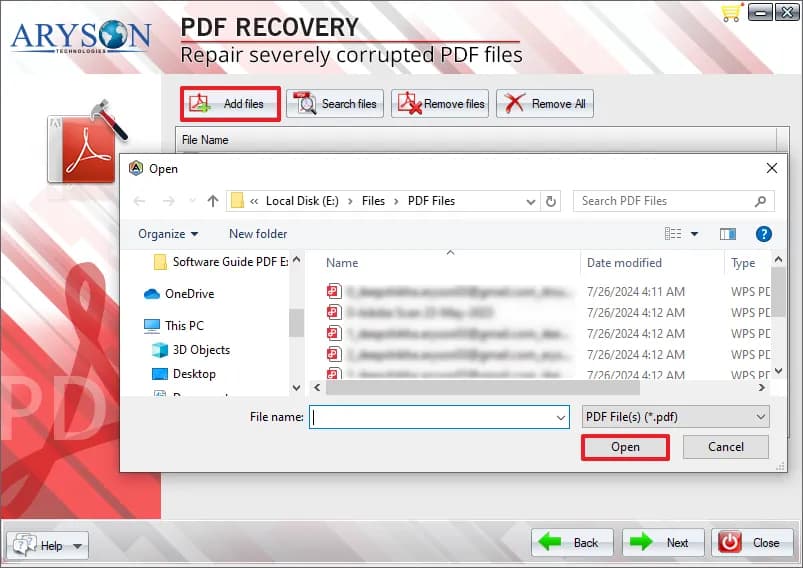
About this app
Aryson PDF Recovery Tool is a Windows application built to repair corrupted or inaccessible PDF files without needing Adobe Acrobat installed. It offers two recovery modes—Standard for minor corruption and Advanced for severe damage—and supports batch processing with no file-size limits. The tool restores text, images, graphics, tables, and original layout, letting users save recovered documents to a new location and optionally extract text and images separately. It features a search function to locate PDFs on the drive, a preview of added files, and a simple GUI suitable for non-technical users. The free trial provides identical features but saves output with a watermark; the licensed version removes watermarks and adds 24/7 support. It runs on Windows 7 through 11 and Windows Server 2008–2016, requires 4GB RAM and 500MB disk space, and is rated 4.8/5 by over 2,200 reviewers. Users appreciate its reliability for large research files, architectural plans, and batch recovery, though ...
Key features
- 1Dual recovery modes (Standard and Advanced) for minor to severe PDF corruption.
- 2Batch processing with no file-size limit; recovers text, images, tables, and layout.
- 3Works without Adobe Acrobat; free trial with watermarked output, one-time licensed purchase.
Target customer profile
Drawn from the product itself, not from a survey.
Demographic
Professionals (architects, engineers, lawyers) handling critical PDF blueprints, contracts, or legal filings
Pain points
Sudden PDF corruption before deadlines; fear of losing detailed design elements or legal text; inability to open files
Primary needs
Fast, reliable recovery of complex PDFs with layout and embedded data intact; no Adobe dependency
Demographic
Academic researchers and students managing large, long-term PDF archives of papers and theses
Pain points
Cloud sync errors or checksum failures rendering years of research inaccessible; large file sizes causing other tools to fail
Primary needs
Batch recovery of large PDFs; preservation of fonts, figures, comments; ability to extract text and images
Demographic
Small business owners and administrative staff with limited IT support
Pain points
Corrupt invoices, client records, or scanned documents; costly downtime; complex recovery tools requiring technical skills
Primary needs
User-friendly GUI; affordable one-time purchase; no need for Adobe Acrobat or specialist knowledge
Scout Review
Written by AI from measured evidence, scored out of 100.
Aryson PDF Recovery Tool is a Windows-only PDF repair utility with a genuinely fast marketing site and a clear, honest pitch: dual recovery modes, batch processing, no file-size limit, no Adobe required, and a free trial that watermarks output. The site is technically well-built (100 mobile Lighthouse, 12/12 security headers) but visually dated and cluttered with competing CTAs. The product's core claim — reliable recovery of complex PDFs — is plausible but not independently verified here, and the category is crowded with near-identical competitors. It's a competent, unremarkable entry in a mature niche.
Measure by measure
Usability
58Download path is obvious and the free-vs-paid comparison plus labeled requirements table make the trial tradeoff clear. Support links (Screens, Video, Guide, Eula) are tiny icon-only afterthoughts, and there's no live demo.
Design
46Functional but dated Windows-software landing page. Consistent feature cards and a clear comparison table, undermined by three competing hero CTAs, an overlapping chat widget, and an unbalanced reviews block.
Speed
88Lighthouse mobile 100/100 (LCP 1.1s, CLS 0, TBT 86ms) and desktop 98/100. The marketing site is genuinely fast and lightweight, which is rare for a software-vendor page loaded with badges and screenshots.
Security
74Full security-header stack (HSTS, CSP, frame protection, Referrer-Policy, Permissions-Policy) plus SPF and DMARC — 12/12 on the probe. No published SOC 2/ISO audit or security page found, which is typical for a small vendor.
Accessibility
70Lighthouse 90/100, but failing audits include insufficient color contrast, non-sequential headings, small touch targets, and a missing main landmark. No WCAG statement or accessibility page found.
Growth
58Real, painful problem with a specific buyer (professionals, researchers, SMBs) and a clear wedge: no Adobe dependency, batch repair, one-time price. But the category is crowded with near-identical dual-mode repair tools.
Improvement areas
- Dated, cluttered landing page with three competing hero CTAs and an overlapping chat widget.
- No live web demo; evaluation requires downloading a Windows executable.
- No published security page, audit, or accessibility statement despite strong technical headers.
Design & Usability
The landing page is a competent, conventional software-vendor page: consistent feature cards, a scannable free-vs-paid comparison table, and a labeled requirements section that answers compatibility questions before download. Where it stumbles is hierarchy — three competing CTAs in the hero (Download Now, Purchase Now, Download Live Demo) split attention, and a floating chat widget plus a 'Click Here for Queries' tooltip physically overlap the hero copy. The reviews section is lopsided, with a single testimonial card next to a mostly empty Softonic card. Usability is decent: the download path is obvious, the trial's watermark limitation is stated up front, and the requirements table is genuinely helpful. But the support links (Screens, Video, Guide, Eula) are tiny icon-only afterthoughts, and there's no live web demo — the only way to evaluate the tool is to download a Windows executable.
Speed & Security
Speed is the standout: Lighthouse mobile 100/100 with LCP 1.1s, CLS 0, and TBT 86ms, and desktop 98/100. For a page carrying award badges, screenshots, and a chat widget, that's genuinely well-built. Security is strong on the technical side — the HTTP probe found HTTPS enforced, HSTS, CSP, frame protection, X-Content-Type-Options, Referrer-Policy, Permissions-Policy, SPF, and DMARC, a clean 12/12. What's missing is the trust layer: no published SOC 2 or ISO certification, no security page, no bug bounty, and no verified privacy policy in the collected evidence. For a small vendor handling users' potentially sensitive documents, that's a gap worth closing, but it's a documentation gap rather than a demonstrated flaw.
Accessibility & Growth
Accessibility scores 90/100 on Lighthouse but fails on real issues: insufficient color contrast, non-sequential heading order, touch targets too small, a missing main landmark, and role=presentation conflicts. There's no WCAG conformance statement or accessibility page. Growth is a judgment call: the problem is real and painful (corrupted PDFs before a deadline), the target customer is specific (architects, lawyers, researchers, SMBs), and the wedge is concrete — no Adobe dependency, batch repair, no file-size limit, one-time purchase. But the category is crowded with near-identical dual-mode repair tools (Stellar, SysInfo, PDF Repair Toolbox), and nothing in the material shows a structural advantage those peers can't copy. The domain dates to 2013 and the vendor has LinkedIn and YouTube presence, which is context, not a moat.
Conclusion
If you're a Windows user with a corrupted PDF and a deadline, the free watermarked trial is a low-risk way to test whether it recovers your file before you pay. Just don't expect a modern, polished experience — the site looks like 2015 and the support links are an afterthought. Compare the trial output against Stellar and SysInfo before committing, since all three offer similar dual-mode repair.
Suggestions for improvement
- Consolidate the hero to one primary CTA (Download Now) and demote Purchase/Live Demo to secondary links.
- Fix the chat widget and tooltip overlap so they don't cover hero copy.
- Add a live web demo or interactive sample so users can evaluate recovery without downloading an executable.
- Publish a security/trust page with privacy policy, data-handling details, and any certifications.
Alternatives comparison
Named competitors, point by point. Nobody paid to appear here or to be left out.
 Aryson PDF Repair Tool |  Stellar Repair for PDF |  SysInfo PDF Recovery | PDF Repair Toolbox | |
|---|---|---|---|---|
| Dual recovery modes (Standard/Advanced) | Yes | Yes | Yes | Yes |
| Batch PDF repair | Yes | Yes | Yes | Not specified |
| Platform support | Windows only | Windows and Mac | Windows only | Windows only |
| Free trial with watermark | Yes | Yes (preview) | Yes | Yes |
| No Adobe Acrobat required | Yes | Yes | Yes | Yes |
Stellar Repair for PDF
Popular PDF repair tool with similar dual-mode recovery, batch processing, and preview; supports Windows and Mac.
SysInfo PDF Recovery
Windows-only PDF repair utility offering standard and advanced recovery, text/image extraction, and batch repair.
PDF Repair Toolbox
Lightweight Windows PDF repair app with a simple interface, preview, and recovery of text, images, and formatting.
Comparing options? See Aryson PDF Repair Tool alternatives, scored side by side
More Productivity apps
View all Productivity
Puzzly – B2B Lead Generation & Sales Intelligence Platform
92Puzzly is an all-in-one B2B lead generation platform that...

Qamarero
92An all-in-one hospitality software for restaurants and ba...

EmbedMyReviews
92White-label reputation management software for agencies s...

StoryPad
92Privacy-first open source journal app with a continuous t...

Notion
92All-in-one AI workspace for docs, projects, and knowledge...

The Stack Newsletter
92A weekly newsletter delivering curated tech jobs, intervi...

Vibe Coding Agent Skills
92A free, open-source platform offering 110 AI agent skills...

QRBliss
91Branded QR codes with AI Brand Sync, 15 free dynamic code...

Gerty
91Private, local AI assistant for Mac that runs offline

Strukchad Property Management
91Property management for Kenyan letting agents: rent invoices raised every month, M-Pesa rent prompts to tenants, arrears tracking and landlord statements.

CC Switch
91Open-source desktop app for switching AI coding providers...

PitchWhip
90AI cold call scripts & direct dials from LinkedIn


A platform dedicated to providing unbiased reviews of newly launched applications, analyzing everything from their features to their full potential.
info@scoutforge.net© 2026 Scoutforge. All rights reserved.
