Cycling through all six. Tap any point to stop.
Measured on six things
Remove PDF passwords & restrictions on Windows/Mac with e...
Growth
52Real, specific problem for helpdesk and legal staff, with batch unlock and attachment extraction as genuine differentiators. But the category is crowded with cheap and free unlockers, and no segment is named that rivals can't serve.
Screenshots
1 / 1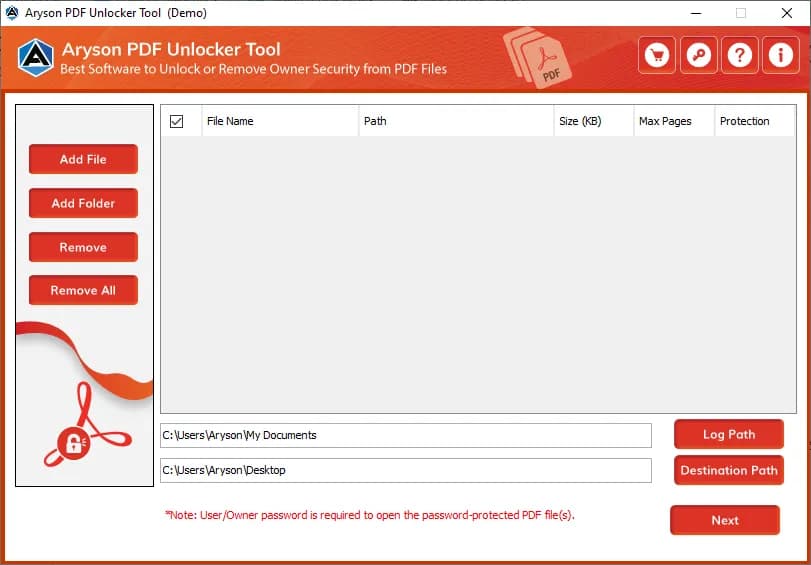
About this app
Aryson PDF Unlocker is a dedicated utility designed to remove both User (Open) and Owner (Permissions) passwords from PDF files, provided the correct password is known. It caters to individuals and businesses that need authorized access to secured PDFs without relying on Adobe Acrobat. The tool supports batch processing, allowing users to unlock multiple PDFs simultaneously, and works with all encryption levels (40-bit, 128-bit RC4, 128-bit AES, 256-bit RC4, 256-bit AES). Standout features include the ability to apply new passwords to output files, edit PDF metadata, extract attachments, and save unlocked PDFs to a custom location. The interface is user-friendly, making it accessible to both technical and non-technical users. Aryson PDF Unlocker is available for Windows (7 through 11, including Server editions) and macOS, with a free demo version that watermarks output files. It does not crack or recover unknown passwords, ensuring ethical use. With a 4.8-star average rating from ov...
Key features
- 1Removes User (Open) and Owner (Permissions) passwords from PDFs when the correct password is known.
- 2Batch and folder unlocking with custom output paths, metadata editing, and attachment extraction.
- 3Supports all encryption levels (40-bit, 128-bit RC4/AES, 256-bit RC4/AES) on Windows and macOS without Adobe Acrobat.
Target customer profile
Drawn from the product itself, not from a survey.
Demographic
IT support analysts and helpdesk technicians
Pain points
Frequently handle encrypted legal or client PDFs; need quick, batch unlocking without Adobe Acrobat; require preservation of file integrity.
Primary needs
Batch removal of user/owner passwords; support for all encryption types; ability to set custom output paths; no dependency on Acrobat.
Demographic
Document processing executives and administrative staff
Pain points
Receive password-protected PDFs from clients; need to remove restrictions for editing, printing, or copying; often process multiple files daily.
Primary needs
Simple interface for unlocking both user and owner passwords; ability to extract attachments; metadata editing; compatibility with Windows and Mac.
Demographic
Small business owners and legal professionals
Pain points
Need authorized access to secured PDFs without expensive software; require a cost-effective, standalone tool; concerned about data security.
Primary needs
Affordable one-time purchase; no watermark on output; support for all PDF versions; ability to apply new passwords; 24/7 tech support.
Scout Review
Written by AI from measured evidence, scored out of 100.
Aryson PDF Unlocker is a mature, competent Windows/macOS utility for removing known PDF passwords, backed by a fast site, clean security headers, and a documented batch workflow. It does what it says, and the 2013-registered domain suggests staying power. The weaknesses are a dated landing page, a watermarked demo that limits real evaluation, accessibility gaps behind a decent audit score, and a commoditized category where it struggles to stand out. It's a solid pick if you specifically need batch unlocking with attachment extraction and don't want Adobe Acrobat — less compelling if a free online unlocker would do.
Measure by measure
Usability
63Clear self-serve paths: guide, FAQ, demo download, and documented batch/folder workflows with custom output paths. The watermarked demo limits real evaluation, and the page is text-heavy, but core tasks are explained.
Design
58Dense legacy-utility landing page: long feature lists, star-rating block, screenshot and video tabs. Functional and on-brand for the category, but visually dated versus modern SaaS peers. App UI itself not independently rendered.
Speed
88Lighthouse mobile 100/100 (LCP 1.1s, CLS 0, TBT 44ms) and desktop 99/100. The marketing site is genuinely fast and lightweight — no measured lag complaints found.
Security
74Full header hygiene: HTTPS, HSTS, CSP, frame protection, Referrer-Policy, Permissions-Policy, SPF, DMARC — 12/12 checklist. No published SOC 2/ISO or bug bounty found, so it sits mid-band rather than top.
Accessibility
68Lighthouse a11y 91/100, but failing contrast, heading order, touch-target size, missing main landmark, and role conflicts. No WCAG statement or multi-language support found. Solid automated baseline, real gaps remain.
Growth
52Real, specific problem for helpdesk and legal staff, with batch unlock and attachment extraction as genuine differentiators. But the category is crowded with cheap and free unlockers, and no segment is named that rivals can't serve.
Improvement areas
- Watermarked demo limits real evaluation — a limited clean-output trial would convert better.
- No published SOC 2, ISO, or pen-test documentation despite handling sensitive legal documents.
- Accessibility gaps: contrast, heading order, touch targets, and missing main landmark behind a 91 audit score.
Design & Usability
Aryson PDF Unlocker's site reads like a well-maintained shareware page from a company that's been at this since 2013: dense feature lists, a star-rating block, screenshot and video tabs, a guide, and an FAQ. It's functional and on-brand, but visually dated next to modern SaaS landing pages. Usability is the stronger half — batch and folder unlocking, custom output paths, metadata editing, and attachment extraction are all documented, and there's a demo to try before buying. The catch is that the demo watermarks every output, so you can confirm it works but not actually use what you unlock. For a tool aimed at helpdesk and admin staff processing files daily, the workflow features are the real selling point, and they're clearly explained.
Speed & Security
Speed is the standout: Lighthouse mobile 100/100 with a 1.1s LCP, zero layout shift, and 44ms total blocking time; desktop scores 99. The marketing site is genuinely lightweight and snappy. Security is solid on the fundamentals — HTTPS enforced, HSTS, CSP, frame protection, Referrer-Policy, Permissions-Policy, SPF, and DMARC all present, a clean 12/12 on the header checklist. What's missing is the compliance layer: no SOC 2, ISO 27001, pen-test report, or bug bounty is published. For a desktop utility handling sensitive legal and client documents, that's a gap worth noting, though the ethical-use stance (it won't crack unknown passwords) is a reasonable trust signal.
Accessibility & Growth
Accessibility lands at a respectable 91/100 on Lighthouse, but the failing audits are real: insufficient color contrast, non-sequential heading order, undersized touch targets, a missing main landmark, and role=presentation conflicts. There's no WCAG conformance statement and no multi-language support mentioned. Growth is the harder question. The problem — authorized removal of known PDF passwords for helpdesk, legal, and admin staff — is real and specific, and batch unlocking plus attachment extraction are genuine differentiators. But the category is crowded with cheap and free alternatives like iSunshare and Cisdem, plus a swarm of free online unlockers, and the site names no segment it serves better than any of them. It's a competent tool in a commoditized niche.
Conclusion
If your job involves a steady stream of password-protected client PDFs and you want a standalone desktop tool that handles batches, preserves file integrity, and doesn't require Acrobat, Aryson is a reasonable, no-nonsense choice. Just go in knowing the demo won't let you keep clean output, there's no published compliance certification, and the category is full of cheaper options. Try the demo on your actual files first, confirm the encryption types you encounter are handled, and only then buy — the one-time purchase and 24/7 support claims are worth verifying against your own workload before committing.
Suggestions for improvement
- Replace the watermarked demo with a limited-count free tier (e.g. 3 clean unlocks) so buyers can verify output quality on real files.
- Publish a security/compliance page — even a self-attestation or pen-test summary — since the tool handles sensitive legal and client documents.
- Fix the Lighthouse a11y failures: contrast ratios, heading order, touch-target sizing, and add a proper main landmark.
- Sharpen positioning against free online unlockers and iSunshare/Cisdem by naming a specific segment (e.g. legal firms with batch compliance needs) and leading with it.
Alternatives comparison
Named competitors, point by point. Nobody paid to appear here or to be left out.
 Aryson PDF Unlocker |  PDF Unlocker by iSunshare | Cisdem PDF Password Remover | |
|---|---|---|---|
| Platform support | Windows (7–11, Server) and macOS | Windows only | macOS focused |
| Batch processing | Yes — multiple files and full folders | Limited batch processing | Not a highlighted feature |
| Attachment extraction & metadata editing | Yes — extract attachments and edit metadata | Not offered | Lacks advanced features like attachment extraction |
| Free demo / trial | Free demo with watermarked output | Free trial available | Free trial available |
| Apply new password to output | Yes — optional new User/Owner password | Not highlighted | Not highlighted |
PDF Unlocker by iSunshare
A Windows tool to remove PDF password restrictions, but with limited batch processing and no Mac version.
Cisdem PDF Password Remover
A Mac-focused PDF password remover that handles owner and user passwords, but lacks advanced features like attachment extraction.
Comparing options? See Aryson PDF Unlocker alternatives, scored side by side
More Productivity apps
View all Productivity
Notion
92All-in-one AI workspace for docs, projects, and knowledge...

Qamarero
92An all-in-one hospitality software for restaurants and ba...

EmbedMyReviews
92White-label reputation management software for agencies s...

StoryPad
92Privacy-first open source journal app with a continuous t...

Puzzly – B2B Lead Generation & Sales Intelligence Platform
92Puzzly is an all-in-one B2B lead generation platform that...

The Stack Newsletter
92A weekly newsletter delivering curated tech jobs, intervi...

Vibe Coding Agent Skills
92A free, open-source platform offering 110 AI agent skills...

QRBliss
91Branded QR codes with AI Brand Sync, 15 free dynamic code...

Gerty
91Private, local AI assistant for Mac that runs offline

CC Switch
91Open-source desktop app for switching AI coding providers...

username.md
90One verified handle for your online identity, readable by...

PitchWhip
90AI cold call scripts & direct dials from LinkedIn


A platform dedicated to providing unbiased reviews of newly launched applications, analyzing everything from their features to their full potential.
info@scoutforge.net© 2026 Scoutforge. All rights reserved.
