Cycling through all six. Tap any point to stop.
Measured on six things
Convert Pegasus Mail files to 10+ formats like PST, PDF, ...
Growth
48A real, specific problem — Pegasus Mail migration — with genuine differentiators (preview, filters, dedup). But the source platform is a shrinking legacy niche and SysTools/Goldy already occupy it.
Screenshots
1 / 1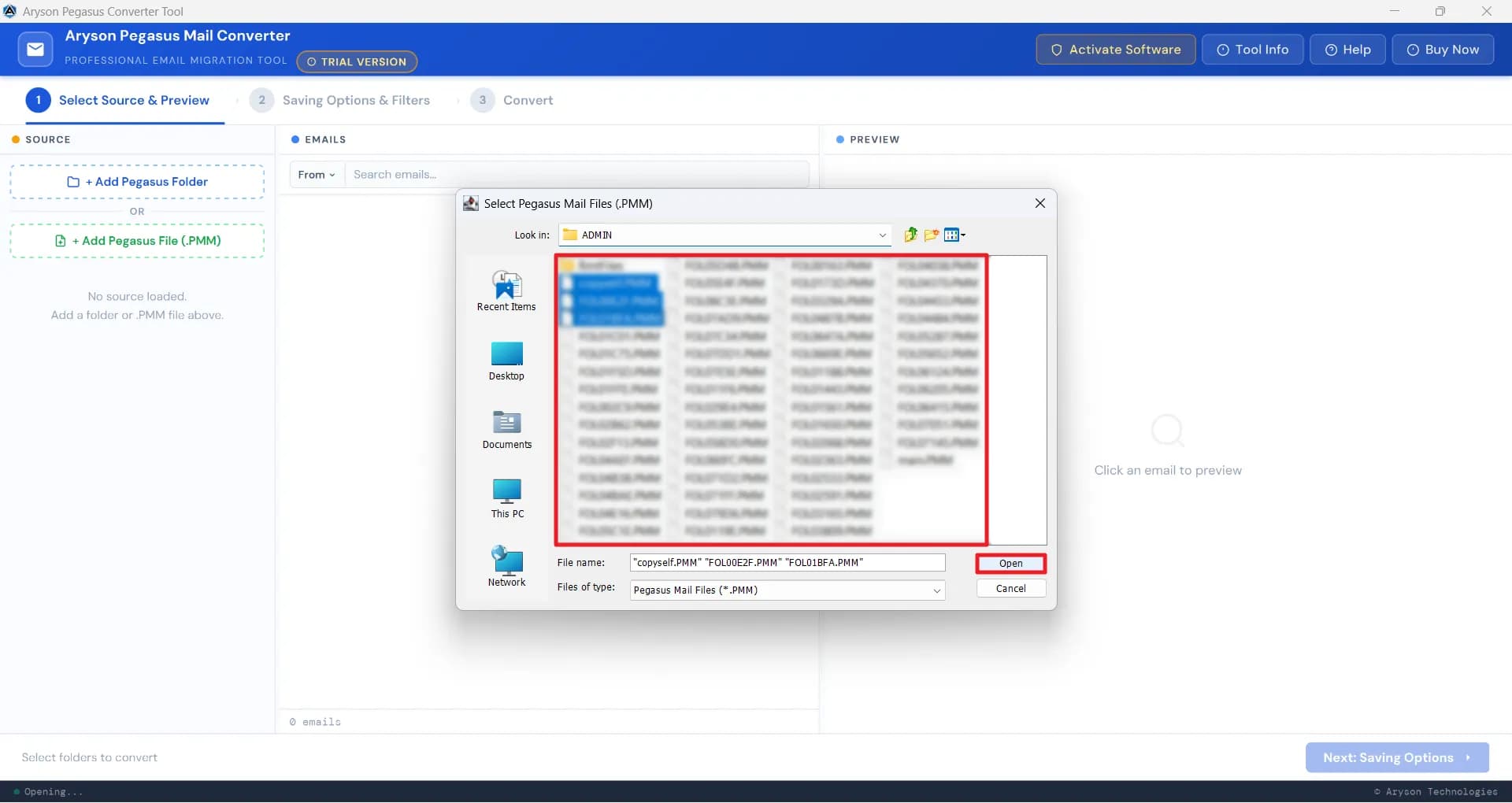
About this app
Aryson Pegasus Mail Converter is a dedicated desktop utility that handles the often daunting task of migrating old Pegasus Mail data. If you've ever been stuck with a pile of PMM, CNN, or PMI files and no clear way to get them into Outlook or a modern archiving system, this tool is for you. It supports conversion of all major Pegasus formats—even files without extensions—into 10+ output formats including PST, PDF, EML, MSG, MBOX, HTML, and CSV. What really sets it apart is the balance between power and simplicity. You get a full preview pane to inspect emails and attachments before conversion, plus a range of filters (date, sender, subject, keyword, attachment status, read status) that let you export only what you need. The software preserves folder hierarchy, metadata, and attachments, and includes an automatic duplicate removal engine. Real-time conversion logs and a detailed post-conversion report give you full visibility. Built for IT admins, compliance officers, and everyday us...
Key features
- 1Converts PMM, CNN, PNM, PML, PMF, PMC, PMI, and extensionless files to 10+ formats (PST, PDF, EML, MSG, MBOX, HTML, CSV, etc.).
- 2Preview pane plus date, sender, subject, keyword, attachment, and read-status filters for selective export.
- 3Preserves folder hierarchy, metadata, and attachments; automatic duplicate removal; real-time logs and post-conversion report.
Target customer profile
Drawn from the product itself, not from a survey.
Demographic
IT administrators and consultants managing legacy email systems
Pain points
Manual conversion is slow, risks data loss, and disrupts folder structures.
Primary needs
Bulk conversion with preserved hierarchy, metadata, and attachments; time-saving filters.
Demographic
Compliance officers and legal teams needing email archives for audits or eDiscovery
Pain points
Retrieving specific emails for legal review is cumbersome; metadata must be intact.
Primary needs
Date and keyword filters, conversion to PDF/MSG with full headers, and audit-ready reports.
Demographic
Business users and non-technical staff migrating from Pegasus to modern clients
Pain points
Unfamiliar with technical conversion steps; fear of losing important emails.
Primary needs
Simple, guided interface; preview before conversion; reliable output in common formats like PST.
Scout Review
Written by AI from measured evidence, scored out of 100.
Aryson Pegasus Mail Converter is a focused, well-featured desktop utility for a narrow but real problem: migrating legacy Pegasus Mail data into modern formats. It handles PMM, CNN, PMI, and extensionless files across 10+ output formats, preserves folder hierarchy and metadata, and adds genuinely useful extras — a preview pane, multi-field filters, automatic duplicate removal, and real-time conversion logs. The free demo (50 emails per folder) is a smart, low-risk trial. The website is fast and technically secure but visually dated and cluttered, with inconsistent product naming and a chat bubble that clips the hero. Accessibility is decent but not audited, and the growth ceiling is limited by the shrinking Pegasus Mail user base and established competitors. For IT admins and compliance teams still holding Pegasus archives, it's a credible, competent choice.
Measure by measure
Usability
60Clear download path, tabbed navigation, and a 50-email free demo make it easy to try. But the page is a very long, repetitive scroll with no section index, and small light-grey body copy hurts readability.
Design
58Functional but dated software-vendor aesthetic. The workflow diagram and app screenshot are strong; the hero is cluttered by an overlapping chat bubble and a 20-bullet wall of features with no hierarchy.
Speed
88Lighthouse mobile 98/100 (LCP 1.8s, CLS 0.003, TBT 46ms) and desktop 92/100. Genuinely fast, well-optimized page with no measurable layout shift.
Security
74Full 12/12 security-header checklist: HTTPS, HSTS, CSP, frame protection, Referrer-Policy, Permissions-Policy, SPF, DMARC. Site explicitly states it stores no credentials or mailbox data. No published audits or SOC 2 found.
Accessibility
68Lighthouse a11y 90/100, but failing audits include insufficient color contrast, non-sequential heading order, small touch targets, and a missing main landmark. No WCAG statement published.
Growth
48A real, specific problem — Pegasus Mail migration — with genuine differentiators (preview, filters, dedup). But the source platform is a shrinking legacy niche and SysTools/Goldy already occupy it.
Improvement areas
- No published SOC 2, ISO 27001, or pen-test documentation despite targeting compliance officers.
- Dated, cluttered homepage: overlapping chat bubble, 20-bullet feature wall, four inconsistent product names.
- Accessibility gaps: contrast, heading order, touch targets, missing main landmark; no WCAG statement.
- Growth ceiling limited by shrinking Pegasus Mail user base and near-identical SysTools/Goldy competitors.
Design & Usability
Aryson Pegasus Mail Converter's site reads like a competent 2015-era software vendor page. The workflow diagram — seven blue source chips into a green hub fanning out to red target formats — explains the product faster than any of the copy, and the app screenshot shows a clean three-pane layout with a numbered stepper. But the hero is fighting itself: a floating chat bubble clips the tagline, the feature list is 20 bullets of equal weight, and the product goes by four different names on one page. Usability is decent where it counts — tabbed nav, a prominent download CTA, and a free 50-email demo that lets you test before buying. The problem is the scroll: features, comparison table, roles, suite, reviews, use cases, with no index and small light-grey body text throughout.
Speed & Security
Speed is the standout. Lighthouse mobile scores 98/100 with an LCP of 1.8s, CLS of 0.003, and TBT of 46ms; desktop lands at 92/100. For a page this long and content-heavy, that's genuinely well-engineered — no layout shift, no sluggish paint. Security is solid on the technical side: the HTTP probe returned a perfect 12/12 on headers (HTTPS enforced, HSTS, CSP, frame protection, Referrer-Policy, Permissions-Policy) plus SPF and DMARC records. The site also states plainly that it stores no user credentials, mailbox content, or organisational data — a sensible posture for a desktop conversion utility. What's missing is the compliance layer: no SOC 2, ISO 27001, pen-test report, or bug bounty is published, which matters for the compliance-officer audience the product explicitly courts.
Accessibility & Growth
Accessibility scores 90/100 on Lighthouse but the failing audits are the usual suspects: insufficient color contrast, non-sequential heading order, undersized touch targets, a missing main landmark, and role=none/presentation conflicts. There's no WCAG conformance statement, so buyers relying on procurement checklists will have to take it on faith. Growth is the harder question. The problem is real and specific — getting legacy Pegasus Mail data into PST, MBOX, PDF, and modern archives — and the product genuinely differentiates with a preview pane, date/keyword/read-status filters, automatic duplicate removal, and real-time conversion logs. But Pegasus Mail is a shrinking legacy platform, and SysTools and Goldy Software already sell near-identical converters. The 13-year-old domain and 1.5M+ download counter show an established vendor, not a growing market.
Conclusion
If you're one of the remaining organisations with Pegasus Mail archives to migrate, Aryson's converter is a solid, feature-rich option worth trialing on the free demo before committing. The filtering, dedup, and preview tools genuinely reduce the risk of manual conversion. Just don't expect a modern SaaS experience — this is a workmanlike desktop utility wrapped in a dated vendor site. Compare it against SysTools and Goldy on price and output-format coverage before you buy, and if compliance is your driver, ask Aryson directly for their security documentation since none is published.
Suggestions for improvement
- Publish a SOC 2 or ISO 27001 report (or at least a security whitepaper) — compliance officers are a named target audience.
- Fix the hero: remove or reposition the chat bubble clipping the tagline, and group the 20 feature bullets into 4-5 themed categories.
- Standardize the product name across the entire page — pick one of the four variants and stick to it.
- Add an accessibility statement and fix the failing audits (contrast, heading order, touch targets, main landmark).
Alternatives comparison
Named competitors, point by point. Nobody paid to appear here or to be left out.
 Aryson Pegasus Mail Converter |  SysTools Pegasus Mail Converter | Pegasus Mail to Outlook Converter by Goldy Software | |
|---|---|---|---|
| Output formats supported | 10+ formats: PST, PDF, HTML, RTF, MBX, MBOX, MSG, EML, EMLX, CSV, MD, DOCX | PST, MSG, EML, and other formats | Primarily PST (Outlook-focused), PMM and other file types |
| Preview before conversion | Yes — advanced preview panel for emails and attachments | Preview available | Straightforward interface; preview not emphasized |
| Filtering options | Date, sender, subject, keyword, attachment, read status, size | Filter options included | Not emphasized |
| Batch processing | Yes — single or multiple files in one operation | Yes — batch processing | Not emphasized |
| Free trial / demo | Free demo converts up to 50 emails per folder | Free demo version available | Trial typically available |
| Duplicate removal | Yes — automatic duplicate removal engine | Not emphasized | Not emphasized |
SysTools Pegasus Mail Converter
A similar tool that converts Pegasus Mail files to PST, MSG, EML, and other formats with batch processing and filter options.
Pegasus Mail to Outlook Converter by Goldy Software
Another utility focused on migrating Pegasus emails to Outlook PST, supporting PMM and other file types with a straightforward interface.
Comparing options? See Aryson Pegasus Mail Converter alternatives, scored side by side
More Productivity apps
View all Productivity
Puzzly – B2B Lead Generation & Sales Intelligence Platform
92Puzzly is an all-in-one B2B lead generation platform that...

Qamarero
92An all-in-one hospitality software for restaurants and ba...

EmbedMyReviews
92White-label reputation management software for agencies s...

StoryPad
92Privacy-first open source journal app with a continuous t...

Notion
92All-in-one AI workspace for docs, projects, and knowledge...

The Stack Newsletter
92A weekly newsletter delivering curated tech jobs, intervi...

Vibe Coding Agent Skills
92A free, open-source platform offering 110 AI agent skills...

QRBliss
91Branded QR codes with AI Brand Sync, 15 free dynamic code...

Gerty
91Private, local AI assistant for Mac that runs offline

Strukchad Property Management
91Property management for Kenyan letting agents: rent invoices raised every month, M-Pesa rent prompts to tenants, arrears tracking and landlord statements.

CC Switch
91Open-source desktop app for switching AI coding providers...

PitchWhip
90AI cold call scripts & direct dials from LinkedIn


A platform dedicated to providing unbiased reviews of newly launched applications, analyzing everything from their features to their full potential.
info@scoutforge.net© 2026 Scoutforge. All rights reserved.
