Cycling through all six. Tap any point to stop.
Measured on six things
Shrink Outlook PST files safely, even without Outlook ins...
Design
46Dated landing page with a disciplined feature-card rhythm but four competing CTA styles, a chat widget covering hero copy, and mismatched panel palettes. The app's own wizard screenshot reads clearer than the site around it.
Screenshots
1 / 1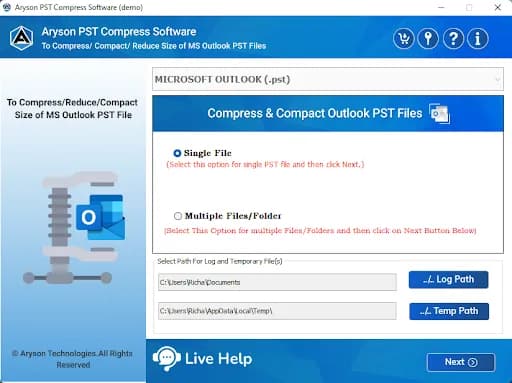
About this app
I've spent a fair amount of time digging into Aryson PST Compress Tool, and it's one of those utilities that quietly solves a very real headache for Outlook users: bloated PST files that drag down performance and eat up disk space. The tool lets you compress single or multiple PST files at once — no Outlook installation required — and it works with both ANSI and Unicode formats. What I like most is the flexibility in how it handles attachments. You can compress them inside a new PST, strip them out entirely, or extract and save them to a separate folder, which you then have the option to compress as well. There's also duplicate email removal based on To, From, Subject, Bcc, or Body, date-range filtering to compress only selected messages, and a split option that breaks oversized PST files into more manageable parts. The folder hierarchy stays intact, and the wizard-style interface means you don't need to be an IT admin to use it. It supports Outlook up to 2021 and runs on Windows 11...
Key features
- 1Compress single or multiple PST files (ANSI and Unicode) without an Outlook installation.
- 2Four attachment modes: compress in new PST, remove and save separately, remove permanently, or extract+compress to a folder.
- 3Duplicate email removal by To, From, Subject, Bcc or Body, plus date-range filtering and PST splitting.
Target customer profile
Drawn from the product itself, not from a survey.
Demographic
IT administrators managing enterprise mailboxes
Pain points
Oversized PST files slow Outlook and trigger storage errors
Primary needs
Batch compression, safe folder-structure preservation, split options
Demographic
Small business owners with archive-heavy Outlook
Pain points
Mailbox hits size limits and performance degrades
Primary needs
Affordable one-time tool with attachment extraction and deduplication
Demographic
Home users and freelancers migrating old PST files
Pain points
Legacy PST files are huge and hard to back up
Primary needs
Simple wizard-based compression without Outlook installed
Scout Review
Written by AI from measured evidence, scored out of 100.
Aryson PST Compress Tool is a competent, narrowly-scoped Outlook utility wrapped in a dated marketing site. The product story is clear and the differentiators are concrete: compress without Outlook, handle attachments four ways, dedupe, filter by date, split oversized files. The site is fast and technically well-secured, but the design is cluttered, the free-tier limit is buried, and accessibility has real gaps. Against Stellar and Kernel it's a credible, affordable alternative rather than a category leader.
Measure by measure
Usability
58Wizard-style app and clear feature list make the workflow legible, but the 50-email free-trial cap hides in the spec table and the persistent chat widget plus dense small-type tables add friction before you ever install it.
Design
46Dated landing page with a disciplined feature-card rhythm but four competing CTA styles, a chat widget covering hero copy, and mismatched panel palettes. The app's own wizard screenshot reads clearer than the site around it.
Speed
88Lighthouse mobile 98/100 (LCP 1.1s, CLS 0.003, TBT 168ms) and desktop 90/100. The marketing site is genuinely fast and stable, with no layout shift to speak of.
Security
76Full header hygiene: HTTPS enforced, HSTS, CSP, frame protection, Referrer-Policy, Permissions-Policy, plus SPF and DMARC — 12/12 on the probe. No published SOC 2/ISO or audit page found, so vendor compliance stays unverified.
Accessibility
70Lighthouse a11y 90/100, but real failures remain: low-contrast text, non-sequential headings, undersized touch targets, no main landmark, and role=none conflicts. No WCAG statement or a11y page found.
Growth
54Real, recurring Outlook pain with a specific wedge (no Outlook needed, attachment modes, dedup, split) — but it's a crowded utility niche against Stellar and Kernel, and the wedge is copyable.
Improvement areas
- Dated, cluttered landing page with four competing download/purchase CTAs and a chat widget over the hero.
- Free-tier limit (50 emails per folder) buried in the spec table instead of near the download button.
- Accessibility gaps: low contrast, non-sequential headings, small touch targets, no main landmark.
- No public security/compliance page (SOC 2, ISO, data-handling) for enterprise buyers.
Design & Usability
The site is a long, badge-stacked landing page that hasn't been redesigned in a while. The feature grid is tidy and the app's own wizard screenshot — Single File vs Multiple Files, one Next button — is genuinely easy to follow. But the marketing page fights itself: four download/purchase treatments, a chat widget parked over the hero sentence, and light-blue/grey/white panels that don't share a design system. Usability is decent where it counts: the workflow is legible and the feature list is concrete. The friction is pre-purchase — the 50-email free cap hides in the spec table, and dense small-type tables make scanning work.
Speed & Security
Speed is the standout. Lighthouse mobile 98/100 with LCP 1.1s, CLS 0.003 and TBT 168ms; desktop 90/100. The site loads fast and doesn't jump around. Security is solid on the technical side: HTTPS enforced, HSTS, CSP, frame protection, Referrer-Policy, Permissions-Policy, SPF and DMARC — a clean 12/12 on the header probe. What's missing is the paperwork: no public SOC 2, ISO or pen-test page, so enterprise buyers can't verify compliance from the site alone. For a desktop utility handling mailbox data, that's the gap worth closing.
Accessibility & Growth
Accessibility lands at 70: the automated audit gives 90/100, but the failing checks are real — low-contrast text, non-sequential headings, undersized touch targets, no main landmark. No WCAG statement anywhere. Growth is a judgement on the idea: oversized PST files are a genuine, recurring Outlook headache, and the wedge is specific — no Outlook install required, ANSI+Unicode, four attachment-handling modes, dedup, date filtering, splitting. That's a real reason to pick it. The limit is the category: Stellar and Kernel already own mindshare, and the feature set is copyable. A 13-year-old domain and self-reported 1.5M downloads show staying power, not a moat.
Conclusion
If you're an IT admin or SMB drowning in multi-gigabyte PSTs and you want a one-time tool that doesn't demand an Outlook install, this does the job and the site won't waste your time loading. Go in knowing the free version caps at 50 emails per folder, and don't expect enterprise compliance paperwork on the site. It's a solid utility with a marketing page that undersells it.
Suggestions for improvement
- Collapse the four download/purchase treatments into one primary CTA with a clear secondary.
- Surface the 50-email free-tier limit next to the download button, not deep in the spec table.
- Fix the failing a11y audits: contrast, heading order, touch targets, and add a main landmark.
- Publish a security/compliance page (data handling, any audits) to support enterprise buyers.
Alternatives comparison
Named competitors, point by point. Nobody paid to appear here or to be left out.
 Aryson PST Compress Tool |  Stellar Compress PST |  Kernel for PST Compress & Compact | |
|---|---|---|---|
| Compress PST without Outlook installed | Yes — explicitly supported | Yes — standalone compression/repair suite | Yes — dedicated compression utility |
| Attachment handling options | Four modes: compress, remove+save, remove, extract+compress | Attachment compression/removal supported | Attachment removal supported |
| Duplicate email removal | Yes — by To, From, Subject, Bcc or Body | Offered in broader suite | Yes — deduplication supported |
| PST splitting for oversized files | Yes — split into smaller parts | Split/compact supported | Yes — split option included |
| Free version available | Free trial — 50 emails per folder | Trial version available | Demo version available |
Stellar Compress PST
A well-known Outlook repair and compression suite that stably reduces PST size and repairs corrupt files.
Kernel for PST Compress & Compact
A dedicated PST compression utility offering attachment removal, deduplication, and splitting.
Comparing options? See Aryson PST Compress Tool alternatives, scored side by side
More Productivity apps
View all Productivity
Puzzly – B2B Lead Generation & Sales Intelligence Platform
92Puzzly is an all-in-one B2B lead generation platform that...

Qamarero
92An all-in-one hospitality software for restaurants and ba...

EmbedMyReviews
92White-label reputation management software for agencies s...

StoryPad
92Privacy-first open source journal app with a continuous t...

Notion
92All-in-one AI workspace for docs, projects, and knowledge...

The Stack Newsletter
92A weekly newsletter delivering curated tech jobs, intervi...

Vibe Coding Agent Skills
92A free, open-source platform offering 110 AI agent skills...

QRBliss
91Branded QR codes with AI Brand Sync, 15 free dynamic code...

Gerty
91Private, local AI assistant for Mac that runs offline

Strukchad Property Management
91Property management for Kenyan letting agents: rent invoices raised every month, M-Pesa rent prompts to tenants, arrears tracking and landlord statements.

CC Switch
91Open-source desktop app for switching AI coding providers...

PitchWhip
90AI cold call scripts & direct dials from LinkedIn


A platform dedicated to providing unbiased reviews of newly launched applications, analyzing everything from their features to their full potential.
info@scoutforge.net© 2026 Scoutforge. All rights reserved.
