Cycling through all six. Tap any point to stop.
Measured on six things
Free Outlook PST viewer to open, read & migrate PST files...
Design
44Dated 2015-era Windows UI with an 'Activate Windows' watermark in the product screenshot, a text-dense homepage, and repeated card grids. Functional but visually behind peers.
Screenshots
1 / 1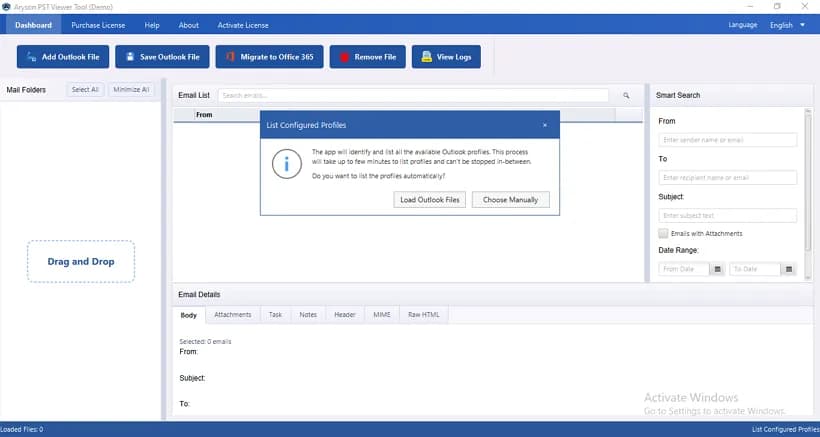
About this app
I've spent enough time around enterprise mailbox archives to know that Outlook PST files are both a blessing and a headache. That's exactly where Aryson PST Viewer earns its keep. It's a dedicated utility that lets you open, read, and inspect every item inside an Outlook PST file — emails, attachments, contacts, calendars, tasks, and notes — without needing Microsoft Outlook installed at all. From a genuinely personal standpoint, the standout is how much it packs into a free tier: a clean tree-structure navigation pane, detailed email previews with Body/Header/MIME/HTML tabs, and a Smart Search panel that filters by sender, recipient, subject, attachment, and date range. It handles healthy and corrupted files alike, preserves the original folder hierarchy, and is compatible with Outlook 2024 down to Outlook 97, plus Windows, Mac, and Linux. But the Pro edition is where enterprises will feel the value. You get duplicate-removal filters (by To, From, Body, Subject, CC, BCC), skip/resu...
Key features
- 1Open and view PST files — emails, attachments, contacts, calendars, tasks, notes — without Microsoft Outlook installed.
- 2Smart Search panel filters by sender, recipient, subject, attachment, and date range; tree navigation preserves folder hierarchy.
- 3Pro tier adds duplicate removal, filtering, and Office 365 migration via Modern Auth or Client Secret, plus export to PDF/EML/MSG/MBOX/CSV.
Target customer profile
Drawn from the product itself, not from a survey.
Demographic
IT administrators in mid-to-large enterprises managing legacy PST archives
Pain points
Cannot access ex-employee PST files without configuring Outlook; large archives are slow and messy
Primary needs
Open, browse, and locate required emails and attachments without an Outlook profile
Demographic
Compliance and legal teams running audits or internal investigations
Pain points
Hard to review email bodies and attachments for evidence; need reliable filtering and export
Primary needs
Analyze PST content and export selected emails to PDF, EML, or MSG for records
Demographic
System administrators planning migrations to Office 365 or Exchange Online
Pain points
Risky, opaque migrations; duplicates and outdated data bloat the process
Primary needs
Preview PST contents, deduplicate, and securely migrate with flexible mailbox mapping
Demographic
Small business owners and power users with personal or team PST backups
Pain points
Lost or deleted Outlook profile; need quick, free access to saved mailbox data
Primary needs
A free, easy-to-use viewer to read PST files and convert them to PDF or other formats
Scout Review
Written by AI from measured evidence, scored out of 100.
Aryson PST Viewer is a competent, long-running utility (domain registered 2013, site cites 1.5M+ downloads) that does the unglamorous job of opening PST files without Outlook and does it across Windows, Mac, and Linux. The free tier is unusually complete — tree navigation, multi-tab email previews, and a real search panel — and the Pro tier adds duplicate removal, filtering, and Office 365 migration with Modern Auth. The measured profile is uneven: strong security headers and solid accessibility scoring sit next to a dated interface, a text-dense homepage, and a mobile page that takes four seconds to paint. It's a workhorse, not a show pony.
Measure by measure
Usability
62Core task is well-served: folder tree, email list, and Body/Header/MIME/HTML tabs plus Smart Search filters. Free tier is genuinely useful. Nav is cluttered with seven top-level items.
Design
44Dated 2015-era Windows UI with an 'Activate Windows' watermark in the product screenshot, a text-dense homepage, and repeated card grids. Functional but visually behind peers.
Speed
58Lighthouse mobile 67/100 with LCP 4.1s and TBT 554ms; desktop 81/100. Heavy marketing page drags the mobile experience, though CLS is a clean 0.
Security
76Full header hygiene: HTTPS, HSTS, CSP, frame protection, Referrer-Policy, Permissions-Policy, plus SPF and DMARC — 12/12 on the probe. No published SOC 2/ISO/pen-test claims found.
Accessibility
70Lighthouse a11y 91/100, but failing contrast, heading order, touch-target, and main-landmark audits. No WCAG statement or a11y page found on the site.
Growth
60Real, specific problem (PST access without Outlook, pre-migration cleanup) aimed at IT admins and compliance teams. Free viewer plus Pro dedupe/O365 migration is a genuine wedge in a crowded field.
Improvement areas
- Dated interface and text-dense homepage; product screenshot still shows an 'Activate Windows' watermark.
- No published SOC 2, ISO, pen-test, or bug bounty documentation despite targeting compliance and legal teams.
- Four failing Lighthouse accessibility audits (contrast, heading order, touch targets, main landmark) and no WCAG statement.
- Mobile Lighthouse performance 67/100 with 4.1s LCP — heavy marketing page slows the path to download.
Design & Usability
The interface is a classic Windows desktop layout — folder tree on the left, email list in the middle, preview tabs on the right — and for the core job of inspecting a PST that's the right call. The problem is polish: the marketing screenshot still carries an 'Activate Windows' watermark, the homepage stacks ten-plus bullets against a product box render, and the same white card grid repeats down the entire scroll. Navigation has seven top-level items for a single-purpose utility. Usability itself is stronger than the design suggests: the free tier includes tree navigation, Body/Header/MIME/HTML preview tabs, and a Smart Search panel filtering by sender, recipient, subject, attachment, and date range — that's a real workflow, not a teaser.
Speed & Security
Measured Lighthouse puts mobile performance at 67/100 with a 4.1s LCP and 554ms TBT, while desktop lands at 81/100 with a clean CLS of 0 — the page is heavy on mobile but not broken. Security is the strongest measured dimension: HTTPS enforced with HSTS, CSP, frame protection, X-Content-Type-Options, Referrer-Policy, Permissions-Policy, plus SPF and DMARC, a full 12/12 on the header and DNS probe. What's missing is the paperwork enterprises actually ask for — no SOC 2, ISO 27001, pen-test summary, or bug bounty surfaced in the collected site content, which is a gap for a tool pitched at legal and compliance teams handling archived mailboxes.
Accessibility & Growth
Accessibility scores 91/100 on Lighthouse but fails four concrete audits: insufficient color contrast, non-sequential heading order, undersized touch targets, and a missing main landmark. No WCAG conformance statement or accessibility page appears in the site content. On growth, the idea holds up: IT admins, compliance reviewers, and sysadmins planning Office 365 migrations are a specific, real audience, and the free-viewer-to-Pro-migration funnel is a coherent wedge. The honest limit is the category — Kernel, SysTools, and Stellar all ship free PST viewers, so Aryson's differentiation rests on dedupe filters, migration reporting, and Modern Auth support rather than anything structurally defensible.
Conclusion
If you're an IT admin who needs to crack open an ex-employee's PST or audit an archive before a migration, this will do the job and the free tier will probably cover the first few. If you're a compliance team that needs vendor paperwork before you'll touch it, ask Aryson directly for their security documentation — none is published on the site. And if you're comparing against Kernel, SysTools, or Stellar, the free viewers are broadly similar; the decision comes down to whether you need the Pro migration and dedupe features, and whether the dated UI bothers you.
Suggestions for improvement
- Remove the 'Activate Windows' watermark from the product screenshot — it undercuts every credibility claim on the page.
- Publish a security/compliance page with SOC 2 or ISO status, data-handling details, and a pen-test summary for the legal-team audience.
- Cut the homepage to a hero, three feature cards, and one screenshot; the current scroll is ten sections of the same card grid.
- Fix the four failing Lighthouse a11y audits — contrast, heading order, touch targets, main landmark — and add a WCAG statement.
Alternatives comparison
Named competitors, point by point. Nobody paid to appear here or to be left out.
 Aryson PST Viewer Aryson PST Viewer |  Kernel PST Viewer Kernel PST Viewer |  SysTools Outlook PST Viewer SysTools Outlook PST Viewer |  Stellar PST Viewer Stellar PST Viewer | |
|---|---|---|---|---|
| Free tier available | Yes — free viewer with tree nav, preview tabs, and Smart Search | Yes — free PST viewer | Yes — free PST viewer | Yes — free PST viewer |
| Opens PST without Outlook installed | Yes | Yes | Yes | Yes |
| Handles corrupted PST files | Yes — site claims healthy and corrupted files | Yes | Yes — corrupted and encrypted PST | Yes — scans and previews |
| Export / conversion beyond viewing | Pro: PDF, EML, MSG, MBOX, PST, CSV + O365 migration | Viewer-focused; conversion via separate Kernel tools | Viewer-focused; conversion via separate SysTools tools | Viewer-focused; conversion via separate Stellar tools |
| Duplicate removal / filtering | Pro: dedupe by To/From/Body/Subject/CC/BCC, date and migration filters | Not a core viewer feature | Not a core viewer feature | Not a core viewer feature |
| Platform coverage | Windows, Mac, Linux | Windows (per site) | Windows (per site) | Windows (per site) |
Kernel PST Viewer
Free PST viewer from Kernel that opens and previews PST file contents, including emails and attachments, without Outlook.
SysTools Outlook PST Viewer
A free tool to view and read Outlook PST files, preview mailbox items, and inspect corrupted or encrypted PST data.
Stellar PST Viewer
Free PST viewer utility that scans and previews Outlook mailboxes, folders, and attachments without requiring MS Outlook.
Comparing options? See Aryson PST Viewer alternatives, scored side by side
More Productivity apps
View all Productivity
Qamarero
92An all-in-one hospitality software for restaurants and ba...

The Stack Newsletter
92A weekly newsletter delivering curated tech jobs, intervi...

EmbedMyReviews
92White-label reputation management software for agencies s...

StoryPad
92Privacy-first open source journal app with a continuous t...

Puzzly – B2B Lead Generation & Sales Intelligence Platform
92Puzzly is an all-in-one B2B lead generation platform that...

Notion
92All-in-one AI workspace for docs, projects, and knowledge...

Vibe Coding Agent Skills
92A free, open-source platform offering 110 AI agent skills...

CC Switch
91Open-source desktop app for switching AI coding providers...

username.md
90One verified handle for your online identity, readable by...

What the GIF
89Frame-perfect video-to-GIF maker that runs entirely in yo...

AuditCloser
89White-label website audits that close deals for digital a...

NudgeWin
89Automated quote follow-up for trades and service businesses.


A platform dedicated to providing unbiased reviews of newly launched applications, analyzing everything from their features to their full potential.
info@scoutforge.net© 2026 Scoutforge. All rights reserved.
