Cycling through all six. Tap any point to stop.
Measured on six things
Split oversized Outlook PST files safely with flexible op...
Design
57Average but functional marketing page: consistent feature cards and a scannable social-proof row, undercut by five competing hero CTAs, a chat popup covering the product copy, and a grey placeholder avatar.
Screenshots
1 / 1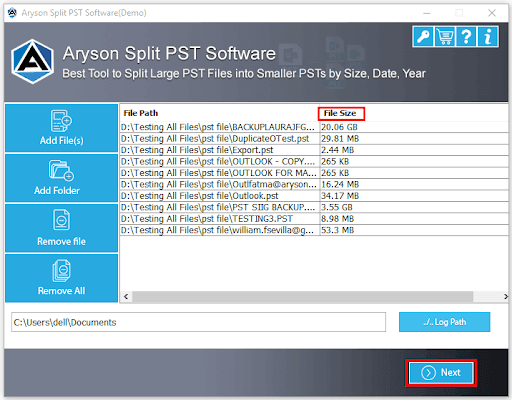
About this app
Aryson Split PST Software is a specialized utility designed to break down oversized Outlook PST files into smaller, more manageable pieces without compromising data integrity. It's a godsend for anyone who's ever watched Outlook crawl to a halt because their mailbox ballooned past the size limit. The tool supports both ANSI and Unicode PST formats and works with all major Outlook versions, from 2002 to 2021, and even Office 365. You don't need Outlook installed to use it, which is a nice bonus. What sets it apart is the flexibility: you can split by size, date, sender, or folder, and even create a single PST or separate PSTs for each folder. There's a duplicate email remover and password protection for output files, too. The interface is straightforward, with a preview pane that shows the folder hierarchy before you commit. It's clearly aimed at IT admins, data managers, and power users who regularly wrestle with bloated PSTs. The free version limits you to 50 items per folder, but...
Key features
- 1Split oversized PST files by size, date, sender, or folder while preserving folder structure.
- 2Skip duplicate emails and add password protection to output PST files.
- 3Supports ANSI and Unicode PST across Outlook 2002–2021 and Office 365; no Outlook install required.
Target customer profile
Drawn from the product itself, not from a survey.
Demographic
IT System Administrators
Pain points
Oversized PST files cause Outlook crashes and slow performance.
Primary needs
Reliable tool to split PSTs without data loss and maintain folder structure.
Demographic
Data Management Specialists
Pain points
Large mailboxes are hard to organize, search, and archive for compliance.
Primary needs
Flexible splitting options (by date, sender, folder) and duplicate removal.
Demographic
Small Business Owners
Pain points
Limited IT resources and need to manage email data without expensive enterprise solutions.
Primary needs
Affordable, easy-to-use PST splitter that works without Outlook installed.
Scout Review
Written by AI from measured evidence, scored out of 100.
Aryson Split PST is a workmanlike utility for a genuinely annoying problem: Outlook mailboxes that balloon past the size limit and drag everything down. The feature set is real — split by size, date, sender or folder, skip duplicates, password-protect output, works without Outlook installed, supports ANSI and Unicode across Outlook 2002–2021 and Office 365. The site is fast (mobile Lighthouse 82, LCP 1.1s) and the security headers are complete. Where it stumbles is craft: a cluttered hero with five competing CTAs, a chat popup covering the copy, seven failing accessibility audits, and a free demo capped at 50 items per folder. Against Stellar and SysTools it's on par on features and behind on polish.
Measure by measure
Usability
60Clear nav with Screens/Video/Guide/Eula routes and a free demo, but the demo caps at 50 items per folder and dense small-text grids make scanning on a laptop a chore.
Design
57Average but functional marketing page: consistent feature cards and a scannable social-proof row, undercut by five competing hero CTAs, a chat popup covering the product copy, and a grey placeholder avatar.
Speed
71Lighthouse mobile 82/100 with a 1.1s LCP and near-zero layout shift; desktop 74/100 and a 721ms TBT keep it from being genuinely fast, but the page loads cleanly.
Security
74Full 12/12 security-header checklist: HTTPS enforced, HSTS, CSP, frame protection, SPF and DMARC all present. No published SOC 2, ISO, pen-test or bug bounty found.
Accessibility
58Lighthouse 83/100 but seven failing audits: low contrast, broken heading order, missing alt text, unnamed links, small touch targets and no main landmark. No WCAG statement found.
Growth
58A real, recurring Outlook pain point with a concrete feature set (split by size/date/sender/folder, dedupe, password). But Stellar and SysTools offer near-identical criteria, so the wedge is thin.
Improvement areas
- Free demo caps at 50 items per folder, too low to validate on a real mailbox.
- Seven failing accessibility audits: alt text, contrast, heading order, link names, touch targets.
- No published security page, SOC 2, ISO 27001, or pen-test summary despite handling mailbox data.
Design & Usability
The homepage is a competent vendor page that gets the job done without much craft. Social proof (4.8 stars, 1,890 reviews, 1.5M downloads) is placed well and scannable, and the Core Functionalities grid has consistent card rhythm. But the hero throws five download/purchase CTAs at you at once, a chat popup sits on top of the product description, and the testimonial avatar is a grey placeholder. Navigation is clear — Features, Specs, Screens, Video, Guide, Eula — and a free demo exists, but it caps at 50 items per folder, which is a teaser rather than a trial. Dense small-text grids make laptop scanning harder than it needs to be.
Speed & Security
Speed is the strongest measured dimension: Lighthouse mobile 82/100 with a 1.1s LCP, 0.003 CLS and 1.1s FCP, though desktop drops to 74/100 and a 721ms TBT shows there's still script weight to trim. Security is solid on the fundamentals — the probe returned a full 12/12 checklist with HTTPS enforced, HSTS, CSP, frame protection, X-Content-Type-Options, Referrer-Policy, Permissions-Policy, plus SPF and DMARC. What's missing is the paperwork: no SOC 2, ISO 27001, pen-test summary or bug bounty found in the collected evidence. For a desktop utility handling sensitive mailbox data, a security page would earn real trust.
Accessibility & Growth
Accessibility is the weak spot. Lighthouse scores 83/100, but seven axe audits fail: insufficient color contrast, non-sequential headings, images without alt text, links without discernible names, undersized touch targets, no main landmark, and role=presentation conflicts. No WCAG conformance statement was found. Growth is a judgement on the idea: splitting oversized PSTs is a real, recurring Outlook problem, and the feature set (split by size, date, sender, folder; dedupe; password protection; no Outlook required) is concrete. But the category is crowded — Stellar and SysTools offer near-identical splitting criteria — and nothing in the material names a segment Aryson serves better. The 13-year-old domain and 1.5M claimed downloads are context, not a moat.
Conclusion
If you're an IT admin with a 40GB PST and a deadline, Aryson will probably get you there — the splitting logic is the point and it's covered. But the demo cap means you're buying somewhat on faith, and the accessibility and design gaps suggest a product coasting on a 13-year-old domain rather than sharpening. Try the demo on a real file first, compare against Stellar and SysTools on price, and only then commit. The bones are fine; the finish is not.
Suggestions for improvement
- Collapse the hero to one primary Download CTA and a secondary Purchase link; move the Microsoft Store badge below the fold.
- Fix the seven failing axe audits: alt text, contrast, heading order, link names, touch targets, main landmark.
- Raise the free demo cap above 50 items per folder so buyers can validate on a real PST before paying.
- Publish a security/trust page covering data handling, and pursue at least an ISO 27001 or pen-test summary.
Alternatives comparison
Named competitors, point by point. Nobody paid to appear here or to be left out.
 Aryson Split PST Software |  Stellar Splitter for Outlook |  SysTools Split PST | |
|---|---|---|---|
| Splitting criteria (size, date, sender, folder) | Size, date, sender, folder | Size, date, folder | Multiple criteria incl. size, date, folder |
| ANSI and Unicode PST support | Yes | Yes | Yes |
| Works without Outlook installed | Yes | Yes | Yes |
| Duplicate email removal | Yes | Not highlighted | Not highlighted |
| Password protection for output PST | Yes | Not highlighted | Not highlighted |
| Free demo / trial | Free demo, 50 items per folder cap | Free trial available | Free demo available |
Stellar Splitter for Outlook
A popular tool to split large PST files by size, date, or folder, with a user-friendly interface.
SysTools Split PST
Another well-known PST splitter that offers multiple splitting criteria and supports both ANSI and Unicode files.
Comparing options? See Aryson Split PST Software alternatives, scored side by side
More Productivity apps
View all Productivity
Puzzly – B2B Lead Generation & Sales Intelligence Platform
92Puzzly is an all-in-one B2B lead generation platform that...

Qamarero
92An all-in-one hospitality software for restaurants and ba...

EmbedMyReviews
92White-label reputation management software for agencies s...

StoryPad
92Privacy-first open source journal app with a continuous t...

Notion
92All-in-one AI workspace for docs, projects, and knowledge...

The Stack Newsletter
92A weekly newsletter delivering curated tech jobs, intervi...

Vibe Coding Agent Skills
92A free, open-source platform offering 110 AI agent skills...

QRBliss
91Branded QR codes with AI Brand Sync, 15 free dynamic code...

Gerty
91Private, local AI assistant for Mac that runs offline

Strukchad Property Management
91Property management for Kenyan letting agents: rent invoices raised every month, M-Pesa rent prompts to tenants, arrears tracking and landlord statements.

CC Switch
91Open-source desktop app for switching AI coding providers...

PitchWhip
90AI cold call scripts & direct dials from LinkedIn


A platform dedicated to providing unbiased reviews of newly launched applications, analyzing everything from their features to their full potential.
info@scoutforge.net© 2026 Scoutforge. All rights reserved.
