Cycling through all six. Tap any point to stop.
Measured on six things
Graph API-based M365 cross-tenant migration for Exchange,...
Design
46The desktop app UI is clean and card-based, but the marketing site is stuck in early-2010s shareware mode: a 3D box render, 20+ unbroken bullets, and an overlapping tooltip. Dated and hard to scan.
Screenshots
1 / 1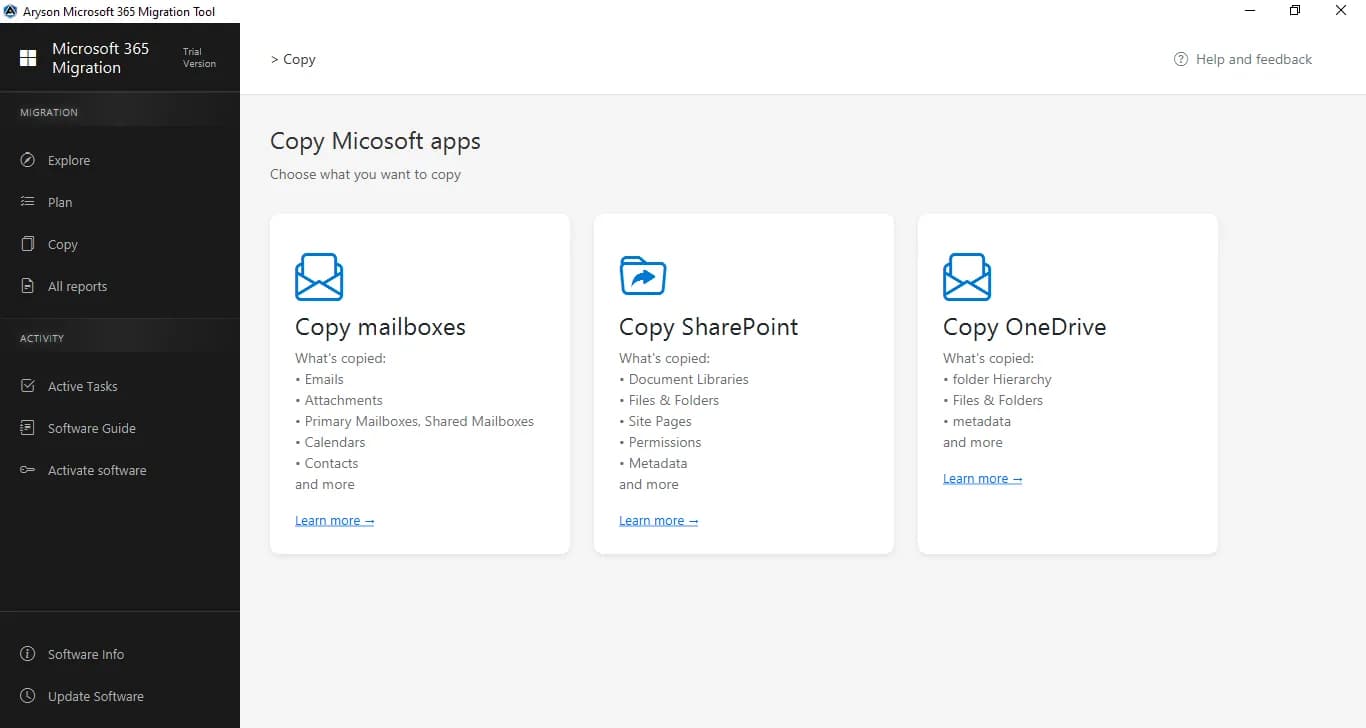
About this app
Aryson Tenant-to-Tenant Migration Tool is a Windows-based, Microsoft Graph API-powered enterprise solution for moving organizational data between Microsoft 365 tenants without PowerShell scripting. It migrates Exchange Online mailboxes (emails, calendars, contacts, tasks, rules, permissions, out-of-office replies), OneDrive files and folders, SharePoint sites and libraries, and Microsoft Teams content (channels, chats, conversations, Planner, tabs, apps, reactions, Loop components, meeting links, recorded videos) while preserving folder hierarchy, metadata, and timestamps. Built for mergers and acquisitions, tenant consolidations, divestitures, and corporate rebranding, the tool supports bulk CSV user mapping, selective and incremental migration, date-range and file filters, cross-storage OneDrive↔SharePoint moves, and dedicated email/OneDrive/SharePoint deduplication modules with reports. It provides OAuth 2.0 modern authentication, encrypted connections, no data storage or retenti...
Key features
- 1Graph API-based cross-tenant migration of Exchange Online mailboxes, OneDrive, SharePoint, and Teams without PowerShell scripting.
- 2Bulk CSV user mapping, selective/incremental migration, date-range and file filters, and cross-storage OneDrive↔SharePoint moves.
- 3Dedicated email, OneDrive, and SharePoint deduplication modules with reports, plus OAuth 2.0 auth and no data retention.
Target customer profile
Drawn from the product itself, not from a survey.
Demographic
IT infrastructure managers and Microsoft 365 admins in enterprises
Pain points
Manual PowerShell tenant migrations are error-prone, complex to map users, and risk data loss.
Primary needs
Automated, secure Graph API-based cross-tenant migration with user mapping and monitoring.
Demographic
Cloud migration consultants and managed service providers
Pain points
Handling large-scale mailbox, OneDrive, SharePoint, and Teams migrations with limited tools and budget constraints.
Primary needs
Bulk processing, deduplication, incremental migration, and flexible CSV mapping for multiple clients.
Demographic
Organizations undergoing mergers, acquisitions, or divestitures
Pain points
Consolidating multiple tenants or splitting data during business separation while maintaining compliance and continuity.
Primary needs
Zero-downtime migration with metadata preservation, permissions, and deduplication during restructuring.
Scout Review
Written by AI from measured evidence, scored out of 100.
Aryson Tenant-to-Tenant Migration Tool is a competent, established (13-year-old domain) Windows utility for a genuinely painful problem: moving Microsoft 365 data between tenants during mergers, acquisitions, and divestitures. The measured signals are mixed but honest. Security headers are perfect (12/12), mobile performance is good (86/100), and the app UI itself is clean and card-based. The website is the weak link — dated shareware aesthetics, a 3D box render, a download counter, and a 20-bullet wall of text. Accessibility sits at 83/100 with seven failing audits and no conformance statement. Documentation is a PDF. Against Microsoft's free native tools and Quest On Demand, Aryson's case rests on breadth — Teams fidelity, dedup, CSV mapping — rather than compliance credentials or a moat.
Measure by measure
Usability
58Free demo, video, guide, and FAQ are all present, and the app's workload cards make scope clear. But docs are a PDF, and the homepage buries key capabilities in a wall of text with repeated, low-contrast CTAs.
Design
46The desktop app UI is clean and card-based, but the marketing site is stuck in early-2010s shareware mode: a 3D box render, 20+ unbroken bullets, and an overlapping tooltip. Dated and hard to scan.
Speed
70Lighthouse mobile 86/100 with LCP 2.7s and near-zero CLS; desktop drops to 71/100 with 404ms TBT, hinting at heavier desktop assets. Solid, not exceptional.
Security
76Full 12/12 header and DNS checklist: HSTS, CSP, frame protection, SPF, DMARC all set. OAuth 2.0 and a no-data-retention claim are stated. No SOC 2, ISO, or pen-test report found to push it higher.
Accessibility
58Lighthouse 83/100 with seven failing audits: contrast, heading order, missing alt text, unnamed links, small touch targets, no main landmark. No accessibility statement or WCAG claim on the site.
Growth
62Real, high-stakes problem (M&A tenant consolidation) with a specific wedge: no PowerShell, bulk CSV mapping, dedup, and unusually deep Teams fidelity. Competes with free Microsoft tools and Quest — breadth is the bet.
Improvement areas
- No SOC 2, ISO 27001, or pen-test documentation published — a blocker for enterprise procurement.
- Documentation is a single PDF rather than a searchable help center; homepage buries features in a 20+ bullet wall.
- Seven failing Lighthouse accessibility audits and no WCAG conformance statement or accessibility page.
Design & Usability
The product's actual interface is the strongest design asset here: a dark sidebar, clear Migration/Activity sections, and three workload cards that tell an admin exactly what gets moved. The website undermines it. A 3D box render, a download counter, an overlapping tooltip, and twenty-plus bullets in a single column read as shareware, not enterprise software. Usability is better than the site suggests — a free demo, video, guide, and FAQ are all present, and the workload cards make scope obvious. But documentation ships as a PDF, and the homepage buries the capabilities that actually differentiate the tool under a wall of undifferentiated text.
Speed & Security
Speed is genuinely fine: Lighthouse mobile 86/100, LCP 2.7s, CLS effectively zero. Desktop drops to 71/100 with 404ms total blocking time, which suggests heavier desktop-only assets, but nothing alarming. Security is the strongest measured dimension — a clean 12/12 on headers and DNS, with HSTS, CSP, frame protection, SPF, and DMARC all in place, plus stated OAuth 2.0 authentication and a no-retention data policy. What's missing is the paperwork enterprises actually ask for: no SOC 2, no ISO 27001, no pen-test summary, no bug bounty. For a tool that touches every mailbox in a company, that gap matters more than the headers.
Accessibility & Growth
Accessibility lands at 83/100 on Lighthouse with seven real failures: insufficient contrast, non-sequential headings, images without alt text, links without discernible names, small touch targets, no main landmark, and role=presentation conflicts. There's no accessibility statement or WCAG conformance claim anywhere on the site. Growth is the more interesting question. Tenant-to-tenant migration during M&A, divestiture, and rebranding is a real, expensive, recurring problem, and Aryson's wedge — no PowerShell, bulk CSV mapping, dedup modules, cross-storage OneDrive↔SharePoint moves, and unusually deep Teams coverage including Loop components and reactions — is specific. But Microsoft ships native cross-tenant migration for free, and Quest On Demand owns the enterprise migration category. Aryson's advantage is breadth of fidelity at what is likely a lower price point; that's a feature gap, not a structural moat.
Conclusion
If you're an IT admin staring down a tenant consolidation and you don't want to hand-write PowerShell for six weeks, this is a legitimate option worth a demo. The free trial exists, the migration scope is unusually broad (especially Teams), and the security posture on the wire is solid. Go in with eyes open: ask for their compliance documentation before you point it at production mailboxes, because the site won't hand it to you. And ignore the download counter — 1.5 million downloads is a marketing number, not a reference list.
Suggestions for improvement
- Publish a SOC 2 Type II or ISO 27001 report — for enterprise mailbox migration, headers alone won't clear procurement.
- Replace the 3D box render and download counter with a real product screenshot or a 60-second migration walkthrough.
- Break the 20+ bullet feature list into grouped cards (Mailbox / OneDrive / SharePoint / Teams) with icons.
- Ship an HTML help center with searchable articles instead of a single PDF documentation guide.
Alternatives comparison
Named competitors, point by point. Nobody paid to appear here or to be left out.
 Aryson Tenant-to-Tenant Migration Tool Aryson Tenant-to-Tenant Migration Tool |  Microsoft 365 Migration Manager (Native Tools) Microsoft 365 Migration Manager (Native Tools) |  Quest On Demand Migration Quest On Demand Migration | |
|---|---|---|---|
| No-code / GUI-driven migration (no PowerShell required) | Yes — Windows GUI, Graph API-based, no scripting | No — requires PowerShell and manual admin center configuration | Yes — SaaS web console with guided workflows |
| Microsoft Teams content migration depth | Channels, chats, Planner, tabs, apps, reactions, Loop components, meeting links, recorded videos | Limited — native tools focus on mailboxes; Teams coverage is partial | Teams chats and channels supported with automation and reporting |
| Deduplication modules with reports | Yes — dedicated Email, OneDrive, and SharePoint dedup with reports | No — not offered natively | Reporting and automation included; dedicated dedup modules not a headline feature |
| Deployment model and pricing transparency | Windows desktop install; free demo, paid license (price not shown on page) | Free — included with Microsoft 365 licensing | SaaS subscription, quote-based enterprise pricing |
| Published compliance certifications (SOC 2 / ISO) | None found in collected evidence | Covered under Microsoft's extensive compliance portfolio | Enterprise-grade certifications typical of Quest's portfolio |
Microsoft 365 Migration Manager (Native Tools)
Microsoft's built-in migration tools for moving data between tenants using PowerShell and admin center, often requiring scripting and manual configuration.
Quest On Demand Migration
A comprehensive SaaS-based cross-tenant migration solution for Microsoft 365, supporting mailboxes, OneDrive, SharePoint, and Teams with automation and reporting.
Comparing options? See Aryson Tenant-to-Tenant Migration Tool alternatives, scored side by side
More Productivity apps
View all Productivity
Qamarero
92An all-in-one hospitality software for restaurants and ba...

The Stack Newsletter
92A weekly newsletter delivering curated tech jobs, intervi...

EmbedMyReviews
92White-label reputation management software for agencies s...

StoryPad
92Privacy-first open source journal app with a continuous t...

Puzzly – B2B Lead Generation & Sales Intelligence Platform
92Puzzly is an all-in-one B2B lead generation platform that...

Notion
92All-in-one AI workspace for docs, projects, and knowledge...

Vibe Coding Agent Skills
92A free, open-source platform offering 110 AI agent skills...

CC Switch
91Open-source desktop app for switching AI coding providers...

username.md
90One verified handle for your online identity, readable by...

What the GIF
89Frame-perfect video-to-GIF maker that runs entirely in yo...

AuditCloser
89White-label website audits that close deals for digital a...

NudgeWin
89Automated quote follow-up for trades and service businesses.


A platform dedicated to providing unbiased reviews of newly launched applications, analyzing everything from their features to their full potential.
info@scoutforge.net© 2026 Scoutforge. All rights reserved.
