Cycling through all six. Tap any point to stop.
Measured on six things
Convert and migrate mailboxes across PST, OST, OLM, MBOX,...
Accessibility
57Lighthouse 87/100, but real failures: low-contrast text, broken heading order, images without alt text, unnamed links, and no main landmark. No a11y statement found.
Screenshots
1 / 1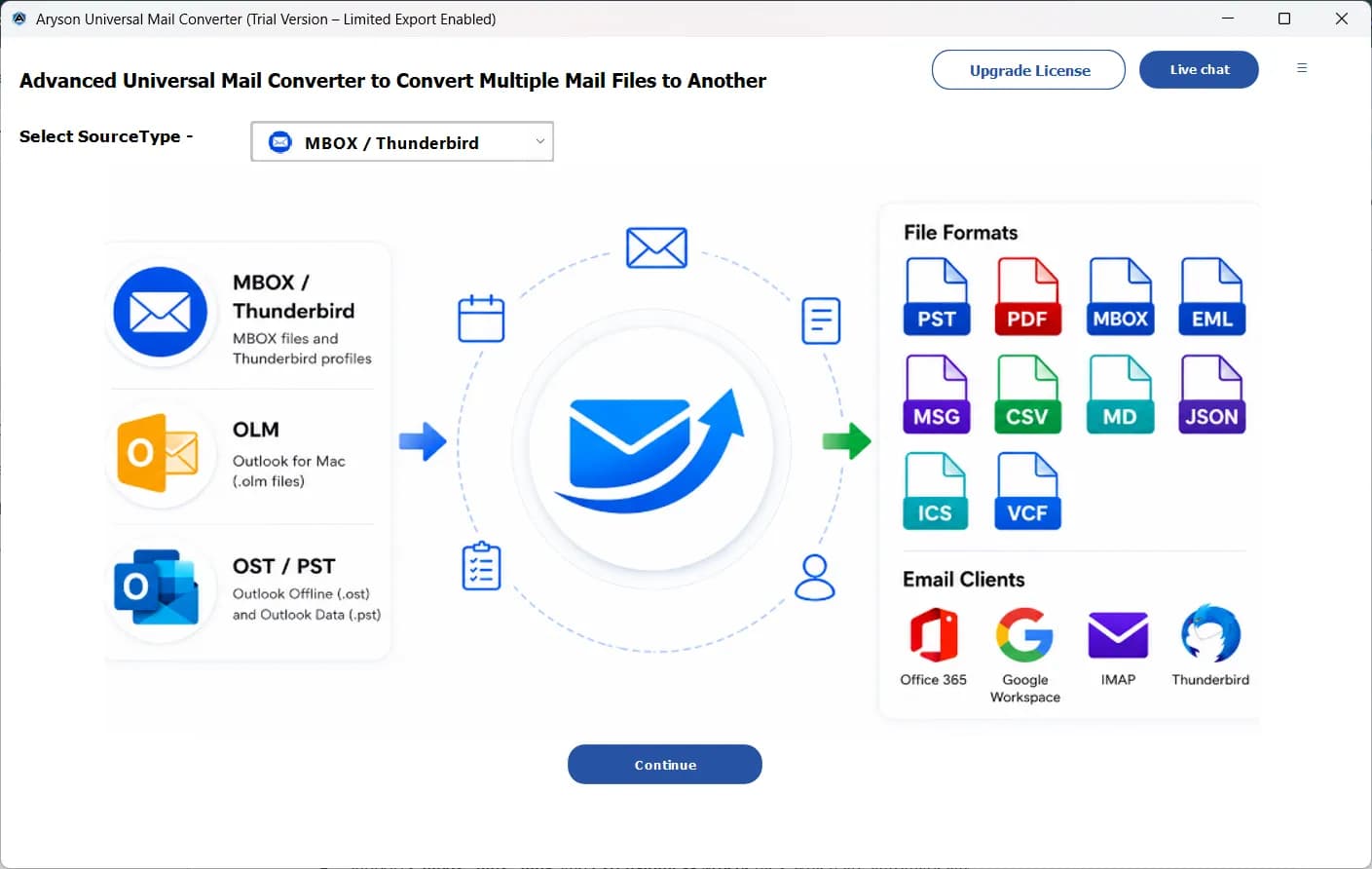
About this app
Aryson Universal Mail Converter is a desktop application for Windows that consolidates email migration and conversion into a single interface. It ingests five source formats — MBOX, Thunderbird profiles, PST, OST, and OLM — and exports to 12+ file formats including PST, MBOX, EML, MSG, PDF, CSV, DOCX, and JSON, or migrates directly into Microsoft 365, Gmail, Google Workspace, Outlook.com, and generic IMAP mailboxes. The tool preserves folder hierarchy, attachments, metadata, contacts, calendars, tasks, and notes across the conversion, with a preview pane that renders HTML bodies, MIME structure, headers, and attachments before anything is written. For enterprise use, it supports bulk processing, drag-and-drop loading, CSV-driven bulk mailbox mapping, many-to-many destination mapping, duplicate detection, date-range filtering, attachment extraction or merging, and PST segmentation up to 20 GB. Authentication is handled through modern OAuth for Microsoft 365 and Gmail, service-account...
Key features
- 1Converts MBOX, Thunderbird, PST, OST and OLM into 12+ formats (PST, MBOX, EML, MSG, PDF, CSV, DOCX, JSON) or migrates directly to M365, Gmail, Workspace, Outlook.com and IMAP.
- 2Enterprise tooling: bulk processing, CSV-driven mailbox mapping, many-to-many destination mapping, duplicate detection, date-range filtering and PST segmentation up to 20 GB.
- 3Preview pane renders HTML bodies, MIME structure, headers and attachments before export; OAuth authentication for Microsoft 365 and Gmail; all processing local with zero external storage.
Target customer profile
Drawn from the product itself, not from a survey.
Demographic
IT administrators and system administrators in mid-size enterprises (200–5,000 seats)
Pain points
Separate tools and licenses for PST, OST, OLM, and MBOX; risk of folder or attachment loss during migration
Primary needs
One licensed platform, bulk mailbox mapping, preserved hierarchy, compliance-friendly local processing
Demographic
Managed service providers (MSPs) and IT consultancies handling multi-client migrations
Pain points
Repeated training on format-specific tools; inconsistent results across customer environments
Primary needs
Standardized workflow, CSV bulk mapping, duplicate detection, live progress tracking, 24/7 support
Demographic
Legal, eDiscovery, and compliance teams in regulated industries
Pain points
Mixed-format mailbox collections that are hard to review; forensic verification of headers and routing
Primary needs
Searchable PDF/PST exports, header and MIME inspection, date-range filtering, no external data storage
Demographic
Freelancers, small agencies, and employees switching between Mac Outlook, Thunderbird, and Windows
Pain points
OLM and MBOX files that Windows Outlook simply cannot open; no budget for enterprise migration suites
Primary needs
Simple OLM-to-PST and MBOX-to-PST conversion, preview before export, affordable single license
Scout Review
Written by AI from measured evidence, scored out of 100.
Aryson Universal Mail Converter is a Windows desktop tool that consolidates five source formats (MBOX, Thunderbird, PST, OST, OLM) into 12+ export formats or direct migration to Microsoft 365, Gmail, Google Workspace, Outlook.com and IMAP. The pitch is aimed squarely at IT admins and MSPs tired of buying and learning a separate converter per format, and the feature list backs it up: bulk processing, CSV-driven mailbox mapping, duplicate detection, date-range filtering, PST segmentation to 20 GB, and OAuth authentication. The marketing site is fast (93 mobile / 98 desktop Lighthouse) and technically well-secured (12/12 header probe), but its design is average and its accessibility has real gaps. The idea is sound and specific; the execution on the web side is competent rather than standout.
Measure by measure
Usability
62The app's three-step source→output flow is genuinely clear and the site offers a User Guide, but a seven-item nav plus search and dense small-type sections add friction.
Design
58Coherent blue brand system and a clear hero CTA pair, but small light-gray body copy, an overlapping query tooltip, and a stray orange nav pill drag it back to average.
Speed
82Lighthouse mobile 93/100 (LCP 2.4s, CLS 0, TBT 92ms) and desktop 98/100 — a genuinely fast, well-built marketing site with no lag complaints found.
Security
76Full header hygiene (HSTS, CSP, frame protection, SPF, DMARC) at 12/12 and GDPR/local-processing claims, but no named SOC 2 or ISO audit in the collected content.
Accessibility
57Lighthouse 87/100, but real failures: low-contrast text, broken heading order, images without alt text, unnamed links, and no main landmark. No a11y statement found.
Growth
63A real, specific pain — one licence replacing five format-specific tools for IT admins and MSPs — with concrete differentiators, though the category is crowded and price-sensitive.
Improvement areas
- No named third-party security certification (SOC 2 / ISO) to substantiate the GDPR compliance claim.
- Accessibility gaps on the site: missing alt text, non-sequential headings, unnamed links, no main landmark, low-contrast text.
- Design polish: overlapping query tooltip, small light-gray body copy, and an off-brand orange nav pill.
- No accessibility statement or WCAG conformance claim published.
Design & Usability
The homepage is a competent, conventional B2B software page: a two-column hero with a clear Free Download / Buy Now pair, a Microsoft Store badge, and a tidy six-stat strip. The blue palette and single primary-button style hold together across the comparison table and feature cards. Where it slips is in the details — small, light-gray body copy across the comparison table and feature cards, a floating 'Click Here for Queries' tooltip parked over the hero's right-hand card, and an orange Services pill that breaks the nav's visual system. The app itself, from the screenshot, has a genuinely clear three-step flow: pick a source type, see sources on the left, outputs and email clients on the right, with an obvious Continue button. Usability is helped by a User Guide link and scenario-based challenge cards for common jobs, but the seven-item nav plus search box dilutes focus and the lower sections are dense with long paragraphs in small type.
Speed & Security
Speed is the standout measured result: Lighthouse mobile 93/100 with LCP 2.4s, CLS 0 and TBT 92ms, and desktop 98/100. That is a fast, well-built marketing site, and no user complaints about lag surfaced in the collected evidence. Security is strong on the technical side — the HTTP/DNS probe returned 12/12 with HTTPS enforced, HSTS, CSP, frame protection, X-Content-Type-Options, Referrer-Policy, Permissions-Policy, SPF and DMARC all present. The site leans on 'GDPR Compliant Processing' and '100% Secure Local Processing' with zero external storage, which is a sensible claim for a desktop migration tool that handles sensitive mailboxes. What is missing is a named third-party audit — no SOC 2 or ISO certification appears in the collected content — so the score sits in the good range rather than excellent.
Accessibility & Growth
Accessibility is the weakest measured dimension: Lighthouse scores 87/100, but the failing audits are real and user-facing — insufficient color contrast, headings out of sequential order, images without alt attributes, links without discernible names, and no main landmark. Those are exactly the issues a screen-reader user hits first, and no accessibility statement or WCAG conformance claim was found to offset them. Growth is a judgement on the idea: the product names a specific, credible pain — IT admins and MSPs juggling separate PST, OST, OLM and MBOX tools — and answers it with a single licence, CSV bulk mailbox mapping, duplicate detection, OAuth to Microsoft 365 and Gmail, and local processing. That is a real wedge. The limit is that the category is crowded with Stellar, SysTools, Kernel and free first-party migration services, so the differentiator is workflow consolidation rather than anything incumbents structurally cannot copy. The 13-year-old domain and LinkedIn/YouTube presence are context, not the score.
Conclusion
For a mid-size IT team or MSP running mixed-format migrations, the single-licence consolidation argument is worth taking seriously, and the local-processing model suits compliance-sensitive work. Before committing, trial the specific conversion path you need — OLM-to-PST and MBOX-to-PST are the headline jobs — and confirm the destination mapping and duplicate handling on a sample mailbox. The site's speed and security posture are reassuring; the accessibility gaps and small-type design are annoyances rather than blockers for a desktop tool. Compare pricing against Stellar and SysTools for your seat count, since the value case rests on replacing multiple licences rather than beating any single competitor on features.
Suggestions for improvement
- Publish a named security certification (SOC 2 or ISO 27001) to back up the GDPR badge and lift trust for enterprise buyers.
- Fix the accessibility failures: alt text on images, sequential headings, discernible link names, a main landmark, and higher-contrast body text.
- Increase body and caption font size and contrast across the comparison table and feature cards to reduce scanning fatigue.
- Remove or reposition the floating query tooltip and unify the nav's color system so the orange Services pill stops competing with the CTAs.
Alternatives comparison
Named competitors, point by point. Nobody paid to appear here or to be left out.
 Aryson Universal Mail Converter |  Stellar Converter for MBOX |  SysTools MailPro+ |  Kernel for PST to MBOX |  Thunderbird with ImportExportTools NG |  Microsoft 365 network upload / Google Workspace Migration | |
|---|---|---|---|---|---|---|
| Source formats supported | MBOX, Thunderbird, PST, OST, OLM | MBOX and Thunderbird | PST, OST, MBOX, EML and more | PST only | MBOX and EML (Thunderbird) | Sanctioned source types only |
| Cloud migration targets | Microsoft 365, Gmail, Google Workspace, Outlook.com, IMAP | Office 365 | Office 365, Google Workspace | None (file conversion only) | None | M365 or Workspace (first-party) |
| Bulk / enterprise mapping | CSV bulk mapping, many-to-many, duplicate detection, 20 GB PST segmentation | Individual review focus | Multi-format suite, bulk options | Narrow single-job utility | Manual, small jobs only | Admin-driven batch migration |
| Pricing model | Single licence covering all five source formats | Per-tool licence | Suite licence | Per-tool licence | Free | Included with subscription |
Stellar Converter for MBOX
Converts MBOX and Thunderbird mailboxes to PST, EML, MSG, PDF, and Office 365, with a focus on individual review rather than bulk enterprise mapping.
SysTools MailPro+
Multi-format email conversion and migration suite covering PST, OST, MBOX, EML, and cloud targets such as Office 365 and Google Workspace.
Kernel for PST to MBOX
Specialized PST-to-MBOX conversion utility from Kernel (Lepide), useful when the job is narrow rather than a broad multi-format migration.
Thunderbird with ImportExportTools NG
Free add-on for Thunderbird that exports mail folders to MBOX and EML and imports MBOX back in — practical for small manual jobs, not for bulk cloud migration.
Microsoft 365 network upload / Google Workspace Migration
First-party migration services for moving mail into M365 or Workspace, typically limited to sanctioned source types and requiring admin setup.
Comparing options? See Aryson Universal Mail Converter alternatives, scored side by side
More Productivity apps
View all Productivity
Puzzly – B2B Lead Generation & Sales Intelligence Platform
92Puzzly is an all-in-one B2B lead generation platform that...

Qamarero
92An all-in-one hospitality software for restaurants and ba...

EmbedMyReviews
92White-label reputation management software for agencies s...

StoryPad
92Privacy-first open source journal app with a continuous t...

Notion
92All-in-one AI workspace for docs, projects, and knowledge...

The Stack Newsletter
92A weekly newsletter delivering curated tech jobs, intervi...

Vibe Coding Agent Skills
92A free, open-source platform offering 110 AI agent skills...

QRBliss
91Branded QR codes with AI Brand Sync, 15 free dynamic code...

Gerty
91Private, local AI assistant for Mac that runs offline

Strukchad Property Management
91Property management for Kenyan letting agents: rent invoices raised every month, M-Pesa rent prompts to tenants, arrears tracking and landlord statements.

CC Switch
91Open-source desktop app for switching AI coding providers...

PitchWhip
90AI cold call scripts & direct dials from LinkedIn


A platform dedicated to providing unbiased reviews of newly launched applications, analyzing everything from their features to their full potential.
info@scoutforge.net© 2026 Scoutforge. All rights reserved.
