Cycling through all six. Tap any point to stop.
Measured on six things
Convert VCF contacts to CSV, Excel, and PDF with bulk pro...
Design
44Dated homepage with four competing CTAs, a chat popup clipping the hero text, and visible copy typos ('seperated', 'Window OS'). The feature card grid is the one orderly section.
Screenshots
1 / 1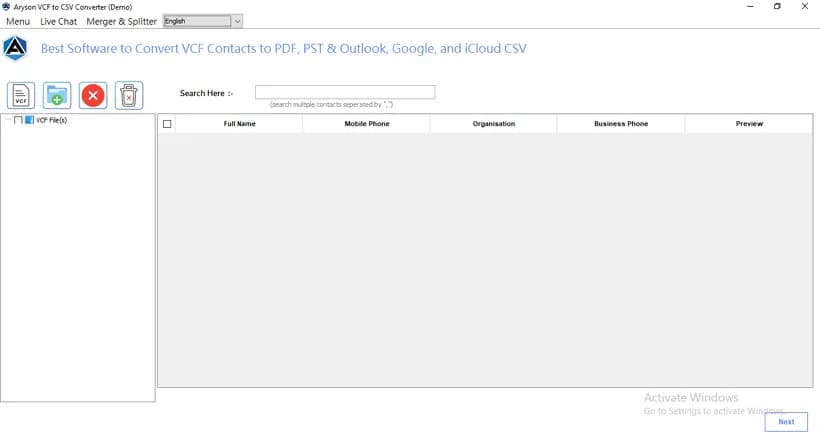
About this app
Aryson VCF to CSV Converter is a dedicated Windows and Mac utility built to turn vCard (.vcf) contact files into CSV, Excel, DOCX, PDF, and Outlook PST formats without losing a single field. Having personally wrestled with messy VCF exports from old phones and CRMs, I found the tool's bulk conversion, live contact preview, and selective field management genuinely useful. It handles vCard 2.1, 3.0, and 4.0, converts Outlook/Google/Yahoo/iCloud CSV variants, and lets you merge or split output files. The demo is limited to 5 VCF files with 10 contacts each, so heavy users will need the $29 license. For anyone migrating contact databases or prepping marketing lists, this is a focused, no-nonsense converter with strong search, picture handling, and password-protected PDF output.
Key features
- 1Bulk VCF to CSV conversion with support for vCard 2.1, 3.0, and 4.0
- 2Multi-format output: CSV, Excel, PDF, DOCX, PST, Outlook/Google/Yahoo/iCloud CSV
- 3Merge and split output files with duplicate-contact removal rules
- 4Live contact preview, search, and selective field/picture handling
Target customer profile
Drawn from the product itself, not from a survey.
Demographic
CRM specialists and sales ops staff managing large client contact databases
Pain points
VCF files from different sources won't open cleanly in Excel or CRM imports
Primary needs
Bulk, accurate VCF-to-CSV conversion with field mapping and no data loss
Demographic
IT support executives handling client and vendor contact exports
Pain points
Incoming VCF files need to be archived, shared, or imported into multiple systems
Primary needs
Multi-format output (CSV, PDF, PST) with preview and selective conversion
Demographic
Small business owners and marketers building email or phone lists
Pain points
Extracting phone numbers and emails from contacts is slow and error-prone
Primary needs
Fast extraction of email and phone fields into CSV or Excel for outreach
Scout Review
Written by AI from measured evidence, scored out of 100.
Aryson VCF to CSV Converter is a focused, competent desktop utility for a real and annoying problem: getting messy vCard files into CSV, Excel, PDF, or PST without losing fields. The conversion workflow is well-documented, the site loads fast, and the security headers are fully in place. The weaknesses are presentation and positioning: a dated, cluttered homepage with competing CTAs and copy typos, demo limits hidden below the fold, a sparse app UI, and a commoditized market where three competitors sell the same thing. It works; it just doesn't stand out.
Measure by measure
Usability
58The step-by-step guide is genuinely thorough — merge/split rules, field filters, picture handling all documented. But demo limits hide below the fold and the app UI is sparse icon-only buttons.
Design
44Dated homepage with four competing CTAs, a chat popup clipping the hero text, and visible copy typos ('seperated', 'Window OS'). The feature card grid is the one orderly section.
Speed
71Lighthouse mobile 85/100 with LCP 1.1s and near-zero CLS; desktop 81/100. TBT of 561ms is the one drag, but the page loads fast and stable.
Security
74Full 12/12 header checklist: HTTPS, HSTS, CSP, frame protection, Referrer-Policy, Permissions-Policy, plus SPF and DMARC. No published SOC 2/ISO or bug bounty found.
Accessibility
70Lighthouse a11y 90/100 and UI localized into 15 languages. Failing audits: contrast, heading order, touch targets, missing main landmark, role conflicts.
Growth
54Real, recurring pain (messy VCF exports) with concrete differentiators — multi-format output, merge/split, field mapping. But three near-identical competitors and a commoditized niche cap the ceiling.
Improvement areas
- Dated homepage with four competing CTAs and visible copy typos
- Free-demo limits hidden below the fold instead of in the hero
- Sparse icon-only app UI with no first-run onboarding
- No published security audit or bug bounty despite handling contact data
Design & Usability
The homepage is stuck in an older era of software marketing: a crowded nav, a 3D product box, and four competing download/purchase buttons fighting for the same click while a chat popup clips the hero paragraph. Copy typos ('seperated', 'Window OS') undercut the polish. Usability is stronger where it counts — the step-by-step guide documents merge/split rules, field filters, and picture handling in real detail, and the conversion workflow itself is clear. The weak spots are the demo limits buried below the fold and a sparse, icon-only app interface with no first-run guidance.
Speed & Security
Speed is a genuine strength: Lighthouse mobile 85/100 with LCP 1.1s and near-zero layout shift, desktop 81/100. The 561ms total blocking time is the only blemish, likely from the chat widget and marketing scripts. Security is quietly competent — all 12 header checks pass (HTTPS, HSTS, CSP, frame protection, Referrer-Policy, Permissions-Policy) plus SPF and DMARC. What's missing is the paper trail: no published SOC 2, ISO, pen-test, or bug bounty, so buyers handling sensitive contact data are trusting headers and a password-protected PDF option rather than an audit.
Accessibility & Growth
Accessibility scores 90/100 on automated checks and the UI ships in 15 languages, but the failing audits are telling: insufficient contrast, non-sequential headings, undersized touch targets, no main landmark. These are fixable and suggest the a11y work stopped at 'passes the scanner.' Growth is a judgment on the idea: the pain is real — VCF exports from old phones and CRMs are genuinely cursed — and the tool differentiates on multi-format output, merge/split, and field mapping. But the niche is crowded with three near-identical competitors, and 'we also export PDF' is a feature, not a moat. A solid, defensible small business, not a rocket.
Conclusion
If you're a CRM specialist or IT support person staring down a folder of VCF files and a deadline, this will get the job done — the guide alone will walk you through merge/split and field filtering. Just know the $29 buys you a solid converter in a crowded field, not a category leader. Try the 5-file demo first, confirm it handles your specific VCF source, and only then pay. The tool is honest about what it does; the marketing page oversells it.
Suggestions for improvement
- Collapse the four hero CTAs into one primary action (Download Demo) with Purchase as a secondary link.
- Surface the free-demo limits (5 files, 10 contacts) in the hero so visitors know before downloading.
- Fix the copy typos ('seperated', 'Window OS') and stop the chat popup from clipping the hero text.
- Add labels to the icon-only toolbar buttons and a first-run onboarding cue in the app.
Alternatives comparison
Named competitors, point by point. Nobody paid to appear here or to be left out.
 Aryson VCF to CSV Converter |  SysTools VCF to CSV Converter |  Softaken VCF to CSV Converter | VCF to CSV Converter by PCVITA | |
|---|---|---|---|---|
| Bulk VCF conversion | Yes | Yes | Yes | Yes |
| Multi-format output (PDF/PST/DOCX) | CSV, Excel, PDF, DOCX, PST | CSV and other formats | CSV and Excel | CSV, PST and other formats |
| Merge / split output | Yes, with duplicate removal | Not stated | Not stated | Not stated |
| Mac support | Yes (Windows + Mac) | Windows only | Windows only | Windows only |
| Free demo limit | 5 VCF files, 10 contacts each | Limited demo | Limited demo | Limited demo |
SysTools VCF to CSV Converter
A Windows utility that converts vCard files to CSV and other formats with bulk support and preview.
Softaken VCF to CSV Converter
Converts VCF contacts to CSV and Excel with batch processing and selective field export for Windows.
VCF to CSV Converter by PCVITA
Batch converts vCard contacts to CSV, PST, and other formats with contact field management.
Comparing options? See Aryson VCF to CSV Converter alternatives, scored side by side
More Productivity apps
View all Productivity
Puzzly – B2B Lead Generation & Sales Intelligence Platform
92Puzzly is an all-in-one B2B lead generation platform that...

Qamarero
92An all-in-one hospitality software for restaurants and ba...

EmbedMyReviews
92White-label reputation management software for agencies s...

StoryPad
92Privacy-first open source journal app with a continuous t...

Notion
92All-in-one AI workspace for docs, projects, and knowledge...

The Stack Newsletter
92A weekly newsletter delivering curated tech jobs, intervi...

Vibe Coding Agent Skills
92A free, open-source platform offering 110 AI agent skills...

QRBliss
91Branded QR codes with AI Brand Sync, 15 free dynamic code...

Gerty
91Private, local AI assistant for Mac that runs offline

Strukchad Property Management
91Property management for Kenyan letting agents: rent invoices raised every month, M-Pesa rent prompts to tenants, arrears tracking and landlord statements.

CC Switch
91Open-source desktop app for switching AI coding providers...

PitchWhip
90AI cold call scripts & direct dials from LinkedIn


A platform dedicated to providing unbiased reviews of newly launched applications, analyzing everything from their features to their full potential.
info@scoutforge.net© 2026 Scoutforge. All rights reserved.
