Cycling through all six. Tap any point to stop.
Measured on six things
Repair corrupt VMDK files and recover VMware data safely.
Design
44Dated Windows-era UI and a cluttered homepage: a 12-bullet hero, three competing CTAs, and a legacy app window screenshot. Functional branding, but visually behind modern recovery-tool peers.
Screenshots
1 / 1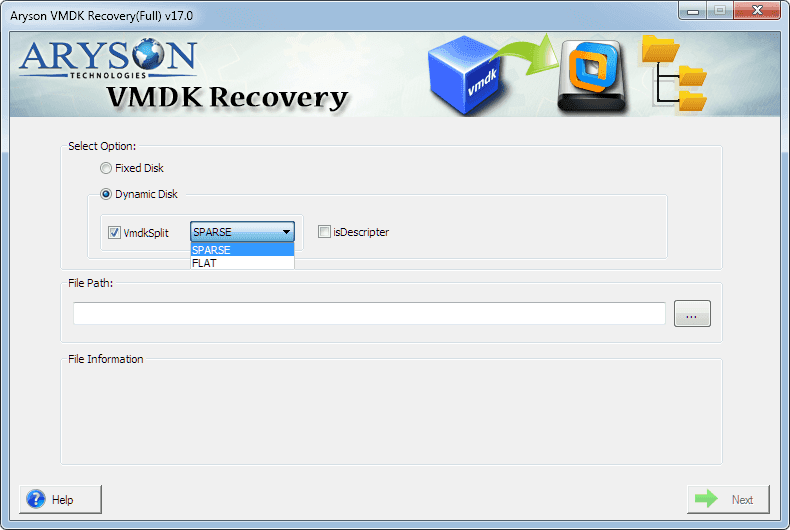
About this app
Aryson VMDK Recovery Tool is a specialized utility for repairing corrupt or damaged VMware virtual machine disk (VMDK) files and recovering data from them. It supports all VMDK types—split, sparse, flat, delta, and descriptor—and works with both fixed and dynamic disks across VMware Workstation, ESXi, vSphere, vSAN, Fusion, and other platforms. The tool offers standard, advanced, and deep scanning modes to handle varying levels of corruption, and it can recover data from RAW or formatted VMDK disks, as well as from VMs that fail to boot or show black screen errors. It supports FAT, NTFS, exFAT, and EXT file systems, and both MBR and GPT partition tables. The interface is user-friendly, with options for custom volume settings, auto-search, and preview before saving. A free demo version allows scanning and previewing recoverable files, while the full version ($99) enables saving recovered data.
Key features
- 1Repairs split, sparse, flat, delta and descriptor VMDK files across VMware Workstation, ESXi, vSphere, vSAN and Fusion.
- 2Standard, Advanced and Deep scan modes for minor to severe corruption; recovers from RAW/formatted disks and boot failures.
- 3Free demo scans and previews recoverable files; $99 full version saves recovered data.
Target customer profile
Drawn from the product itself, not from a survey.
Demographic
IT professionals and system administrators managing VMware environments
Pain points
Corrupt VMDK files causing VM downtime, data loss, and difficulty in recovering critical data
Primary needs
Reliable, fast recovery of VMDK files with minimal disruption and support for various disk types
Demographic
Small to medium businesses using virtualization for operations
Pain points
Limited budget and expertise for complex data recovery, risk of data loss impacting business continuity
Primary needs
Affordable, easy-to-use recovery tool that doesn't require specialized skills
Demographic
Virtualization consultants and data recovery specialists
Pain points
Handling diverse and severe corruption cases across multiple VMware platforms and file systems
Primary needs
Advanced scanning modes, broad compatibility, and the ability to recover data from severely damaged VMDK files
Scout Review
Written by AI from measured evidence, scored out of 100.
Aryson VMDK Recovery Tool is a focused, competent niche utility: it repairs and recovers data from corrupt VMware VMDK files across every major disk type and file system, with a free demo that lets you preview before you pay $99. The engineering-adjacent basics are strong — the site is fast (mobile Lighthouse 99) and the security headers are complete (12/12). Where it lags is presentation: a dated Windows-era UI, a cluttered homepage with competing CTAs, and accessibility gaps in contrast, heading order and touch targets. It won't win a design award, but for an admin staring at a dead VM, the demo-first model and broad format support are the things that count.
Measure by measure
Usability
58Solid table stakes: demo scan-and-preview before buying, plus Features, Screenshots, Video, FAQs and a Guide. The dense, repetitive homepage and diluted CTAs make finding the next step harder than it should be.
Design
44Dated Windows-era UI and a cluttered homepage: a 12-bullet hero, three competing CTAs, and a legacy app window screenshot. Functional branding, but visually behind modern recovery-tool peers.
Speed
88Lighthouse mobile 99/100 (LCP 1.1s, CLS 0, TBT 118ms) and desktop 79/100. Genuinely snappy for a page this content-heavy — the site loads faster than its design suggests.
Security
76Full header hygiene: HTTPS enforced, HSTS, CSP, frame protection, Referrer-Policy, Permissions-Policy, plus SPF and DMARC (12/12). No published SOC 2/ISO/pen-test, so it lands mid-band rather than top.
Accessibility
68Lighthouse a11y 90/100, but real fails: low color contrast, out-of-order headings, small touch targets, no main landmark, role=presentation conflicts. No WCAG statement. Decent, not compliant.
Growth
58A real, high-stakes niche (corrupt VMDK = dead VM) with a clear affordable-$99 wedge against enterprise recovery suites. Differentiated on format coverage, but a narrow, event-driven market caps the ceiling.
Improvement areas
- Dated Windows-era app UI and a cluttered, repetitive homepage with competing CTAs.
- Accessibility gaps: low contrast, out-of-order headings, small touch targets, no main landmark.
- No published security certifications or data-handling page to back the 'fully secured' claim.
Design & Usability
Design is the weak link: the visual audit calls the homepage dated, and it's right — a 12-bullet hero, a red Purchase button elbowing a blue Download button, and a tiny live-demo link all compete above the fold, while the app screenshot shows a classic blue-title-bar Windows window. Usability is more competent than the design implies: a free demo lets you scan and preview recoverable files before paying, and the site ships Features, Specifications, Screenshots, Video, FAQs and a Guide. The core flow (pick Fixed or Dynamic, then Sparse or Flat) is legible in the screenshot. The problem is density — the same feature list is restated across multiple sections, so scanning for the one thing you need takes longer than it should.
Speed & Security
Speed is the standout: Lighthouse mobile 99/100 with LCP 1.1s, CLS 0 and TBT 118ms, desktop 79/100 — impressive for a page carrying this much text and imagery. Security is solid on the fundamentals: HTTPS enforced with HSTS, a Content-Security-Policy, frame protection, X-Content-Type-Options, Referrer-Policy and Permissions-Policy all present, plus SPF and DMARC, for a clean 12/12 on the header checklist. What's missing is the paper trail — no published SOC 2, ISO 27001 or independent pen-test report, and 'fully secured software' is a homepage slogan rather than a certification. For a tool that touches your virtual disks, a security page with data-handling details would earn real trust.
Accessibility & Growth
Accessibility scores 90/100 on Lighthouse but the failing audits are the ones that matter to real users: insufficient color contrast, headings out of sequential order, touch targets too small, no main landmark, and role=presentation conflicts. There's no WCAG conformance statement, so treat 90 as a floor, not a promise. Growth is a judgement on the idea: corrupt VMDK files take down VMs, and Aryson targets IT admins and SMBs who can't afford enterprise recovery suites, at $99 with broad format coverage (split, sparse, flat, delta, descriptor; FAT/NTFS/exFAT/EXT; MBR/GPT) and Standard/Advanced/Deep scans. That's a genuine wedge against Stellar and DiskInternals. The limit is the market itself — recovery is event-driven and narrow, so growth depends on reputation and reach more than on product depth.
Conclusion
If your VMware VM won't boot and you need data off a corrupt VMDK without an enterprise recovery invoice, this is a reasonable, affordable first stop — scan and preview free, then decide. Just budget patience for the dated interface and dense site, and don't mistake 'fully secured' for an audit. Compare against Stellar and DiskInternals on the specific corruption case you have before committing.
Suggestions for improvement
- Rebuild the hero: cut the 12-bullet list to 3-4 outcomes and pick one primary CTA instead of three.
- Modernize the app UI — the classic blue title bar and radio-button layout read as legacy next to competitors.
- Add a security/trust page with data-handling details and any certifications or pen-test results.
- Fix the accessibility fails: contrast ratios, heading order, touch-target sizing, and add a main landmark.
Alternatives comparison
Named competitors, point by point. Nobody paid to appear here or to be left out.
 Aryson VMDK Recovery Tool |  Stellar Data Recovery for Virtual Machines |  DiskInternals VMFS Recovery | |
|---|---|---|---|
| VMDK repair & recovery | Yes — split, sparse, flat, delta, descriptor; Standard/Advanced/Deep scans | Yes — VMDK, VHD, VHDX across VMware and Hyper-V | Yes — VMFS partitions and VMDK, local and remote ESX/ESXi |
| Platform coverage | VMware Workstation, ESXi, vSphere, vSAN, Fusion, VirtualBox, QEMU | VMware and Hyper-V (VHD/VHDX) | VMware ESX/ESXi and VMFS |
| Free preview before purchase | Yes — demo scans and previews recoverable files | Trial typically allows scan/preview (per vendor) | Trial available (per vendor) |
| Pricing | $99 full version | Tiered licensing (per vendor) | Tiered licensing (per vendor) |
Stellar Data Recovery for Virtual Machines
A tool for recovering data from corrupt or deleted virtual machines, including VMDK, VHD, and VHDX files, with support for VMware and Hyper-V.
DiskInternals VMFS Recovery
Software for recovering data from VMware ESX/ESXi servers and VMFS partitions, including VMDK files, with support for both local and remote recovery.
Comparing options? See Aryson VMDK Recovery Tool alternatives, scored side by side
More Productivity apps
View all Productivity
Notion
92All-in-one AI workspace for docs, projects, and knowledge...

Qamarero
92An all-in-one hospitality software for restaurants and ba...

EmbedMyReviews
92White-label reputation management software for agencies s...

StoryPad
92Privacy-first open source journal app with a continuous t...

Puzzly – B2B Lead Generation & Sales Intelligence Platform
92Puzzly is an all-in-one B2B lead generation platform that...

The Stack Newsletter
92A weekly newsletter delivering curated tech jobs, intervi...

Vibe Coding Agent Skills
92A free, open-source platform offering 110 AI agent skills...

QRBliss
91Branded QR codes with AI Brand Sync, 15 free dynamic code...

Gerty
91Private, local AI assistant for Mac that runs offline

CC Switch
91Open-source desktop app for switching AI coding providers...

username.md
90One verified handle for your online identity, readable by...

PitchWhip
90AI cold call scripts & direct dials from LinkedIn


A platform dedicated to providing unbiased reviews of newly launched applications, analyzing everything from their features to their full potential.
info@scoutforge.net© 2026 Scoutforge. All rights reserved.
