Is this your app?
Claim Ashdeck to manage its page, add your badge and see your traffic — free, and it stays free.
Cycling through all six. Tap any point to stop.
Measured on six things
A free Chrome extension combining a website blocker with a Pomodoro timer to eliminate distractions and boost productivity.
Accessibility
70Limited to English, no screen reader optimization, keyboard shortcuts, or adjustable UI elements.
Screenshots
1 / 3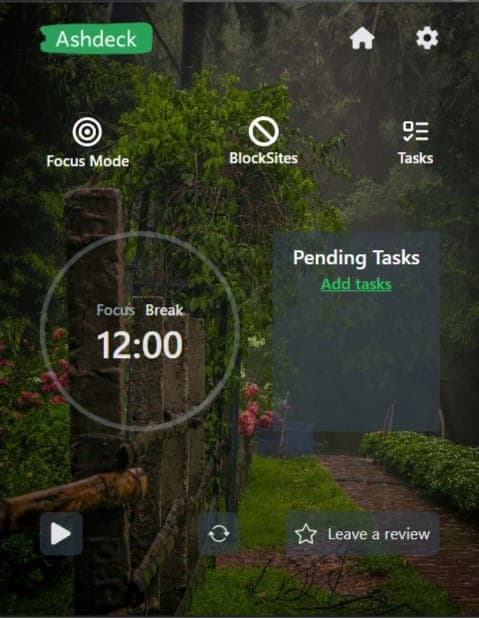
About this app
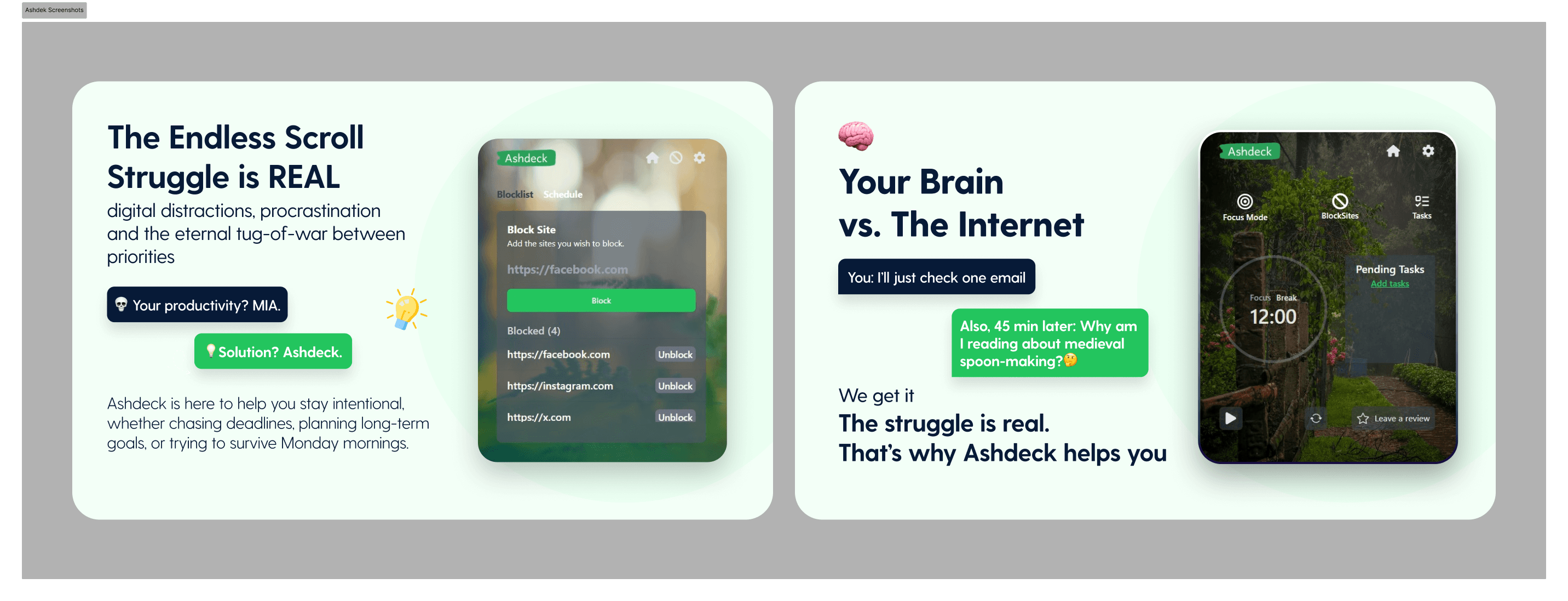
Ashdeck is a nifty tool that tackles digital distractions head-on by merging a website blocker and a Pomodoro timer into one seamless Chrome extension. It's perfect for students, remote workers, and freelancers who struggle with procrastination and need a simple way to stay focused. The app allows users to block time-wasting sites like social media while enforcing structured work intervals with breaks. Its standout feature is the integration of both functionalities, eliminating the need for multiple apps. While it's lightweight and free, it offers a minimalist interface that's easy to use, though it lacks advanced features like customization or mobile support. Overall, it's a solid choice for anyone looking to enhance their productivity without complexity.
Key features
- 1Minimalist interface with soft grays and blues for a clean, non-distracting user experience
- 2Intuitive one-click setup for blocking websites and starting Pomodoro timers, enabling quick deployment
- 3Lightweight Chrome extension that performs without lag, even with multiple sites blocked
Target customer profile
Drawn from the product itself, not from a survey.
Demographic
Students
Pain points
Procrastination on social media, difficulty maintaining study routines
Primary needs
Block distracting sites, enforce study sessions with timers
Demographic
Remote Workers
Pain points
Endless browser tabs, lack of work-life balance
Primary needs
Minimize interruptions, create focused work blocks
Demographic
Freelancers
Pain points
Time management challenges, self-imposed deadlines
Primary needs
Track productivity, avoid overworking with breaks
Scout Review
Written by AI from measured evidence, scored out of 100.
Ashdeck delivers exactly what it promises: a straightforward, no-cost solution to digital distraction that combines two essential productivity tools into one seamless experience. It's not trying to be everything to everyone - instead, it focuses on doing the core job well without unnecessary complexity. The extension excels at quick deployment and reliable performance, making it ideal for students, remote workers, and freelancers who need immediate distraction blocking without learning curves or subscription fees.
Measure by measure
Usability
90Intuitive one-click setup for blocking sites and starting timers, perfect for quick deployment.
Design
84Minimalist interface with soft grays and blues, clean but lacks customization options like dark mode.
Speed
86Lightweight Chrome extension performs without lag even with multiple sites blocked.
Security
76Basic browser permissions but unclear privacy policy and no mention of data encryption.
Accessibility
70Limited to English, no screen reader optimization, keyboard shortcuts, or adjustable UI elements.
Growth
80High demand for focus tools but needs mobile support and customization to compete with premium options.
Improvement areas
- Lacks customization options such as dark mode, theme variations, and adjustable UI elements
- Insufficient accessibility features, including no screen reader optimization, keyboard shortcuts, or language options beyond English
- Security concerns due to unclear privacy policy and absence of data encryption for user activity logs
Design & Usability
Ashdeck's interface embraces a minimalist philosophy with a muted palette of soft grays and blues that won't overwhelm users during focus sessions. The dashboard is thoughtfully organized with clear labeling for blocked sites, session history, and settings. What really stands out is the one-click functionality - adding distracting websites and starting Pomodoro sessions happens instantly without friction. While the design avoids visual clutter beautifully, it does feel somewhat basic compared to competitors, lacking customization options like dark mode or theme variations that many users now expect.
Speed & Security
Performance-wise, Ashdeck shines as a lightweight Chrome extension that operates smoothly without noticeable lag, even when blocking multiple websites simultaneously. It requires only essential browser permissions to function properly, which is reassuring. However, the security aspect shows room for improvement - the privacy policy isn't prominently displayed, and there's no mention of data encryption for user activity logs. For a tool that tracks browsing habits and work patterns, clearer communication about data handling would build greater trust among privacy-conscious users.
Accessibility & Growth
Accessibility is Ashdeck's weakest area, offering only basic tooltips for guidance without screen reader optimization, keyboard navigation, or language options beyond English. The growth potential, however, is significant given the rising demand for digital wellness tools. The unique combination of website blocking and Pomodoro timing in a free package positions it well, but expanding to mobile platforms and adding customization features would dramatically increase its market appeal and competitive edge against premium alternatives.
Conclusion
If you're tired of juggling multiple apps for focus and timing, Ashdeck offers a refreshingly simple approach that actually works. It won't replace premium tools with granular controls, but for anyone seeking immediate relief from digital procrastination, this free Chrome extension is worth installing. Give it a try during your next work session - you might find it's the gentle nudge toward productivity you've been needing.
Suggestions for improvement
- Adding mobile app support would enable cross-device synchronization, making Ashdeck more versatile for users who switch between computer and phone.
- Customizable Pomodoro intervals would accommodate different work styles beyond the standard 25/5 split.
- Implementing a detailed privacy policy with data encryption would address security concerns, while accessibility features like dark mode, screen reader compatibility, and additional language options would make the tool more inclusive.
- These enhancements would transform Ashdeck from a good free tool into an exceptional one.
Alternatives comparison
Named competitors, point by point. Nobody paid to appear here or to be left out.
 Ashdeck |  BlockSite |  Cold Turkey |  Pomofocus | |
|---|---|---|---|---|
| Website Blocking | Yes | Yes | Yes (paid advanced features) | No |
| Pomodoro Timer | Yes | No | No | Yes (with task lists) |
| Price | Free | Free basic, paid premium | Paid for advanced features | Free |
| Customization | Limited | Moderate | High (paid) | Timer customization only |
BlockSite
Offers similar site-blocking features but lacks a built-in Pomodoro timer, requiring separate apps for timing.
Cold Turkey
More robust blocking customization but paid for advanced features, whereas Ashdeck is free.
Pomofocus
A dedicated Pomodoro timer with task lists but no website-blocking functionality.
Comparing options? See Ashdeck alternatives, scored side by side
More Productivity apps
View all Productivity
Notion
92All-in-one AI workspace for docs, projects, and knowledge...

Qamarero
92An all-in-one hospitality software for restaurants and ba...

EmbedMyReviews
92White-label reputation management software for agencies s...

StoryPad
92Privacy-first open source journal app with a continuous t...

Puzzly – B2B Lead Generation & Sales Intelligence Platform
92Puzzly is an all-in-one B2B lead generation platform that...

The Stack Newsletter
92A weekly newsletter delivering curated tech jobs, intervi...

Vibe Coding Agent Skills
92A free, open-source platform offering 110 AI agent skills...

QRBliss
91Branded QR codes with AI Brand Sync, 15 free dynamic code...

Gerty
91Private, local AI assistant for Mac that runs offline

CC Switch
91Open-source desktop app for switching AI coding providers...

username.md
90One verified handle for your online identity, readable by...

PitchWhip
90AI cold call scripts & direct dials from LinkedIn


A platform dedicated to providing unbiased reviews of newly launched applications, analyzing everything from their features to their full potential.
info@scoutforge.net© 2026 Scoutforge. All rights reserved.
