Cycling through all six. Tap any point to stop.
Measured on six things
Say what you need. Aureon routes it to your Mac apps.
Speed
47Lighthouse mobile 57/100 with LCP 2.5s and CLS 0, but TBT of 14.1s — the page is visually stable yet main-thread-blocked. Desktop 60/100. Marketing site feels heavier than a landing page needs to be.
Screenshots
1 / 1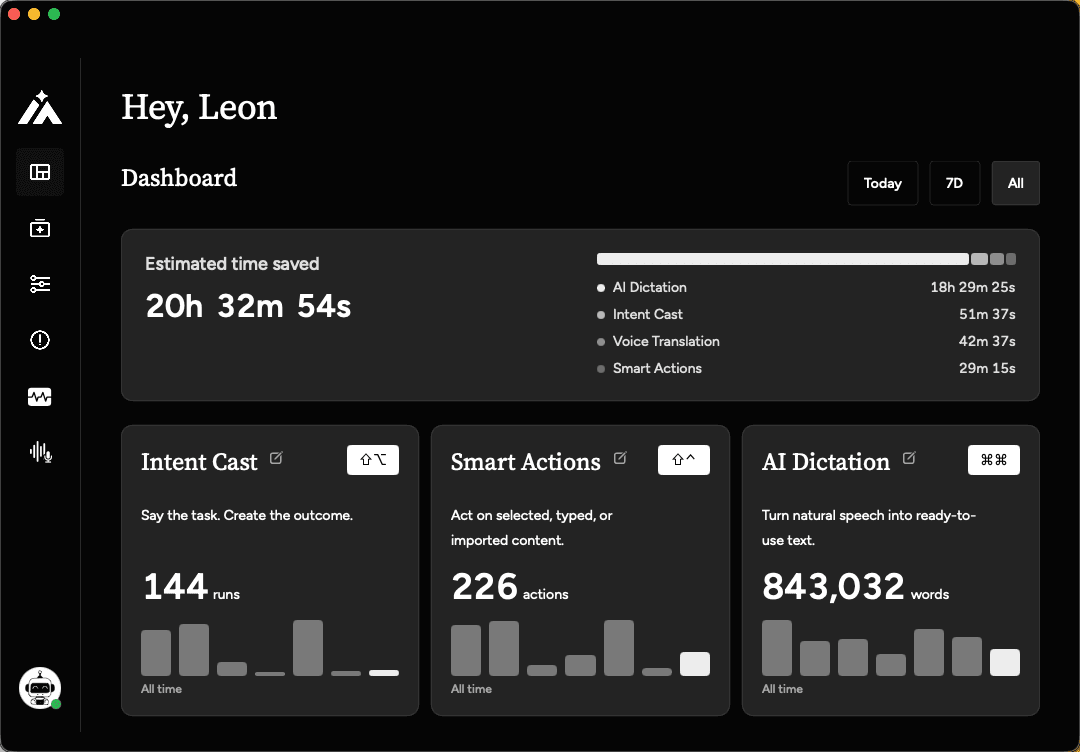
About this app
Aureon is an AI intent layer for Mac. Speak or type one passage and Aureon splits the intents inside it, then creates the matching items in Calendar, Reminders, Notes, Things, Notion, Todoist and more. It is create-only: it never sends email or messages and never edits or deletes existing content. If a time or destination is unclear, it asks instead of guessing. The same layer also covers AI dictation, voice translation, Smart Actions, Snippets, and Custom Agents. macOS 14 or later. Paid, with a free trial. Download: https://inaureon.com/download
Key features
- 1Intent Cast: splits one spoken passage into multiple intents and creates matching items in Calendar, Reminders, Notes, Things, Notion, and Todoist.
- 2Create-only by design: never sends email or messages, never edits or deletes existing content; asks when time or destination is unclear.
- 3AI dictation with filler removal and structure restoration, plus cross-language voice translation across 14+ languages.
Target customer profile
Drawn from the product itself, not from a survey.
Demographic
Mac power users and professionals
Pain points
Tired of typing long documents, emails, and notes; frustrated by inaccurate or raw dictation outputs.
Primary needs
Efficient, accurate voice-to-text that produces polished, structured writing without manual editing.
Demographic
Multilingual founders and global teams
Pain points
Struggle to communicate in multiple languages; need to draft messages in a non-native language quickly.
Primary needs
Speak in one language and get natural, context-aware translations in another for seamless cross-language communication.
Demographic
Creators and knowledge workers
Pain points
Overwhelmed by capturing ideas and tasks across different apps; lose time switching contexts.
Primary needs
Voice-driven workflow automation to create notes, tasks, reminders, and drafts in connected apps with minimal effort.
Scout Review
Written by AI from measured evidence, scored out of 100.
Aureon is a Mac voice-input layer that does something its competitors mostly don't: it takes one spoken passage, splits the intents inside it, and creates the matching items across Calendar, Reminders, Notes, Things, Notion, and Todoist — while refusing to send, edit, or delete anything. The marketing site is polished and specific, the accessibility audit is spotless, and the 7-day Max trial with no card is a fair on-ramp. The weak spots are a heavy, main-thread-blocked landing page (14.1s TBT on mobile) and a security posture that stops at HSTS and DMARC with no CSP, no frame protection, and no published audits. For a tool that listens to your voice and writes into your apps, that's the gap to watch.
Measure by measure
Usability
687-day Max trial with no card, clear Plus/Max tiers, 5 step-by-step guides covering speech-to-text, voice commands, snippets, and email replies. Direct .dmg download. No live demo or interactive playground to try before installing.
Design
72Polished, coherent dark-mode marketing site with numbered feature blocks, real app mockups (Reminders, Mail, Messages), and before/after voice examples. Seven-language switcher signals care. Not judged on app UI — no store screenshots available.
Speed
47Lighthouse mobile 57/100 with LCP 2.5s and CLS 0, but TBT of 14.1s — the page is visually stable yet main-thread-blocked. Desktop 60/100. Marketing site feels heavier than a landing page needs to be.
Security
52HTTPS with HSTS, SPF and DMARC in place. But no CSP, no frame protection, no X-Content-Type-Options, no Referrer-Policy, no Permissions-Policy — 6/12 on header checklist. No SOC 2, ISO, or pen-test claims published.
Accessibility
80Lighthouse accessibility audit scored a perfect 100/100. Seven-language UI switcher (EN, ES, FR, DE, JA, KO) supports multilingual users. No published WCAG conformance statement, but automated checks are clean.
Growth
68Sharp wedge: create-only intent-splitting across Calendar, Reminders, Notes, Things, Notion, Todoist — a workflow none of the listed alternatives (Wispr Flow, macOS Dictation, Otter.ai) actually own. Mac-only limits ceiling.
Improvement areas
- Landing page performance: 14.1s mobile TBT and 57/100 Lighthouse score on a mostly static marketing site.
- Security headers: no CSP, X-Frame-Options, X-Content-Type-Options, Referrer-Policy, or Permissions-Policy (6/12 checklist).
- No published security audits (SOC 2, ISO, pen-test) despite handling voice input and writing into user apps.
Design & Usability
Aureon's marketing site is genuinely well-built: numbered feature blocks with before/after voice examples, real UI mockups of Reminders and Mail, and a seven-language switcher that most indie Mac tools skip. The design language is consistent and the copy is specific about what the product does. Usability is solid but thin on the try-before-you-buy front — a 7-day Max trial with no card is generous, and the five guides cover the basics, but there's no live demo or interactive playground. You download a .dmg and hope. For a paid Mac app, that's a real friction point.
Speed & Security
Speed is the weak spot. Lighthouse mobile lands at 57/100 with a 14.1-second total blocking time — the page is visually stable (CLS 0) but main-thread-heavy, which is a strange trade for a landing page that mostly shows static mockups. Desktop is 60/100, so it's not a mobile-only problem. Security is middling: HTTPS and HSTS are enforced, SPF and DMARC are set, but the header checklist scores 6/12 with no CSP, no frame protection, and no referrer policy. No SOC 2, ISO, or pen-test claims are published — 'Privacy first' is a tagline, not an audit. For a tool that reads your voice and writes into your apps, that's a gap worth closing.
Accessibility & Growth
Accessibility is the standout: a perfect 100/100 on the Lighthouse axe-core audit and a seven-language UI switcher covering English, Spanish, French, German, Japanese, and Korean. No published WCAG statement, but the automated checks are clean and the multilingual support is real. Growth is the interesting question. Aureon's wedge is specific — it doesn't just transcribe, it splits a spoken passage into intents and creates the matching items in Calendar, Reminders, Notes, Things, Notion, and Todoist, and it's deliberately create-only. None of the listed alternatives (Wispr Flow, macOS Dictation, Otter.ai) own that workflow. The Mac-only scope caps the ceiling, but within that ceiling the positioning is sharp and the category has room.
Conclusion
If you're a Mac power user who already lives in Reminders, Things, or Notion and you're tired of dictation that dumps raw transcripts, Aureon is aimed squarely at you — and the create-only design is a genuinely sensible safety choice, not just a marketing line. The 7-day Max trial costs nothing to test, and the five guides will get you oriented. Go in knowing the site is slower than it should be and the security documentation is thin, and decide from there. The idea is sharper than the execution's rough edges.
Suggestions for improvement
- Cut the 14.1s mobile TBT — the landing page is mostly static mockups and shouldn't be main-thread-blocked.
- Add CSP, X-Frame-Options, X-Content-Type-Options, and Referrer-Policy headers to close the 6/12 gap.
- Publish a security page with data-handling details and, eventually, a SOC 2 or pen-test summary.
- Add a short interactive demo or 60-second video so users can see intent-splitting before downloading the .dmg.
Alternatives comparison
Named competitors, point by point. Nobody paid to appear here or to be left out.
 Aureon Aureon |  Wispr Flow Wispr Flow |  macOS Dictation macOS Dictation |  Otter.ai Otter.ai | |
|---|---|---|---|---|
| Splits one spoken passage into multiple intents and creates items across apps | Yes — Intent Cast creates items in Calendar, Reminders, Notes, Things, Notion, Todoist | No — dictation and cleanup only, no cross-app item creation | No — raw transcription only | No — meeting transcription and notes, not cross-app task creation |
| Cross-language voice translation (speak one language, output another) | Yes — 14+ input languages, target output includes German (Switzerland) | Limited — dictation in multiple languages, no explicit translation output | No — dictation in selected language only | Partial — transcription language support, not voice-to-translated-output |
| Create-only safety model (never sends, edits, or deletes) | Yes — explicit create-only design, asks when unclear | N/A — inserts text at cursor, no app actions to send or delete | N/A — text insertion only | N/A — records and transcribes, no write actions into apps |
| Pricing model | 7-day Max trial; Plus $1.99 first month then $6.99/mo; Max $19.99/mo | Free tier plus paid Pro plan (subscription) | Free — built into macOS | Free tier plus paid Pro and Business plans |
| Platform coverage | macOS 14+ only | macOS and Windows | macOS, iOS, iPadOS (built-in) | Web, iOS, Android |
Wispr Flow
AI dictation app for Mac that offers voice-to-text with cleanup features, but lacks cross-language translation and advanced workflow automation.
macOS Dictation
Built-in dictation on Mac provides raw transcription without polishing, translation, or app integration for workflow actions.
Otter.ai
AI transcription service focused on meeting notes and recordings, but not designed for real-time voice input and workflow automation across apps.
Comparing options? See Aureon alternatives, scored side by side
More Productivity apps
View all Productivity
Qamarero
92An all-in-one hospitality software for restaurants and ba...

The Stack Newsletter
92A weekly newsletter delivering curated tech jobs, intervi...

EmbedMyReviews
92White-label reputation management software for agencies s...

StoryPad
92Privacy-first open source journal app with a continuous t...

Puzzly – B2B Lead Generation & Sales Intelligence Platform
92Puzzly is an all-in-one B2B lead generation platform that...

Notion
92All-in-one AI workspace for docs, projects, and knowledge...

Vibe Coding Agent Skills
92A free, open-source platform offering 110 AI agent skills...

CC Switch
91Open-source desktop app for switching AI coding providers...

username.md
90One verified handle for your online identity, readable by...

What the GIF
89Frame-perfect video-to-GIF maker that runs entirely in yo...

AuditCloser
89White-label website audits that close deals for digital a...

NudgeWin
89Automated quote follow-up for trades and service businesses.


A platform dedicated to providing unbiased reviews of newly launched applications, analyzing everything from their features to their full potential.
info@scoutforge.net© 2026 Scoutforge. All rights reserved.
