

A platform dedicated to providing unbiased reviews of newly launched applications, analyzing everything from their features to their full potential.
info@scoutforge.net© 2026 Scoutforge. All rights reserved.
A platform dedicated to providing unbiased reviews of newly launched applications, analyzing everything from their features to their full potential.
info@scoutforge.net© 2026 Scoutforge. All rights reserved.
A platform dedicated to providing unbiased reviews of newly launched applications, analyzing everything from their features to their full potential.
info@scoutforge.net© 2026 Scoutforge. All rights reserved.
Cycling through all six. Tap any point to stop.
Measured on six things
Press ⌘C twice to translate. Runs on your Mac, offline
HTTP probe shows HTTPS not enforced, no HSTS, CSP, frame protection, or Referrer-Policy — 1/12 checklist points. On-device model and Keychain-stored BYO keys are real privacy positives, but the site's own transport hygiene is weak and no audits are published.
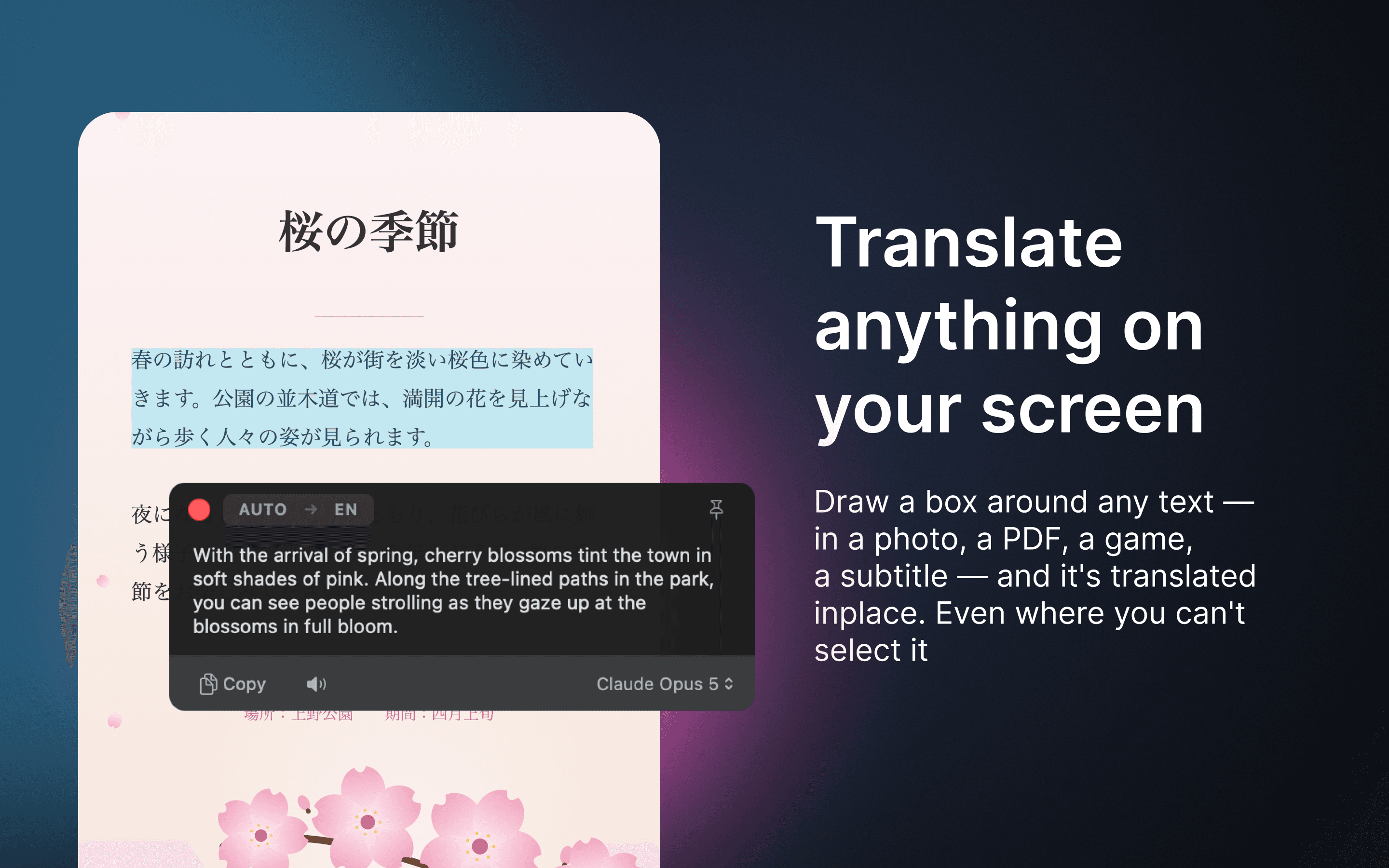
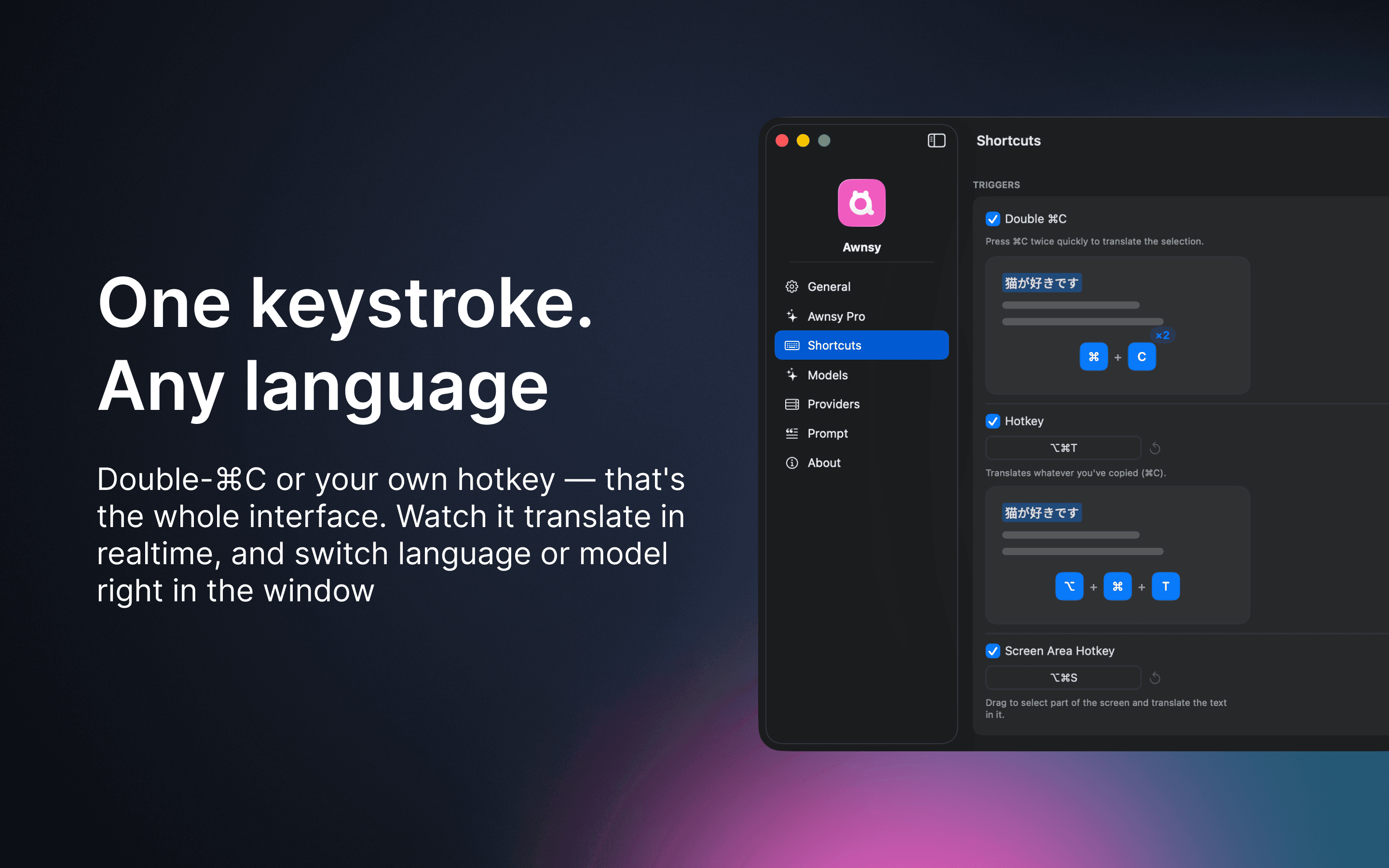
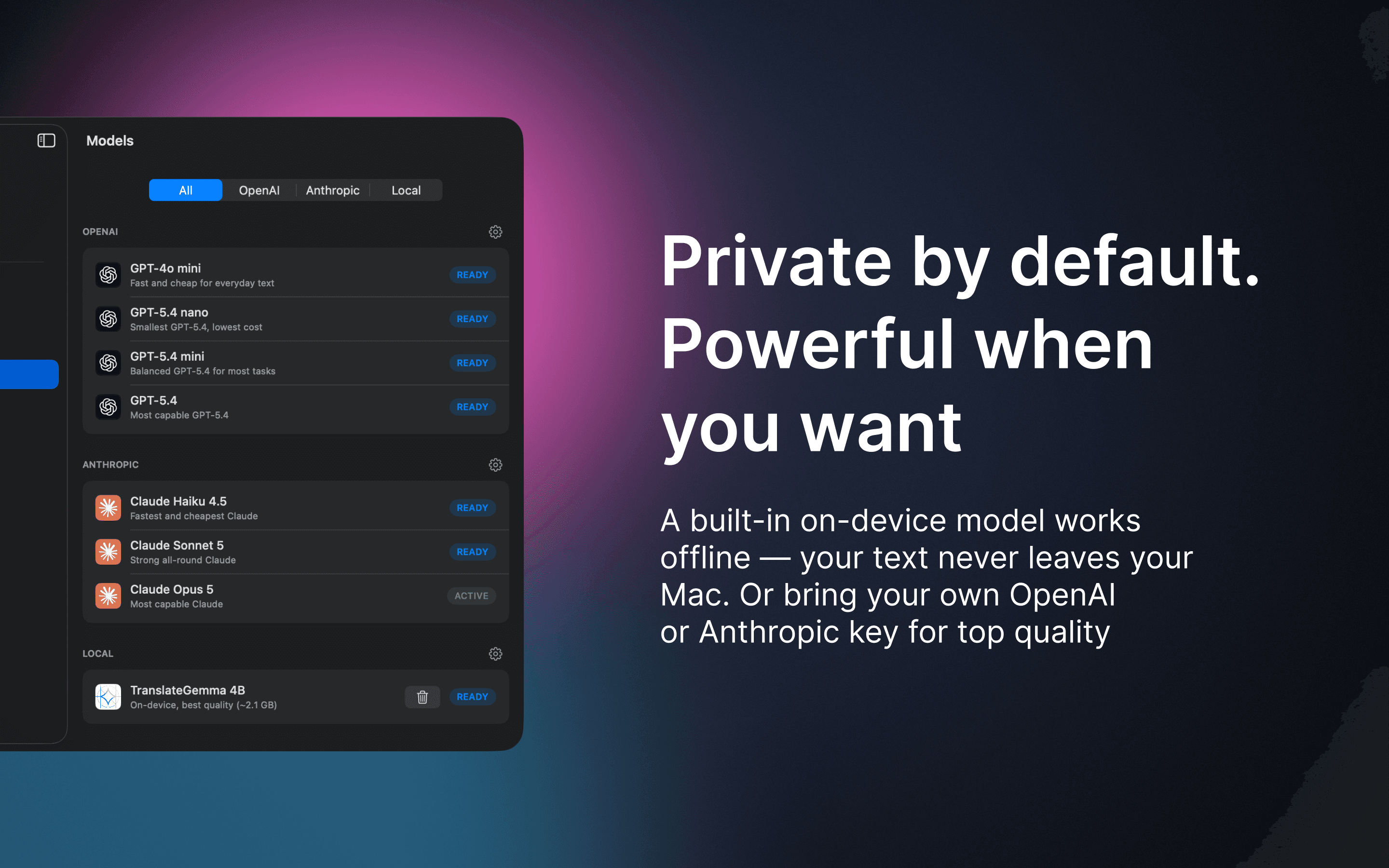
Awnsy is a small menu bar translator for macOS. Select text in any app, press ⌘C twice, and the translation appears right over the window. For text you can't select, like images, scanned PDFs or video, drag a box around it and Awnsy reads and translates it. The translation model lives inside the app and runs on your Mac. No account, no API key, works offline, and what you translate stays on your machine. If you prefer cloud quality, add your own OpenAI or Anthropic key, or point it at any OpenAI-compatible server. 78 target languages; language and model switchable right in the popup. Reads translations aloud. Interface localized into 14 languages. Translating selected text is free and unlimited. Screen area translation is free for 10 uses; Awnsy Pro removes the limit: $1.99 per month, $14.99 per year, or $29.99 one-time. Requires macOS 15 or later and an Apple silicon Mac (M1 or newer).
Drawn from the product itself, not from a survey.
Demographic
Multilingual professionals
Pain points
Switching between apps for translation disrupts workflow and loses context.
Primary needs
Quick, in-context translation without leaving current application.
Demographic
Students and researchers
Pain points
Struggling with untranslatable text in PDFs, scanned documents, or video lectures.
Primary needs
Ability to translate text from images and non-selectable sources accurately.
Demographic
Privacy-conscious users
Pain points
Concerns about data being sent to third-party servers for translation.
Primary needs
On-device translation that works offline and doesn't require accounts.
Written by AI from measured evidence, scored out of 100.
Awnsy is a focused, well-executed macOS menu-bar translator with a genuinely differentiated pitch: the model runs on your Mac, offline, with no account, and it can translate text you can't even select by letting you drag a box around it. The free tier is fair (unlimited selected-text translation, 10 screen-translation uses), and Pro is priced sensibly at $1.99/month, $14.99/year, or $29.99 one-time. The marketing site is fast and clean, the app is native Swift rather than Electron, and the interface is localized into 14-15 languages. The weak points are security hygiene on the site (1/12 header checklist points, HTTPS not enforced) and a narrow platform requirement — macOS 15 on Apple silicon only. There are no App Store ratings yet, so independent validation is still pending. For Mac users who translate constantly and care about privacy, this is a compelling, fairly priced tool; for everyone else, the hardware gate is the first thing to check.
Double-⌘C or custom hotkey is a genuinely low-friction core loop, and drag-a-box screen translation covers the unselectable-text gap. Free tier is usable (unlimited selected text, 10 screen uses). macOS 15 + M1 requirement narrows the audience.
Judging the app UI from store screenshots: a clean, native macOS menu-bar popup with live streaming translation and in-window language/model switching. The site's dark theme and '⌘C⌘C → translated' motif are consistent. Polished, though unproven by user ratings.
Lighthouse mobile 97/100 (LCP 1.8s, CLS 0, TBT 12ms) and desktop 100/100 — the marketing site is genuinely fast. The app itself is native Swift with an on-device model, so runtime overhead should be minimal. No lag complaints found.
HTTP probe shows HTTPS not enforced, no HSTS, CSP, frame protection, or Referrer-Policy — 1/12 checklist points. On-device model and Keychain-stored BYO keys are real privacy positives, but the site's own transport hygiene is weak and no audits are published.
Lighthouse a11y 95/100 with one failing audit: insufficient color contrast. Interface localized into 14-15 languages, which is strong for a small app. No WCAG statement or keyboard-navigation documentation published on the site.
Real problem, specific segments (multilingual pros, students, privacy-conscious users), and a concrete wedge: an on-device model shipped in-app with offline OCR screen translation. Differentiated vs cloud-only Google Translate and DeepL, but the Apple-silicon-only base caps reach.
Awnsy is a native macOS menu-bar translator, and judging the app UI from its store screenshots, the design is clean and appropriately macOS-native — a compact popup with streaming translation and in-window language/model switching. The website matches with a consistent dark theme and a clear '⌘C⌘C → translated' motif. Usability is the stronger story: the core loop is one gesture (double-⌘C or a custom hotkey), and drag-a-box screen translation covers images, scanned PDFs, and video where selection isn't possible. The free tier is genuinely usable — unlimited selected-text translation with a 10-use cap on screen translation. The main friction is environmental: macOS 15 or later on Apple silicon only, which shuts out Intel Macs and older OS versions. There's a Support & FAQ page but no live demo, and with no App Store ratings yet there's no independent usability feedback to lean on.
Speed is where Awnsy's marketing site shines: Lighthouse mobile 97/100 with LCP 1.8s, CLS 0, TBT 12ms, and a perfect 100/100 on desktop. The app itself is pure Swift with an on-device model, so runtime overhead should be low, though no published benchmarks confirm translation latency. Security is the weak flank. The HTTP probe found HTTPS not enforced and zero of the standard hardening headers — no HSTS, CSP, frame protection, X-Content-Type-Options, Referrer-Policy, or Permissions-Policy — for 1/12 checklist points. On the product side, the privacy architecture is a real strength: the translation model runs locally, there's no account or telemetry, and BYO OpenAI/Anthropic keys are stored in the Keychain. But the site serving those claims doesn't practice what it preaches, and no SOC 2, ISO, pen-test, or bug bounty is published. For a privacy-positioned product, that gap is the one to close first.
Accessibility scores well on automated checks: Lighthouse 95/100, with a single failing audit for insufficient color contrast. The interface is localized into 14 languages on the site (15 per the App Store listing), which is unusually broad for a small indie app and directly serves the multilingual audience. What's missing is a published accessibility statement or WCAG conformance claim, and keyboard-navigation documentation. On growth, the idea holds up: the problem — leaving your app to translate something, or being unable to select text at all — is real, and the target segments (multilingual professionals, students and researchers, privacy-conscious users) are specific. The wedge is concrete: an on-device model shipped inside the app, offline, no account, plus OCR screen translation for images, PDFs, and video. That's differentiated against cloud-only Google Translate and DeepL, and against Easydict, which needs Apple Translate or a separately installed Ollama for offline. The honest limit is the platform: Apple silicon and macOS 15+ caps the addressable base, and the domain is only weeks old with LinkedIn as the sole listed social profile.
Conclusion
Awnsy earns its place by solving a specific, annoying problem well: translating things you can't select, without shipping your text to a server. The on-device model, offline operation, and drag-a-box screen translation are real differentiators against Google Translate, DeepL, and Easydict, and the pricing is honest. What holds it back from a higher verdict is the combination of a narrow platform requirement and a website that doesn't enforce HTTPS despite selling privacy as the headline feature. If you're on an M-series Mac running macOS 15 and you translate daily, the free tier is worth trying today — the double-⌘C loop takes about ten seconds to learn. If you're on Intel or an older OS, this simply isn't for you yet. Fix the transport security and publish a real privacy/security page, and this becomes an easy recommendation.
Named competitors, point by point. Nobody paid to appear here or to be left out.
 Awnsy Awnsy |  Google Translate Google Translate |  DeepL for Mac DeepL for Mac |  Easydict Easydict | |
|---|---|---|---|---|
| Translation engine location | On-device model shipped in-app; optional BYO cloud key | Cloud only; requires internet connection | Cloud only; free tier caps characters per translation | Offline only via Apple Translate or separately installed Ollama |
| Account / API key required | No account or key needed; cloud keys optional | No account for basic use; Google account for some features | Account required for API; web use is free | No account; some services need their own API keys |
| Translate non-selectable text (images, PDFs, video) | Yes — drag a box, on-device OCR reads and translates | Yes via Google Lens / image upload, cloud-based | Yes via document/image upload on paid plans | Yes — OCR screen translation built in |
| Platform | macOS 15+ on Apple silicon (M1 or newer) | Web, iOS, Android — any platform | Web, iOS, Android, Windows, macOS | macOS only |
| Pricing | Free tier; Pro $1.99/mo, $14.99/yr, or $29.99 one-time | Free | Free tier with caps; Pro from ~$8.99/mo | Free and open source |
| Offline capability | Yes — built-in model runs fully offline | Limited offline via downloaded language packs on mobile | No — requires internet | Partial — only via Apple Translate or local Ollama |
Google Translate
Cloud translation service, needs an internet connection. Awnsy runs a local model on the Mac and works offline.
DeepL for Mac
Cloud only; the free tier caps characters per translation. Awnsy runs its model on the Mac with no account.
Easydict
Free, open source, more translation services and a dictionary; offline only through Apple Translate or a separately installed Ollama. Awnsy ships its own local model inside the app.
Comparing options? See Awnsy alternatives, scored side by side

An all-in-one hospitality software for restaurants and ba...

A weekly newsletter delivering curated tech jobs, intervi...

White-label reputation management software for agencies s...

Privacy-first open source journal app with a continuous t...

Puzzly is an all-in-one B2B lead generation platform that...

All-in-one AI workspace for docs, projects, and knowledge...

A free, open-source platform offering 110 AI agent skills...

Open-source desktop app for switching AI coding providers...

One verified handle for your online identity, readable by...

Frame-perfect video-to-GIF maker that runs entirely in yo...

White-label website audits that close deals for digital a...

Automated quote follow-up for trades and service businesses.
A platform dedicated to providing unbiased reviews of newly launched applications, analyzing everything from their features to their full potential.
info@scoutforge.net© 2026 Scoutforge. All rights reserved.
