

A platform dedicated to providing unbiased reviews of newly launched applications, analyzing everything from their features to their full potential.
info@scoutforge.net© 2026 Scoutforge. All rights reserved.
A platform dedicated to providing unbiased reviews of newly launched applications, analyzing everything from their features to their full potential.
info@scoutforge.net© 2026 Scoutforge. All rights reserved.
A platform dedicated to providing unbiased reviews of newly launched applications, analyzing everything from their features to their full potential.
info@scoutforge.net© 2026 Scoutforge. All rights reserved.
Cycling through all six. Tap any point to stop.
Measured on six things
Local-first Windows file verification software for confid...
HTTPS and HSTS enforced, X-Content-Type-Options and SPF present. Missing CSP, frame protection, Referrer-Policy, Permissions-Policy and DMARC; 6/13 checklist points. No published audits.
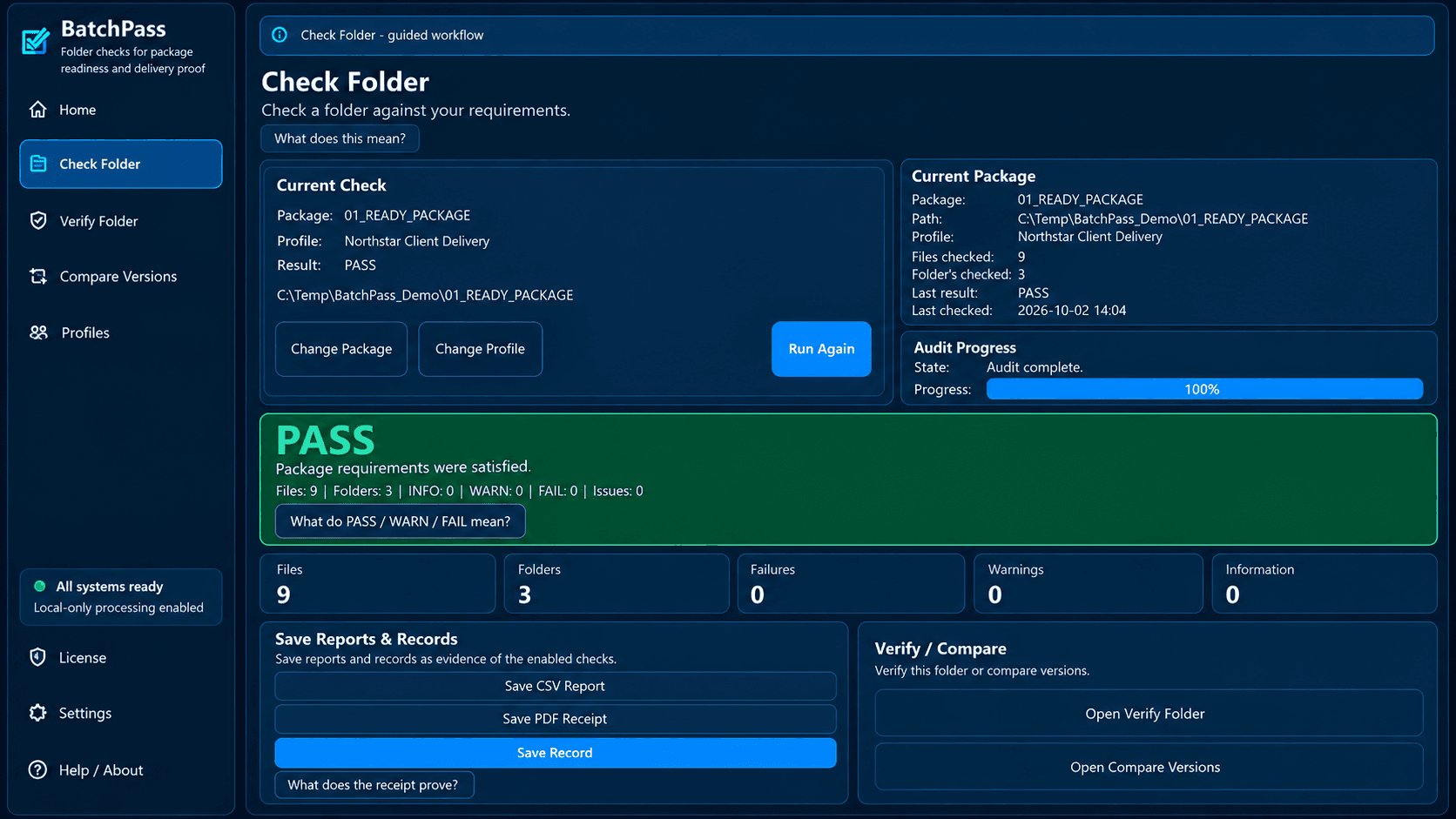
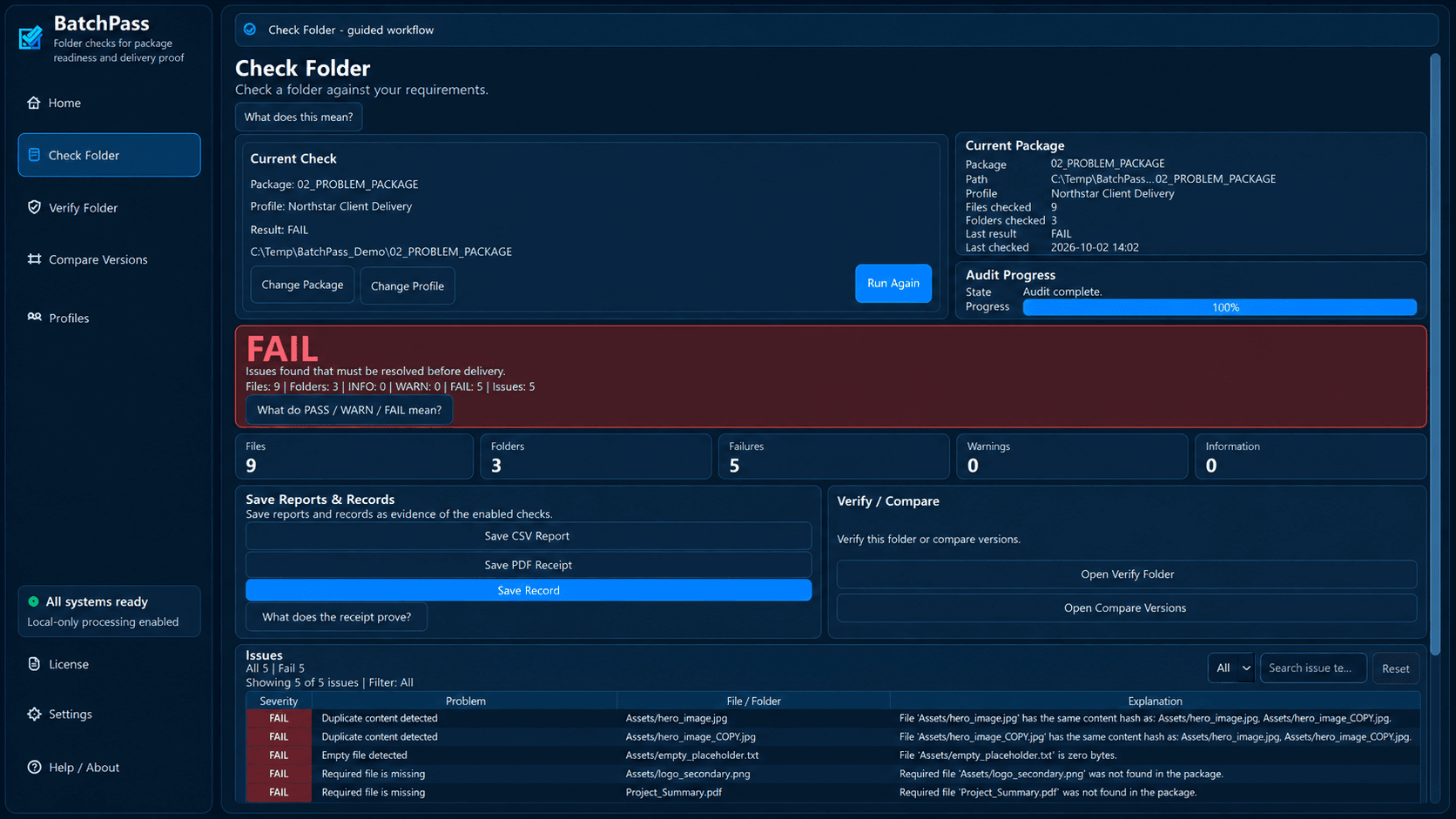
BatchPass is a local-first Windows desktop application designed to verify delivery folders before they are sent, archived, or handed off. It allows users to check folders against reusable requirements, identify missing files, empty files, duplicates, naming problems, size limits, and sequence gaps. The software also enables verification of current folders against Saved Records using SHA-256 digital fingerprints, and comparison of different versions to see added, removed, modified, or renamed files. BatchPass operates locally, ensuring that checked folder contents are not uploaded to the cloud, and performs read-only audits without modifying the files. It is ideal for professionals who need to ensure the completeness and consistency of file deliveries, such as in media production, software releases, and data management. Priced at $29 as a one-time payment, it offers a 7-day trial at launch.
Drawn from the product itself, not from a survey.
Demographic
Media and Entertainment Professionals
Pain points
Missing files, duplicates, and naming inconsistencies in delivery packages.
Primary needs
Ensure delivery folders are complete and meet specifications before sending to clients.
Demographic
Software Release Managers
Pain points
Version control issues and unexpected file changes between releases.
Primary needs
Verify that release packages match saved records and compare versions accurately.
Demographic
Data Managers and Archivists
Pain points
Difficulty in tracking file integrity and proof of checks over time.
Primary needs
Create and store verification records for future audits and comparisons.
Written by AI from measured evidence, scored out of 100.
BatchPass is a local-first Windows utility that verifies delivery folders against reusable requirement Profiles, checks current folders against Saved Records using SHA-256 fingerprints, and compares saved versions to show what changed. It is priced at $29 one-time with a 7-day trial, and it deliberately never uploads folder contents or modifies files — a real selling point for anyone who has ever shipped a package and prayed. The marketing site is clean and the workflow is clearly explained, but the pre-purchase experience is thin: no app screenshots, no live demo, no visible docs. Security headers are middling (6/13), and there is no published audit. Accessibility is unmeasured and unclaimed, and the product is Windows-only. The idea itself is well-aimed at a real niche with a genuine differentiator over TeraCopy, but the product is early and the evidence of traction is minimal.
Clear 5-step workflow and a 7-day trial with a $29 one-time license. No live demo, no visible docs or help center, and no app screenshots to preview the interface before download.
Dark, high-contrast marketing site with a clean numbered workflow and consistent section blocks. No app UI screenshots in the fetched content, so the actual Windows interface is unjudged.
No Lighthouse performance measurement was available this run, so page speed and load behavior could not be assessed. Score held in the category-typical band pending real data.
HTTPS and HSTS enforced, X-Content-Type-Options and SPF present. Missing CSP, frame protection, Referrer-Policy, Permissions-Policy and DMARC; 6/13 checklist points. No published audits.
No Lighthouse accessibility measurement was available this run. No WCAG statement or accessibility page found on the site, and the product is Windows-only with no multi-platform coverage described.
Real niche problem — verifying delivery folders before handoff — with a concrete wedge over TeraCopy: reusable requirement Profiles and saved-record version comparison. Early-stage domain, no traction signals yet.
BatchPass presents a dark, high-contrast marketing site with a tidy numbered workflow (create Profile → check folder → review PASS/WARN/FAIL → save record → verify or compare later) that maps cleanly to what the product does. The copy is dense but organized, and the repeated 'LOCAL BY DESIGN' and 'READ-ONLY AUDITS' blocks hammer the two things buyers care about: nothing leaves your machine and nothing gets modified. The catch is that the fetched content shows no screenshots of the actual Windows app, no live demo, and no visible docs or help center. For a $29 desktop utility with a 7-day trial, that means the buyer's first real look at the interface is after download. Usability is competent on paper — clear steps, clear pricing, a trial — but the pre-purchase experience leaves the product itself a black box.
No Lighthouse performance measurement completed for this run, so page speed and load behavior cannot be assessed from the collected evidence — the score sits in the category-typical band rather than reflecting a verified strength or flaw. On security, the HTTP probe found HTTPS enforced with HSTS, X-Content-Type-Options, and SPF present, but CSP, frame protection, Referrer-Policy, Permissions-Policy, and DMARC all absent — 6 of 13 checklist points. That is a middling header posture for a desktop utility whose selling point is trust: you are handing it your delivery folders. The product's own claim that checks run locally and folder contents are never uploaded is a genuine architectural security advantage, and internet is required only for initial license activation. But there is no published SOC 2, no pen-test report, and no bug bounty, so the trust story rests entirely on the maker's word.
No accessibility measurement was available this run, and the site itself carries no WCAG statement, no accessibility page, and no a11y mention in the fetched content. The product is Windows-only, so there is no mobile or multi-platform coverage to broaden reach. On growth, the idea is sharper than most: BatchPass names a real, specific pain — verifying that a delivery folder is complete and unchanged before it goes out — and targets identifiable buyers in media production, software releases, and archiving. Its wedge over TeraCopy (the listed alternative) is meaningful: TeraCopy verifies file integrity during copying, while BatchPass checks folders against reusable requirement Profiles and compares saved records via SHA-256 fingerprints to surface missing, unexpected, modified, or renamed files. That is a different job. The limit is category size: this is a focused professional utility, not a platform, and the domain is brand new with no visible traction. The idea can grow within its niche; it will not become a category-defining platform.
Conclusion
If you regularly hand off delivery folders and have been burned by a missing file or a silent rename, BatchPass addresses a real problem with a sensible local-first design and a fair one-time price. The 7-day trial is the right way in — download it, throw a real delivery folder at it, and see whether the Profile and Saved Record workflow fits how you actually work. What you should not expect yet is a mature ecosystem: no docs site, no demo, no published security audit, and no accessibility commitments. It is a focused tool from an early-stage maker, and it should be judged that way. Try the trial before you buy, and keep your own backup of anything you care about.
Named competitors, point by point. Nobody paid to appear here or to be left out.
 BatchPass BatchPass |  TeraCopy TeraCopy | |
|---|---|---|
| Primary function | Verifies delivery folders against reusable requirements and saved records before handoff | Copies and moves files with integrity verification during transfer |
| Integrity verification method | SHA-256 fingerprints compared against Saved Records | Hash verification during copy operations |
| Requirement Profiles / reusable rules | Yes — reusable Profiles for required files, extensions, counts, naming, sequences, size limits | No — focused on copy/move operations, not folder requirement checking |
| Version comparison | Yes — compares Earlier vs Newer Saved Records for added, removed, modified, renamed files | No version comparison feature |
| Local / offline operation | Local-first; internet only for initial license activation | Fully local file operations |
| Read-only audits (no file modification) | Yes — checks and reports without moving, renaming, overwriting, or deleting files | No — primary function is copying and moving files |
| Pricing model | $29 one-time Full License; 7-day free trial | Free version available; Pro is a paid one-time license |
| Platform | Windows desktop | Windows desktop |
Comparing options? See BatchPass alternatives, scored side by side

An all-in-one hospitality software for restaurants and ba...

A weekly newsletter delivering curated tech jobs, intervi...

White-label reputation management software for agencies s...

Privacy-first open source journal app with a continuous t...

Puzzly is an all-in-one B2B lead generation platform that...

All-in-one AI workspace for docs, projects, and knowledge...

A free, open-source platform offering 110 AI agent skills...

Open-source desktop app for switching AI coding providers...

One verified handle for your online identity, readable by...

Frame-perfect video-to-GIF maker that runs entirely in yo...

White-label website audits that close deals for digital a...

Automated quote follow-up for trades and service businesses.
A platform dedicated to providing unbiased reviews of newly launched applications, analyzing everything from their features to their full potential.
info@scoutforge.net© 2026 Scoutforge. All rights reserved.
