

Is this your app?

Claim Biotracker to manage its page, add your badge and see your traffic — free, and it stays free.

Usability85Design90Speed85Security80Accessibility88Growth70

Cycling through all six. Tap any point to stop.

Measured on six things

An innovative health dashboard that consolidates and interprets lab results for better personal health insights.

Growth

70

Strong foundation but limited file format support and lacks personalized health recommendations for broader appeal.

Screenshots

1 / 2

About this app

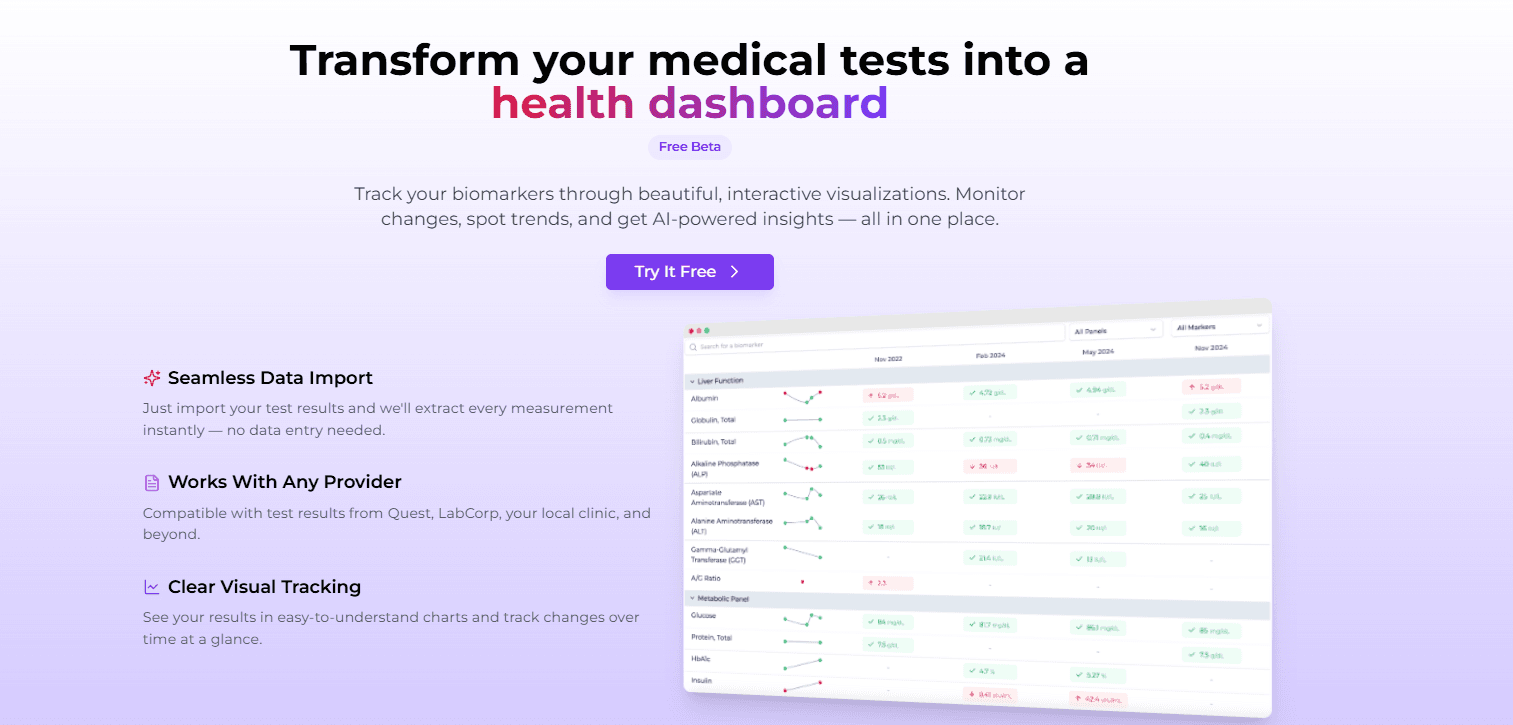
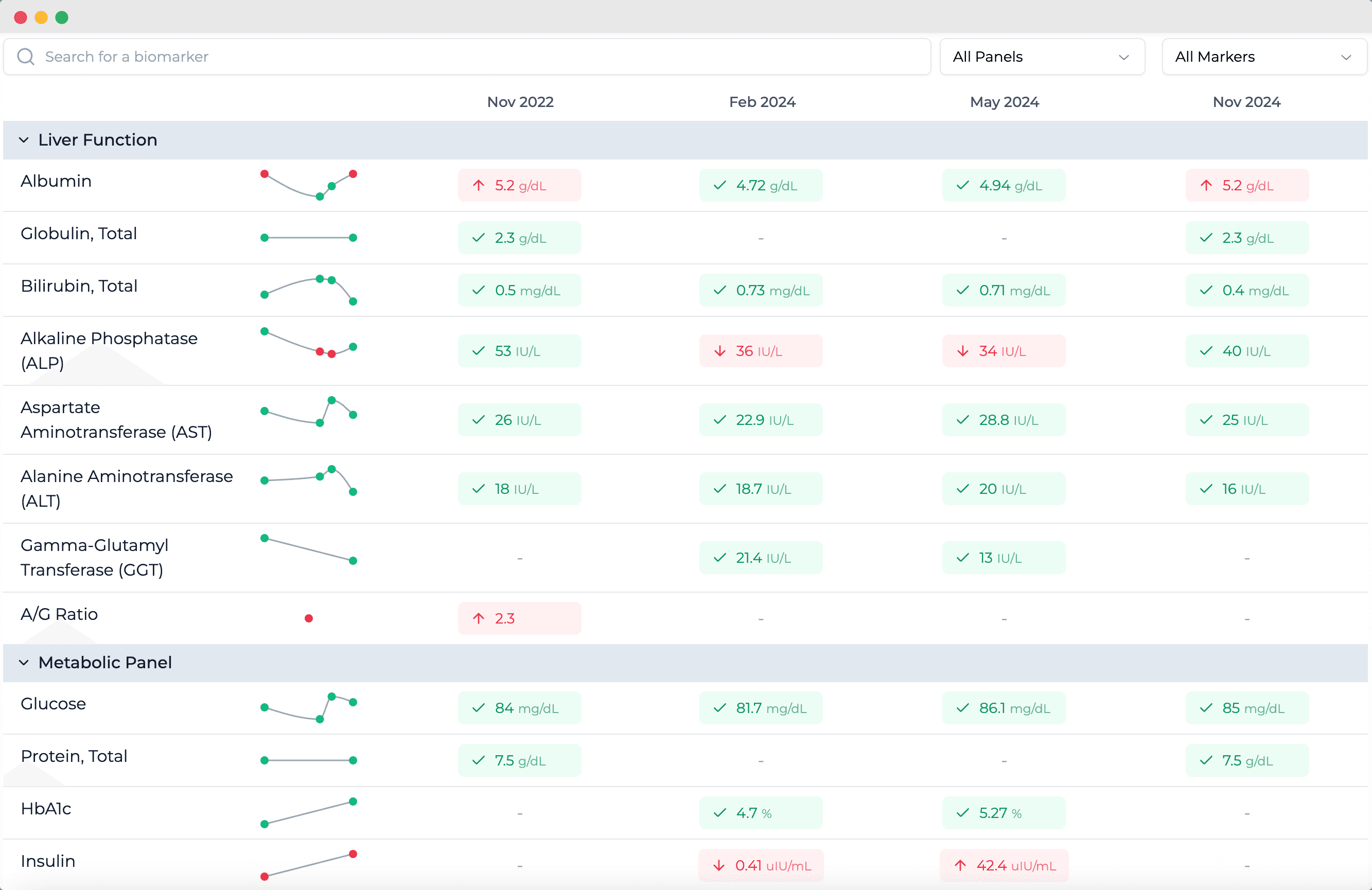
Biotracker.me is a cutting-edge platform that transforms your disparate lab reports into a unified, interactive health dashboard. By uploading PDF lab results, it automatically extracts and categorizes biomarkers, allowing you to monitor trends over time and gain a comprehensive understanding of your health. With a clean, intuitive interface, robust security measures, and real-time data processing, it's designed for users seeking to take control of their health data. It's particularly useful for individuals managing chronic conditions, fitness enthusiasts, and proactive health-conscious people who want to make informed decisions based on their lab metrics.

Key features

  • 1Clean, intuitive dashboard with excellent biomarker visualization and straightforward PDF upload process
  • 2Automatic data extraction minimizes manual entry, making complex health data accessible to non-technical users
  • 3Real-time data processing with quick dashboard updates after uploading new lab results

Target customer profile

Drawn from the product itself, not from a survey.

Demographic

Adults aged 30-60 with chronic health conditions

Pain points

Difficulty tracking and interpreting multiple lab reports over time, leading to confusion and missed health trends

Primary needs

A centralized system to visualize health data, identify patterns, and facilitate discussions with healthcare providers

Demographic

Fitness enthusiasts and athletes

Pain points

Lack of easy access to performance-related biomarkers and trends to optimize training and recovery

Primary needs

Tools to monitor key health metrics like vitamin levels, hormones, and inflammation markers for peak performance

Demographic

Health-conscious individuals and biohackers

Pain points

Manual data entry and disorganized health records that hinder proactive health management and personalized insights

Primary needs

Automated data extraction, trend analysis, and actionable health recommendations to support lifestyle improvements

Human reviews

What people found in Biotracker

Written by Scout Forge members. We do not verify that a reviewer purchased or installed the app.How we handle reviews
H

Hakan TEMUR

Sep 08, 2026

I went in expecting the usual beta routine: make an account, verify your email, then stare at an empty dashboard. None of that here. You land on /reports, it doesn't ask you to sign up, and it tells you upfront that your data stays in your browser and nothing medical goes to their servers. I checked, and it's actually true, everything I entered sat in local storage. For a health tool that's a real plus. I skipped the PDF upload and added a result by hand. The biomarker picker has search, the unit dropdown makes sense, and the moment you save it walks you through picking biological sex and pops a little "your first result is saved" note that points you to the dashboard. That's already a better welcome than most tools bother with. The dashboard is clean. Markers grouped by panel, values by date, and clicking one opens a panel with the reference range, a small chart, and a link back to the original result. Refreshing /trends or opening it from a direct link works fine, which sounds basic but plenty of apps get it wrong. What I liked: - No account, no email verification, data stays on your device, and it genuinely does - After you save the first result there's a small flow guiding you along, it doesn't leave you stranded - The marker detail popup does its job: reference range, mini chart, link back to the source - Refreshing pages and sharing direct links both work - CSV export actually gave me my own data, not some demo table What I didn't like: - Add a single result and the AI insights section falls over. The request 500s in the background and you're left with an empty "Insights" area and no explanation. New users will hit this on day one - The profile dialog keeps showing "Female" selected even after I picked "Male" and saved. It stores the right value underneath, but on a tool that sets reference ranges by sex, seeing the wrong one every time you open it doesn't inspire confidence - Only two options for biological sex, no skip button - A single data point is drawn as one lonely dot inside a shaded band. Expected, but the "spot your trends" pitch promises more than a first import delivers - The CSV came down with a random .tmp name instead of something readable - The demo chart popup on the homepage dropped the oldest date from its axis even though the table still had it The privacy approach and the import-then-see-it-on-a-dashboard flow are genuinely good. The AI insights, the thing the marketing leads with, is the most unfinished part. 3 out of 5 for now. I'd use it to keep my results in one place, I wouldn't trust the insights yet.

Test an app and get paid in credits

Developers fund these. You keep the credits whatever your verdict.

Scout Review

Written by AI from measured evidence, scored out of 100.

Biotracker excels at its core mission: transforming messy lab reports into clean, actionable health visualizations. It's particularly valuable for anyone tracking chronic conditions, fitness metrics, or long-term health trends. The automated data extraction is a game-changer that sets it apart from manual-entry competitors.

Measure by measure

Usability

85

Automatic data extraction minimizes manual entry, making complex health data accessible to non-technical users.

Design

90

Clean, intuitive dashboard with excellent biomarker visualization and straightforward PDF upload process.

Speed

85

Real-time data processing with quick dashboard updates after uploading new lab results.

Security

80

Robust security measures for health data protection, though specific encryption details aren't highlighted.

Accessibility

88

Web-based accessibility across devices, though mobile-specific optimizations could enhance the experience.

Growth

70

Strong foundation but limited file format support and lacks personalized health recommendations for broader appeal.

Improvement areas

  • Expand beyond PDF support to include image uploads and direct integrations with major lab providers
  • Develop AI-powered health insights that provide personalized recommendations based on biomarker trends
  • Create a mobile app with offline capabilities and push notifications for important health changes

Design & Usability

Biotracker's interface immediately impresses with its clean, minimalist design that prioritizes clarity over clutter. The dashboard organizes complex biomarker data into visually intuitive charts and graphs that even non-medical users can understand. The PDF upload process is remarkably straightforward - simply drag and drop your lab reports, and the system handles the rest. Automatic data extraction eliminates the tedious manual entry that plagues other health apps, making this accessible to users of all technical levels. The color-coded trend indicators and timeline views make spotting health patterns effortless, though some users might want more customization options for the dashboard layout.

Speed & Security

Performance is a strong suit for Biotracker, with near-instant processing of uploaded lab reports. The system efficiently parses PDF data and updates your dashboard in real-time, providing immediate feedback rather than making you wait hours for results. Security measures appear robust for handling sensitive health information, though the platform could be more transparent about specific encryption standards and compliance certifications. The web-based architecture ensures reliable access without app store dependencies, though occasional loading delays might occur with larger report batches or slower internet connections.

Accessibility & Growth

Being browser-based gives Biotracker excellent cross-device accessibility, working seamlessly on desktops, tablets, and smartphones. However, the experience isn't fully optimized for mobile touch interfaces, and a dedicated app could enhance on-the-go usage. The platform shows solid growth foundations with its unique PDF parsing technology, but currently limits itself by only accepting PDF format. Expanding to image files and direct lab integrations would significantly broaden its appeal. The biggest growth opportunity lies in adding AI-driven health insights and personalized recommendations based on the tracked data.

Conclusion

If you're tired of staring at disjointed PDF lab reports and want to actually understand your health trends, Biotracker is worth trying. It's ideal for health-conscious individuals, biohackers, and anyone managing ongoing health conditions who needs better data visualization tools.

Suggestions for improvement

  • Expand beyond PDF support to include image uploads and direct integrations with major lab providers.
  • Develop AI-powered health insights that provide personalized recommendations based on biomarker trends.
  • Create a mobile app with offline capabilities and push notifications for important health changes.
  • Add collaboration features for sharing data securely with healthcare providers.
How we score

Alternatives comparison

Named competitors, point by point. Nobody paid to appear here or to be left out.

BiotrackerInsideTrackerWelltoryMyFitnessPal
Lab Result IntegrationAutomatic PDF extraction with biomarker categorizationBlood test analysis with personalized recommendationsHeart rate variability and stress metricsManual nutrition and exercise tracking
Data VisualizationInteractive health dashboard with trend analysisPersonalized insights with action plansStress and energy level chartsNutrition and fitness progress graphs
Automation LevelHigh (automatic PDF parsing)Medium (blood test analysis)Medium (HRV measurement)Low (manual entry required)

Comparing options? See Biotracker alternatives, scored side by side

View all Health & Wellness
Scout Forge

A platform dedicated to providing unbiased reviews of newly launched applications, analyzing everything from their features to their full potential.

info@scoutforge.net

© 2026 Scoutforge. All rights reserved.
