Cycling through all six. Tap any point to stop.
Measured on six things
WhatsApp-style blue ticks for Gmail: one tick when your email is sent, two blue ticks the moment it is opened.
Growth
35Tiny indie footprint: 11 Trustpilot reviews, creator Reddit mentions, no major review platforms or community hubs. Low-cost pricing suggests early-stage solo project.
Screenshots
1 / 1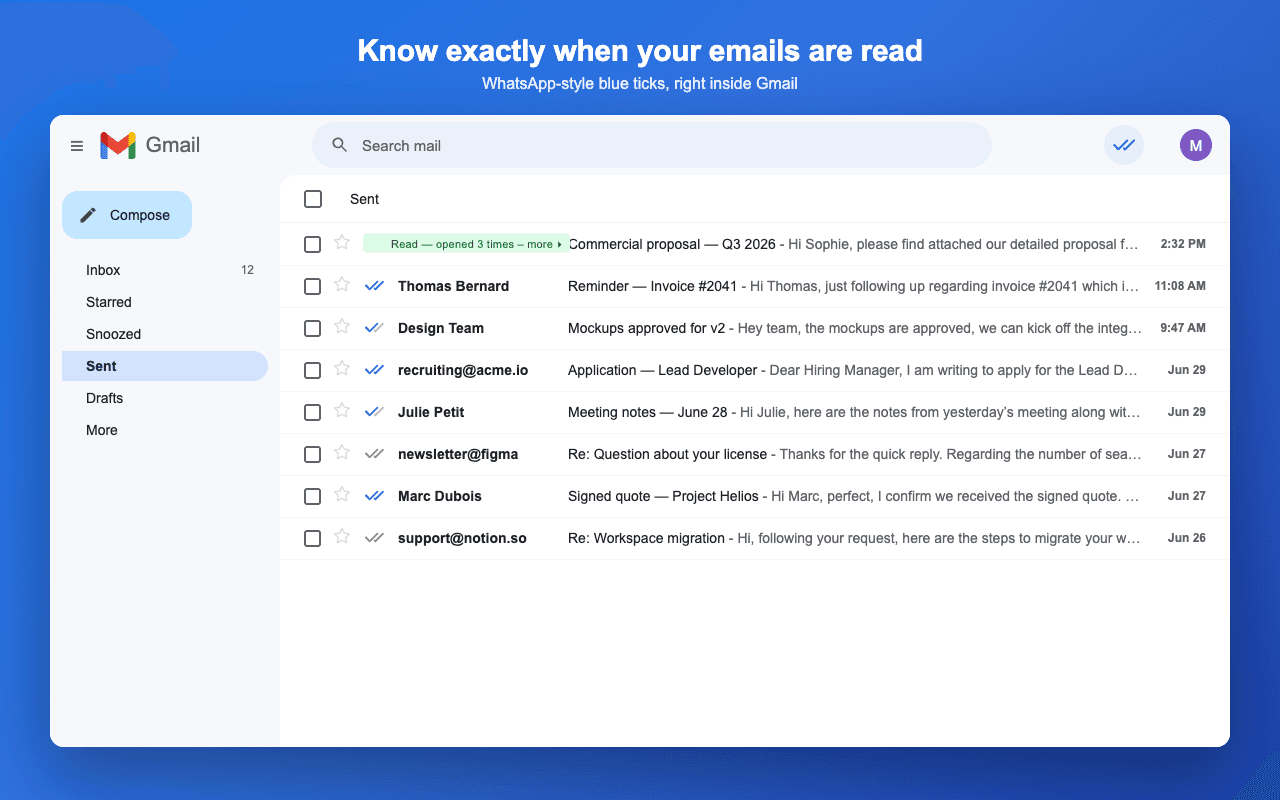
About this app
BlueTicks for Gmail is a browser extension that adds WhatsApp-style read receipts to your sent emails. One tick means your email was sent, two blue ticks mean it has been opened, in real time, right in your Sent list. Hover a tick to see when, and how many times, an email was opened, and a companion side panel surfaces the messages still waiting on a read. It integrates into the Gmail interface with no signup, no OAuth and no access to your Google account. Privacy first and GDPR by design: email content is never stored on the servers, no IP addresses are kept, and nothing is ever added to the emails recipients receive. There is a free plan, and the paid plan is 4 dollars a year for gmail accounts. Installation takes 30 seconds on Chrome or Firefox.
Key features
- 1WhatsApp-style blue ticks in Gmail Sent list with real-time updates
- 2Hover for open timestamps and count; companion side panel for pending reads
- 3No OAuth, no data storage, GDPR by design, free tier available
Target customer profile
Drawn from the product itself, not from a survey.
Demographic
Sales professionals and business developers
Pain points
Waste time following up on unread emails; uncertainty about client engagement
Primary needs
Know when prospects open emails to time follow-ups effectively
Demographic
Remote workers and freelancers
Pain points
Lack of feedback on email communication; anxiety over ghosting
Primary needs
Peace of mind knowing emails are read without intrusive read receipts
Demographic
Recruiters and HR professionals
Pain points
Difficulty tracking candidate engagement; inefficient communication follow-ups
Primary needs
Real-time read receipts to prioritize responsive candidates
Scout Review
Written by AI from measured evidence, scored out of 100.
BlueTicks delivers exactly what it promises—WhatsApp-style read receipts that feel native to Gmail—without the usual privacy tax of OAuth or data collection. The low price and instant setup make it attractive for freelancers and sales folks tired of ghosting anxiety. It won't replace heavier tools for teams needing pipelines or link tracking, but for pure read-receipt peace of mind it's refreshingly minimal.
Measure by measure
Usability
72Extremely low-friction install and native feel. Free tier plus in-extension upgrade keeps the path short from curiosity to value.
Design
68Clean blue-accented landing page with strong value demo in Gmail mocks. Some dated UI elements and generous whitespace make it feel slightly stretched.
Speed
78Strong Lighthouse scores on both mobile and desktop with fast LCP and zero layout shift. No complaints about sluggishness surfaced.
Security
52Privacy-first claims are explicit (no data storage, no OAuth, GDPR by design). Basic HTTPS present but missing modern headers and any third-party audits.
Accessibility
68High automated score but real contrast and landmark issues flagged. No dedicated accessibility statement or language options noted.
Growth
35Tiny indie footprint: 11 Trustpilot reviews, creator Reddit mentions, no major review platforms or community hubs. Low-cost pricing suggests early-stage solo project.
Improvement areas
- Modernize Gmail mock visuals and reduce hero whitespace
- Strengthen security headers and publish compliance details
- Improve accessibility contrast and add landmark elements
Design & Usability
BlueTicks nails the core promise with a clean, blue-accented landing page that shows exactly what the ticks look like inside Gmail. The design is consistent and the value is instantly scannable, though some dated Gmail styling and generous whitespace keep it from feeling premium. Usability is where it really shines: one-click install, zero signup friction, and everything lives natively in your Sent list with hover details and a side panel. The free tier lowers the barrier even further, making it feel like the extension was built by someone who actually hates extra logins.
Speed & Security
Performance is legitimately strong for such a lightweight site, with Lighthouse scores in the high 80s-90s and no reported lag. Security lands in the middle because the privacy story is genuinely thoughtful—no OAuth, no stored content, GDPR by design—yet the technical headers are thin and there are zero published audits or bug bounties. For a privacy-first tool aimed at sales and recruiting users, the claims are credible but the lack of visible compliance theater keeps the score modest.
Accessibility & Growth
Accessibility gets a decent automated score but fails on contrast and landmarks, with no extra statements or language support to push it higher. Growth is the weakest area: an indie extension with only a handful of reviews and almost no presence on major platforms. It feels like a solo project that solves a real annoyance for a small group of users rather than something scaling toward mainstream adoption.
Conclusion
If you just want to know when your emails are opened without drama, this is one of the cleanest options available right now.
Suggestions for improvement
- Tighten hero spacing and update the Gmail mock styling to feel more current
- Add a proper security page with headers and any future audit plans
- Publish a short accessibility statement and fix the contrast/landmark issues
- Seed more reviews on G2 or Product Hunt to build visible traction
Alternatives comparison
Named competitors, point by point. Nobody paid to appear here or to be left out.
 BlueTicks for Gmail BlueTicks for Gmail |  Mailtrack Mailtrack |  Mixmax Mixmax |  Streak Streak | |
|---|---|---|---|---|
| Read receipts without banners or signatures | Yes - invisible to recipients | No - shows banner in emails | Yes - but requires OAuth | Yes - but heavier CRM integration |
| Pricing (personal use) | $4/year or free tier | Freemium with paid upgrades | Higher-tier sales platform | CRM pricing, more expensive |
| OAuth / Google account access required | No | Yes | Yes | Yes |
| Native Gmail Sent list integration | Yes - ticks appear directly | Partial - tracking in dashboard | Yes - but heavier UI | Yes - inside CRM pipeline |
Mailtrack
Email tracking with read receipts and link tracking, but shows a banner in emails.
Mixmax
Sales engagement platform with read receipts and scheduling, but requires OAuth access.
Streak
CRM for Gmail with email tracking and pipeline management, but heavier integration.
Comparing options? See BlueTicks for Gmail alternatives, scored side by side
Sources
What the review was written against. A verdict with no sources is an opinion.
More Productivity apps
View all Productivity
Qamarero
92An all-in-one hospitality software for restaurants and ba...

The Stack Newsletter
92A weekly newsletter delivering curated tech jobs, intervi...

EmbedMyReviews
92White-label reputation management software for agencies s...

StoryPad
92Privacy-first open source journal app with a continuous t...

Puzzly – B2B Lead Generation & Sales Intelligence Platform
92Puzzly is an all-in-one B2B lead generation platform that...

Notion
92All-in-one AI workspace for docs, projects, and knowledge...

Vibe Coding Agent Skills
92A free, open-source platform offering 110 AI agent skills...

CC Switch
91Open-source desktop app for switching AI coding providers...

username.md
90One verified handle for your online identity, readable by...

What the GIF
89Frame-perfect video-to-GIF maker that runs entirely in yo...

AuditCloser
89White-label website audits that close deals for digital a...

NudgeWin
89Automated quote follow-up for trades and service businesses.


A platform dedicated to providing unbiased reviews of newly launched applications, analyzing everything from their features to their full potential.
info@scoutforge.net© 2026 Scoutforge. All rights reserved.
