Cycling through all six. Tap any point to stop.
Measured on six things
Boost your productivity with a free online Pomodoro timer and built in task tracker designed to optimize your work and study sessions.
Design
58Functional but generic. Timer is clear and dominant, task tracker is handy, but flat cartoon illustrations and cluttered tooltips dilute the professional feel.
Screenshots
1 / 1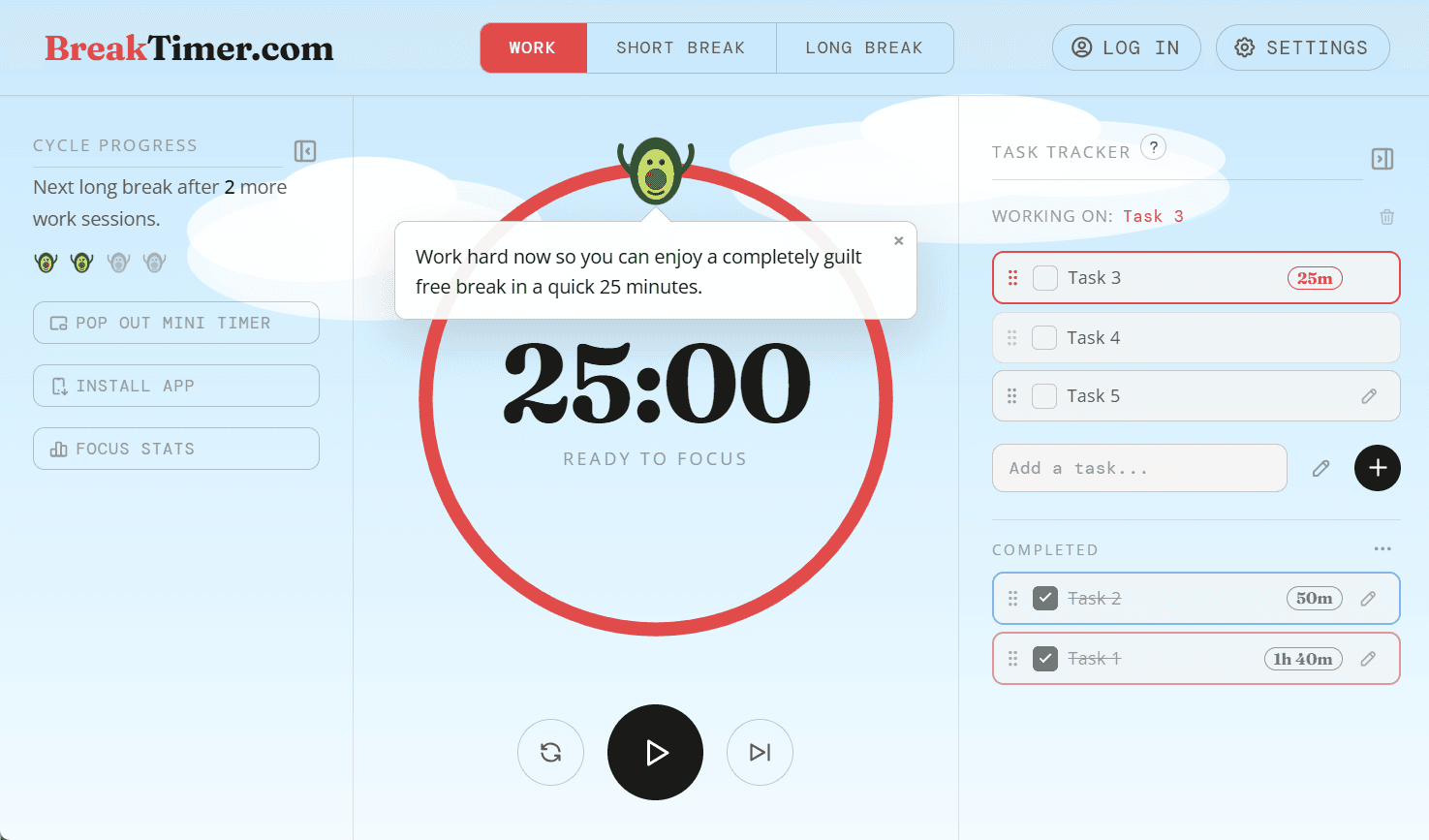
About this app
This isn’t just a Pomodoro timer—it’s a fully customizable focus toolkit. Choose between classic intervals or natural flowtime mode to work at your own pace. Track your tasks, customize your workspace with unique characters and backgrounds, and stay motivated with gentle, encouraging micro-prompts that keep you moving forward without the burnout.
Key features
- 1Pomodoro and Flowtime timer modes with customizable intervals
- 2Task tracker with drag-and-drop, notes, categories, and recurring tasks
- 3Customizable characters, backgrounds, and ambient sounds
Target customer profile
Drawn from the product itself, not from a survey.
Demographic
Students (high school, college, university)
Pain points
Struggling to focus while studying, procrastination due to distractions, managing multiple subjects or assignments
Primary needs
A simple timer to structure study sessions, track time per subject, and remind to take breaks to avoid burnout
Demographic
Remote workers and freelancers
Pain points
Difficulty maintaining focus in a home environment, juggling multiple projects, feeling pressure to be constantly productive, risk of overworking
Primary needs
A tool to implement timeboxing, track time on client projects, and encourage regular breaks to sustain energy
Demographic
Tech enthusiasts and productivity hobbyists
Pain points
Easily bored with traditional timers, desire for customization and analytics, looking for effective time management methods
Primary needs
A feature-rich Pomodoro timer with Flowtime mode, task tracking, detailed stats, and customizable themes/sounds
Scout Review
Written by AI from measured evidence, scored out of 100.
BreakTimer.com is a solid, free Pomodoro timer with a few standout features. The Flowtime mode is a genuine differentiator, and the task tracker is more capable than most competitors. Performance is excellent, and the security baseline is solid. However, the design feels generic, and accessibility issues need attention. For students and remote workers looking for a customizable, no-cost focus tool, it's worth trying. The lack of traction signals is a concern, but the product's strengths could help it gain a following if marketed well.
Measure by measure
Usability
72Strong core: no signup needed, drag-and-drop tasks, inline editing, clear timer controls. Onboarding tooltips help but can feel intrusive. Docs are thin but adequate.
Design
58Functional but generic. Timer is clear and dominant, task tracker is handy, but flat cartoon illustrations and cluttered tooltips dilute the professional feel.
Speed
78Excellent performance: 93 mobile, 100 desktop. LCP 2.9s, CLS 0, TBT 2ms. Snappy and lightweight.
Security
72Solid baseline: HTTPS, HSTS, CSP, frame protection, and more all present. No SOC 2 or pen-test claims, but for a free tool this is above average.
Accessibility
58Lighthouse 87/100 but with real issues: contrast, form labels, missing main landmark. No a11y statement. Keyboard navigation works, but screen reader users will hit walls.
Growth
62Real problem, clear differentiators (Flowtime, customization, free tier). But crowded market and no traction signals yet. Needs a wedge to stand out.
Improvement areas
- Design: replace generic cartoon illustrations with more professional visuals
- Accessibility: fix contrast, form labels, and add main landmark
- Documentation: expand guides and add FAQ/help center
Design & Usability
BreakTimer.com presents a functional but visually unremarkable interface. The timer is the clear focal point, with a bold red accent for active states and a persistent, editable task tracker. However, the flat cloud illustrations and cartoon avocado feel generic and juvenile, undermining the professional tone. Usability is a strong point: no signup required, drag-and-drop tasks, inline editing, and clear timer controls. Onboarding tooltips are helpful but can become intrusive, overlapping the main timer. The docs are minimal but sufficient for the core features. Overall, it's a competent tool that prioritizes function over form, with room for polish in both design and documentation.
Speed & Security
Performance is a clear win. Lighthouse scores of 93 mobile and 100 desktop, with LCP at 2.9s and zero layout shift, make for a snappy experience. The site is lightweight and responsive. Security is solid for a free tool: HTTPS, HSTS, CSP, frame protection, and proper referrer policies are all in place. However, there are no SOC 2, ISO, or pen-test claims, which is typical for a small product. The absence of a security page or bug bounty program is a minor gap, but the baseline is above average. Users can trust their data is transmitted securely, though they should be aware of the lack of formal certifications.
Accessibility & Growth
Accessibility is a mixed bag. The Lighthouse score of 87/100 is decent, but the failing audits—color contrast, form labels, and missing main landmark—are real issues that could hinder screen reader users. No accessibility statement is provided, which is a missed opportunity. Growth potential is promising: the product addresses a real problem (focus and productivity) with clear differentiators like Flowtime mode, task tracking, and a free tier with no signup. The target audience is well-defined (students, remote workers, tech enthusiasts), and the category has headroom. However, the market is crowded, and without traction signals, it's hard to predict breakout success. The wedge is the combination of customization and free access, but it needs to be communicated more effectively.
Conclusion
If you're tired of the same old Pomodoro timers and want something with a bit more flexibility, BreakTimer.com is worth a shot. It's free, fast, and has a few tricks up its sleeve. Just be prepared to look past the avocado and give it a chance. With some design polish and a stronger accessibility story, it could become a go-to for focus enthusiasts.
Suggestions for improvement
- Add a proper accessibility statement and fix contrast/label issues.
- Replace cartoon illustrations with more professional, subtle graphics.
- Expand the docs with detailed guides and FAQs.
- Add a public roadmap or changelog to build trust and community.
Alternatives comparison
Named competitors, point by point. Nobody paid to appear here or to be left out.
 BreakTimer.com BreakTimer.com |  Pomofocus.io Pomofocus.io |  Forest Forest |  Toggl Track Toggl Track | |
|---|---|---|---|---|
| Flowtime mode | Yes, built-in | No | No | No |
| Task tracking | Yes, with notes, categories, recurring tasks | Basic task list | Limited, no task details | Yes, with time tracking and billing |
| Free tier | Yes, no signup required | Yes, with ads | Limited free, premium for full features | Free tier with limited features |
| Customization | Characters, backgrounds, sounds, intervals | Timer lengths, sounds, themes | Limited to tree types and sounds | Minimal, focused on time tracking |
Pomofocus.io
A simple Pomodoro timer with task list and customizable timers, but lacks flowtime mode and advanced stats.
Forest
A pomodoro-based app that gamifies focus by planting virtual trees, but is primarily for mobile and has limited task tracking.
Toggl Track
A time tracking tool with a Pomodoro option, but heavier and more oriented towards billing and client work.
Comparing options? See BreakTimer.com alternatives, scored side by side
More Productivity apps
View all Productivity
Vibe Coding Agent Skills
92A free, open-source platform offering 110 AI agent skills...

Puzzly – B2B Lead Generation & Sales Intelligence Platform
92Puzzly is an all-in-one B2B lead generation platform that...

Qamarero
92An all-in-one hospitality software for restaurants and ba...

StoryPad
92Privacy-first open source journal app with a continuous t...

The Stack Newsletter
92A weekly newsletter delivering curated tech jobs, intervi...

Notion
92All-in-one AI workspace for docs, projects, and knowledge...

EmbedMyReviews
92White-label reputation management software for agencies s...

Gerty
91Private, local AI assistant for Mac that runs offline

CC Switch
91Open-source desktop app for switching AI coding providers...

QRBliss
91Branded QR codes with AI Brand Sync, 15 free dynamic code...

username.md
90One verified handle for your online identity, readable by...

PitchWhip
90AI cold call scripts & direct dials from LinkedIn


A platform dedicated to providing unbiased reviews of newly launched applications, analyzing everything from their features to their full potential.
info@scoutforge.net© 2026 Scoutforge. All rights reserved.
