Cycling through all six. Tap any point to stop.
Measured on six things
Browser Notes is a local-first workspace for notes, sticky boards, and mind maps. No signup, no forced cloud sync—just open, capture your thoughts, an
Growth
38Brand new (late June 2026 launch), 52 users, 1 review, 179 PH followers. No community, reviews, or GitHub activity yet.
Screenshots
1 / 1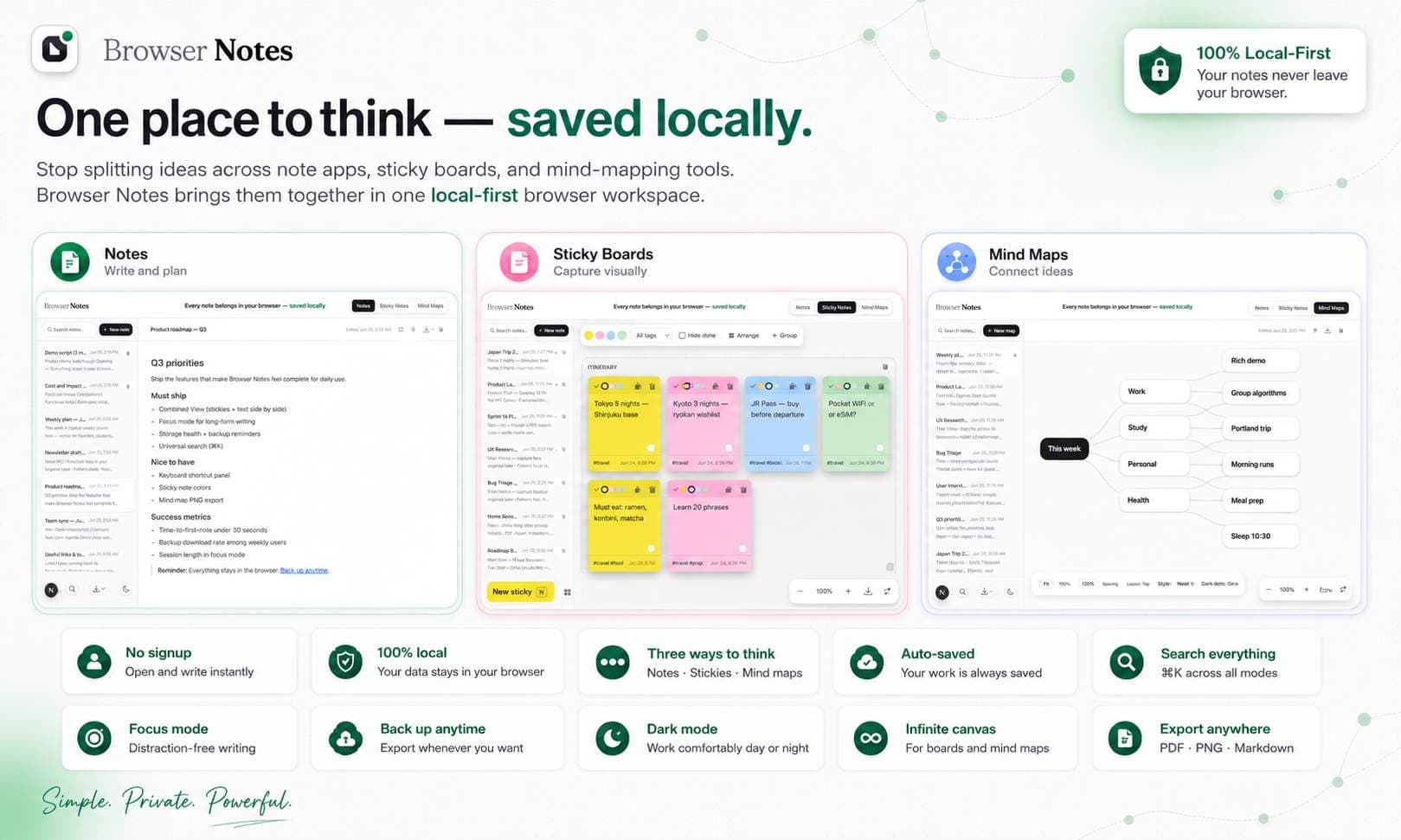
About this app
Notes are often scattered across writing apps, sticky boards, and mind-mapping tools, while your private ideas are pushed to the cloud. Browser Notes brings notes, sticky notes, and mind maps into one local-first workspace. No account, no tracking, and no forced sync. It works offline, stores everything in your browser, and lets you back up your data anytime.
Key features
- 1Local-first notes, sticky boards & mind maps in browser (IndexedDB)
- 2Chrome extension for instant web capture with source links
- 3Zero account, offline, exportable backups, markdown support
Target customer profile
Drawn from the product itself, not from a survey.
Demographic
Students aged 18-30
Pain points
Need to organize study notes and ideas visually but overwhelmed by complex apps
Primary needs
Simple, private note-taking with mind maps for brainstorming
Demographic
Freelancers and remote workers aged 25-45
Pain points
Want a secure, offline note app that works without cloud dependency
Primary needs
Local storage, privacy, and cross-tab sync for quick access
Demographic
Privacy-conscious users aged 30-60
Pain points
Tired of cloud-based note apps that collect data
Primary needs
Fully local, no-account note-taking with sticky and text notes
Scout Review
Written by AI from measured evidence, scored out of 100.
Browser Notes delivers exactly what it promises—a dead-simple, local-only workspace for text notes, sticky boards, and mind maps inside your browser. Strengths in privacy, speed, and zero-friction capture make it appealing for students and freelancers tired of cloud accounts. Weaknesses in accessibility, mobile reach, and early-stage growth keep it from challenging established players. It's a solid niche tool if you live in Chrome and value data sovereignty above all.
Measure by measure
Usability
68Zero-friction onboarding with instant browser access and web capture extension. Markdown + boards + maps in one spot beats juggling apps.
Design
62Clean, focused landing and store page highlighting three core modes with privacy emphasis. Simple typography and messaging suit indie privacy tool.
Speed
70Tiny 20KiB extension and pure local IndexedDB mean snappy performance with zero latency from servers.
Security
75True local-only storage, no accounts, explicit privacy policy, and minimal permissions. Strong for privacy-conscious users.
Accessibility
45Basic browser app with English support only. No a11y statements, multi-language, or cross-platform mentions found.
Growth
38Brand new (late June 2026 launch), 52 users, 1 review, 179 PH followers. No community, reviews, or GitHub activity yet.
Improvement areas
- Mobile/PWA support and cross-browser compatibility
- Public documentation, tutorials, and accessibility features
- Community building and visible development activity
Design & Usability
Browser Notes nails the indie privacy vibe with a straightforward landing that screams 'no signup, no cloud.' The extension's right-click capture and instant local sync between tabs make it feel seamless for quick captures. Usability shines for Chrome power users who want notes, stickies, and mind maps without leaving the browser. Onboarding is literally open-and-type. However, the design stays safe and minimal—nothing revolutionary visually, and deeper docs or advanced workflows are missing. It's competent for its target (students/freelancers wanting simple local tools) but lacks the depth of Obsidian or polish of Notion.
Speed & Security
Speed is a clear win thanks to the featherweight 20KiB extension and pure IndexedDB backend—captures appear instantly with no network calls. Offline-first is genuinely reliable here. Security posture is excellent for the niche: everything stays on-device, no accounts, clear privacy policy, and minimal Chrome permissions. No data leaves your browser unless you export a backup. That said, there's zero encryption transparency or third-party audits, and browser storage limits could bite heavy users. Compared to Google Keep's cloud sync or Notion's enterprise security, it's refreshingly simple but carries the usual local-app risks.
Accessibility & Growth
Accessibility is the weakest link—nothing documented about screen readers, contrast, or keyboard support, and it's locked to English/Chrome. Growth is still embryonic: launched days ago with tiny user counts and no reviews ecosystem yet. Product Hunt traction is modest (179 followers), and there's no community, changelog momentum, or GitHub presence. For a brand-new tool targeting privacy-conscious 18-45 users, this is normal early-stage reality rather than failure. It needs time and visibility to grow beyond the 'cool side project' phase.
Conclusion
If your workflow is 90% browser-based and you hate subscriptions, give it a spin—it's free and risk-free. Just don't expect enterprise features or cross-device magic without manual backups.
Suggestions for improvement
- Add export/import formats beyond basic backup and a public roadmap.
- Publish basic accessibility audit and keyboard shortcuts.
- Build a small Discord or changelog page to boost early community.
- Offer optional encrypted cloud sync for power users without breaking local-first promise.
Alternatives comparison
Named competitors, point by point. Nobody paid to appear here or to be left out.
 Browser Notes |  Notion |  Obsidian |  Google Keep | |
|---|---|---|---|---|
| Local storage only (no cloud required) | Yes - IndexedDB only | No - cloud-first | Yes - local files | No - cloud sync |
| Built-in mind maps / visual boards | Yes - sticky boards + mind maps | Limited (databases/embeds) | Yes - graph view + canvases | No |
| No account / signup required | Yes | No | Yes | No (Google account) |
Notion
A powerful all-in-one workspace with databases and collaboration, but requires account and cloud storage.
Obsidian
Local-first markdown note-taking with a graph view, ideal for knowledge management, but steeper learning curve.
Google Keep
Simple sticky notes with cloud sync, but lacks mind maps and local-only options.
Comparing options? See Browser Notes alternatives, scored side by side
Sources
What the review was written against. A verdict with no sources is an opinion.
More Productivity apps
View all Productivity
Puzzly – B2B Lead Generation & Sales Intelligence Platform
92Puzzly is an all-in-one B2B lead generation platform that...

Qamarero
92An all-in-one hospitality software for restaurants and ba...

EmbedMyReviews
92White-label reputation management software for agencies s...

StoryPad
92Privacy-first open source journal app with a continuous t...

Notion
92All-in-one AI workspace for docs, projects, and knowledge...

The Stack Newsletter
92A weekly newsletter delivering curated tech jobs, intervi...

Vibe Coding Agent Skills
92A free, open-source platform offering 110 AI agent skills...

QRBliss
91Branded QR codes with AI Brand Sync, 15 free dynamic code...

Gerty
91Private, local AI assistant for Mac that runs offline

Strukchad Property Management
91Property management for Kenyan letting agents: rent invoices raised every month, M-Pesa rent prompts to tenants, arrears tracking and landlord statements.

CC Switch
91Open-source desktop app for switching AI coding providers...

PitchWhip
90AI cold call scripts & direct dials from LinkedIn


A platform dedicated to providing unbiased reviews of newly launched applications, analyzing everything from their features to their full potential.
info@scoutforge.net© 2026 Scoutforge. All rights reserved.
