Cycling through all six. Tap any point to stop.
Measured on six things
Pay-once disk cleaner for Mac, Windows, Linux and phones
Security
63HTTPS with HSTS, frame protection and Referrer-Policy in place (8/12 header checks). Missing CSP, Permissions-Policy and DMARC; no published audit or security page found.
Screenshots
1 / 5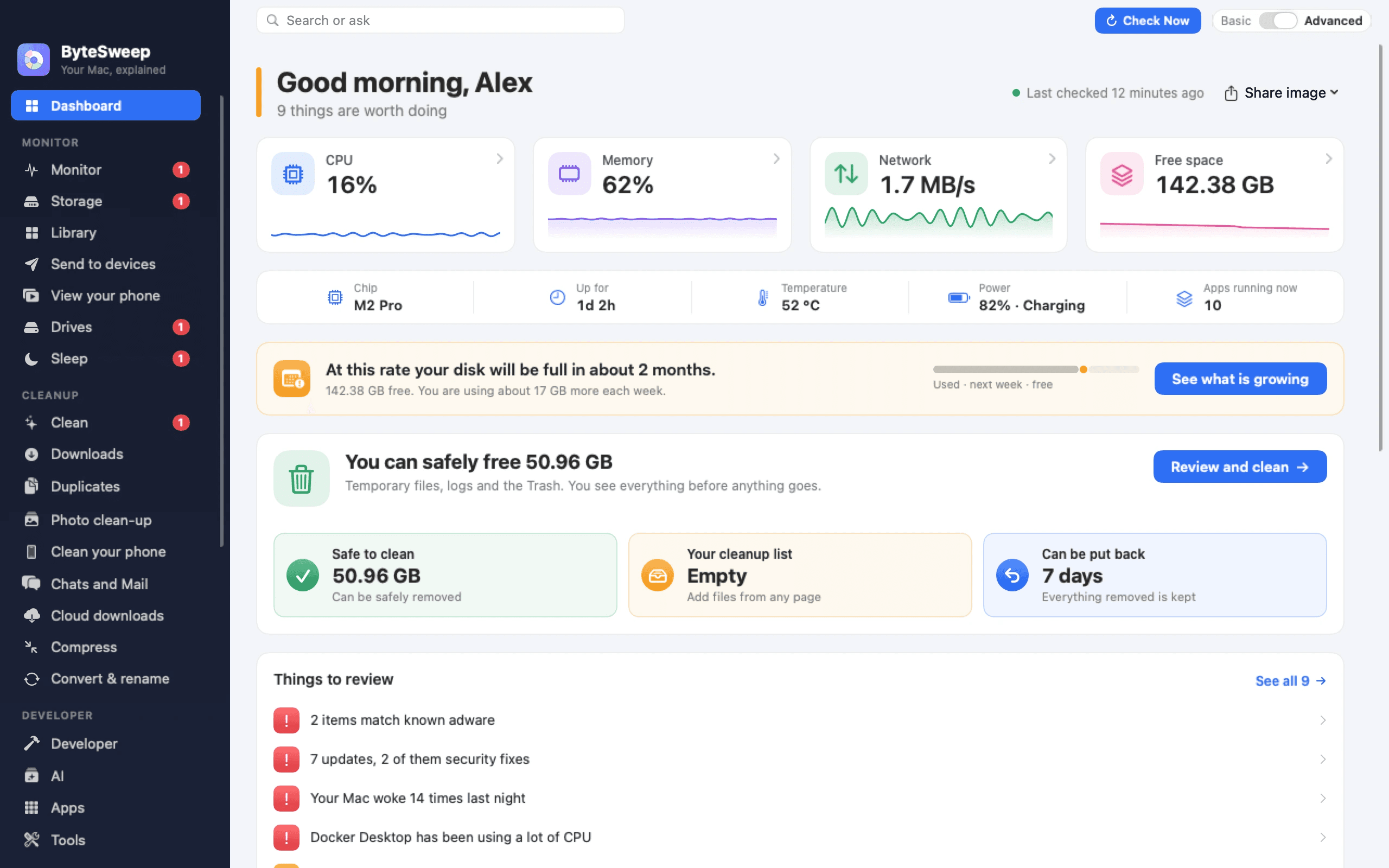
About this app
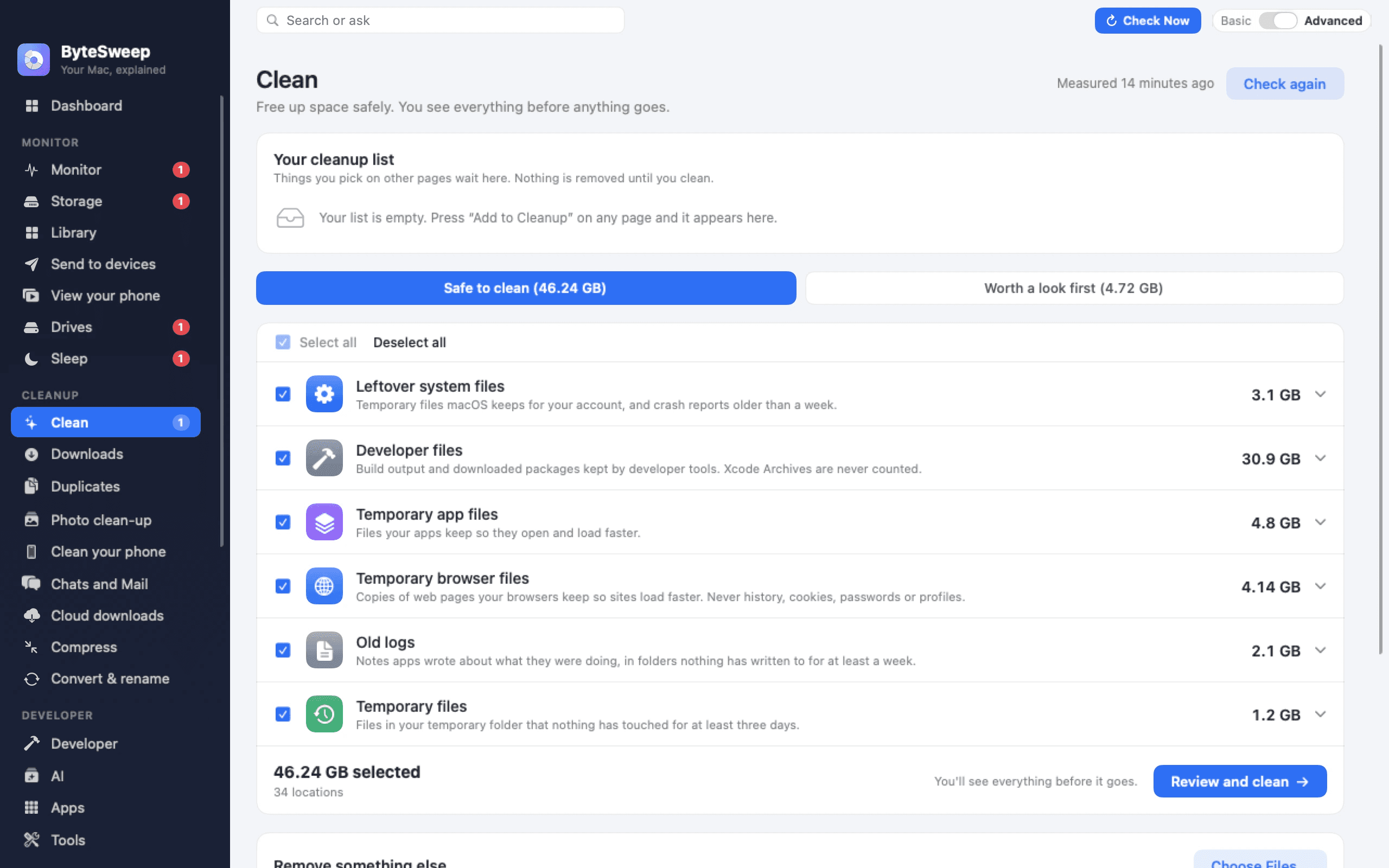
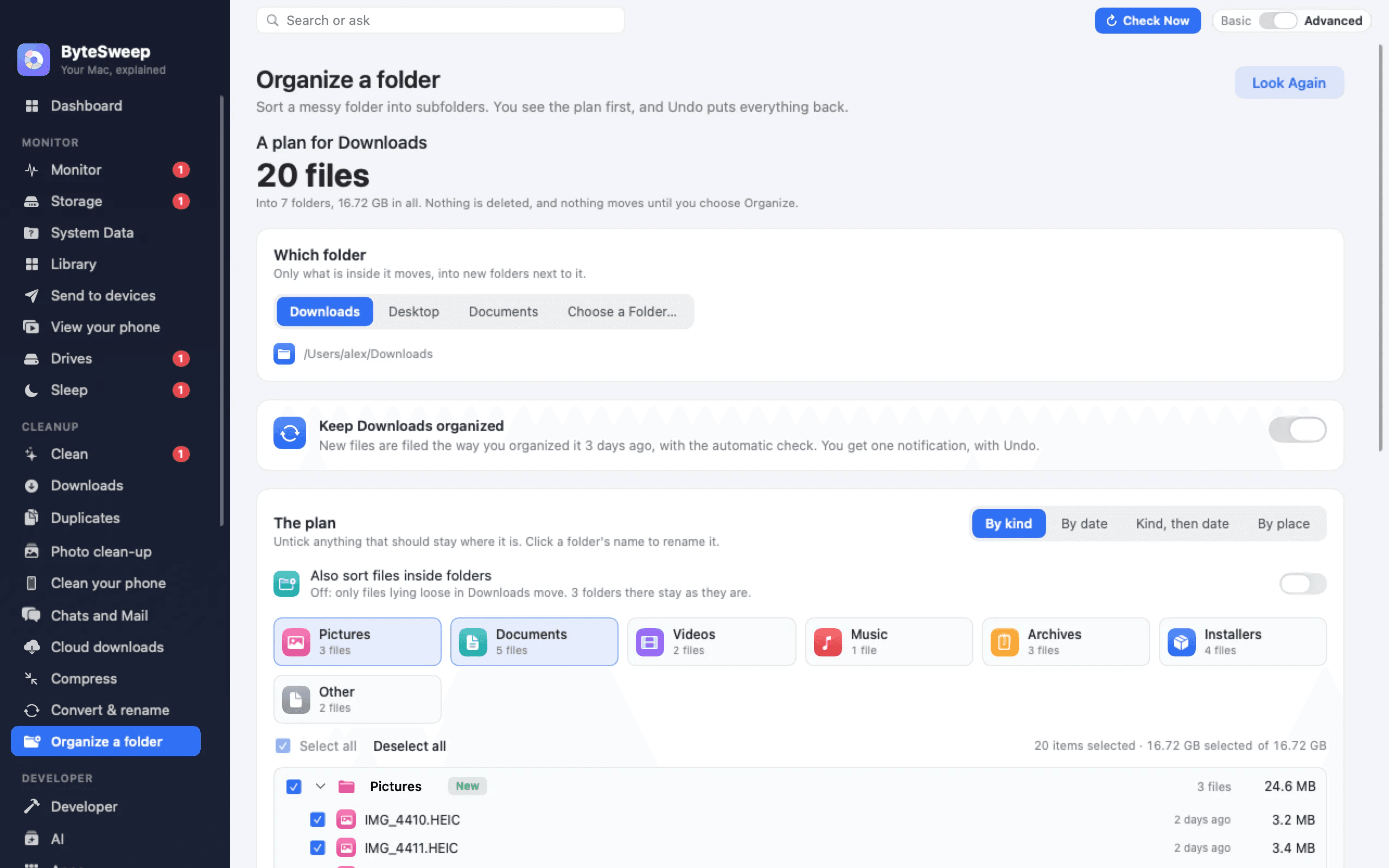
ByteSweep is a disk cleaner and storage manager for Mac, Windows, Linux, iPhone and Android. It scans your disk and sorts what it finds into three bays: Safe to Clear (caches, temp files, update leftovers), Review First (downloads, duplicates, phone backups) and Keep (photos, documents, apps). Only the Safe bay is ticked for you. On a computer, anything you clean can be put back for 7 days, and undo is always free. It also finds duplicates, shows what fills your disk on a map, uninstalls apps with their leftovers, and sends files between your devices over Wi-Fi. Nothing is uploaded and no account is needed. On Mac, Windows and Linux it is free to try for 3 days, then $29.99 once for one computer, with no subscription. On iPhone and Android every feature works free within your first 1 GB and 30 items. The command-line tool is free.
Key features
- 1Three-bay triage scan: Safe to Clear (pre-ticked), Review First, and Keep — nothing removed without confirmation.
- 27-day restore point with free undo on Mac, Windows and Linux, even without a licence.
- 3Cross-platform coverage: Mac, Windows, Linux, iPhone, Android and a free CLI, with Wi-Fi device-to-device file transfer.
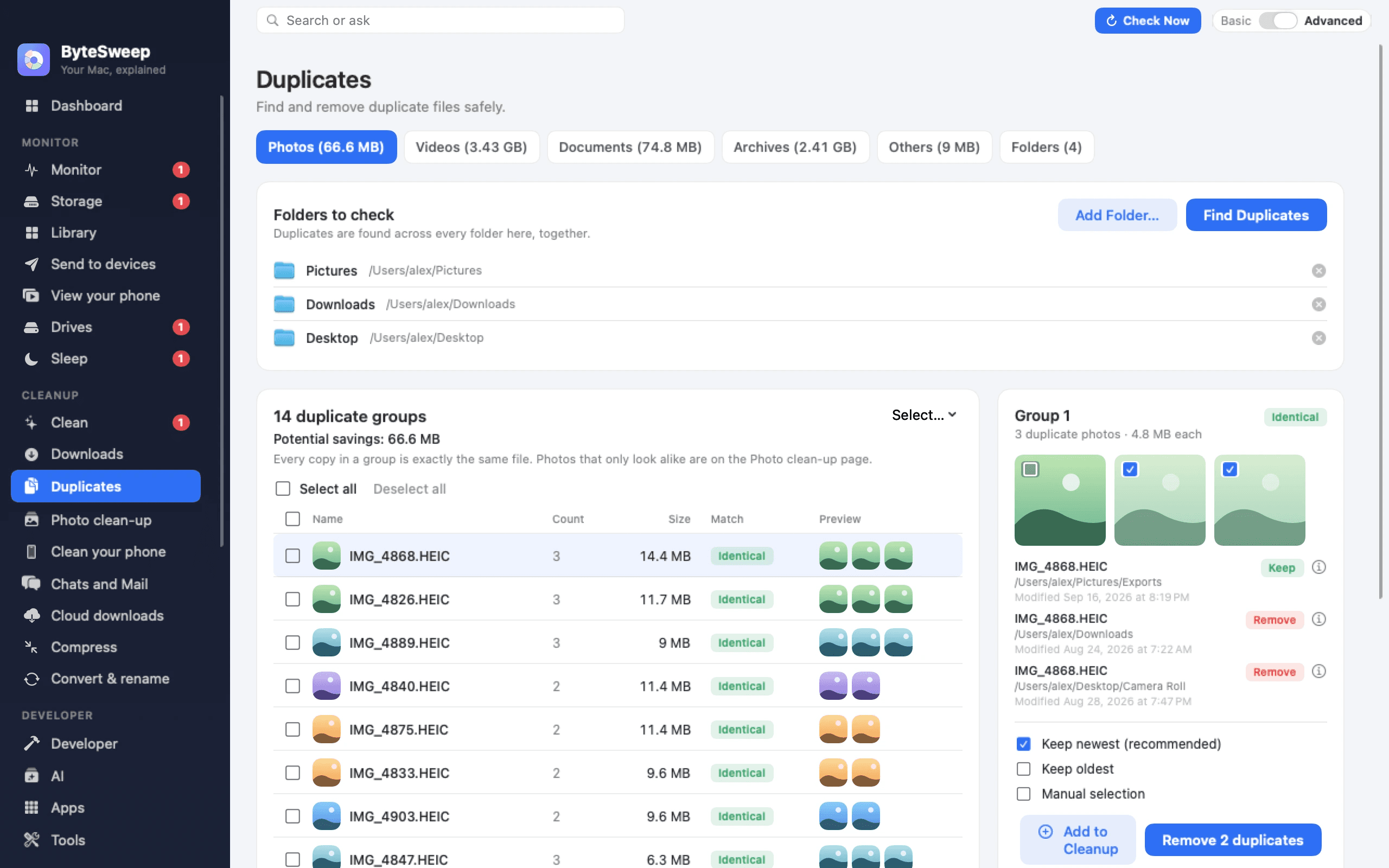
- 4Duplicate finder, disk space map, app uninstaller with leftovers, and on-device processing with no account required.
Target customer profile
Drawn from the product itself, not from a survey.
Demographic
Mac users tired of subscription cleaners
Pain points
Paying yearly fees for multiple utilities, fear of deleting important files
Primary needs
Affordable one-time cleaner with undo and duplicate finder
Demographic
Windows users with cluttered disks
Pain points
Slow PC due to temp files, leftover Windows Update files, and downloads
Primary needs
Easy-to-use cleaner that safely removes junk without touching personal data
Demographic
Linux developers
Pain points
Manually cleaning package caches, Docker images, and old kernels
Primary needs
CLI and GUI tool that understands Linux filesystem and respects user control
Demographic
iPhone/Android users with full storage
Pain points
Duplicated photos, large videos, forgotten screenshots taking up space
Primary needs
Simple photo cleaner that finds duplicates and large files without uploading to cloud
Demographic
Privacy-conscious individuals
Pain points
Distrust of apps that upload files to servers
Primary needs
On-device processing with no account required and no data collection
Scout Review
Written by AI from measured evidence, scored out of 100.
ByteSweep is a cross-platform disk cleaner built around a genuinely good idea: sort everything into Safe to Clear, Review First and Keep, tick only the safe bay, and let people undo for 7 days. The triage model is the product's best asset and it shows up in the UI, the store screenshots and the docs. Execution is above average for an indie utility — fast site (Lighthouse 86 mobile, LCP 1.3s), structured six-lesson documentation, 14-language localization, a 3-day trial with no card and a free CLI. The gaps are the ones small products usually have: no published security audit and three missing header protections, a contrast failure that undercuts a color-coded brand, a homepage with no hero CTA and pricing in grey fine print, and a Mac dashboard that tries to show everything at once. Against CleanMyMac, CCleaner and DaisyDisk, the $29.99 one-time price and cross-platform reach are the real differentiators. Whether that beats brand recognition is the open question.
Measure by measure
Usability
68Six-lesson docs with per-platform switching and progress tracking are better than most indie tools. Undermined by a hero with no CTA and pricing buried in small grey table text.
Design
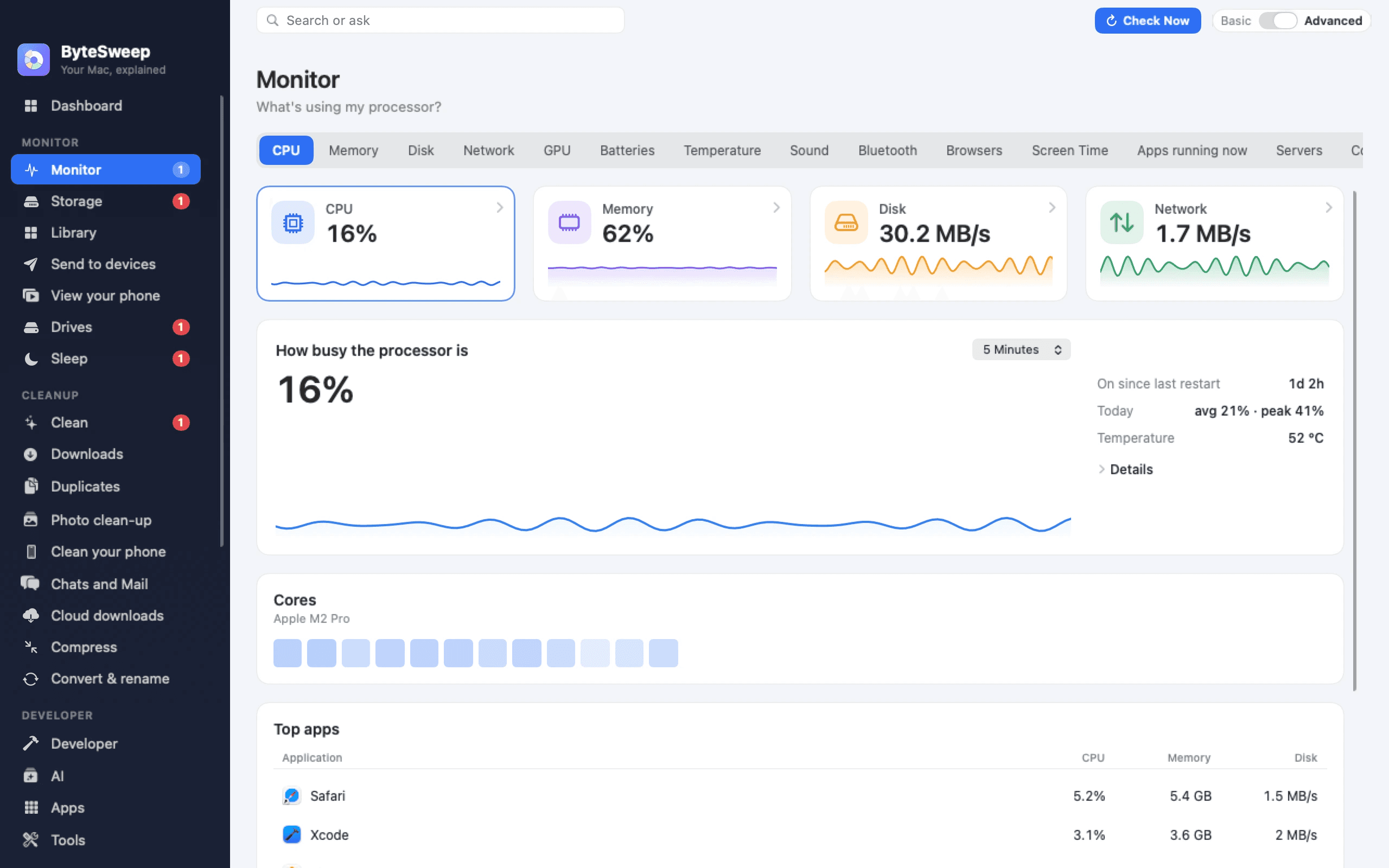
71Judging the app UI and store material: the triage bays and iPhone screens are clean and confident. The Mac dashboard is crowded and the homepage's dark overlay muddies the lower sections.
Speed
72Lighthouse mobile 86 and desktop 83, LCP 1.3s, CLS 0.001. TBT at 241ms is the one metric holding it back from a higher mark.
Security
63HTTPS with HSTS, frame protection and Referrer-Policy in place (8/12 header checks). Missing CSP, Permissions-Policy and DMARC; no published audit or security page found.
Accessibility
79Lighthouse 96/100 with one contrast failure, 14-language localization, and keyboard-searchable docs. Strong automated results; no published WCAG statement found.
Growth
63Real problem, sharp wedge: one-time $29.99 against subscription cleaners, cross-platform, with undo. The cost-comparison table does the selling. Ceiling is the crowded cleaner category.
Improvement areas
- No published security audit, SOC 2/ISO status, or security page; CSP, Permissions-Policy and DMARC all missing.
- Homepage contrast failure and dark overlay reduce readability; platform screenshots too small to read.
- Hero lacks a primary CTA; pricing and platform requirements buried in small grey table text.
- Mac dashboard sidebar and alert list overloaded; needs progressive disclosure.
Design & Usability
ByteSweep's strongest design idea is turning its safety model into a visual system: three numbered bays, green for safe, amber for review, navy for keep, each with a sample list and one action. That reads before you parse a word of copy, and the iPhone screenshots carry the same discipline — a storage donut, one full-width 'Review & Clean' button, tidy Quick Clean cards. The Mac dashboard is where it slips: sidebar grouped into Monitor, Cleanup and Developer, but the badge counts and alert list compete for attention. On the web side, the homepage runs under a uniform dark overlay that flattens the amber and green accents and leaves lower-section body copy hard to read, and the platform screenshots are rendered so small their captions are illegible. Usability is above average for the category: the docs are six short lessons with per-platform switching and a progress marker, the trial is 3 days with no card, and the phone apps are free within 1 GB and 30 items. The friction is at the front door — the hero has no primary CTA beside the headline, so the first action is a Download button tucked top-right, and pricing sits in small grey table text exactly where comparison shoppers need it legible.
Speed & Security
Speed is a genuine strength. Lighthouse measured 86/100 on mobile and 83/100 on desktop, with LCP at 1.3s, FCP at 1.3s and a CLS of 0.001 — the layout does not shift, which matters on a page full of sample disk figures. Total blocking time at 241ms is the one number keeping this out of the top tier; it suggests some main-thread work on load that a lighter script budget would fix. Security is competent but unfinished. The probe confirms HTTPS enforced with HSTS, frame protection, X-Content-Type-Options, Referrer-Policy and SPF — 8 of 12 checklist points. Missing: a Content-Security-Policy, a Permissions-Policy, and a DMARC record, the last of which leaves the support@bytesweep.app address spoofable. The product's own privacy story is strong on paper — on-device processing, no account, nothing uploaded, encrypted Wi-Fi transfer with per-file verification — but there is no published SOC 2, ISO certification, pen-test summary or security page in the material collected, so that story rests on the maker's word rather than an audited claim. For a $29.99 indie utility that is normal for the stage; it is still the gap between 'trust us' and 'here's the report'.
Accessibility & Growth
Accessibility scores well on automated checks: Lighthouse 96/100, with a single failing audit for insufficient background/foreground contrast — likely the same dark-overlay grey body copy flagged in the visual audit. The app is localized in 14 languages, the docs support Ctrl K / ⌘ K keyboard search, and the site is responsive with a platform selector that works across Mac, Windows, Linux, iPhone, Android and CLI. What is absent is a published WCAG conformance statement or a documented screen-reader path; for an indie utility that is unremarkable, but it means the 96 is a floor, not a certificate. Growth is the interesting question. The category — disk cleaners — is crowded and dominated by subscription incumbents: CleanMyMac at roughly $40/year, CCleaner Pro around $30/year, DaisyDisk at $9.99 one-time. ByteSweep's wedge is concrete and demonstrated on the page: $29.99 once for one computer, no subscription, 7-day undo that is free even without a licence, cross-platform coverage including Linux and a free CLI, plus Wi-Fi device transfer with no account. The cost-comparison table is unusually honest marketing and does real work. The limit is trust and distribution: a domain registered in September 2026 and an App Store listing with a single 3/5 rating is a cold start against brands people already recognize, and the cleaner category has no network effects to reward adoption. The idea can grow; the wedge is real but not defensible against an incumbent simply matching the one-time price.
Conclusion
If you are the person who has paid CleanMyMac's renewal three years running and winced each time, ByteSweep is aimed directly at you, and the pitch is coherent: same jobs, one payment, undo that works even after your licence lapses. The 3-day trial is enough to run a scan and see whether the Safe bay actually matches what you would have deleted yourself — that is the test that matters, and it costs nothing to run. Go in with realistic expectations about maturity: this is a young product with a thin review base, no published audit, and a Mac interface that could use a decluttering pass of its own. None of that is disqualifying at this price point. Start with the free CLI or the phone app's 1 GB allowance if you want to see the scanning logic before paying, and keep the 7-day restore window in mind as your safety net rather than a reason to skip reading the Review First bay.
Suggestions for improvement
- Add a primary Download CTA beside the hero headline instead of only in the top-right nav.
- Publish a security page with a pen-test summary or SOC 2 status, and add CSP, Permissions-Policy and DMARC.
- Fix the contrast failure flagged by Lighthouse — it hits the dark-overlay body copy and undercuts the color-coded brand.
- Declutter the Mac dashboard: collapse badge counts and alert lists behind progressive disclosure.
Alternatives comparison
Named competitors, point by point. Nobody paid to appear here or to be left out.
 ByteSweep | CleanMyMac X |  CCleaner |  DaisyDisk | |
|---|---|---|---|---|
| Pricing model | $29.99 one-time per computer; 3-day free trial; CLI free; phone free within 1 GB/30 items | Subscription, roughly $40/year | Free tier plus paid Pro around $30/year | $9.99 one-time |
| Platform coverage | Mac, Windows, Linux, iPhone, Android, CLI | macOS only | Windows primarily, limited Mac | macOS only |
| Undo / restore after cleaning | 7-day restore point, free undo with or without licence | Limited restore; not a full 7-day window | Recycle Bin backup option; no timed restore point | N/A — analyzer, does not delete by default |
| Duplicate finder | Built in, surfaced in Review First bay | Built in | Built in on Pro | Not included |
| Disk space visualization | Disk map included | Included | Basic disk analyzer | Best-in-class treemap — its core feature |
| Account / cloud upload required | No account, on-device processing, nothing uploaded | No account required for core cleaning | No account for core cleaning; upsells and telemetry | No account, local only |
CleanMyMac X
Popular Mac cleaner with subscription pricing, includes malware removal and performance monitoring.
CCleaner
Windows-focused system optimization tool with registry cleaner and privacy features, free and paid versions.
DaisyDisk
Mac disk space analyzer with visual treemap interface, one-time purchase.
Comparing options? See ByteSweep alternatives, scored side by side
More Productivity apps
View all Productivity
Puzzly – B2B Lead Generation & Sales Intelligence Platform
92Puzzly is an all-in-one B2B lead generation platform that...

Qamarero
92An all-in-one hospitality software for restaurants and ba...

EmbedMyReviews
92White-label reputation management software for agencies s...

StoryPad
92Privacy-first open source journal app with a continuous t...

Notion
92All-in-one AI workspace for docs, projects, and knowledge...

The Stack Newsletter
92A weekly newsletter delivering curated tech jobs, intervi...

Vibe Coding Agent Skills
92A free, open-source platform offering 110 AI agent skills...

QRBliss
91Branded QR codes with AI Brand Sync, 15 free dynamic code...

Gerty
91Private, local AI assistant for Mac that runs offline

Strukchad Property Management
91Property management for Kenyan letting agents: rent invoices raised every month, M-Pesa rent prompts to tenants, arrears tracking and landlord statements.

CC Switch
91Open-source desktop app for switching AI coding providers...

PitchWhip
90AI cold call scripts & direct dials from LinkedIn


A platform dedicated to providing unbiased reviews of newly launched applications, analyzing everything from their features to their full potential.
info@scoutforge.net© 2026 Scoutforge. All rights reserved.
