Cycling through all six. Tap any point to stop.
Measured on six things
Snap a meal, plan the rest, ask your AI coach
Speed
57Desktop Lighthouse hits 87/100, but mobile scores 61 with a 7.5s LCP and 5.1s FCP — well past the 'good' threshold. CLS is a clean 0 and TBT is modest at 114ms.
Screenshots
1 / 4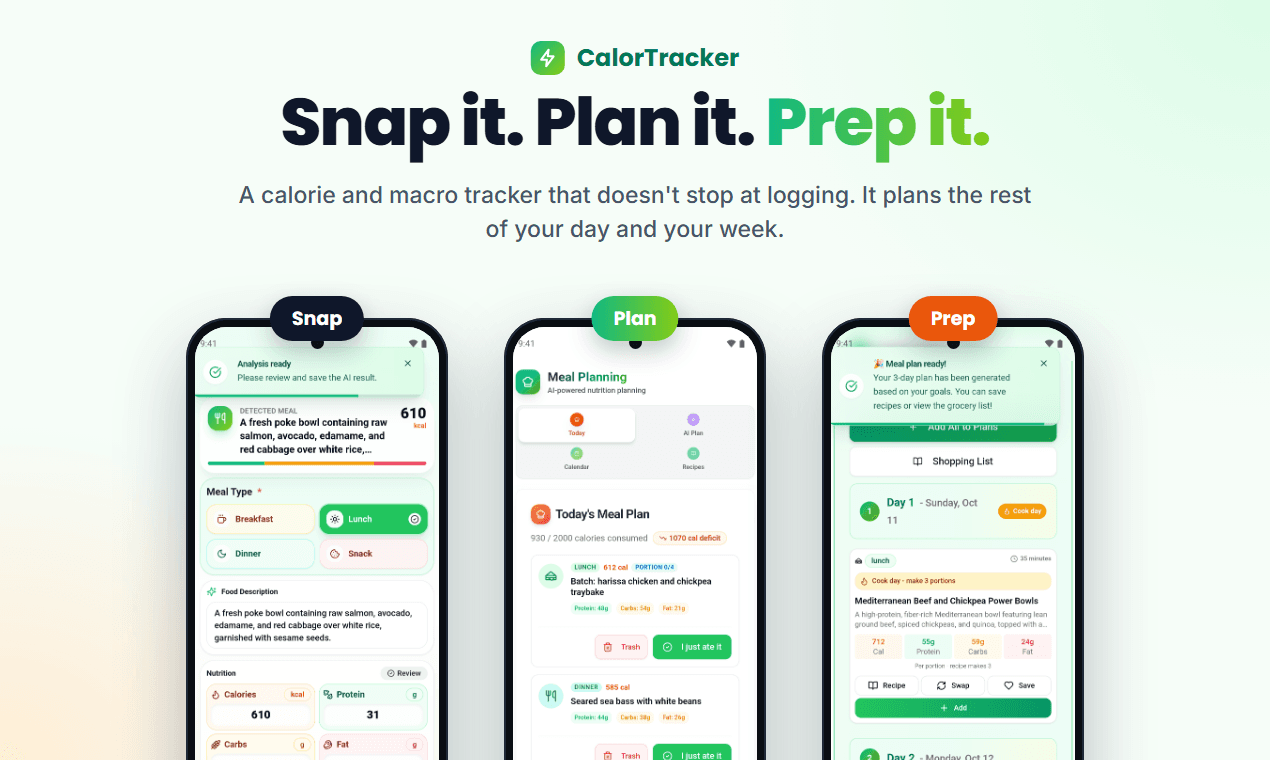
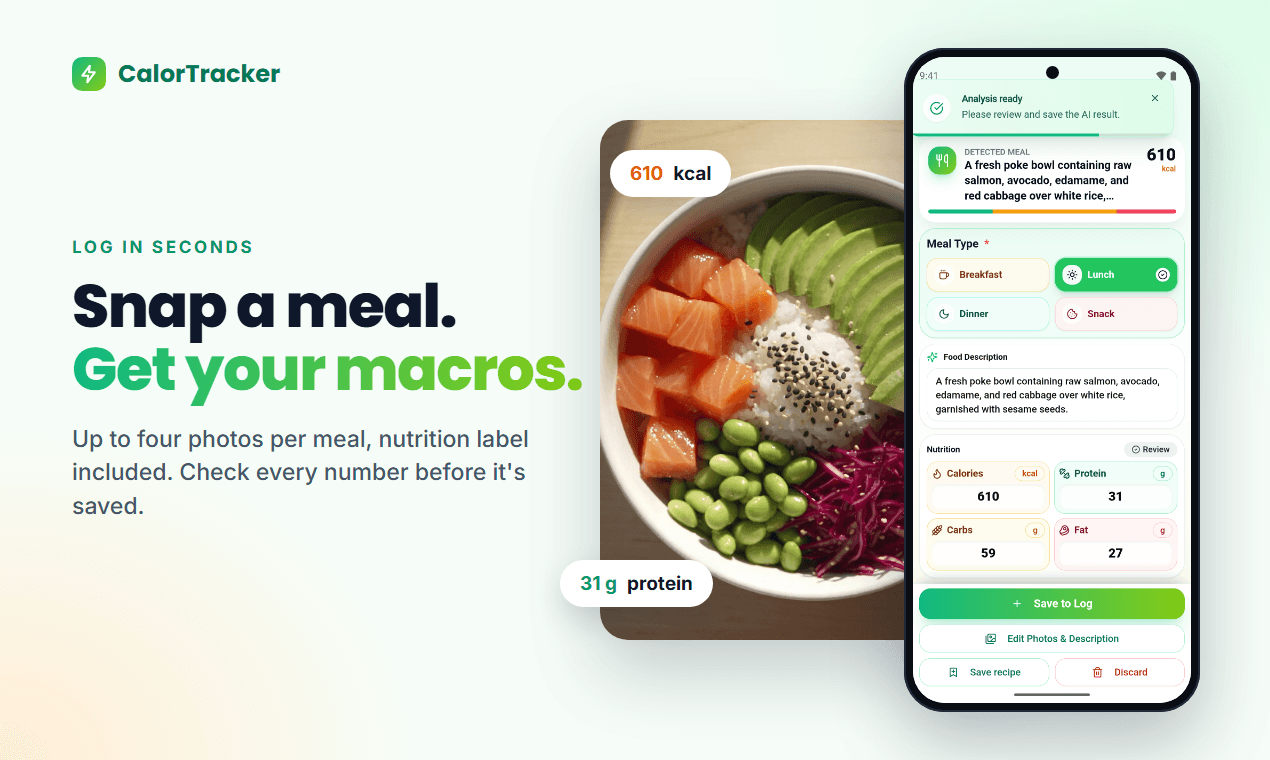
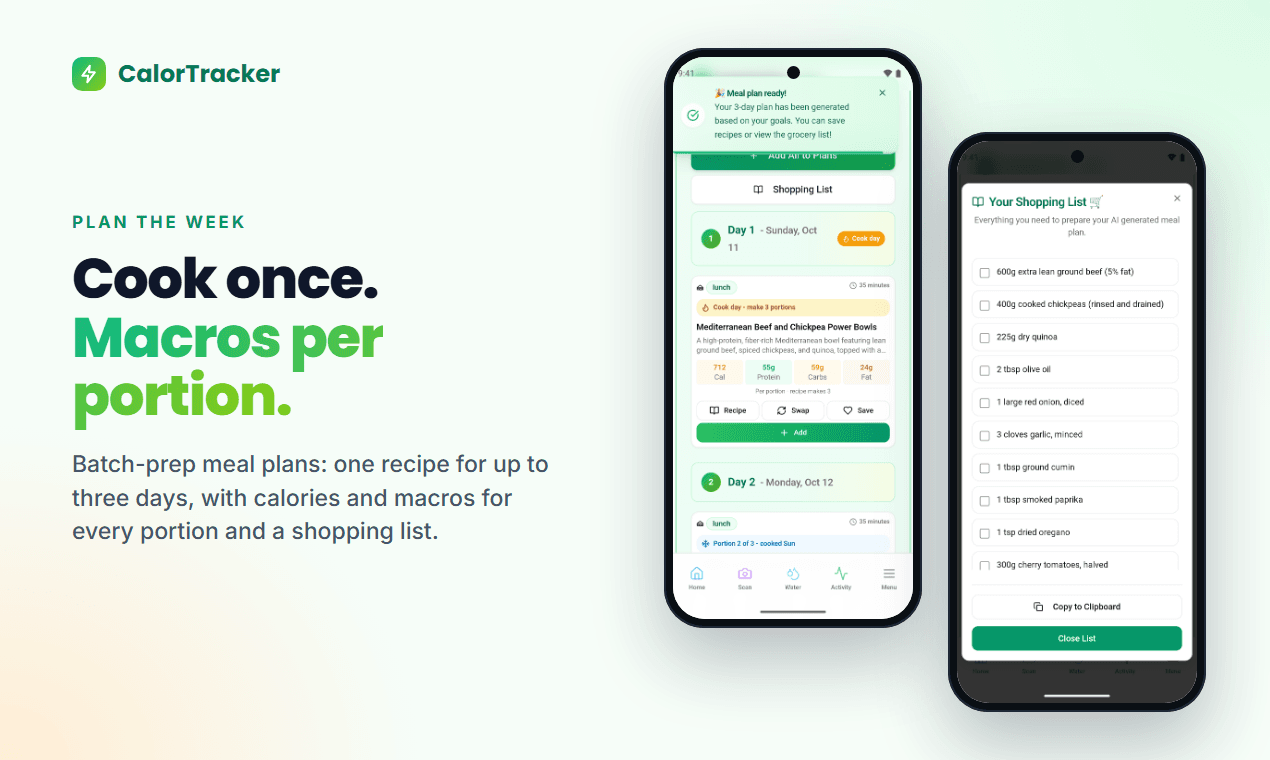
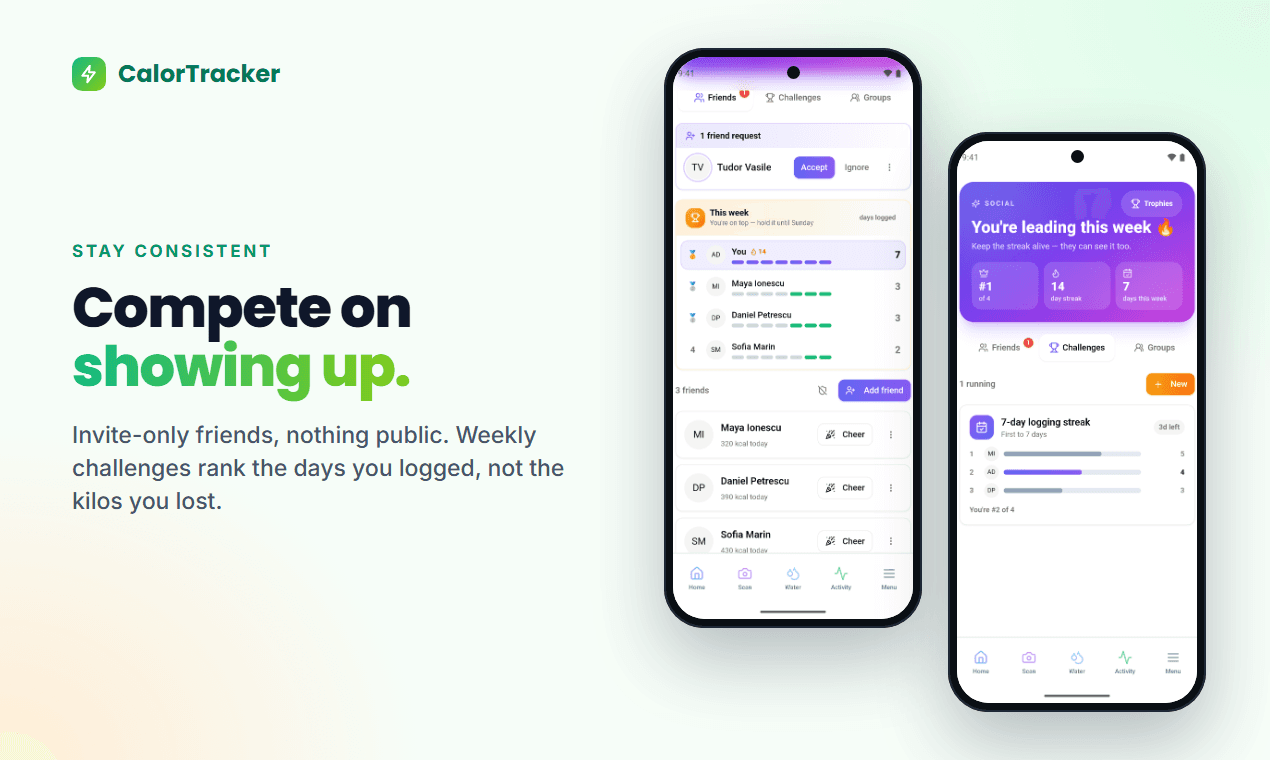
About this app
I built CalorTracker after getting tired of typing every ingredient into a food database. Fast logging solved half of it; the other half was "so what do I eat now?" So CalorTracker is a calorie and macro tracker that also plans what you eat next. Snap a meal (up to four photos, nutrition label included), say it or type it, and check every number before it is saved. Premium plans the rest of your day on the calories you have left, or a whole week with batch prep and the macros of every portion. Pepperly, the built-in AI coach, knows your recent meals and workouts. Water, weight, Health Connect, home-screen widgets and friend challenges ranked on days logged are included. It's for anyone working toward a nutrition goal who wants logging to take seconds. Free tier with no ads, on Android and the web.
Key features
- 1Log meals by photo (up to four, label included), voice or text, with a review-before-save step.
- 2Premium plans the rest of your day on remaining calories, or a full week with batch prep and per-portion macros.
- 3Pepperly AI coach aware of recent meals and workouts; water, weight, Health Connect, widgets and friend challenges.
Target customer profile
Drawn from the product itself, not from a survey.
Demographic
Busy people aged 25-45 fitting a nutrition goal around work
Pain points
No time for manual food logging; forget to track meals; give up on clunky food databases
Primary needs
Logging a meal in seconds by photo, voice or text; a clear daily calorie and macro view
Demographic
Gym-goers and meal preppers focused on protein and body composition
Pain points
Hard to hit macro targets; planning and batch-cooking a week of meals takes too much effort
Primary needs
Custom macro targets; weekly meal plans with batch prep and per-portion macros; weight tracking
Demographic
Adults working toward a weight goal who have quit tracking apps before
Pain points
Overwhelmed by complex apps; unsure about portion sizes; motivation fades after a few weeks
Primary needs
Low-friction logging; an AI coach to ask questions; streaks and friend challenges that keep them going
Scout Review
Written by AI from measured evidence, scored out of 100.
CalorTracker is a competent, well-branded calorie tracker with a sharper pitch than most: log by photo, voice or text, then let the app plan what you eat next. The design is cohesive and the four logging cards sell the value instantly. Security headers are genuinely excellent at 12/12. The weak spots are concrete: a 7.5-second mobile LCP undercuts the 'seconds' promise, three accessibility failures include a zoom-blocking viewport, and there's no audited security or WCAG statement to back the claims. Against MyFitnessPal and Lose It!, the low-friction logging plus planning wedge is the reason to pick it — if execution holds up past the landing page. A solid mid-60s product with clear, fixable gaps.
Measure by measure
Usability
68Four logging cards explain the core value before you scroll, and the Snap/Plan/Prep flow is shown clearly. Free tier with no ads and Android+web coverage keep the barrier low; deeper docs weren't verifiable.
Design
71Cohesive green branding, scannable logging cards and clean app screenshots give a polished, modern feel. Undercut by a noisy fake-log ticker and generic stock lifestyle photos that clash with the real UI.
Speed
57Desktop Lighthouse hits 87/100, but mobile scores 61 with a 7.5s LCP and 5.1s FCP — well past the 'good' threshold. CLS is a clean 0 and TBT is modest at 114ms.
Security
76Full header hygiene: HTTPS enforced, HSTS, CSP, frame protection, Referrer and Permissions policies, plus SPF and DMARC — 12/12 on the probe. No published SOC 2, ISO or bug bounty found.
Accessibility
70Lighthouse a11y 88/100, but three real failures: insufficient color contrast, links without discernible names, and a viewport that blocks user zoom. No WCAG statement or a11y page found.
Growth
63A real, specific pain — logging fatigue plus 'what do I eat next' — with a genuine wedge: photo/voice/text capture, an AI coach, and batch-prep planning. Early stage (domain from mid-2025), but the idea has room.
Improvement areas
- Mobile performance: 7.5s LCP and 5.1s FCP undercut the 'logging in seconds' promise.
- Accessibility: contrast failures, unnamed links, and a viewport that disables user zoom.
- Trust: no published SOC 2, ISO, pen-test or WCAG statement to back the strong header posture.
Design & Usability
CalorTracker's design is genuinely above the indie-app median. The green accent and icon language carry cleanly from the marketing site into the app screenshots, and the four logging-method cards — photo, voice, text, label — explain the entire product before you scroll. The Snap/Plan/Prep flow is shown, not just claimed. Where it slips is the marketing layer: a fake-log ticker right under the CTA adds noise, and the numbered lifestyle photos in steps 2-3 are stock imagery that doesn't match the crisp UI shown elsewhere. Usability reads well on the surface — a free, ad-free tier, Android plus web, and a value proposition you grasp in five seconds. What I couldn't verify is depth: onboarding flow, help-center quality, and how the AI coach actually behaves day to day. The pitch is tight; the proof of a smooth signup-to-value path isn't in what I could see.
Speed & Security
Speed is a tale of two devices. Desktop Lighthouse lands at a strong 87/100, but mobile drops to 61 with a 7.5-second Largest Contentful Paint and 5.1-second First Contentful Paint — both far past the 2.5s and 1.8s 'good' lines. Cumulative Layout Shift is a clean 0 and Total Blocking Time is a modest 114ms, so the page is stable and not CPU-bound; it's simply heavy to paint on mobile, likely the hero imagery and mockup. For a product whose whole promise is 'logging in seconds,' a slow first impression is an awkward contradiction. Security is the strongest dimension on the board: the probe returned 12/12, with HTTPS enforced, HSTS, a Content-Security-Policy, frame protection, Referrer and Permissions policies, plus SPF and DMARC configured. That's disciplined header hygiene many larger apps skip. What's missing is third-party assurance — no SOC 2, ISO, pen-test summary or bug bounty surfaced, so the good posture is self-attested rather than audited.
Accessibility & Growth
Accessibility scores 88/100 on Lighthouse but fails three audits that matter: insufficient color contrast, links with no discernible name, and a viewport meta that disables user zoom. That last one is a direct middle finger to low-vision users, and it's a one-line fix. No WCAG conformance statement or dedicated accessibility page was found, so the commitment is unstated. Growth is the more interesting question. The category — calorie tracking — is crowded and dominated by MyFitnessPal and Lose It!, both built around manual search and barcode scanning. CalorTracker's wedge is real: photo, voice and text logging cut the friction that makes people quit, and the planning layer ('what do I eat next,' weekly batch prep with per-portion macros) addresses a gap the incumbents structurally ignore. The AI coach is table stakes now, but bundled with planning it's coherent. The limit: this is a feature-differentiated entrant in a market where switching costs are low and the giants can copy capture. The domain dates to mid-2025 and only YouTube is listed socially — early, but the idea itself has headroom.
Conclusion
The honest read: CalorTracker knows exactly what it's selling and mostly delivers it on the surface. The logging-method clarity, the cohesive brand, and the 12/12 security headers show a maker who cares about craft. The gaps are the kind that separate a promising indie app from a daily habit: mobile load time that betrays the core promise, accessibility basics left unfixed, and no third-party proof behind the security posture. None of these are fatal. Fix the mobile LCP, restore user zoom and contrast, publish a short a11y and security page, and the product starts matching its own marketing. The planning angle is the real asset — lean into it harder than the AI-coach hype.
Suggestions for improvement
- Cut mobile LCP from 7.5s: compress and lazy-load the hero mockup and salmon image, serve responsive formats.
- Remove user-scalable=no / maximum-scale from the viewport so low-vision users can zoom.
- Fix color contrast and add discernible names to icon-only links flagged by Lighthouse.
- Publish a short security and accessibility page stating data handling and WCAG intent.
Alternatives comparison
Named competitors, point by point. Nobody paid to appear here or to be left out.
 CalorTracker CalorTracker |  MyFitnessPal MyFitnessPal |  Lose It! Lose It! | |
|---|---|---|---|
| Primary logging method | Photo (up to 4), voice or text with review before save | Manual search and barcode scanning | Barcode scanning and manual entry |
| Meal planning / 'what to eat next' | Plans remaining day or full week with batch prep and per-portion macros | Diary-based; no automated next-meal planning | Weight-loss focused; limited planning |
| AI coach | Pepperly, aware of recent meals and workouts | Not a core feature | Not a core feature |
| Free tier | Free tier with no ads | Free tier with ads; premium subscription | Freemium with premium subscription |
| Platforms | Android and web | iOS, Android, web | iOS, Android, web |
MyFitnessPal
A popular calorie tracker with a large food database and barcode scanning; logging is mostly manual search and entry.
Lose It!
A weight-loss focused calorie tracker with barcode scanning and community features; less centered on photo and voice logging.
Comparing options? See CalorTracker alternatives, scored side by side
More Health & Wellness apps
View all Health & Wellness
StoryPad
92Privacy-first open source journal app with a continuous t...

Pushup RPG: Fitness Quest
90Pushup RPG is a camera-based push-up counter and fitness RPG for home workouts. Real push-ups and squats become attacks as you defeat 48 foes across 8 biomes, earn XP and loot, join guilds, and battle in live 40-second duels. Free on iOS and Android.

Gryper
89Workout tracker with muscle heatmaps and volume landmarks

Snapkin: Photo Calorie Counter
88Snapkin is a calorie tracker you use by photographing your plate.

Innermost
87An AI-powered emotional support app that acts as a person...

Mantra Meditation Timer
85A minimalist, distraction-free meditation timer for mantr...

WellWired
84AI explained simply for older adults, with safety lessons...

TheBean.ai
84Adaptive AI personal trainer that evolves with your progr...

TDEE Calculator
84Free TDEE calculator that estimates maintenance calories, weight loss targets, muscle gain calories, and macro recommendations based on your body stats and activity level.

FitLifeBud
84AI meal plans for your week, with one aisle-sorted shopping list

RAADS-R Test
82Free 80-item RAADS-R autism self-assessment for adults, with instant total and domain scores, privacy-first access, and clear non-diagnostic guidance.

FormBlends
82A personalized GLP-1 weight loss platform offering physic...


A platform dedicated to providing unbiased reviews of newly launched applications, analyzing everything from their features to their full potential.
info@scoutforge.net© 2026 Scoutforge. All rights reserved.
