Cycling through all six. Tap any point to stop.
Measured on six things
Collect every guest photo with one QR code. No app needed. One QR code collects every wedding guest's photos into a private shared album. No app or login for guests. One-time price from $49.
Growth
63Real, specific problem (scattered guest photos, chasing people) with a genuine wedge: no guest app or login, wedding-specific QR cards, one-time pricing. Category is crowded but the friction angle holds.
Screenshots
1 / 1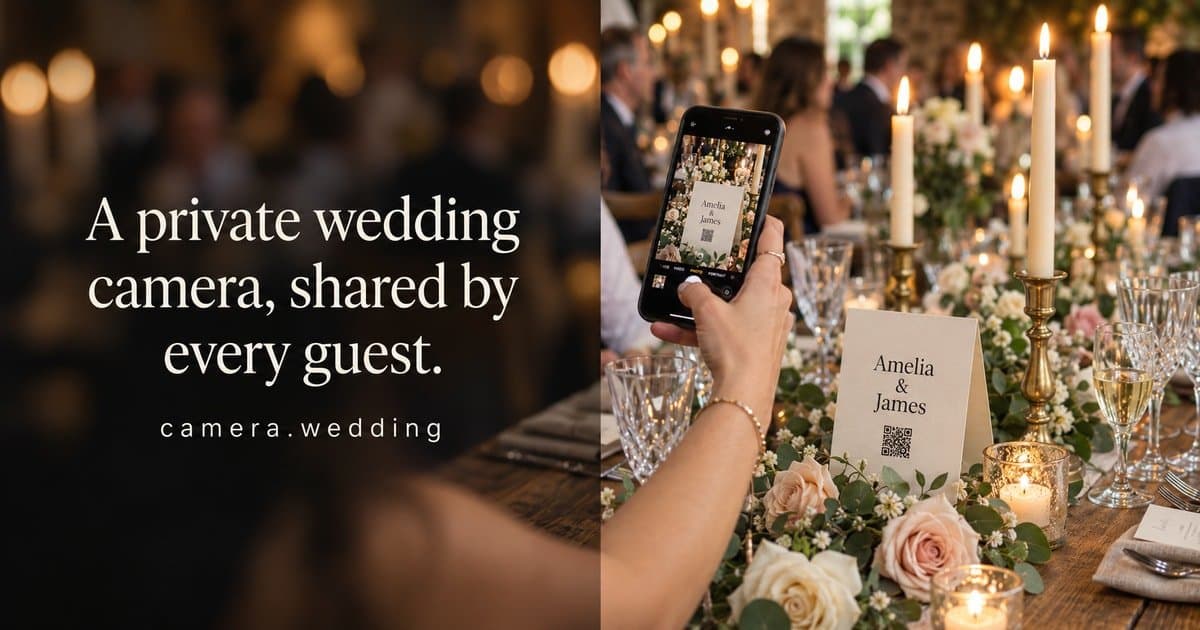
About this app
camera.wedding gives couples one QR code that wedding guests scan to upload their photos straight into a shared private album. Guests need no app and no login, and nobody has to chase people for pictures after the wedding. The couple can view and download everything afterwards. Standard ($49 one-time) includes 2 GB, 1 month of uploads and 1 year of hosting. Premium ($69 one-time) adds video, 5 GB, 3 months of uploads, 3 years of hosting and sub-albums. No subscription.
Key features
- 1One QR code lets guests upload photos from their browser with no app and no login.
- 2One-time pricing: $49 Standard (2 GB, 1-month uploads, 1-year hosting) or $69 Premium (5 GB, video, 3-month uploads, 3-year hosting).
- 3Printable QR table cards and welcome signs in 16 customizable designs.
Target customer profile
Drawn from the product itself, not from a survey.
Demographic
Couples planning a wedding with 50–200 guests
Pain points
Guest photos scattered across WhatsApp, AirDrop, and email; months of chasing people for shots
Primary needs
One simple place for guests to upload photos without downloading an app or creating an account
Demographic
DIY-inclined couples who want a private, unlisted gallery
Pain points
Privacy concerns with public hashtags and social media sharing; losing original quality through messaging apps
Primary needs
Control over who sees the gallery, original-quality downloads, and simple QR code sharing
Demographic
Couples who want video memories as well as photos
Pain points
Most free photo-sharing tools don't accept video or have strict storage limits
Primary needs
A one-time paid plan that includes video uploads, generous storage, and long hosting without a subscription
Scout Review
Written by AI from measured evidence, scored out of 100.
camera.wedding is a focused, well-designed wedding photo-collection tool built around one genuinely good idea: a single QR code that lets guests upload from their browser with no app and no login. The landing page is the best-executed part — editorial typography, a warm palette, real QR card templates and clickable demos. Pricing is honest and simple at $49/$69 one-time with no subscription. The weaknesses are detail-level: a high layout shift on mobile, low-contrast caption text, sample photos with duplicate names, and privacy that leans on an unlisted forwardable link rather than real access control. No third-party reviews or audits exist yet, so the verdict rests on the product's own material — which is unusually polished for an early-stage indie tool.
Measure by measure
Usability
68Clear repeated CTA, plain-language guest-flow explanation up front, and guest/couple demos you can click before paying. Onboarding path is easy to follow; no independent user reviews to confirm real-world ease.
Design
71Warm editorial serif/sans pairing, restrained taupe palette and real QR-card templates give it a premium stationery feel. Undercut by repeated 'Daniel' sample names and low-contrast caption text.
Speed
68Lighthouse desktop 100 and mobile 79, LCP 1.2s and TBT 10ms are snappy. But CLS 0.439 is nearly 4x the 'good' threshold — the page visibly jumps as it loads.
Security
74Full header stack — HSTS, CSP, frame protection, Referrer and Permissions policies — plus SPF/DMARC, 12/13 checklist. No published audits or bug bounty, and the invite link is forwardable.
Accessibility
79Lighthouse a11y 96/100 with only contrast and label-name mismatches failing, corroborated by the low-contrast grey captions. No WCAG statement or multi-language support found.
Growth
63Real, specific problem (scattered guest photos, chasing people) with a genuine wedge: no guest app or login, wedding-specific QR cards, one-time pricing. Category is crowded but the friction angle holds.
Improvement areas
- High cumulative layout shift (0.439) on mobile causes visible page reflow.
- Low-contrast grey caption and disclaimer text fails the accessibility audit.
- Privacy relies on an unlisted, forwardable link rather than real access control.
Design & Usability
The homepage is the strongest part of this product. A high-contrast serif headline against a clean sans, a warm off-white and taupe palette, and a fanned row of guest photo cards with handwritten names all read as premium wedding stationery rather than generic SaaS. The four QR card templates are a smart, concrete proof of the print angle. Usability follows through: the 'Create your wedding camera' CTA repeats in the header, hero and print section, the subcopy explains the no-app guest flow immediately, and you can click a guest demo and a couple demo before spending a cent. The cracks are in the details — the sample album repeats the name 'Daniel' on two photos, and small grey caption text is hard to read. No independent user reviews exist yet to confirm the real-world onboarding is as smooth as the demo suggests.
Speed & Security
Speed is a mixed bag with a clear culprit. Desktop Lighthouse hits 100 and mobile 79, with LCP at 1.2s and total blocking time at just 10ms — the page is genuinely light. But cumulative layout shift sits at 0.439, roughly four times the 'good' threshold, meaning the page visibly reflows as it loads, most likely the fanned hero card row. Security is solid for an indie product: HTTPS enforced with HSTS, a full CSP, frame protection, Referrer and Permissions policies, plus SPF and DMARC, landing 12 of 13 checklist points. The one gap is secure cookies. There are no published audits, SOC 2 or bug bounty, and the 'unlisted' gallery relies on a forwardable link, so privacy is by obscurity rather than access control.
Accessibility & Growth
Accessibility scores well on automated checks — 96/100 — with only two failures: insufficient color contrast and visible text labels lacking matching accessible names. The contrast failure is real and visible in the small grey disclaimer copy. There is no WCAG conformance statement and the site is English-only. On growth, the idea is well-aimed: guest photos genuinely scatter across WhatsApp, AirDrop and email, and couples do chase people for months. The wedge is concrete — no guest app or login, wedding-specific printable QR cards, and one-time $49/$69 pricing against account-required free tools like Google Photos and app-required Wedshoots. The category is crowded and the real competitor is a free WhatsApp group, so the bet is whether couples pay for polish and privacy. The domain is only months old, so traction is unproven.
Conclusion
If you're planning a wedding with 50–200 guests and dreading the post-wedding photo chase, this is a sensible, fairly priced option that removes the biggest friction point — making guests download something. The demos let you test the flow before paying, and the one-time pricing means no subscription creep. Go in with clear eyes: the gallery is unlisted rather than access-controlled, so share the link carefully, and download your originals before the hosting window closes. The product is young and unproven at scale, but the core idea is sound and the execution is above average for its stage.
Suggestions for improvement
- Fix the CLS 0.439 layout shift — reserve space for the fanned hero card row so the page doesn't jump on mobile.
- Raise contrast on the small grey disclaimer and caption text to pass the failing Lighthouse audit.
- Replace duplicate 'Daniel' sample names in the hero with unique names to make the demo feel real.
- Add an accessibility statement and consider a real access-control option beyond the forwardable unlisted link.
Alternatives comparison
Named competitors, point by point. Nobody paid to appear here or to be left out.
 Camera Wedding |  Google Photos Shared Album |  Wedshoots |  Dropbox File Requests | |
|---|---|---|---|---|
| Guest upload friction | No app, no login — guests enter name and upload in browser | Guests need a Google account to contribute | Guests must download the app and join via code | Guests use a request link; more setup, no wedding flow |
| Video uploads | Premium only ($69), within 5 GB | Supported but counts against storage | Supported in shared album | Supported, limited by plan storage |
| Pricing model | $49/$69 one-time, no subscription | Free with Google account | Free app with in-app options | Free tier plus paid storage plans |
| Wedding-specific QR cards & gallery | 16 printable QR card designs, private wedding gallery | Generic shared album, no wedding cards | Wedding-focused album, app-based | Generic file requests, no wedding presentation |
Google Photos Shared Album
Free shared albums with unlimited photo storage (compressed) and easy link sharing, but guests need a Google account to contribute and video counts against storage.
Wedshoots
A wedding-specific photo-sharing app that requires guests to download the app and join via a code; offers a shared album but is less frictionless for older guests.
Dropbox File Requests
A general file-collection tool where you create a request link and guests upload files; powerful but less elegant for weddings and requires more setup for guests.
Comparing options? See Camera Wedding alternatives, scored side by side
More Social & Community apps
View all Social & Community
username.md
90One verified handle for your online identity, readable by...

HackathonHost
88End-to-end hackathon and game jam event management software

Creastor
88An all-in-one platform for creators to sell digital produ...

LaunchSpot
87A vibrant platform for discovering and launching new tech...

67ez
86Free viral 67 (Six Seven) browser games, world counter & ...

Recap Raven
83Discord bot for D&D session recordings, AI recaps, and se...

mhm
82Same thought, without words.

Dev Hunt
82A launchpad for discovering and voting on the best new de...

TikSave
81Free Download TikTok videos without watermark in HD and conver...

PostPocket
81A powerful content management app for iPhone users to save, organize, and access articles and posts offline.

Samasemua
80Samasemua is a dynamic platform empowering creators to monetize digital products with an intuitive website builder and community support.

FlowPrompter
80A web-based teleprompter with a transparent interface for seamless script delivery during recordings, ideal for content creators and professionals.


A platform dedicated to providing unbiased reviews of newly launched applications, analyzing everything from their features to their full potential.
info@scoutforge.net© 2026 Scoutforge. All rights reserved.
