Is this your app?
Claim CamTuner to manage its page, add your badge and see your traffic — free, and it stays free.
Cycling through all six. Tap any point to stop.
Measured on six things
A lightweight browser extension for real-time webcam adjustments, perfect for enhancing video presence in meetings and streams.
Accessibility
50Minimal accessibility features - no screen reader support, limited language options, no keyboard shortcuts.
Screenshots
1 / 4
About this app
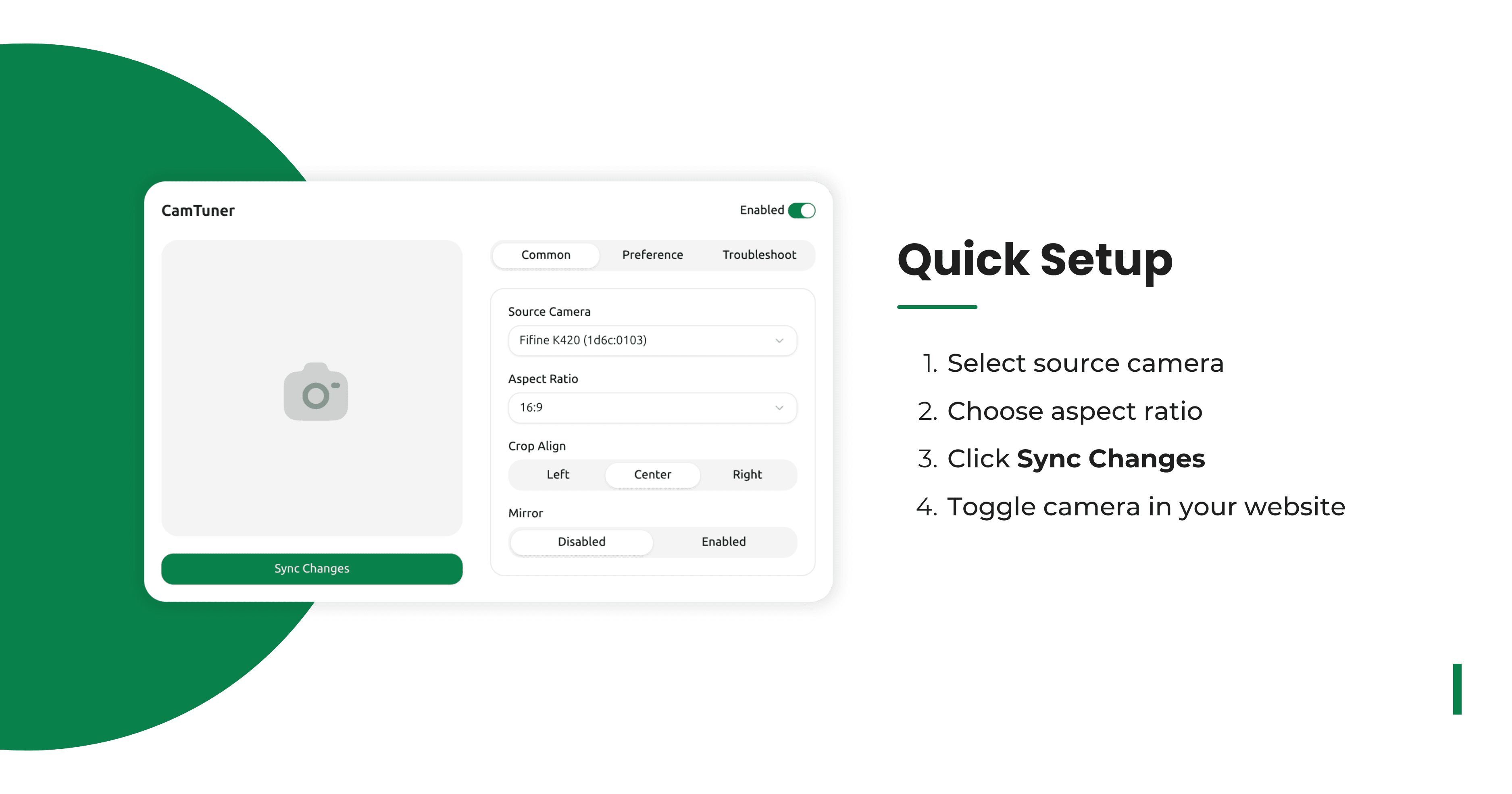
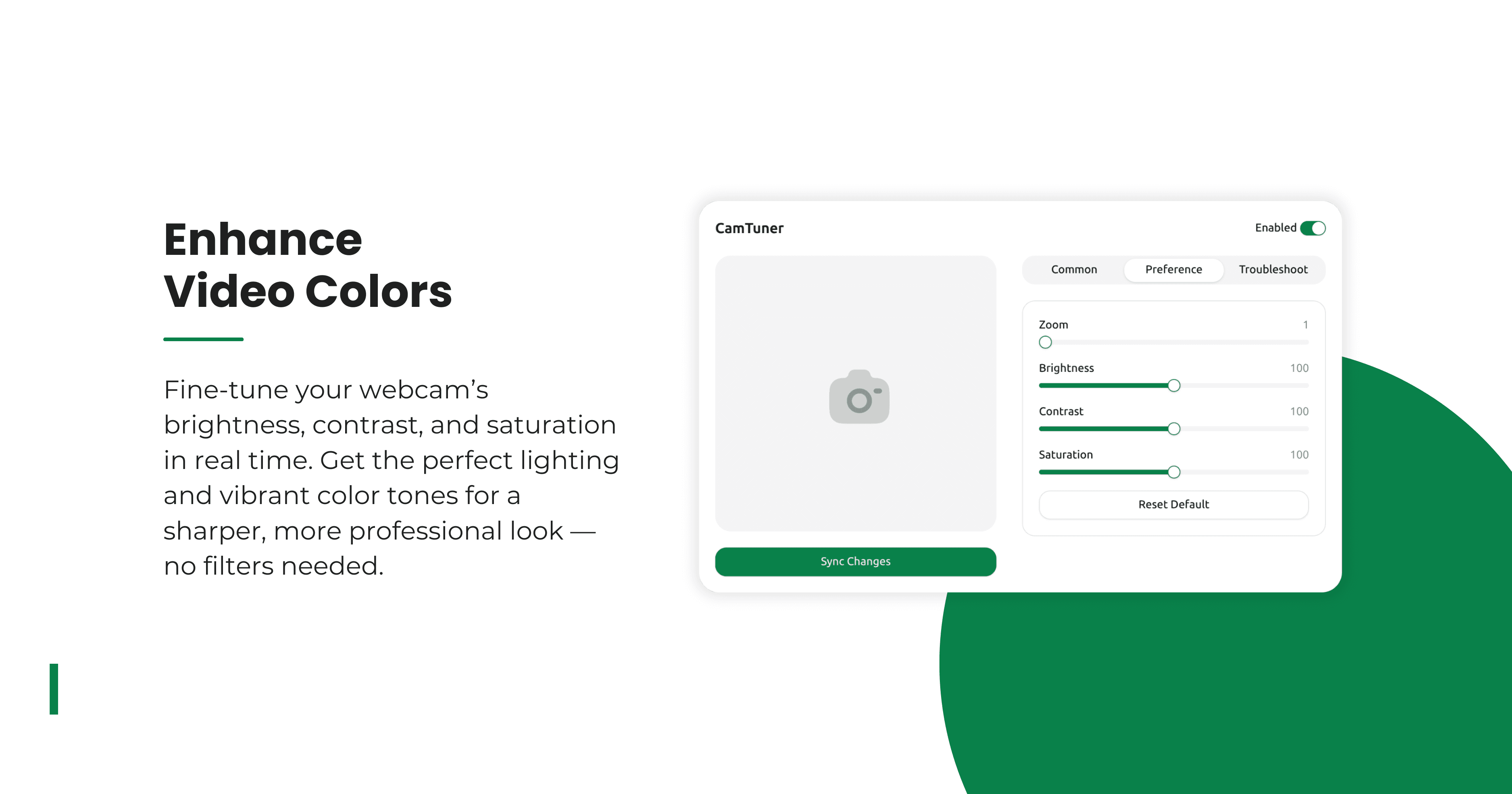
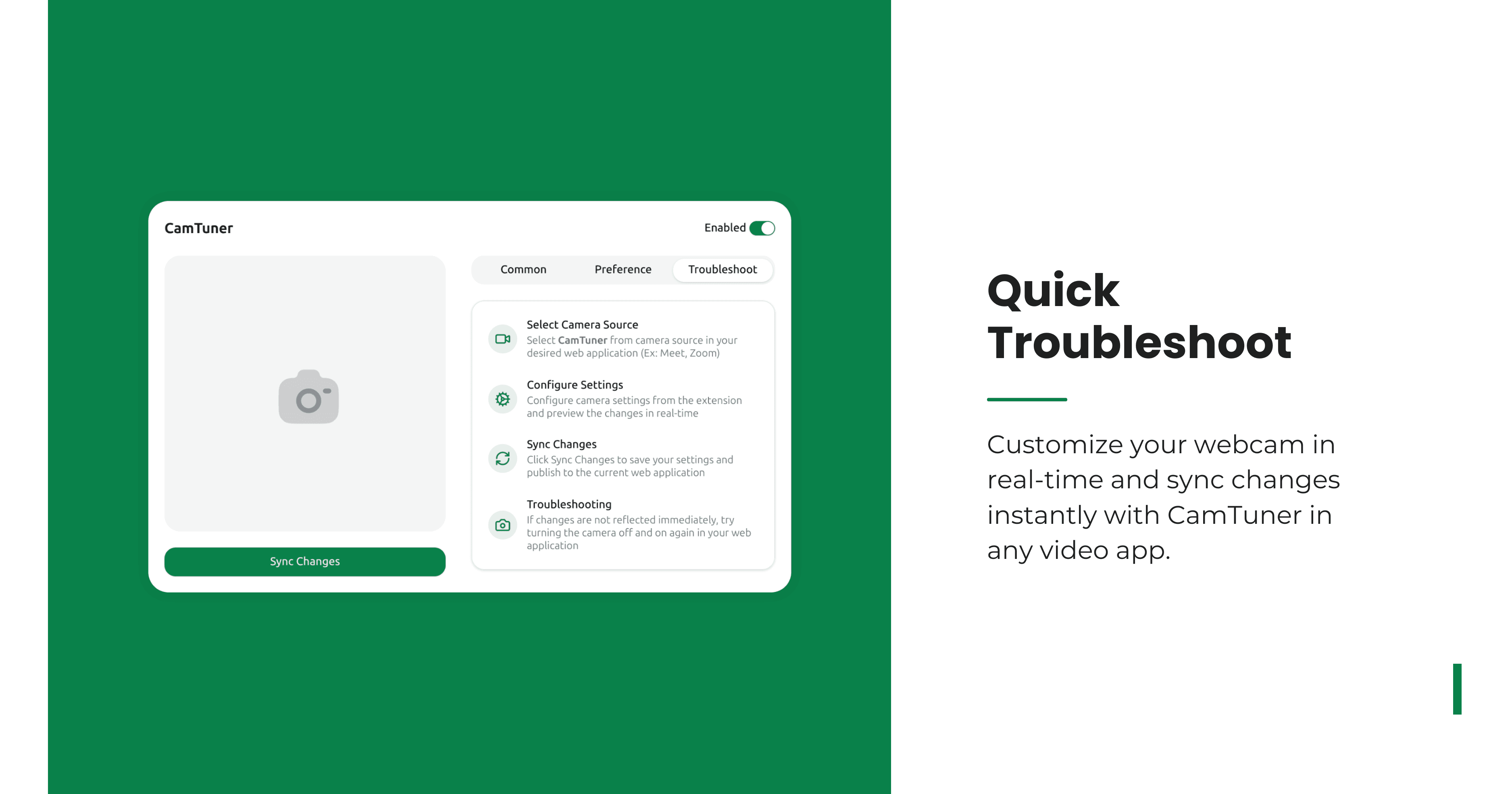
CamTuner is a browser extension that offers granular control over webcam settings like brightness, contrast, saturation, zoom, mirror mode, and aspect ratio changes, with additional features such as overlays and multi-camera support. It's designed for users who need quick, no-nonsense tweaks without complex software, making it ideal for remote professionals, content creators, and tech-savvy individuals. Available for Chrome and Firefox, it processes data locally for privacy and provides instant adjustments with a clean, minimalist interface. While it lacks advanced features like presets or accessibility options, it excels in simplicity and speed, earning a solid 4-star rating for its utility and potential for growth.
Key features
- 1Clean, minimalist interface with intuitive sliders and live preview for real-time adjustments.
- 2Lightweight browser extension with instant performance, works well on lower-end devices.
- 3Processes all camera data locally, ensuring privacy with no external storage or transmission.
Target customer profile
Drawn from the product itself, not from a survey.
Demographic
Remote Professionals
Pain points
Poor lighting, unflattering camera angles, lack of customization in video calls
Primary needs
Professional appearance, quick adjustments without leaving the browser
Demographic
Streamers & Content Creators
Pain points
Static webcam settings, limited creative control
Primary needs
Real-time tweaks, overlays, and aspect ratio flexibility
Demographic
Tech-Savvy Users
Pain points
Built-in OS camera settings lack depth
Primary needs
Advanced controls like zoom and multiple camera support
Scout Review
Written by AI from measured evidence, scored out of 100.
CamTuner delivers exactly what it promises: straightforward webcam control without unnecessary complexity. It excels in performance and core functionality while maintaining a clean, if somewhat basic, interface. The extension's strongest assets are its real-time adjustments and local data processing, making it ideal for quick enhancements during video calls or streams. While it won't replace professional streaming software, it fills a valuable niche for users who need immediate camera adjustments without leaving their browser.
Measure by measure
Usability
80Straightforward navigation with real-time adjustments. Missing tooltips and onboarding for advanced features.
Design
70Clean, minimalist interface with intuitive sliders and live preview. Functional but lacks visual polish and preset options.
Speed
90Lightweight extension with instant adjustments, performs well even on lower-end devices.
Security
80Follows browser security protocols, processes data locally with no storage of camera data.
Accessibility
50Minimal accessibility features - no screen reader support, limited language options, no keyboard shortcuts.
Growth
85High demand for remote work tools with strong potential for feature expansion and market growth.
Improvement areas
- Lacks visual polish and preset profiles for common scenarios, hindering usability.
- Minimal accessibility features, missing screen reader support, keyboard shortcuts, and multilingual options.
- Absence of tooltips and onboarding guidance for advanced features, making it less user-friendly.
Design & Usability
CamTuner's interface embraces a minimalist, functional approach that gets straight to the point. The clean layout features intuitive sliders for brightness, contrast, saturation, and other adjustments, accompanied by a live preview window that shows changes in real-time. While the design avoids unnecessary clutter, it lacks visual polish and preset profiles that could streamline the user experience. Navigation is straightforward for basic adjustments, though advanced features like overlays could benefit from better tooltips or onboarding guidance. The utilitarian design serves its purpose well but misses opportunities for visual enhancement that would elevate the overall experience.
Speed & Security
Performance is where CamTuner truly shines - this lightweight browser extension applies adjustments instantly without noticeable lag, even on lower-end hardware. The extension follows Chrome and Firefox's security protocols, processing all camera data locally without storing any information externally. The privacy policy clearly states that no camera data is collected or transmitted, providing peace of mind for privacy-conscious users. While the security measures align with browser extension standards, more detailed information about encryption methods would further strengthen user confidence in the tool's data protection capabilities.
Accessibility & Growth
Accessibility represents CamTuner's most significant area for improvement. The extension currently lacks screen reader compatibility, high-contrast modes, keyboard navigation support, and multilingual options, making it challenging for users with diverse needs. However, the growth potential is substantial given the increasing demand for remote work tools and video enhancement solutions. The market for browser-based productivity tools continues to expand, and CamTuner's core functionality positions it well for future development. Adding accessibility features and expanding language support could significantly broaden its user base and market appeal.
Conclusion
If you're tired of looking like a ghost or a tomato on video calls but don't want to learn complex software, CamTuner is your solution. It's perfect for remote professionals, content creators, and anyone who values quick, effective webcam enhancements. The extension's simplicity and speed make it an excellent addition to your browser toolkit. Give it a try - your next video meeting audience will thank you for the improved visual quality.
Suggestions for improvement
- Adding preset profiles for common scenarios like 'office lighting' or 'low-light environments' would significantly improve usability.
- Implementing keyboard shortcuts would cater to power users, while expanding accessibility features including screen reader support and multiple language options would make the tool more inclusive.
- A brief tutorial for first-time users, particularly for advanced features like overlays, would enhance the onboarding experience.
- These improvements would transform CamTuner from a functional tool into an exceptional one.
Alternatives comparison
Named competitors, point by point. Nobody paid to appear here or to be left out.
 CamTuner CamTuner |  Webcam Settings (Mac) Webcam Settings (Mac) |  OBS Studio OBS Studio | |
|---|---|---|---|
| Platform Compatibility | Chrome, Firefox browsers | macOS only | Windows, macOS, Linux |
| Real-time Browser Adjustments | Yes | No | Yes (complex setup) |
| Advanced Controls (zoom, overlays) | Yes | Limited | Yes (professional grade) |
| Ease of Use | Simple browser extension | OS-level app | Complex software |
Webcam Settings (Mac)
A macOS app for adjusting webcam parameters, but limited to Apple devices and no browser integration.
OBS Studio
A powerful tool for streamers with webcam controls, but overkill for simple adjustments.
Comparing options? See CamTuner alternatives, scored side by side
More Productivity apps
View all Productivity
Notion
92All-in-one AI workspace for docs, projects, and knowledge...

Qamarero
92An all-in-one hospitality software for restaurants and ba...

EmbedMyReviews
92White-label reputation management software for agencies s...

StoryPad
92Privacy-first open source journal app with a continuous t...

Puzzly – B2B Lead Generation & Sales Intelligence Platform
92Puzzly is an all-in-one B2B lead generation platform that...

The Stack Newsletter
92A weekly newsletter delivering curated tech jobs, intervi...

Vibe Coding Agent Skills
92A free, open-source platform offering 110 AI agent skills...

QRBliss
91Branded QR codes with AI Brand Sync, 15 free dynamic code...

Gerty
91Private, local AI assistant for Mac that runs offline

CC Switch
91Open-source desktop app for switching AI coding providers...

username.md
90One verified handle for your online identity, readable by...

PitchWhip
90AI cold call scripts & direct dials from LinkedIn


A platform dedicated to providing unbiased reviews of newly launched applications, analyzing everything from their features to their full potential.
info@scoutforge.net© 2026 Scoutforge. All rights reserved.
